
- 전체
- Python 일반
- Python 수학
- Python 그래픽
- Python 자료구조
- Python 인공지능
- Python 인터넷
- Python SAGE
- wxPython
- TkInter
- iPython
- wxPython
- pyQT
- Jython
- django
- flask
- blender python scripting
- python for minecraft
- Python 데이터 분석
- Python RPA
- cython
- PyCharm
- pySide
- kivy (python)
Python 인터넷 [Python 인터넷] 5 - 다른 페이지 크롤링
2023.03.26 18:06
[Python 인터넷] 5 - 다른 페이지 크롤링
일단은 폴더를 하나 새로 만듭니다.
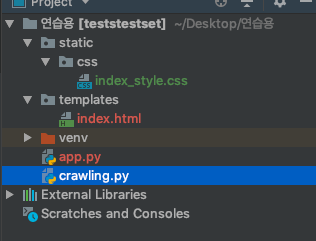
# 크롤링 라이브러리 import
import requests
from bs4 import BeautifulSoup

def daum() :
    # 엔터치기
    req = requests.get('https://www.daum.net/')

    # 이런 식으로 HTML에 있는 코드를 다 가져온다
    soup = BeautifulSoup(req.text, 'html.parser')

    myList = []

    for i in soup.select("#mArticle > div.cmain_tmp > div.section_media > div.hotissue_builtin > div.realtime_part > ol > li"):
        myList.append(i.find("a").text)

    return myList


def today_humor() :
    # 엔터치기
    req = requests.get('http://www.todayhumor.co.kr/board/list.php?table=bestofbest')

    # 이런 식으로 HTML에 있는 코드를 다 가져온다
    soup = BeautifulSoup(req.text, 'html.parser')

    myList = []

    for i in soup.find_all("td", class_="subject") :
        myList.append(i.text)

    return myList


def clien():
    # 엔터치기
    req = requests.get('https://www.clien.net/service/recommend')

    # 이런 식으로 HTML에 있는 코드를 다 가져온다
    soup = BeautifulSoup(req.text, 'html.parser')

    myList = []

    for i in soup.find_all("span", class_="subject_fixed") :
        myList.append(i.text)

    return myList
html 파일도 설정해주고
<!DOCTYPE html>
<html lang="en">
<head>
    <meta charset="UTF-8">
    <title>Title</title>

    <link rel="stylesheet" href="{{ url_for('static', filename='css/index_style.css') }}">

</head>
<body>

    <div>

        여기는 html영역입니다.

        <a href="/about">어바웃페이지로 이동</a>

    </div>

    <div class="daum_content">
        <h1>여기는 다음 인기검색어입니다.</h1>
        <ul>
            {% for i in list %}
                <li>{{i}}</li>
            {% endfor %}

        </ul>

    </div>

    <div class="daum_content">
        <h1>여기는 오늘의유머</h1>
        <ul>
            {% for i in list2 %}
                <li>{{i}}</li>
            {% endfor %}

        </ul>

    </div>

    <div class="daum_content">
        <h1>여기는 클리앙</h1>
        <ul>
            {% for i in list2 %}
                <li>{{i}}</li>
            {% endfor %}

        </ul>

    </div>


</body>
</html>
app.py파일을 수정하면
from flask import Flask, render_template
app = Flask(__name__)

import crawling


@app.route('/')
def hello():

    myList = crawling.daum()
    todayhumor = crawling.today_humor()
    clien = crawling.clien()

    return render_template("index.html", list = myList, list2 = todayhumor, list3 = clien)

@app.route('/about')
def about():
    return "여기는 어바웃입니다."


if __name__ == '__main__':
    app.run()
여기까지 하면


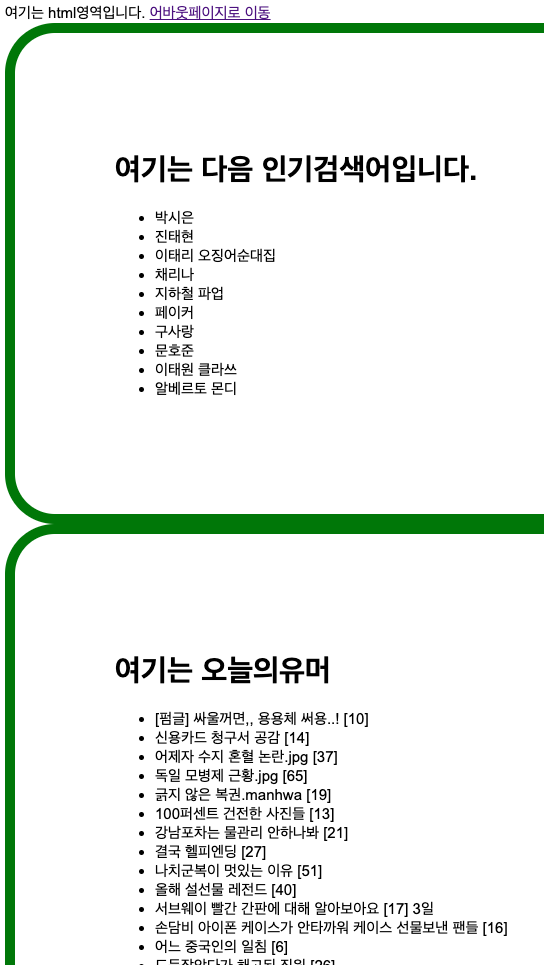
[출처] https://philosopher-chan.tistory.com/431
본 웹사이트는 광고를 포함하고 있습니다.
광고 클릭에서 발생하는 수익금은 모두 웹사이트 서버의 유지 및 관리, 그리고 기술 콘텐츠 향상을 위해 쓰여집니다.
광고 클릭에서 발생하는 수익금은 모두 웹사이트 서버의 유지 및 관리, 그리고 기술 콘텐츠 향상을 위해 쓰여집니다.
댓글 0
| 번호 | 제목 | 글쓴이 | 날짜 | 조회 수 |
|---|---|---|---|---|
| 10 |
[Kivy (python)] Kivy에서 Hello World
 | 졸리운_곰 | 2024.12.20 | 358 |
| 9 |
[Kivy (python)] Kivy 시작하기 1 (1.11.1 버전 - 설치하기)
| 졸리운_곰 | 2024.12.20 | 401 |
| 8 | [Kivy (python)] Kivy 앱 배포: Android APK 생성하기 | 졸리운_곰 | 2024.12.20 | 347 |
| 7 |
[kivy (python)] [Python] 파이썬 키비(kivy) 앱 개발 - Screen Manager
| 졸리운_곰 | 2024.12.20 | 509 |
| 6 |
[kivy (python)] [Python] 파이썬 키비(kivy) 앱 개발 - 머티리얼 디자인, KivyMD
| 졸리운_곰 | 2024.12.20 | 392 |
| 5 |
[kivy (python)] [Python] 파이썬 키비(kivy) 앱 개발 - 레이아웃 개요와 입력창
| 졸리운_곰 | 2024.12.20 | 495 |
| 4 |
[kivy (python)] [Python] 파이썬 키비(Kivy) buildozer로 APK 앱 빌드 in Linux
| 졸리운_곰 | 2024.12.20 | 383 |
| 3 |
[kivy (python)] [Python] 파이썬 키비(kivy) 앱 개발 - 설치와 예제 앱 분석
| 졸리운_곰 | 2024.12.20 | 427 |
| 2 |
[kivy (python)] [Python] 파이썬 키비(kivy) 앱 개발 - kv 파일과 한글 폰트
| 졸리운_곰 | 2024.12.20 | 385 |
| 1 |
[kivy (python)] <재정리> 파이썬 키비(Kivy) buildozer로 APK 앱 완벽 변환하기 in Linux Ubuntu, 변환 환경 제공!
| 졸리운_곰 | 2024.12.20 | 598 |