
- 전체
- JAVA 일반
- JAVA 수학
- JAVA 그래픽
- JAVA 자료구조
- JAVA 인공지능
- JAVA 인터넷
- Java Framework
- Java GUI (AWT,SWING,SWT,JFACE)
- SWT and RCP (web RAP/RWT)[eclipse], EMF
Java GUI (AWT,SWING,SWT,JFACE) SWT Button Action : Button « SWT JFace Eclipse « Java
2015.07.28 21:18
SWT Button Action : Button « SWT JFace Eclipse « Java
SWT Button Action
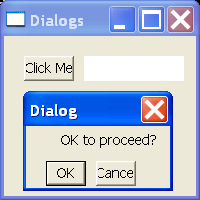


| /* * Created on Nov 20, 2003 * * To change the template for this generated file go to * Window>Preferences>Java>Code Generation>Code and Comments */ import org.eclipse.swt.SWT; import org.eclipse.swt.widgets.Button; import org.eclipse.swt.widgets.Display; import org.eclipse.swt.widgets.Event; import org.eclipse.swt.widgets.Label; import org.eclipse.swt.widgets.Listener; import org.eclipse.swt.widgets.Shell; import org.eclipse.swt.widgets.Text; /** * @author Steven Holzner * * To change the template for this generated type comment go to * Window>Preferences>Java>Code Generation>Code and Comments */ public class SWTButtonAction { public static void main(String[] args) { Display display = new Display(); Shell shell = new Shell(display); shell.setSize(200, 200); shell.setText("Dialogs"); shell.open(); final Button opener = new Button(shell, SWT.PUSH); opener.setText("Click Me"); opener.setBounds(20, 20, 50, 25); final Text text = new Text(shell, SWT.SHADOW_IN); text.setBounds(80, 20, 100, 25); final Shell dialog = new Shell(shell, SWT.APPLICATION_MODAL | SWT.DIALOG_TRIM); dialog.setText("Dialog"); dialog.setSize(150, 100); final Label label = new Label(dialog, SWT.NONE); label.setText("OK to proceed?"); label.setBounds(35, 5, 100, 20); final Button okButton = new Button(dialog, SWT.PUSH); okButton.setBounds(20, 35, 40, 25); okButton.setText("OK"); Button cancelButton = new Button(dialog, SWT.PUSH); cancelButton.setBounds(70, 35, 40, 25); cancelButton.setText("Cancel"); final boolean[] response = new boolean[1]; response[0] = true; Listener listener = new Listener() { public void handleEvent(Event event) { if (event.widget == okButton) { response[0] = true; } else { response[0] = false; } dialog.close(); } }; okButton.addListener(SWT.Selection, listener); cancelButton.addListener(SWT.Selection, listener); Listener openerListener = new Listener() { public void handleEvent(Event event) { dialog.open(); } }; opener.addListener(SWT.Selection, openerListener); while (!dialog.isDisposed()) { if (!display.readAndDispatch()) display.sleep(); } if (response[0]) { text.setText("You clicked OK"); } else { text.setText("You clicked Cancel"); } while (!shell.isDisposed()) { if (!display.readAndDispatch()) display.sleep(); } display.dispose(); } } |
본 웹사이트는 광고를 포함하고 있습니다.
광고 클릭에서 발생하는 수익금은 모두 웹사이트 서버의 유지 및 관리, 그리고 기술 콘텐츠 향상을 위해 쓰여집니다.
광고 클릭에서 발생하는 수익금은 모두 웹사이트 서버의 유지 및 관리, 그리고 기술 콘텐츠 향상을 위해 쓰여집니다.
댓글 0
| 번호 | 제목 | 글쓴이 | 날짜 | 조회 수 |
|---|---|---|---|---|
| 6 |
java4autocad Java for Autocad
 | 졸리운_곰 | 2017.04.26 | 397 |
| 5 | Java3D and Eclipse | 졸리운_곰 | 2015.08.12 | 329 |
| 4 |
Draw2d Intro
| 졸리운_곰 | 2015.07.29 | 545 |
| 3 |
FreeLayout: A New Java Layout
| 졸리운_곰 | 2015.05.14 | 322 |
| 2 |
XML file to Treeviewer
| 졸리운_곰 | 2015.03.19 | 409 |
| 1 |
Java GUI(AWT) 프로그래밍
| 졸리운_곰 | 2015.03.09 | 957 |