
- 전체
- JAVA 일반
- JAVA 수학
- JAVA 그래픽
- JAVA 자료구조
- JAVA 인공지능
- JAVA 인터넷
- Java Framework
- Java GUI (AWT,SWING,SWT,JFACE)
- SWT and RCP (web RAP/RWT)[eclipse], EMF
Java GUI (AWT,SWING,SWT,JFACE) [SWT] Number Input Dialog
2015.08.16 20:50
Number Input Dialog
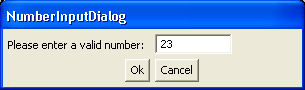
/*******************************************************************************
 * All Right Reserved. Copyright (c) 1998, 2004 Jackwind Li Guojie
 *
 * Created on Mar 18, 2004 1:01:54 AM by JACK $Id$
 *
 ******************************************************************************/


import org.eclipse.swt.SWT;
import org.eclipse.swt.layout.GridData;
import org.eclipse.swt.layout.GridLayout;
import org.eclipse.swt.widgets.Button;
import org.eclipse.swt.widgets.Dialog;
import org.eclipse.swt.widgets.Display;
import org.eclipse.swt.widgets.Event;
import org.eclipse.swt.widgets.Label;
import org.eclipse.swt.widgets.Listener;
import org.eclipse.swt.widgets.Shell;
import org.eclipse.swt.widgets.Text;

public class NumberInputDialog extends Dialog {
  Double value;

  /**
   * @param parent
   */
  public NumberInputDialog(Shell parent) {
    super(parent);
  }

  /**
   * @param parent
   * @param style
   */
  public NumberInputDialog(Shell parent, int style) {
    super(parent, style);
  }

  /**
   * Makes the dialog visible.
   *
   * @return
   */
  public Double open() {
    Shell parent = getParent();
    final Shell shell =
      new Shell(parent, SWT.TITLE | SWT.BORDER | SWT.APPLICATION_MODAL);
    shell.setText("NumberInputDialog");

    shell.setLayout(new GridLayout(2, true));

    Label label = new Label(shell, SWT.NULL);
    label.setText("Please enter a valid number:");

    final Text text = new Text(shell, SWT.SINGLE | SWT.BORDER);

    final Button buttonOK = new Button(shell, SWT.PUSH);
    buttonOK.setText("Ok");
    buttonOK.setLayoutData(new GridData(GridData.HORIZONTAL_ALIGN_END));
    Button buttonCancel = new Button(shell, SWT.PUSH);
    buttonCancel.setText("Cancel");

    text.addListener(SWT.Modify, new Listener() {
      public void handleEvent(Event event) {
        try {
          value = new Double(text.getText());
          buttonOK.setEnabled(true);
        } catch (Exception e) {
          buttonOK.setEnabled(false);
        }
      }
    });

    buttonOK.addListener(SWT.Selection, new Listener() {
      public void handleEvent(Event event) {
        shell.dispose();
      }
    });

    buttonCancel.addListener(SWT.Selection, new Listener() {
      public void handleEvent(Event event) {
        value = null;
        shell.dispose();
      }
    });

    shell.addListener(SWT.Traverse, new Listener() {
      public void handleEvent(Event event) {
        if(event.detail == SWT.TRAVERSE_ESCAPE)
          event.doit = false;
      }
    });

    text.setText("");
    shell.pack();
    shell.open();

    Display display = parent.getDisplay();
    while (!shell.isDisposed()) {
      if (!display.readAndDispatch())
        display.sleep();
    }

    return value;
  }

  public static void main(String[] args) {
    Shell shell = new Shell();
    NumberInputDialog dialog = new NumberInputDialog(shell);
    System.out.println(dialog.open());
  }
}


[출처] http://www.java2s.com/Code/Java/SWT-JFace-Eclipse/NumberInputDialog.htm
본 웹사이트는 광고를 포함하고 있습니다.
광고 클릭에서 발생하는 수익금은 모두 웹사이트 서버의 유지 및 관리, 그리고 기술 콘텐츠 향상을 위해 쓰여집니다.
광고 클릭에서 발생하는 수익금은 모두 웹사이트 서버의 유지 및 관리, 그리고 기술 콘텐츠 향상을 위해 쓰여집니다.
