
- 전체
- JAVA 일반
- JAVA 수학
- JAVA 그래픽
- JAVA 자료구조
- JAVA 인공지능
- JAVA 인터넷
- Java Framework
- Java GUI (AWT,SWING,SWT,JFACE)
- SWT and RCP (web RAP/RWT)[eclipse], EMF
[SWT] Dialog Examples
2015.08.16 20:54
Dialog Examples
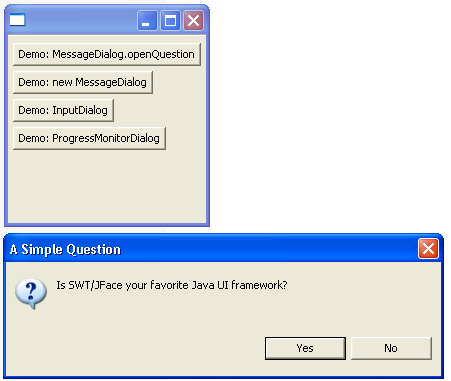


/*******************************************************************************
 * All Right Reserved. Copyright (c) 1998, 2004 Jackwind Li Guojie
 *
 * Created on 2004-5-13 22:13:55 by JACK $Id$
 *
 ******************************************************************************/


import java.lang.reflect.InvocationTargetException;

import org.eclipse.core.runtime.IProgressMonitor;
import org.eclipse.jface.dialogs.IInputValidator;
import org.eclipse.jface.dialogs.InputDialog;
import org.eclipse.jface.dialogs.MessageDialog;
import org.eclipse.jface.dialogs.ProgressMonitorDialog;
import org.eclipse.jface.operation.IRunnableWithProgress;
import org.eclipse.jface.window.ApplicationWindow;
import org.eclipse.jface.window.Window;
import org.eclipse.swt.SWT;
import org.eclipse.swt.layout.GridLayout;
import org.eclipse.swt.widgets.Button;
import org.eclipse.swt.widgets.Composite;
import org.eclipse.swt.widgets.Control;
import org.eclipse.swt.widgets.Event;
import org.eclipse.swt.widgets.Listener;
import org.eclipse.swt.widgets.Shell;

public class DialogExamples extends ApplicationWindow {

  /**
   * @param parentShell
   */
  public DialogExamples(Shell parentShell) {
    super(parentShell);
  }

  /*
   * (non-Javadoc)
   *
   * @see org.eclipse.jface.window.Window#createContents(org.eclipse.swt.widgets.Composite)
   */
  protected Control createContents(Composite parent) {
    Composite composite = new Composite(parent, SWT.NULL);

    composite.setLayout(new GridLayout());

    /* ------ MessageDialog ------------- */
    // openQuestion
    final Button buttonOpenMessage = new Button(composite, SWT.PUSH);
    buttonOpenMessage.setText("Demo: MessageDialog.openQuestion");
    buttonOpenMessage.addListener(SWT.Selection, new Listener() {
      public void handleEvent(Event event) {

        boolean answer =
          MessageDialog.openQuestion(
            getShell(),
            "A Simple Question",
            "Is SWT/JFace your favorite Java UI framework?");
        System.out.println("Your answer is " + (answer ? "YES" : "NO"));
      }
    });

    final Button buttonMessageDialog = new Button(composite, SWT.PUSH);
    buttonMessageDialog.setText("Demo: new MessageDialog");
    buttonMessageDialog.addListener(SWT.Selection, new Listener() {
      public void handleEvent(Event event) {
        MessageDialog dialog =
          new MessageDialog(
            getShell(),
            "Select your favorite Java UI framework",
            null,
            "Which one of the following is your favorite Java UI framework?",
            MessageDialog.QUESTION,
            new String[] { "AWT", "Swing", "SWT/JFace" },
            2);
        int answer = dialog.open();

        switch (answer) {
          case -1: // if the user closes the dialog without clicking any button.
            System.out.println("No selection");
            break;

          case 0 :
            System.out.println("Your selection is: AWT");
            break;
          case 1 :
            System.out.println("Your selection is: Swing");
            break;
          case 2 :
            System.out.println("Your selection is: SWT/JFace");
            break;

        }
      }
    });

    /* ------ InputDialog ------------- */
    final Button buttonInputDialog = new Button(composite, SWT.PUSH);
    buttonInputDialog.setText("Demo: InputDialog");
    buttonInputDialog.addListener(SWT.Selection, new Listener() {
      public void handleEvent(Event event) {
        IInputValidator validator = new IInputValidator() {
          public String isValid(String newText) {
            if(newText.equalsIgnoreCase("SWT/JFace") ||
                newText.equalsIgnoreCase("AWT") ||
                newText.equalsIgnoreCase("Swing"))
              return null;
            else
              return "The allowed values are: SWT/JFace, AWT, Swing";
          }
        };
        InputDialog dialog = new InputDialog(getShell(), "Question", "What's your favorite Java UI framework?", "SWT/JFace", validator);
        if(dialog.open() == Window.OK) {
          System.out.println("Your favorite Java UI framework is: " + dialog.getValue());
        }else{
          System.out.println("Action cancelled");
        }
      }
    });

    /* ------ ProgressMonitorDialog ------------- */
    final Button buttonProgressDialog = new Button(composite, SWT.PUSH);
    buttonProgressDialog.setText("Demo: ProgressMonitorDialog");
    buttonProgressDialog.addListener(SWT.Selection, new Listener() {
      public void handleEvent(Event event) {
        IRunnableWithProgress runnableWithProgress = new IRunnableWithProgress() {
          public void run(IProgressMonitor monitor)
            throws InvocationTargetException, InterruptedException {
            monitor.beginTask("Number counting", 10);
            for(int i=0; i<10; i++) {
              if(monitor.isCanceled()) {
                monitor.done();
                return;
              }

              System.out.println("Count number: " + i);
              monitor.worked(1);
              Thread.sleep(500); // 0.5s.
            }
            monitor.done();
          }
        };

        ProgressMonitorDialog dialog = new ProgressMonitorDialog(getShell());
        try {
          dialog.run(true, true, runnableWithProgress);
        } catch (InvocationTargetException e) {
          e.printStackTrace();
        } catch (InterruptedException e) {
          e.printStackTrace();
        }


      }
    });
    return super.createContents(parent);
  }

  public static void main(String[] args) {
    ApplicationWindow window = new DialogExamples(null);
    window.setBlockOnOpen(true);
    window.open();
  }
}
[출처] http://www.java2s.com/Code/Java/SWT-JFace-Eclipse/DialogExamples.htm
본 웹사이트는 광고를 포함하고 있습니다.
광고 클릭에서 발생하는 수익금은 모두 웹사이트 서버의 유지 및 관리, 그리고 기술 콘텐츠 향상을 위해 쓰여집니다.
광고 클릭에서 발생하는 수익금은 모두 웹사이트 서버의 유지 및 관리, 그리고 기술 콘텐츠 향상을 위해 쓰여집니다.
