[python] Apache Airflow PythonOperator 실습하기(중급)

지난 시간에 이어 Python Operator를 실습 해보겠습니다

1) 새로운 DAG 파일을 만듭니다

cd $AIRFLOW_HOME/dags/ && vim my_python_op.py

2) my_python_op.py 소스코드를 입력합니다

from airflow.models import DAG from airflow.utils.dates import days_ago from airflow.operators.python_operator import PythonOperator import time from pprint import pprint args = {'owner': 'jovyan', 'start_date': days_ago(n=1)} dag = DAG(dag_id='my_python_dag', default_args=args, schedule_interval='@daily') def print_fruit(fruit_name, **kwargs): print('=' * 60) print('fruit_name:', fruit_name) print('=' * 60) pprint(kwargs) print('=' * 60) return 'print complete!!!' def sleep_seconds(seconds, **kwargs): print('=' * 60) print('seconds:' + str(seconds)) print('=' * 60) pprint(kwargs) print('=' * 60) print('sleeping...') time.sleep(seconds) return 'sleep well!!!' t1 = PythonOperator(task_id='task_1', provide_context=True, python_callable=print_fruit, op_kwargs={'fruit_name': 'apple'}, dag=dag) t2 = PythonOperator(task_id='task_2', provide_context=True, python_callable=print_fruit, op_kwargs={'fruit_name': 'banana'}, dag=dag) t3 = PythonOperator(task_id='task_3', provide_context=True, python_callable=sleep_seconds, op_kwargs={'seconds': 10}, dag=dag) t4 = PythonOperator(task_id='task_4', provide_context=True, python_callable=print_fruit, op_kwargs={'fruit_name': 'cherry'}, dag=dag) t1 >> [t2, t3] [t2, t3] >> t4

3) 코드를 실행해봅니다 (문법 오류가 없는지 정도를 확인할 수 있습니다)

cd $AIRFLOW_HOME/dags/ && python my_python_op.py

4) airflow 스케쥴러를 실행합니다

airflow scheduler &

5) 스케쥴러를 컨트롤하고 관리할 웹서버를 실행합니다(포트는 변경가능하며 실습에서는 8882 포트 사용)

airflow webserver -p 8882 &

6) 웹브라우저로 접속합니다

http://localhost:8882/admin/

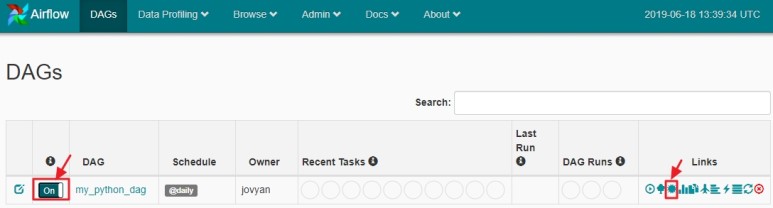
7) DAGs 탭에서 만들었던 my_python_dag을 Off에서 On으로 활성화 합니다
6) Graph View, Tree View, Gantt 탭에서 아래와 같이 그래프를 확인할 수 있습니다
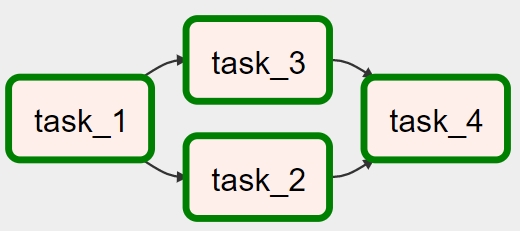
Graph View, 각 Task를 클릭하면 상세팝업이 뜨고 Log도 확인할 수 있다
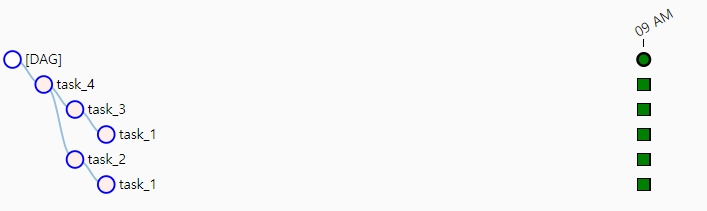
Tree View, 우측에 여러 회 수행할 때마다 세로열이 추가된다
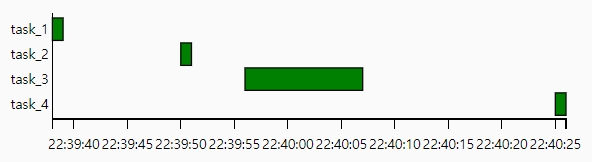
Gantt 로 시간 X축과 각 Task의 실행 순서와 시간을 알 수 있다

경축! 아무것도 안하여 에스천사게임즈가 새로운 모습으로 재오픈 하였습니다.
어린이용이며, 설치가 필요없는 브라우저 게임입니다.
https://s1004games.com

7) Graph View의 각 Task별 Log를 살펴봅니다

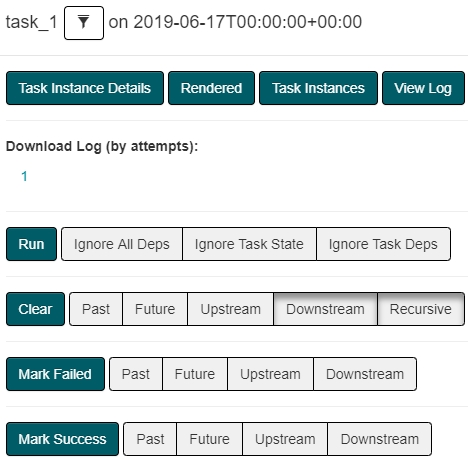
Graph View의 각 Task를 클릭하면 위 팝업이 뜬다. 우측 상단의 View Log를 클릭한다

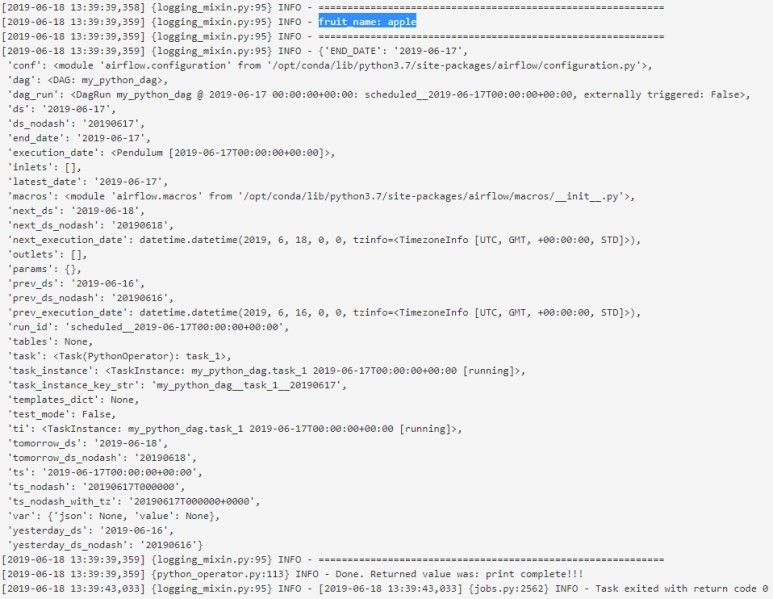
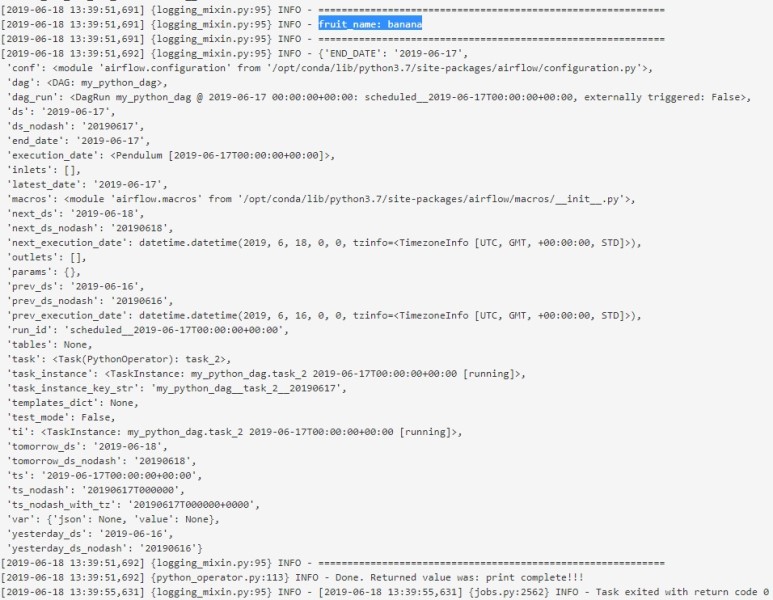
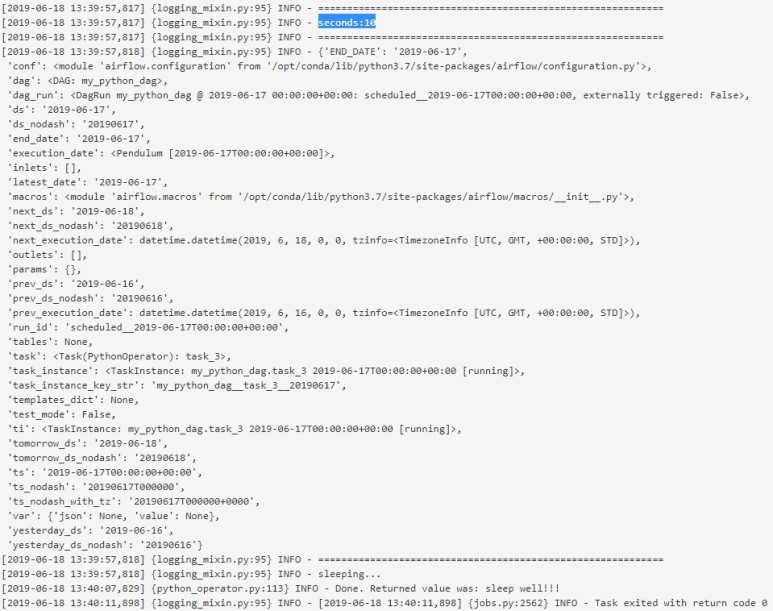
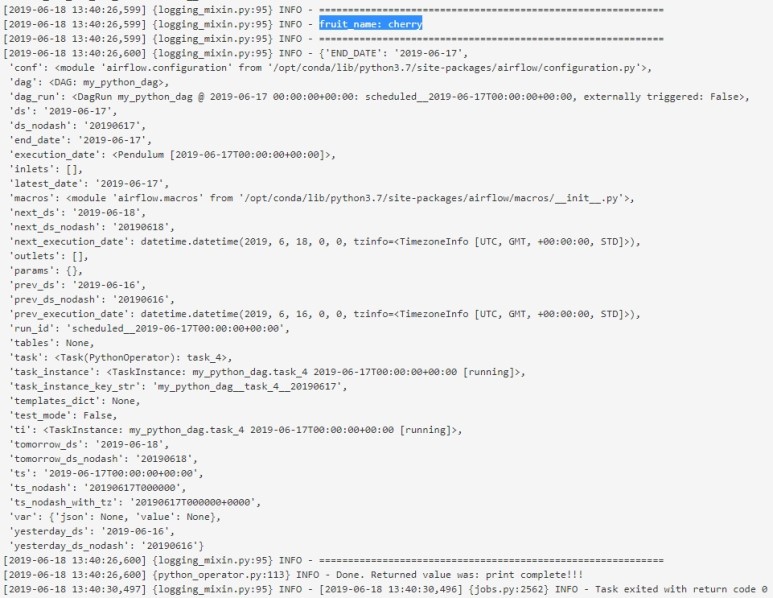
상세 로그를 통해 각 파라미터 값과 Task에 전달된 값들을 확인할 수 있습니다.

[Task_1 로그]
[Task_2 로그]
[Task_3 로그]
[Task_4 로그]
끝.

​[출처] https://blog.naver.com/wideeyed/221565276777


본 웹사이트는 광고를 포함하고 있습니다.
광고 클릭에서 발생하는 수익금은 모두 웹사이트 서버의 유지 및 관리, 그리고 기술 콘텐츠 향상을 위해 쓰여집니다.
번호 제목 글쓴이 날짜 조회 수
47 [python] 파이썬 f-string (파이썬 스트링 앞에 f') file 졸리운_곰 2021.07.17 446
46 [Python] 파이썬으로 복리 계산하기 file 졸리운_곰 2021.07.17 562
45 [python, 파이썬] 연습 문제: 복리 이자 계산 졸리운_곰 2021.07.17 925
44 [python] 파이썬 기초 문법 정리 졸리운_곰 2021.05.17 861
43 [python] [GPU]GPU 사용 Python 코드 실행 졸리운_곰 2021.04.21 567
42 [python] 파이썬 스케줄 수행 - schedule, apscheduler file 졸리운_곰 2020.07.26 454
41 파이썬 스크립트 스케줄링하기 file 졸리운_곰 2020.07.26 1011
40 Python Scheduler 만들기(APScheduler) 졸리운_곰 2020.07.26 1089
39 [python] 주피터 노트북에서 패키지 설치 졸리운_곰 2018.12.06 1225
38 Data Structures and Algorithm In python 파이썬으로 자료구조와 알고리즘 : 출처 인터넷 file 졸리운_곰 2018.08.27 514
37 Mastering Basic Algorithms in the Python Language 이북 출처 인터넷 file 졸리운_곰 2018.08.27 629
36 python dev 사용자 입력과 출력 졸리운_곰 2018.03.01 471
35 APScheduler 사용기 file 졸리운_곰 2018.02.09 1070
34 [파이썬, 조각코드] 스케쥴러 만들기. 졸리운_곰 2018.02.09 795
33 Python virtualenv 정리 (Linux/Windows) 졸리운_곰 2018.01.23 486
32 [Python] 코드난독화 file 졸리운_곰 2018.01.19 1001
31 Python - Way to recursively find and replace string in text files 졸리운_곰 2017.08.30 478
30 Python Coding for Minecraft 마인크래프트를 위한 파이썬 프로그래밍 file 졸리운_곰 2017.05.05 1794
29 Atom을 Python 개발 툴로 사용하기 file 졸리운_곰 2017.03.06 938
28 IPython Notebook을 통한 데이터 분석 #3 file 졸리운_곰 2017.03.05 754
대표 김성준 주소 : 경기 용인 분당수지 U타워 등록번호 : 142-07-27414
통신판매업 신고 : 제2012-용인수지-0185호 출판업 신고 : 수지구청 제 123호 개인정보보호최고책임자 : 김성준 sjkim70@stechstar.com
대표전화 : 010-4589-2193 [fax] 02-6280-1294 COPYRIGHT(C) stechstar.com ALL RIGHTS RESERVED