
- 전체
- Python 일반
- Python 수학
- Python 그래픽
- Python 자료구조
- Python 인공지능
- Python 인터넷
- Python SAGE
- wxPython
- TkInter
- iPython
- wxPython
- pyQT
- Jython
- django
- flask
- blender python scripting
- python for minecraft
- Python 데이터 분석
- Python RPA
- cython
- PyCharm
- pySide
- kivy (python)
Python 인터넷 [python 인터넷] Python으로 XML-RPC 서버 구축
2022.06.28 12:54
[python 인터넷] Python으로 XML-RPC 서버 구축
Python으로 XML-RPC 서버 구축
한 15년전 즈음되나?
그땐 php에 빠져 허우적댔는데,,,
한동안 잊고있다가
나이 45에...
느닷없이 python으로 xpressengine 블로그 글쓰기를 해봐야겠다고 생각했다.
그래서 한번 해보니 대충 되긴된다.
import xmlrpc.client

API_URL = "http://econo.urin79.com/attention/api"

class NaverBlog(object):
    def __init__(self, user_id, api_key):
        self.__server = None
        self.__user_id = user_id
        self.__api_key = api_key
        self.__categories = []

        try:
            self.__set_categories()
        except Exception as e:
            raise e

    def __client(self):
        if self.__server is None:
            self.__server = xmlrpc.client.ServerProxy(API_URL)

        return self.__server

    def __set_categories(self):
        categories = self.__client().metaWeblog.getCategories(self.__user_id,
                                                              self.__user_id,
                                                              self.__api_key)

        for category in categories:
            self.__categories.append(category['title'])

    def post(self, title, description, category, publish=True):
        struct = {}
        struct['title'] = title
        struct['description'] = description
        if category in self.__categories:
            struct['categories'] = [category]

        try:
            return self.__client().metaWeblog.newPost(self.__user_id,
                                                      self.__user_id,
                                                      self.__api_key,
                                                      struct,
                                                      publish)
        except Exception as e:
            raise e


def main():
    naver = NaverBlog('아이디', '비밀번호')
    naver.post('테스트 제목', '<h1>테스트 글쓰기</h1>', '카테고리 한글')


if __name__ == '__main__':
    main()
1. XML-RPC란?
XML-RPC는 XML로 인코딩을 하는 RPC(Remote Procedure Call) 프로토콜의 종류 중 하나로, Server와 Client가 통신할때 사용한다. 이때, HTTP 프로토콜로 통신한다.
XML-RPC를 사용하면, client에서 server의 프로그램을 마치 로컬에 있는 프로그램을 사용하듯이 원격 실행이 가능하다.
이후에는 좀 더 부가기능을 추가하여 SOAP 프로토콜이 개발되었지만, 단순하고 사용하기 쉬운 XML-RPC를 더 많이 사용하고 있다. (비슷한 프로토콜로는 JSON-RPC가 존재)


1.1. XML-RPC XML 예시
XML-RPC Call
<?xml version="1.0"?>
<methodCall>
  <methodName>examples.getStateName</methodName>
  <params>
    <param>
        <value><i4>40</i4></value>
    </param>
  </params>
</methodCall>html
XML-RPC Response
<?xml version="1.0"?>
<methodResponse>
  <params>
    <param>
        <value><string>South Dakota</string></value>
    </param>
  </params>
</methodResponse>html
1.2. REST API vs XML-RPC
하지만, 요즘은 XML-RPC를 사용하지 않고 REST API를 많이 사용한다.
- REST API가 상대적으로 사용하기 쉬움
- XML-RPC는 대량의 데이터 전송에 상대적으로 효율적이지 못함
2. Python으로 XML-RPC 서버 구축
2.1. Server
from xmlrpc.server import SimpleXMLRPCServer
from xmlrpc.server import SimpleXMLRPCRequestHandler


class RequestHandler(SimpleXMLRPCRequestHandler):
    rpc_paths = ("/RPC2",)


if __name__ == "__main__":
    with SimpleXMLRPCServer(('localhost', 8000), requestHandler=RequestHandler) as server:
        server.register_introspection_functions()

        # 1. pow 함수를 저장하는 경우
        server.register_function(pow)

        # 2. 사용자가 정의한 함수를 저장하는 경우
        def adder_function(x, y):
            return x + y
        server.register_function(adder_function, 'add')

        # 3. 사용자가 정의한 클래스를 인스턴스로 생성하여 저장하는 경우
        class MyFuncs:
            def mul(self, x, y):
                return x + y
        server.register_instance(MyFuncs())

        # 서버 실행
        print("Start server...")
        server.serve_forever()
python
2.2. Client
Client쪽에는 pow, add, mul 메소드가 없지만, 실행 할 수 있다.
import xmlrpc.client

if __name__ == "__main__":
    proxy = xmlrpc.client.ServerProxy("http://localhost:8000")

    # 따로 pow, add, mul 함수를 정의한적이 없지만 사용이 가능하다.
    print(proxy.pow(2, 3))
    print(proxy.add(2, 3))
    print(proxy.mul(5, 2))

    # 사용할 수 있는 메소드 확인
    print(proxy.system.listMethods())
python
결과
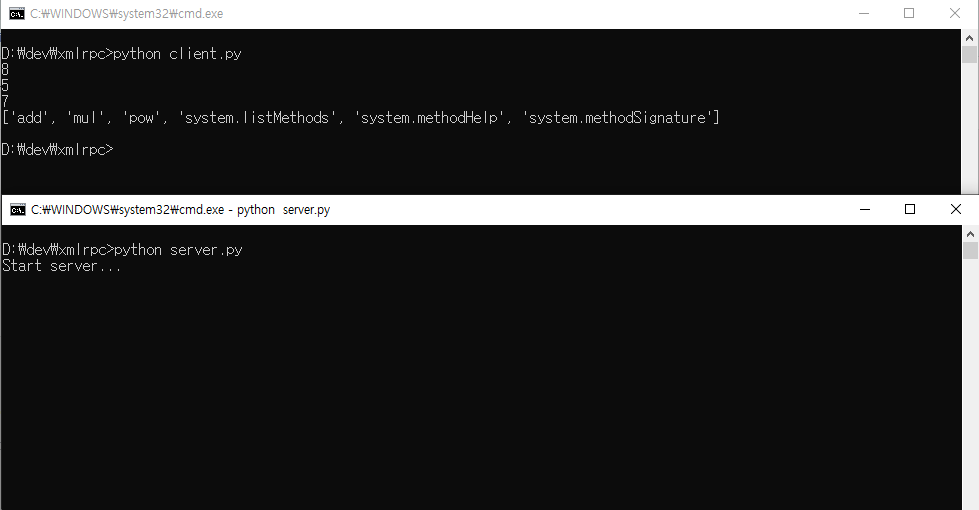
출처: https://memostack.tistory.com/240 [MemoStack]
[Reference] : nanumi, 「우린친구블로그 - Python 메타블로그 글쓰기(제로보드, xpressengine blog api)」 http://urin79.com/?mid=blog&document_srl=20668083.
[출처] 우린친구블로그 - Python 메타블로그 글쓰기(제로보드, xpressengine blog api) (urin79.com)
본 웹사이트는 광고를 포함하고 있습니다.
광고 클릭에서 발생하는 수익금은 모두 웹사이트 서버의 유지 및 관리, 그리고 기술 콘텐츠 향상을 위해 쓰여집니다.
광고 클릭에서 발생하는 수익금은 모두 웹사이트 서버의 유지 및 관리, 그리고 기술 콘텐츠 향상을 위해 쓰여집니다.
