
- 전체
- Python 일반
- Python 수학
- Python 그래픽
- Python 자료구조
- Python 인공지능
- Python 인터넷
- Python SAGE
- wxPython
- TkInter
- iPython
- wxPython
- pyQT
- Jython
- django
- flask
- blender python scripting
- python for minecraft
- Python 데이터 분석
- Python RPA
- cython
- PyCharm
- pySide
- kivy (python)
Python 인공지능 Python NLP - NLTK and scikit-learn
2017.06.18 15:35
Python NLP - NLTK and scikit-learn
14 January 2015
This post is meant as a summary of many of the concepts that I learned in Marti Hearst's Natural Language Processingclass at the UC Berkeley School of Information. I wanted to record the concepts and approaches that I had learned with quick overviews of the code you need to get it working. I figured that it could help some other people get a handle on the goals and code to get things done.

I would encourage anyone else to take a look at the Natural Language Processing with Python and read more about scikit-learn.
Tokenization
The goal of tokenization is to break up a sentence or paragraph into specific tokens or words. We basically want to convert human language into a more abstract representation that computers can work with.
Sometimes you want to split sentence by sentence and other times you just want to split words.
Sentence Tokenizers
sent_tokenizer = nltk.data.load('tokenizers/punkt/english.pickle')
Here's a popular word regular expression tokenizer from the NLTK book that works quite well.
Word Tokenizers
tokenization_pattern = r'''(?x)    # set flag to allow verbose regexps
([A-Z]\.)+        # abbreviations, e.g. U.S.A.
| \w+(-\w+)*        # words with optional internal hyphens
| $?\d+(\.\d+)?%?  # currency and percentages, e.g. .40, 82%
| \w+[\x90-\xff]  # these are escaped emojis
| [][.,;"'?():-_`]  # these are separate tokens
'''
word_tokenizer = nltk.tokenize.regexp.RegexpTokenizer(tokenization_pattern)
Part of Speech Tagging
Once you've tokenized the sentences you need to tag them. Tagging is not necessary for all purposes but it does help the computer better understand the objects and references in your sentences. Remember our goal is to encode semantics, not words, and tagging can help us do that.
Unfortunately, this is an imperfect science, it's just never going to work out perfectly because in so many sentences there are so many different representations of text. Let me show you what I mean, I'll be using a comical example of a garden path sentence.
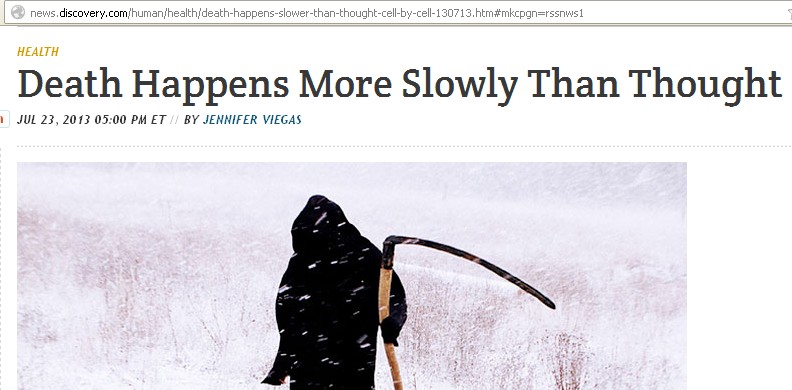
This sentence is comical because death can either happen more slowly than thought (as in we had an expectation of death happening at a certain rate of speed).
But semantically, the speed of death can compared to the speed of thought which is obviously strange. Once you learn about these kinds of comical sentence structures, you start to seem them more often.
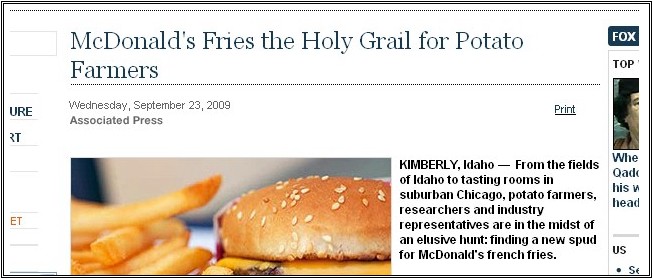
This one is also comical. In this sentence we've got two meanings as well. McDonald's fries are the holy grail for potato farmers or more comically McDonald's fries the actual holy grail for potato farmers. A comical mental image.
images from Sentence first
Thus part of speech tagging is never perfect, because there are so many interpretations.
Built in tagger
This is the built in tagger, the one that NLTK recommends. It's pretty slow when working on sort of large corpus.
nltk.pos_tag(sentence) # tokenized sentence
nltk.batch_pos_tag(sentences) # for lots of tokenized sentences
Unigram, Bigram, and Backoff Tagging
These are backoff taggers, basically it's just a dictionary look up to tag parts of speech. You train it on a tagged corpus(or corpora) and then use it to tag sentences in the future.
default_tagger = nltk.DefaultTagger('NN')
raw = r'''what will this silly tagger do?'''
tokens = nltk.word_tokenize(raw)
print default_tagger.tag(tokens)
# [('what', 'NN'), ('will', 'NN'), ('this', 'NN'), ('silly', 'NN'), ('tagger', 'NN'), ('do', 'NN'), ('?', 'NN')]
Here's how you train the tagger on brown, this is a unigram tagger, so it's not going to perform really well because it will tag everything as a NN (noun) or whatever part of speech we give it.
from nltk.corpus import brown
brown_tagged_sents = brown.tagged_sents()
unigram_tagger = nltk.UnigramTagger(brown_tagged_sents)
print "%0.3f" % unigram_tagger.evaluate(test_sents) # eval the tagger
This is a true backoff tagger that defaults to a certain part of speech. So it will look for trigram occurrences and see if it finds any with a certain word formation, if it does not then it will backoff to the bigram tagger, etc.
def build_backoff_tagger(train_sents):
    t0 = nltk.DefaultTagger('NN')
    t1 = nltk.UnigramTagger(train_sents, backoff=t0)
    t2 = nltk.BigramTagger(train_sents, backoff=t1)
    t3 = nltk.TrigramTagger(train_sents, backoff=t2)
    return t3
ngram_tagger = build_backoff_tagger(train_sents)
What's nice is to speed things up, you can actually just pickle the backoff tagger so that it's easier to deploy a tagger if need be.
import pickle # or cPickle
with open('pickled_file.pickle', 'wb') as f:
    pickle.dump(ngram_tagger, f)
with open('pickled_file.pickle', 'r') as f:
    tagger = pickle.load(f)
Removing Punctuation
At times you'll need to remove certain punctuation marks - this is an easy way to do so.
import string
nopunct = [w for w in text if w not in string.punctuation]
' '.join(nopunct[0:100])
Stopwords
Here's an easy way to remove stop words.


from nltk.corpus import stopwords
normalized = [w for w in text6 if w.lower() not in stopwords.words('english')]
Extend it with:
from nltk.corpus import stopwords
my_stops = stopwords
my_stops.append("shoebox")
Stemming
Stemming the process by which endings are removed from words in order to remove things like tense or plurality. It's not appropriate for all cases but can make it easier to connect together tenses to see if you're covering the same subject matter.
pstemmer = nltk.PorterStemmer()
lstemmer = nltk.LancasterStemmer()
wnlemmatizer = nltk.WordNetLemmatizer()
Frequency Distributions
A common go to to see what's going on with certain text data sets, frequency distributions allow you to see the frequency at which certain words occur and plot it if need be.
fd = nltk.FreqDist(data)
fd.plot()
fd.plot(50, cumulative=True)
fd.most_common(12)
Collocations, Bigrams, Trigrams
Bigrams and trigrams are just words that are commonly found together and measures their relevance by a certain measurement.
bigram_measures = nltk.collocations.BigramAssocMeasures()
trigram_measures = nltk.collocations.TrigramAssocMeasures()
finder = nltk.collocations.BigramCollocationFinder.from_words(text)
finder.nbest(bigram_measures.pmi, 10)
Chunking
Chunking basically just grabs chunks of text that might be more meaningful to your research or program. You create a list of parts of speech and run that over your corpus. It will extract the phrasing that you need.
Remember you've got to customize it to the part of speech tagger that you're using, like Brown or the Stanford Tagger.
technical_term = r"T: {<(JJ|NN|NNS|NNP|NNPS)>+<(NN|NNS|NNP|NNPS|CD)>|<(NN|NNS|NNP|NNPS)>}"
cp = nltk.RegexpParser(technical_term)

for count, sent in enumerate(brown.sents()[100:104]):
    print "Sentence #" + str(count) + ":"
    parsed = cp.parse(nltk.pos_tag(sent))
    print parsed
    print "\nTechnical Terms:\n"
    for tree in parsed.subtrees():
        if tree.label() == "T":
            print tree
Splitting Training Sets + Test Sets
This is a simple way that Marti showed us that allows for simple splitting of test sets.
This splits it into thirds.
Train, Dev, Test Sets
def create_training_sets_trips(feature_function, items):
    featuresets = [(feature_function(key), value) for (key, value) in items]
    third = int(float(len(featuresets)) / 3.0)
    return items[0:third], items[third:third*2], items[third*2:], featuresets[0:third], featuresets[third:third*2], featuresets[third*2:]

train_items, dev_items, test_items, train_features, dev_features, test_features = create_training_sets_trips(f_func, data)
This splits it into halves.
Simpler Test Sets
def create_training_sets(feature_function, items):
    featuresets = [(feature_function(key), value) for (key, value) in items]
    halfsize = int(float(len(featuresets)) / 2.0)
    train_set, test_set = featuresets[halfsize:], featuresets[:halfsize]
    return train_set, test_set
train, test = create_training_sets(f_func, data)
Classifiers & Scikit-learn

Now there are plenty of different ways of classifying text, this isn't an exhaustive list but it's a pretty good starting point.
TF-IDF
See my other two posts on TF-IDF here:
Naive Bayes Classifiers
This is a simple Naive Bayes classifier.
from sklearn.naive_bayes import MultinomialNB

cl = nltk.NaiveBayesClassifier.train(train_set)
print "%.3f" % nltk.classify.accuracy(cl, test_set)
cl.show_most_informative_features(40)
cl.prob_classify(featurize(name)) # get a confidence for the prediction
SVC Classifier
SVMs need numerican inputs, it can take text-based features so you have to convert these features into numbers before passing them to this classifier.
from nltk.classify import SklearnClassifier
from sklearn.svm import SVC
svmc = SklearnClassifier(SVC(), sparse=False).train(train_features)
Decision Tree Classification
This is a simple decision tree classifier.
dtc = nltk.classify.DecisionTreeClassifier.train(train_features, entropy_cutoff=0, support_cutoff=0)
Maximum Entropy Classifier
A maximum entropy classifier and some helpful explainers here.
import numpy
import scipy

from nltk.classify import maxent
nltk.classify.MaxentClassifier.ALGORITHMS
# ['GIS','IIS','CG','BFGS','Powell','LBFGSB','Nelder-Mead','MEGAM','TADM']

# MEGAM or TADM are not rec'd for text classification
mec = nltk.classify.MaxentClassifier.train(train_features, 'GIS', trace=0, max_iter=1000)
Cross Validating Classifiers
One thing you'll need to avoid over-fitting is you'll want to cross validate with k-folds. This can help you see where you might be over-fitting in your corpus.
from sklearn import cross_validation
cv = cross_validation.KFold(len(train_features), n_folds=10, indices=True, shuffle=False, random_state=None)

for traincv, evalcv in cv:
    classifier = nltk.NaiveBayesClassifier.train(train_features[traincv[0]:traincv[len(traincv)-1]])
    print 'accuracy: %.3f' % nltk.classify.util.accuracy(classifier, train_features[evalcv[0]:evalcv[len(evalcv)-1]])
Creating Pipelines for Classifiers
Finally creating pipelines can help speed things up immensely, especially when you're moving to more production level code.
import sklearn
from sklearn.svm import LinearSVC
from nltk.classify.scikitlearn import SklearnClassifier
from sklearn.feature_extraction.text import TfidfTransformer
from sklearn.feature_selection import SelectKBest, chi2
from sklearn.naive_bayes import MultinomialNB
from sklearn.pipeline import Pipeline
pipeline = Pipeline([('tfidf', TfidfTransformer()),
                     ('chi2', SelectKBest(chi2, k=2000)),
                     ('nb', MultinomialNB())])
pipecl = SklearnClassifier(pipeline)
pipecl.train(train_features)
[출처] http://billchambers.me/tutorials/2015/01/14/python-nlp-cheatsheet-nltk-scikit-learn.html
광고 클릭에서 발생하는 수익금은 모두 웹사이트 서버의 유지 및 관리, 그리고 기술 콘텐츠 향상을 위해 쓰여집니다.
