
- 전체
- Python 일반
- Python 수학
- Python 그래픽
- Python 자료구조
- Python 인공지능
- Python 인터넷
- Python SAGE
- wxPython
- TkInter
- iPython
- wxPython
- pyQT
- Jython
- django
- flask
- blender python scripting
- python for minecraft
- Python 데이터 분석
- Python RPA
- cython
- PyCharm
- pySide
- kivy (python)
Python 인공지능 [python 파이썬] Creating REST API for TensorFlow models
2021.02.01 16:40
[python 파이썬] Creating REST API for TensorFlow models

Introduction
A while ago I wrote about Machine Learning model deployment with TensorFlow Serving. The main advantage of that approach, in my opinion, is a performance (thanks to gRPC and Protobufs) and direct use of classes generated from Protobufs instead of manual creation of JSON objects. The client calls a server as they were parts of the same program. That makes the code easy to understand and maintain.
Now we host our model somewhere (for instance here) and can talk to it over gRPC using our special client. But what if you want provide additionally a public API? Usually you do this with HTTP(S) and REST but not with gRPC and protobufs. How can we solve the problem?
REST overall
Obviously, we could get rid of using TensorFlow Serving and deploy a normal web application using some modern framework like Flask. In that case we lose all the advantages I listed above and our own internal clients must use REST and JSONs too.

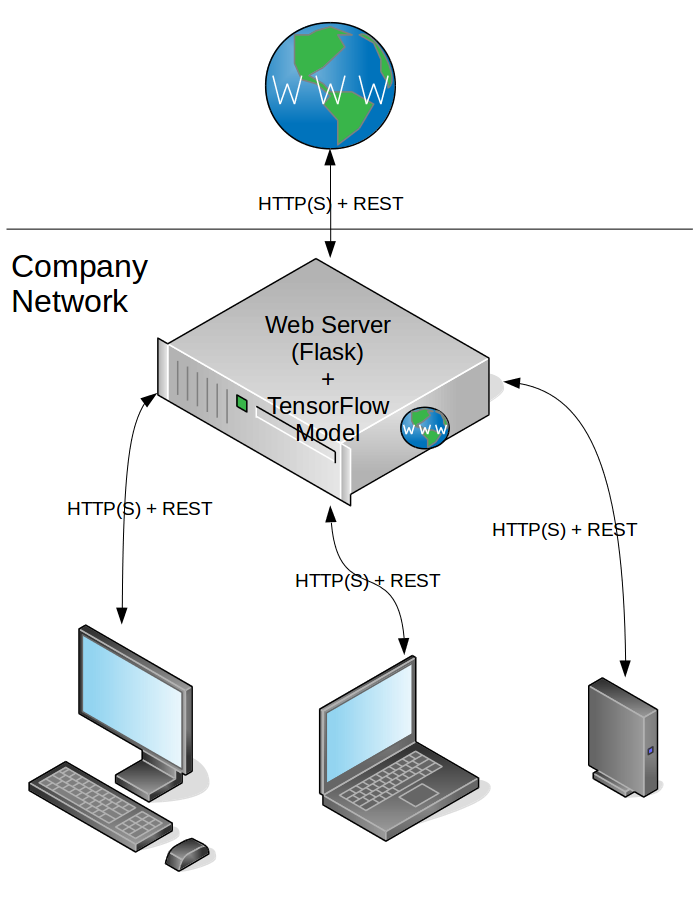
We provide the universal interface to TensorFlow model without differentiating between internal and external clients. The positive — we have it once and maintain only a server, the negative — we do not use a more efficient communication way for our internal clients to interact with a model.
gRPC and REST
The second possibility is having a TensorFlow Server that provides gRPC interface only. Then we need an adapter that receives REST requests from the outside, transforms them into protobufs, sends them to the server and transforms results back.

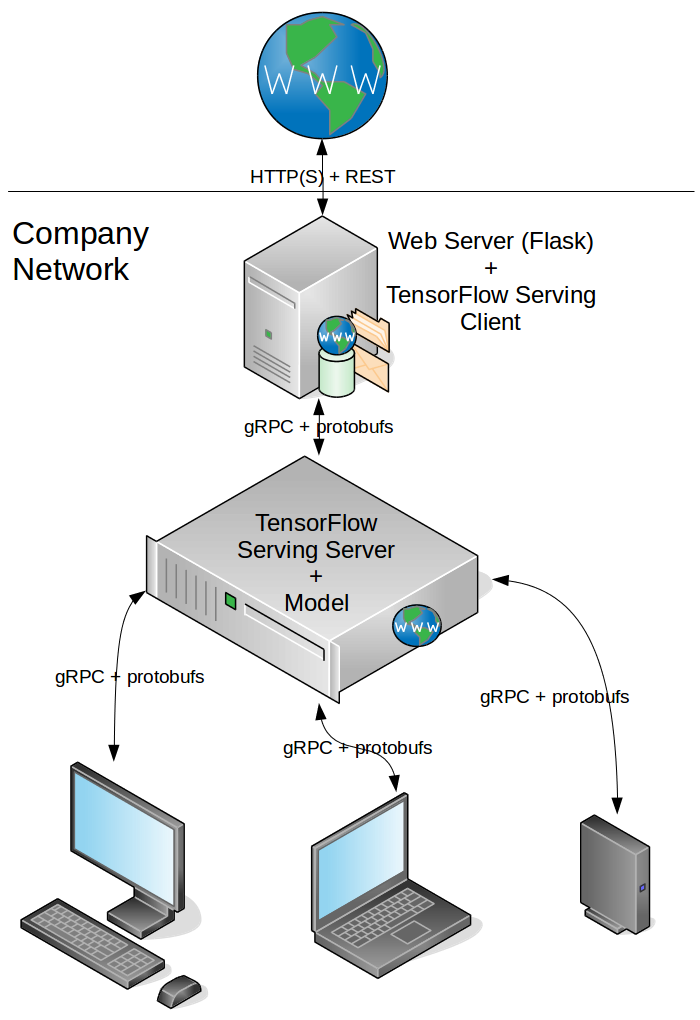
Our adapter is a Web server that hosts TensorFlow Serving client, which is responsible for those transformations. The positive — we use an efficient communication internally, the negative — there is an overhead of transforming JSONs to protobufs and back and we have an additional component to maintain.
It depends strongly on the use case whether using of gRPC, protobufs and TensorFlow Serving is worth of it. If you use the model internally, but also want to make it public, then I would go for a second option. If you have only public API only then I would avoid an overhead and go for a first option.
The objective
If I choose a second option, I need an additional component — Web server to host TensorFlow Serving client. I will use sample GAN model that hosted by a TensorFlow server in a Docker container as backend. I will create a simple Flask application with TensorFlow client and dockerize it. For convenience the application will provide Swagger documentation for our simple REST API.
Our REST API will have a single resource prediction with a single operation POST on it. It expects an image as an input parameter and returns JSON object with 3 most probable digits and their probabilities for Street View House Numbers. Here I extracted a couple of images for tests.
Environment
I developed and tested in the following environment:
- Ubuntu 16.04
- Anaconda 4.3.14
- Python 3.5.4
- Docker 17.09.0-ce
- Docker Compose 1.13.0
TensorFlow Server for a model
My TensorFlow Server hosts sample GAN model. I prepared a Docker image for it as described here and here. So I use a Docker image $USER/tensorflow-serving-gan tagged with v1.0.
Web server for TensorFlow client
I use Flask as Web framework to host my TensorFlow client. It is lightweight, simple, production ready and provide all functionality I need. Additionally I use Flask-RESTPlus extension that adds support for quickly building REST APIs and provides a coherent collection of decorators and tools to describe the API. It also has a killer-feature — it exposes the API documentation using Swagger, which is neat and very convenient also to test things.
I put the sources to the GitHub. Feel free to use it but, as usual, I do not provide any warranty.
Project structure
When you open a project you find important parts in:
- app.py: entry point of the application. Here you find configuration and initialization steps.
- settings.py: setting contstants.
- requirements.txt: “Requirements file” containing a list of items to be installed using pip install.
- tensorflow_serving/: this folder contains TensorFlow Serving API, which I generated from TensorFlow protobufs.
- api/: this folder contains files and sub-folders for our REST API.
- api/restplus.py: initializes Flask-RESTPlus API and provides default error handler.
- api/gan/: this sub-folder contains endpoint and logic for prediction.
- /api/gan/endpoints/client.py: an endpoint that receives prediction requests, transforms them into protobufs and forward to a TensorFlow server.
- /api/gan/logic/tf_serving_client.py: TensorFlow client that sends requests to and pre-processes responses from TensorFlow server.
Initialize and start Flask REST API and Flask server
Inspired by this great blog post I created a Flask application that exposes and documents the API for the Street View House Numbers prediction.
First we create Flask-RESTPlus API object (see api/restplus.py):
# create Flask-RestPlus API
api = Api(version='1.0',
          title='TensorFlow Serving REST Api',
          description='RESTful API wrapper for TensorFlow Serving client')
Now we can initialize and start our Flask application (see app.py):
blueprint = Blueprint('tf_api', __name__, url_prefix='/tf_api')configure_app(flask_app)
api.init_app(blueprint)
api.add_namespace(gan_client_namespace)
flask_app.register_blueprint(blueprint)
Blueprint (see Flask Blueprints for details) allows us separate our prediction API from other parts of the application, so it will be provided under /tf_api prefix. Also we add prediction client endpoint as a separate namespace (see below), so the prediction will be provided under /tf_api/gan_client endpoint.
Endpoint definition
The next thing is a definition of the client endpoint. It is done in api/gan/endpoints/client.py.
# create dedicated namespace for GAN client
ns = api.namespace('gan_client', description='Operations for GAN client')
Here we create a dedicated namespace for our client. It could be useful if we are developing more sophisticated model and want to make it public for a test. Then we would want a separate endpoint for a new model, still keeping and serving an old ones. So we would have /tf_api/gan_client plus new /tf_api/gan_client_plus_plus endpoints.


Then we define our resource as a class:
@ns.route('/prediction')
class GanPrediction(Resource):
ns.route is a Flask-RESTPlus decorator for resource routing. The above means, we have a resource /tf_api/gan_client/prediction. And next we define the only operation POST on that resource:
@ns.doc(description='Predict the house number on the image using GAN model. ' +
'Return 3 most probable digits with their probabilities',
responses={
    200: "Success",
    400: "Bad request",
    500: "Internal server error"
})
@ns.expect(upload_parser)
def post(self):
........
Again we use decorators to document the operation, return codes and expected parameters. upload_parser is a Flask-RESTPlus parser object that we need for image upload (we want to predict a digit on the image!):
# Flask-RestPlus specific parser for image uploading
UPLOAD_KEY = 'image'
UPLOAD_LOCATION = 'files'
upload_parser = api.parser()
upload_parser.add_argument(UPLOAD_KEY,
                           location=UPLOAD_LOCATION,
                           type=FileStorage,
                           required=True)
In POST processing we take the image from the request as a byte array and call TensorFlow Serving client to send it to the server for prediction.
TensorFlow Serving client
TensorFlow Serving client can be found in api/gan/logic/tf_serving_client.py. It is slightly modified and refactored version of a client that I created before. The only thing I changed — when a client gets a response from the server, it takes 3 most probable digits and returns them to the caller as list of tuples (digit, probability).
Run
Previously I have created a Docker image, which contains TensorFlow Serving server and my sample GAN model, so I can start a Docker container, which serves my model, receives gRPC requests and responses to them.
We could test our application against it directly, but I want to prepare it for future deployment. So I create a Docker container, where I run my Flask application.
Dockerize the Flask application
I provided a Dockerfile, so you can easily create an image with:
cd <path to Flask application project>
docker build -t $USER/tensorflow-serving-client:latest .
Compose and start TensorFlow server and Flask application
Now we have 2 Docker images for TensorFlow server and Flask application. In my case — $USER/tensorflow-serving-gan:v1.0 and $USER/tensorflow-serving-client:latest. I do not want to start and parameterize them separately, rather I want to start them together and, furthermore, tell that my Flask application depends on TensorFlow server. I can do that using very handy tool — Docker Compose. It allows me to define and run multi-container Docker applications. I encourage you to check the official documentation for further details.
For my purpose I need a docker-compose YAML configuration file, where I specify my services (Docker image name, container name, expose ports, environment variables among others) and dependencies between them. I provided docker-compose.yaml. It is really simple and self-explained.
Now we start our complete application with just one command:
cd <path to Flask application project>
docker-compose -f docker-compose.yaml up
You should see now in the terminal the log entries from both services (TensorFlow Server and Flask application). You stop the services with Ctrl-C. To clean everything up, execute:
docker-compose -f docker-compose.yaml down
Test
After start of the Docker container you can test functionality in your browser. When you type the address http://0.0.0.0:5000/tf_api, you should see the Swagger document page like this:

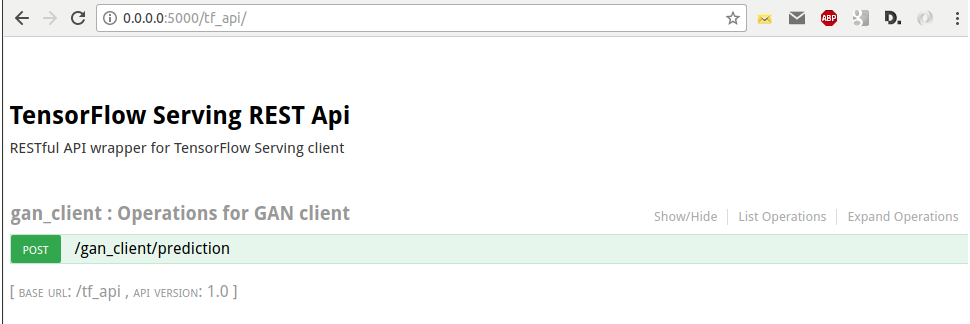
Now we can expand our POST method, select an image and call our Flask application to make a prediction:

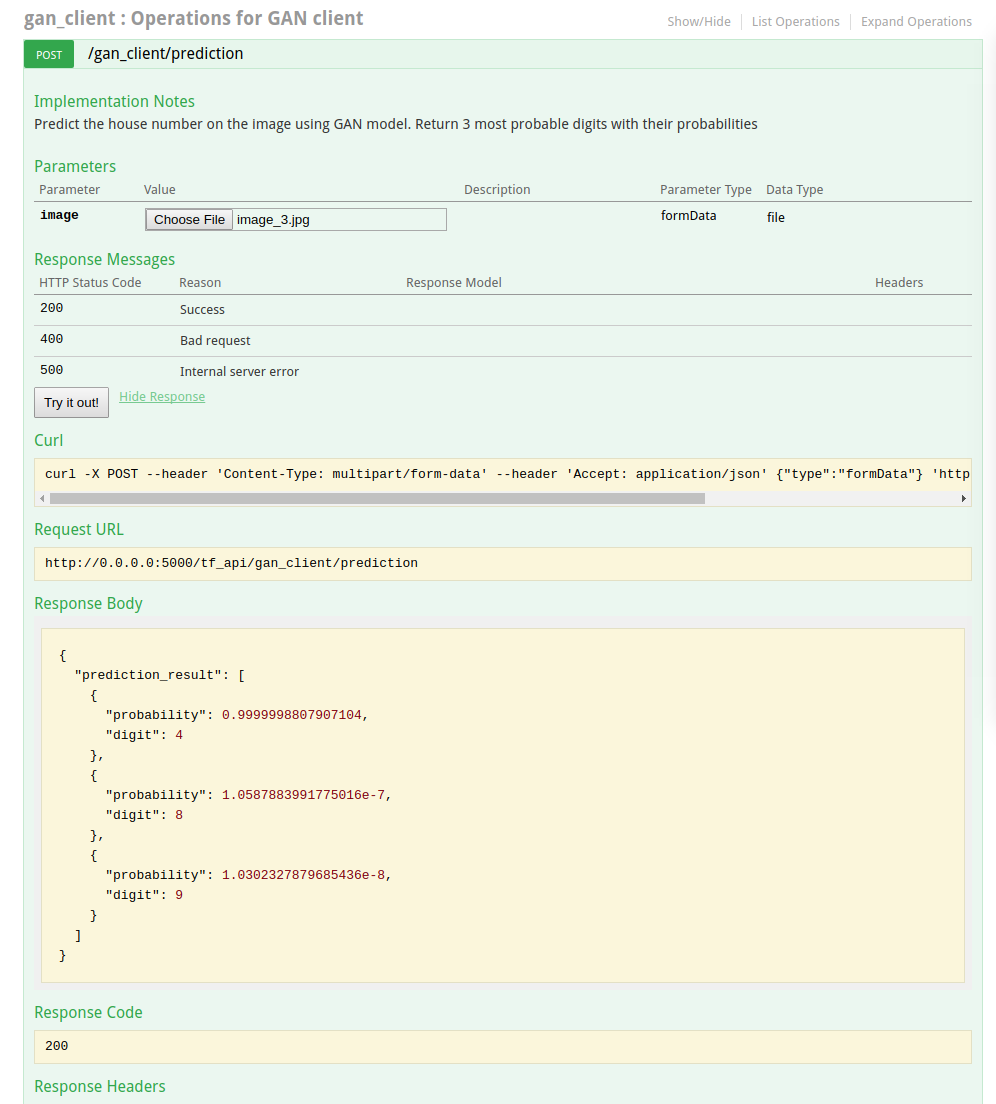
I found it extremely useful for quick try on prediction of different images. Alternatively you can use Postman to issue POST requests:

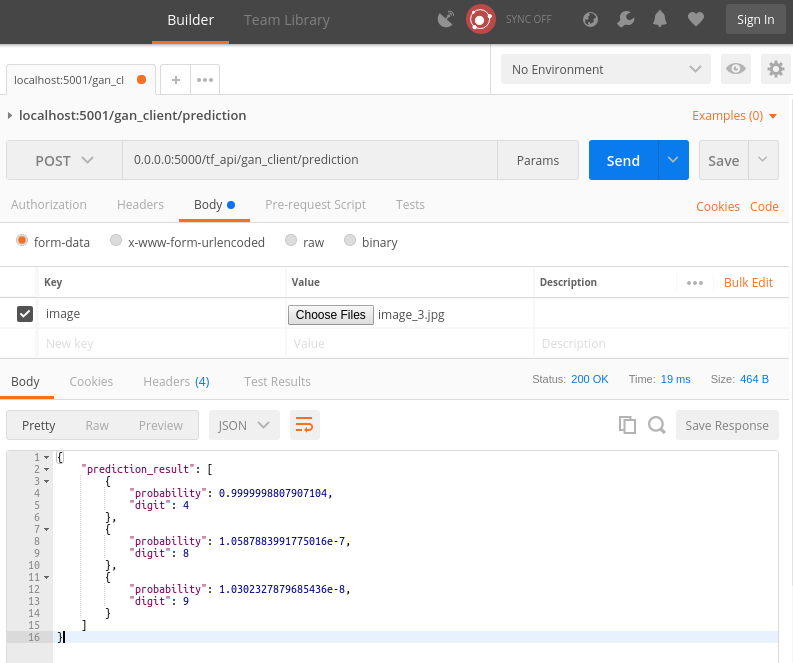
Conclusion
We have created a Web application that provides public REST API for Street View House Numbers prediction. This is a Flask web application that is, effectively, an adapter of TensorFlow Serving capabilities. It hosts TensorFlow Serving client, transforms HTTP(S) REST requests into protobufs and forwards them to a TensorFlow Serving server via gRPC. TensorFlow server, in its turn, host a GAN model, which do, actually, a prediction job.
Introduced architecture benefits from using of an effective communication (gRPC + protobufs) between internal services and exposes a public REST API for external use.
[출처] https://becominghuman.ai/creating-restful-api-to-tensorflow-models-c5c57b692c10
광고 클릭에서 발생하는 수익금은 모두 웹사이트 서버의 유지 및 관리, 그리고 기술 콘텐츠 향상을 위해 쓰여집니다.
