
- 전체
- C/C++ 일반
- C/C++ 수학
- C/C++ 그래픽
- C/C++ 자료구조
- C/C++ 인공지능
- C/C++ 인터넷
- wxWidget
- GTK+
- UNIX or LINUX programming
- 리눅스 마스터 - 국가공인자격
- VC++/ MFC
- C#/CLI/.NET
- QT/기타UI
- Boost lib
- 오픈소스 C 분석자료
- MSA (마이크로서비스), Docker, kubernetes
- WSL(windows subsystem linux)
[C/C++][인터넷] C++ Web Scraping: Tutorial 2023 : C++ 웹 스크래핑: 튜토리얼 2023
C++ remains a highly efficient language. The performance of C++ web scraping might surprise you if you have to parse tons of pages or very large ones! In this step-by-step tutorial, you'll learn how to do data scraping in C++ with the libcurl and libxml2 libraries.
Let's dive in!
Is C++ Good for Web Scraping?
C++ is a viable option for web scraping, especially when resource usage matters. At the same time, most developers tend to choose other languages. That's because they're easier to use, have a larger community, and come with more libraries.
Python web scraping, for example, is a popular choice thanks to its extensive packages. JavaScript with Node.js is also commonly used. You can discover more about the best programming languages for web scraping in our article.
Using C++ can make all the difference when performance is critical, as its low-level nature makes it fast and efficient. It's a well-suited tool for handling large-scale web scraping tasks.
C++ Web Scraping Libraries: Prerequisites
C++ isn't a language designed for the web, but some good tools exist to extract data from the internet.
To build a web scraper in C++, you'll need the following:
- libcurl: An open-source and easy-to-use HTTP client for C and C++ built on top of cURL.
- libxml2: A HTML and XML parser with a complete element selection API based on XPath.
libcurl will help you retrieve web pages from the web. Then, you can parse their HTML content and extract data from them with libxml2.
Before seeing how to install them, initialize a C++ project in your IDE.
On Windows, you can rely on Visual Studio with C++. Visual Studio Code with the C/C++ extension will do on macOS or Linux. Follow the instructions and create a project based on your local compiler.
Initialize it with the following scraper.cpp file:
#include <iostream>

int main() {
    std::cout << "Hello, World!";
    return 0;
}
The main() function will contain the scraping logic.
Next, install the C++ package manager vcpkg and set it up in VS IDEs, as explained in the official guide.
To install libcurl, run:
vcpkg install curl
Then, to install libxml2, launch:
vcpkg install libxml2
libxml2 exposes many features, but you'll only need the functions from these two header files:
HTMLparser.h: Interface for an HTML parser.XPath.h: API for performing XPath queries.
The first will help you parse an HTML document, and the second will select the desired elements from it.
Import the two libraries by adding these three lines on top of the scraper.cpp file:
#include <curl/curl.h>
#include "libxml/HTMLparser.h"
#include "libxml/xpath.h"
Fantastic! You're now ready to learn the basics of data scraping with C++!
How to Web Scrape in C++
To do web scraping with C++, you need to:
- Download the target page with libcurl.
- Parse the retrieved HTML document and scrape data from it with libxml2.
- Export the collected data to a file.
As a target site, we'll use ScrapeMe, an e-commerce that contains a paginated list of Pokémon-inspired products:
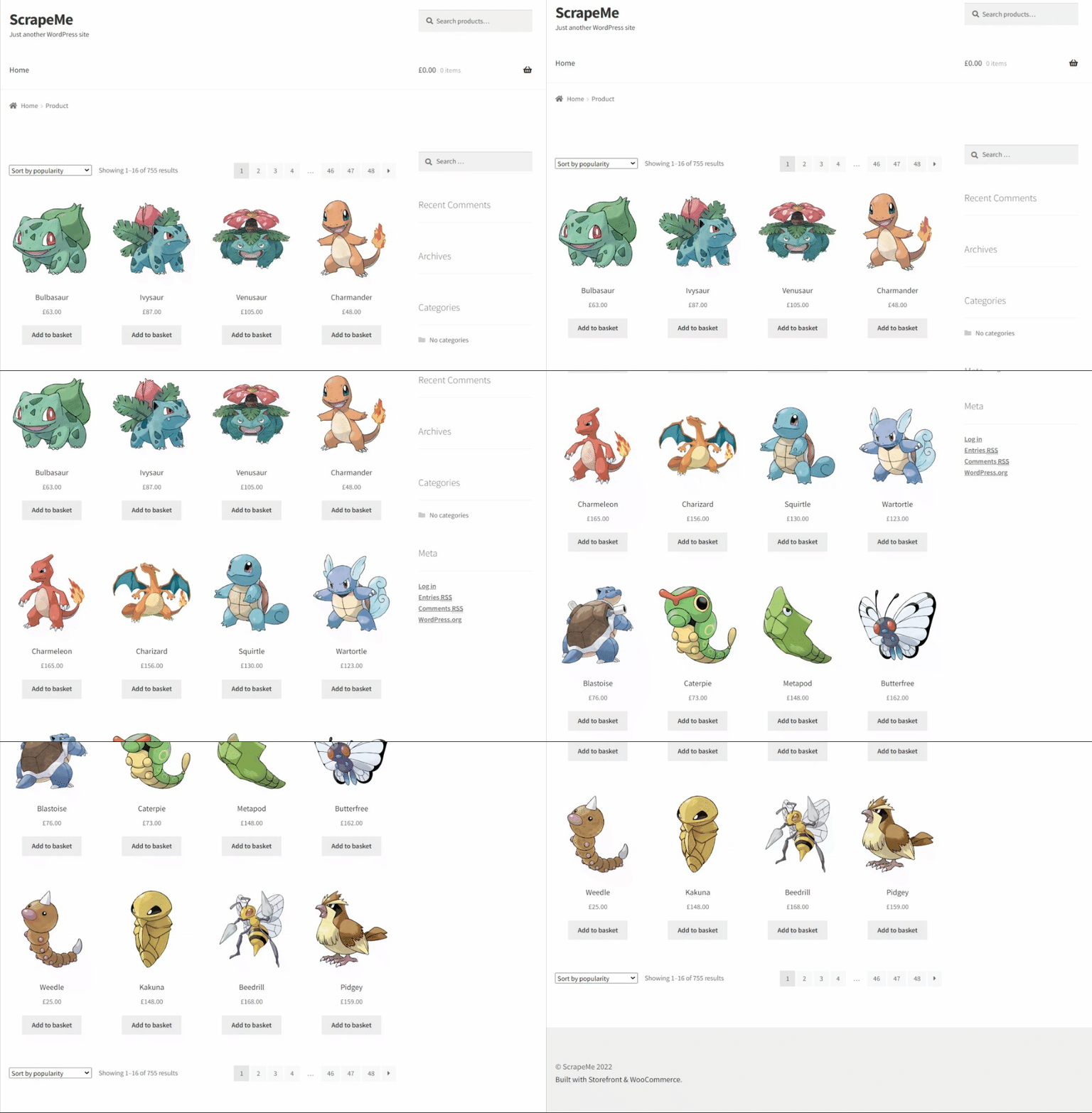
The C++ spider you're about to build will be able to retrieve all product data.
Let's perform web scraping using C++!
Step 1: Scrape by Requesting Your Target Page
Making a request with libcurl involves boilerplate operations you want to avoid repeating every time. Encapsulate them in a reusable function that initializes a cURL instance and uses it to run an HTTP GET request to the URL passed as a parameter. Then, it returns the HTML document returned by the server as a string.
std::string get_request(std::string url) {
    // initialize curl locally
    CURL *curl = curl_easy_init();
    std::string result;

    if (curl) {
        // perform the GET request
        curl_easy_setopt(curl, CURLOPT_URL, url.c_str());
        curl_easy_setopt(curl, CURLOPT_WRITEFUNCTION, [](void *contents, size_t size, size_t nmemb, std::string *response) {
            ((std::string*) response)->append((char*) contents, size * nmemb);
            return size * nmemb; });
        curl_easy_setopt(curl, CURLOPT_WRITEDATA, &result);
        curl_easy_perform(curl);

        // free up the local curl resources
        curl_easy_cleanup(curl);
    }

    return result;
}
If you have any doubts about how libcurl works, take a look at the official tutorial from the docs.
Now, use it in the main() function of scraper.cpp to retrieve HTML content as a string:
#include <iostream>
#include <curl/curl.h>
#include "libxml/HTMLparser.h"
#include "libxml/xpath.h"

// std::string get_request(std::string url) { ... }

int main() {
    // initialize curl globally
    curl_global_init(CURL_GLOBAL_ALL);

    // download the target HTML document
    // and print it
    std::string html_document = get_request("https://scrapeme.live/shop/");
    std::cout << html_document;

    // scraping logic...

    // free up the global curl resources
    curl_global_cleanup();

    return 0;
}
The script prints this:
<!doctype html>
<html lang="en-GB">
<head>
<meta charset="UTF-8">
<meta name="viewport" content="width=device-width, initial-scale=1, maximum-scale=2.0">
<link rel="profile" href="http://gmpg.org/xfn/11">
<link rel="pingback" href="https://scrapeme.live/xmlrpc.php">
<title>Products – ScrapeMe</title>
<!-- Omitted for brevity... -->
Great! That's the HTML code of the target page!
Step 2: Parse the HTML Data You Want Using C++
After retrieving the HTML document, feed it to libxml2:
htmlDocPtr doc = htmlReadMemory(html_document.c_str(), html_document.length(), nullptr, nullptr, HTML_PARSE_NOERROR);
htmlReadMemory() parses the HTML string and builds a tree on which you can apply XPath selectors.
Inspect the target site to define an effective selector strategy. In the browser, right-click on a product HTML node, and opt for the "Inspect" option. The following DevTools section will open:
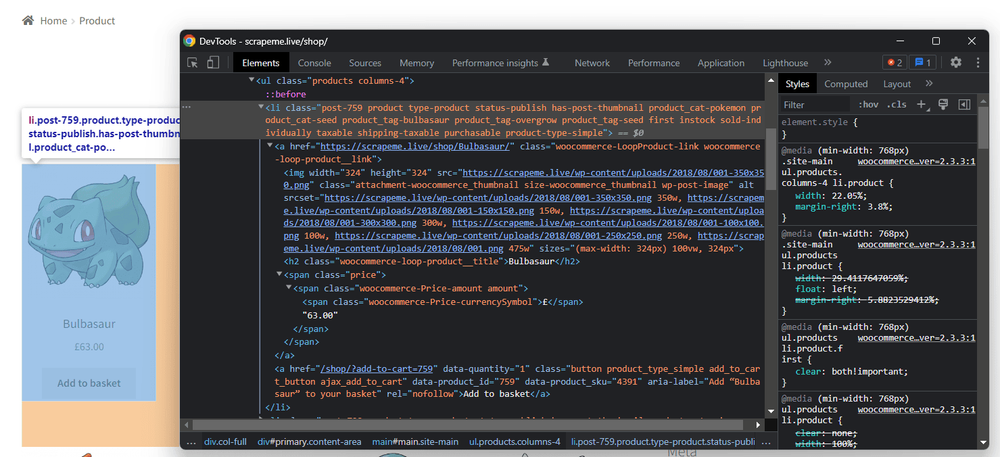
Analyze the HTML code and note that you can get all li.product elements with the XPath selector below:
//li[contains(@class, 'product')]
Use it to retrieve all HTML products:
xmlXPathContextPtr context = xmlXPathNewContext(doc);
xmlXPathObjectPtr product_html_elements = xmlXPathEvalExpression((xmlChar *) "//li[contains(@class, 'product')]", context);
xmlXPathNewContext() sets the XPath context to the entire document. Next, xmlXPathEvalExpression() applies the selector strategy defined above.
Given a product, the useful information to scrape is:
- The product URL in the
<a>. - The product image in the
<img>. - The product name in the
<h2>. - The product price in the
<span>.
To store this data, you need to define a new data structure:
struct PokemonProduct {
    std::string url;
    std::string image;
    std::string name;
    std::string price;
};
In C++, a struct is a collection of different data fields grouped under the same name.
Since there are several products on the page, you'll need an array of PokemonProduct:
std::vector<PokemonProduct> pokemon_products;
Don't forget to enable the vector feature in C++:
#include <vector>
Iterate over the list of the product nodes and extract the desired data:
for (int i = 0; i < product_html_elements->nodesetval->nodeNr; ++i) {
    // get the current element of the loop
    xmlNodePtr product_html_element = product_html_elements->nodesetval->nodeTab[i];

    // set the context to restrict XPath selectors
    // to the children of the current element
    xmlXPathSetContextNode(product_html_element, context);

    xmlNodePtr url_html_element = xmlXPathEvalExpression((xmlChar *) ".//a", context)->nodesetval->nodeTab[0];
    std::string url = std::string(reinterpret_cast<char *>(xmlGetProp(url_html_element, (xmlChar *) "href")));
    xmlNodePtr image_html_element = xmlXPathEvalExpression((xmlChar *) ".//a/img", context)->nodesetval->nodeTab[0];
    std::string image = std::string(reinterpret_cast<char *>(xmlGetProp(image_html_element, (xmlChar *) "src")));
    xmlNodePtr name_html_element = xmlXPathEvalExpression((xmlChar *) ".//a/h2", context)->nodesetval->nodeTab[0];
    std::string name = std::string(reinterpret_cast<char *>(xmlNodeGetContent(name_html_element)));
    xmlNodePtr price_html_element = xmlXPathEvalExpression((xmlChar *) ".//a/span", context)->nodesetval->nodeTab[0];
    std::string price = std::string(reinterpret_cast<char *>(xmlNodeGetContent(price_html_element)));

    PokemonProduct pokemon_product = {url, image, name, price};
    pokemon_products.push_back(pokemon_product);
}
Great! pokemon_products will contain all product data of interest!
After the loop, remember to free up the resources allocated by libxml2:
// free up libxml2 resources
xmlXPathFreeContext(context);
xmlFreeDoc(doc);
Now when we're able to extract the data we wanted, the next step is to get the output. We'll see that next, as well as the final code.
Step 3: Export Data to CSV
All that remains is to export the data to a more useful format, such as CSV. You don't need extra libraries. You only have to open a .csv file, convert PokemonProduct structures to CSV records, and append them to the file.
// create the CSV file of output
std::ofstream csv_file("products.csv");
// populate it with the header
csv_file << "url,image,name,price" << std::endl;
// populate the CSV output file
for (int i = 0; i < pokemon_products.size(); ++i) {
    // transform a PokemonProduct instance to a
    // CSV string record
    PokemonProduct p = pokemon_products.at(i);
    std::string csv_record = p.url + "," + p.image + "," + p.name + "," + p.price;
    csv_file << csv_record << std::endl;
}
// free up the resources for the CSV file
csv_file.close();
Put it all together, and you'll get this final code for your scraper:
#include <iostream>
#include <curl/curl.h>
#include "libxml/HTMLparser.h"
#include "libxml/xpath.h"
#include <vector>

std::string get_request(std::string url) {
    // initialize curl locally
    CURL *curl = curl_easy_init();
    std::string result;

    if (curl) {
        // perform the GET request
        curl_easy_setopt(curl, CURLOPT_URL, url.c_str());
        curl_easy_setopt(curl, CURLOPT_WRITEFUNCTION, [](void *contents, size_t size, size_t nmemb, std::string *response) {
            ((std::string*) response)->append((char*) contents, size * nmemb);
            return size * nmemb;
        });
        curl_easy_setopt(curl, CURLOPT_WRITEDATA, &result);
        curl_easy_perform(curl);

        // free up the local curl resources
        curl_easy_cleanup(curl);
    }

    return result;
}

// to store the scraped data of interest
// for each product
struct PokemonProduct {
    std::string url;
    std::string image;
    std::string name;
    std::string price;
};

int main() {
    // initialize curl globally
    curl_global_init(CURL_GLOBAL_ALL);
    // retrieve the HTML content of the target page
    std::string html_document = get_request("https://scrapeme.live/shop/");

    // parse the HTML document returned by the server
    htmlDocPtr doc = htmlReadMemory(html_document.c_str(), html_document.length(), nullptr, nullptr, HTML_PARSE_NOERROR);

    // initialize the XPath context for libxml2
    // to the entire document
    xmlXPathContextPtr context = xmlXPathNewContext(doc);
    // get the product HTML elements
    xmlXPathObjectPtr product_html_elements = xmlXPathEvalExpression((xmlChar *) "//li[contains(@class, 'product')]", context);

    // to store the scraped products
    std::vector<PokemonProduct> pokemon_products;

    // iterate the list of product HTML elements
    for (int i = 0; i < product_html_elements->nodesetval->nodeNr; ++i) {
        // get the current element of the loop
        xmlNodePtr product_html_element = product_html_elements->nodesetval->nodeTab[i];

        // set the context to restrict XPath selectors
        // to the children of the current element
        xmlXPathSetContextNode(product_html_element, context);
        xmlNodePtr url_html_element = xmlXPathEvalExpression((xmlChar *) ".//a", context)->nodesetval->nodeTab[0];
        std::string url = std::string(reinterpret_cast<char *>(xmlGetProp(url_html_element, (xmlChar *) "href")));
        xmlNodePtr image_html_element = xmlXPathEvalExpression((xmlChar *) ".//a/img", context)->nodesetval->nodeTab[0];
        std::string image = std::string(reinterpret_cast<char *>(xmlGetProp(image_html_element, (xmlChar *) "src")));
        xmlNodePtr name_html_element = xmlXPathEvalExpression((xmlChar *) ".//a/h2", context)->nodesetval->nodeTab[0];
        std::string name = std::string(reinterpret_cast<char *>(xmlNodeGetContent(name_html_element)));
        xmlNodePtr price_html_element = xmlXPathEvalExpression((xmlChar *) ".//a/span", context)->nodesetval->nodeTab[0];
        std::string price = std::string(reinterpret_cast<char *>(xmlNodeGetContent(price_html_element)));

        PokemonProduct pokemon_product = {url, image, name, price};
        pokemon_products.push_back(pokemon_product);
    }

    // free up libxml2 resources
    xmlXPathFreeContext(context);
    xmlFreeDoc(doc);

    // create the CSV file of output
    std::ofstream csv_file("products.csv");

    // populate it with the header
    csv_file << "url,image,name,price" << std::endl;

    // populate the CSV output file
    for (int i = 0; i < pokemon_products.size(); ++i) {
        // transform a PokemonProduct instance to a
        // CSV string record
        PokemonProduct p = pokemon_products.at(i);
        std::string csv_record = p.url + "," + p.image + "," + p.name + "," + p.price;
        csv_file << csv_record << std::endl;
    }

    // free up the resources for the CSV file
    csv_file.close();

    // free up the global curl resources
    curl_global_cleanup();

    return 0;
}
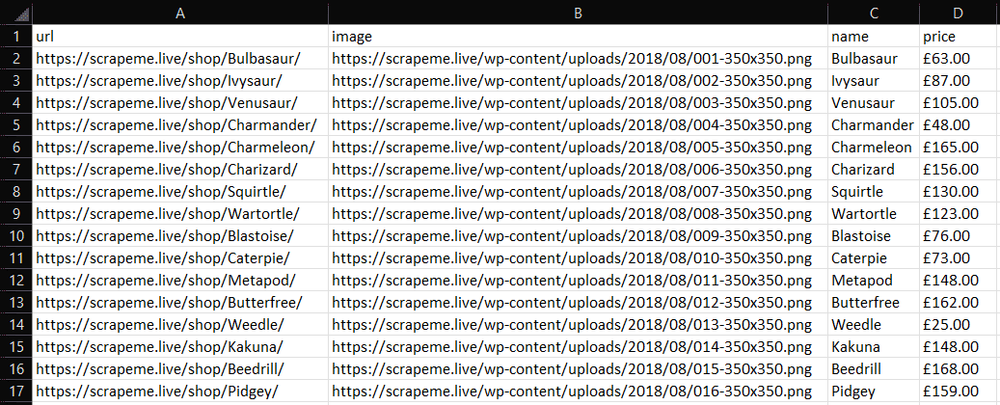
Run the web scraping C++ script to generate a products.csv file. Open it, and you'll see the output below:
Well done!
Web Crawling with C++
The target website has several product pages, right? To scrape it entirely, you have to discover and visit all pages. That's what web crawling is about.
First, you need to find a way to find all pagination pages. Start by inspecting any pagination number HTML element with the DevTools:
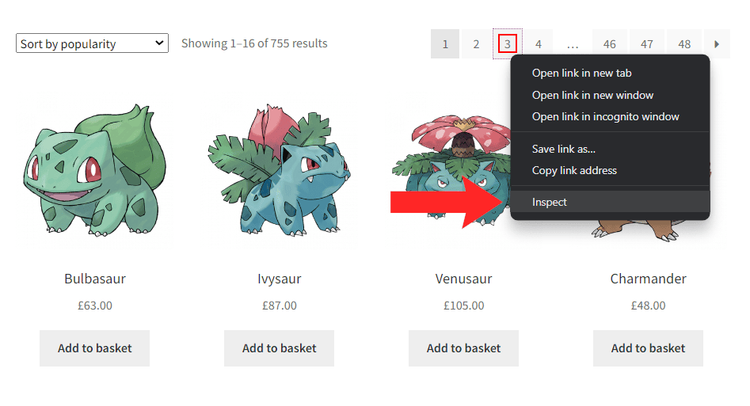
You can select them with this:
//li/a[contains(@class, 'page-numbers')]

To implement web crawling, these are the steps:
- Visit a page.
- Get the pagination link elements.
- Add the newly discovered URLs to a queue.
- Repeat the cycle with a new page.
To achieve that, you need some supporting data structures to avoid visiting the same page twice (details below):
#include <iostream>
#include <curl/curl.h>
#include "libxml/HTMLparser.h"
#include "libxml/xpath.h"
#include <vector>

// std::string get_request(std::string url) { ... }

// struct PokemonProduct { ... }

int main() {
    // initialize curl globally
    curl_global_init(CURL_GLOBAL_ALL);

    std::vector<PokemonProduct> pokemon_products;

    // web page to start scraping from
    std::string first_page = "https://scrapeme.live/shop/page/1/";
    // initialize the list of pages to scrape
    std::vector<std::string> pages_to_scrape = {first_page};
    // initialize the list of pages discovered
    std::vector<std::string> pages_discovered = {first_page};

    // current iteration
    int i = 1;
    // max number of iterations allowed
    int max_iterations = 5;

    // until there is still a page to scrape or
    // the limit gets hit
    while (!pages_to_scrape.empty() && i <= max_iterations) {
        // get the first page to scrape
        // and remove it from the list
        std::string page_to_scrape = pages_to_scrape.at(0);
        pages_to_scrape.erase(pages_to_scrape.begin());

        std::string html_document = get_request(pages_to_scrape);
        htmlDocPtr doc = htmlReadMemory(html_document.c_str(), html_document.length(), nullptr, nullptr, HTML_PARSE_NOERROR);

        // scraping logic...

        // re-initialize the XPath context to
        // restore it to the entire document
        context = xmlXPathNewContext(doc);

        // extract the list of pagination links
        xmlXPathObjectPtr pagination_html_elements = xmlXPathEvalExpression((xmlChar *)"//a[@class='page-numbers']", context);

        // iterate over it to discover new links to scrape
        for (int i = 0; i < pagination_html_elements->nodesetval->nodeNr; ++i) {
            xmlNodePtr pagination_html_element = pagination_html_elements->nodesetval->nodeTab[i];

            // extract the pagination URL
            xmlXPathSetContextNode(pagination_html_element, context);
            std::string pagination_link = std::string(reinterpret_cast<char *>(xmlGetProp(pagination_html_element, (xmlChar *) "href")));
            // if the page discovered is new
            if (std::find(pages_discovered.begin(), pages_discovered.end(), pagination_link) == pages_discovered.end())
            {
                // if the page discovered should be scraped
                pages_discovered.push_back(pagination_link);
                if (std::find(pages_to_scrape.begin(), pages_to_scrape.end(), pagination_link) == pages_to_scrape.end())
                {
                    pages_to_scrape.push_back(pagination_link);
                }
            }
        }

        // free up libxml2 resources
        xmlXPathFreeContext(context);
        xmlFreeDoc(doc);

        // increment the iteration counter
        i++;
    }

    // export logic...

    return 0;
}
This C++ data scraping script crawls a web page, scrapes it, and gets the new pagination URLs. If these links are unknown, it adds them to the crawling queue. It repeats this logic until the queue is empty or reaches the max_iterations limit.
At the end of the while cycle, pokemon_products will contain all products discovered in the pages visited. In other words, you just crawled ScrapeMe! Congrats!
Headless Browser Scraping in C++
Some sites rely on JavaScript for rendering or data retrieval. In that case, you can't use a simple HTML parser to extract data from them and need a tool that can render web pages in a browser. It exists and is called a headless browser.
Selenium is one of the most popular headless browsers, and webdriverxx is its C++ binding.
To install it, launch the following commands in the root folder of your project:
git clone https://github.com/durdyev/webdriverxx
cd webdriverxx
mkdir build
cd build && cmake ..
sudo make && sudo make install
Launch them in the Windows Subsystem for Linux (WSL) if you're a Windows user.
Then, download the Selenium Grid server, install it, set it up, and run it. That's the only prerequisite required by webdriverxx.
Control a Chrome instance to extract the data from ScrapeMe with the following code. It's a translation of the web scraping C++ logic seen earlier. Note that the FindElements() and FindElement() methods allow you to select HTML elements with webdriverxx.
#include <iostream>
#include <vector>
#include <webdriverxx/webdriver.h>

struct PokemonProduct {
    std::string url;
    std::string image;
    std::string name;
    std::string price;
};

int main() {
    webdriverxx::WebDriver driver = Start(Chrome());
    // visit the target page in the controlled browser
    driver.Navigate("https://scrapeme.live/shop/");

    // perform an XPath query
    webdriverxx::WebElements product_html_elements = driver.FindElements(webdriverxx::By::XPath("//li[contains(@class, 'product')]"));

    // To store the scraped products
    std::vector<PokemonProduct> pokemon_products;

    // Iterate over the list of product HTML elements
    for (auto& product_html_element : product_html_elements) {
        std::string url = product_html_element.FindElement(webdriverxx::By::XPath(".//a")).GetAttribute("href");
        std::string image = product_html_element.FindElement(webdriverxx::By::XPath(".//a/img")).GetAttribute("src");
        std::string name = product_html_element.FindElement(webdriverxx::By::XPath(".//a/h2")).GetText();
        std::string price = product_html_element.FindElement(webdriverxx::By::XPath(".//a/span")).GetText();

        PokemonProduct pokemon_product = {url, image, name, price};
        pokemon_products.push_back(pokemon_product);
    }

    // stop the Chrome driver
    driver.Stop();

    // create the CSV file of output
    std::ofstream csv_file("products.csv");

    // populate it with the header
    csv_file << "url,image,name,price" << std::endl;

    // populate the CSV output file
    for (int i = 0; i < pokemon_products.size(); ++i) {
        // transform a PokemonProduct instance to a
        // CSV string record
        PokemonProduct p = pokemon_products.at(i);
        std::string csv_record = p.url + "," + p.image + "," + p.name + "," + p.price;
        csv_file << csv_record << std::endl;
    }

    // free up the resources for the CSV file
    csv_file.close();

    return 0;
}
Keep in mind that a headless browser is a powerful tool that can perform any human interaction on a page. It's also capable of operations that HTTP clients and parsers can only dream about. For example, you can use webdriverxx to take a screenshot of the current viewport as below:
webdriverxx::WebDriver driver = Start(Chrome());

// visit the target page in the controlled browser
driver.Navigate("https://scrapeme.live/shop/");

// take a screenshot in Base64
webdriverxx::string screenshot_data = driver.GetScreenshot();

// initialize the screenshot file
std::ofstream screenshot_file("screenshot.png"=);
csv_file << screenshot_data;
csv_file.close();
That produces this:
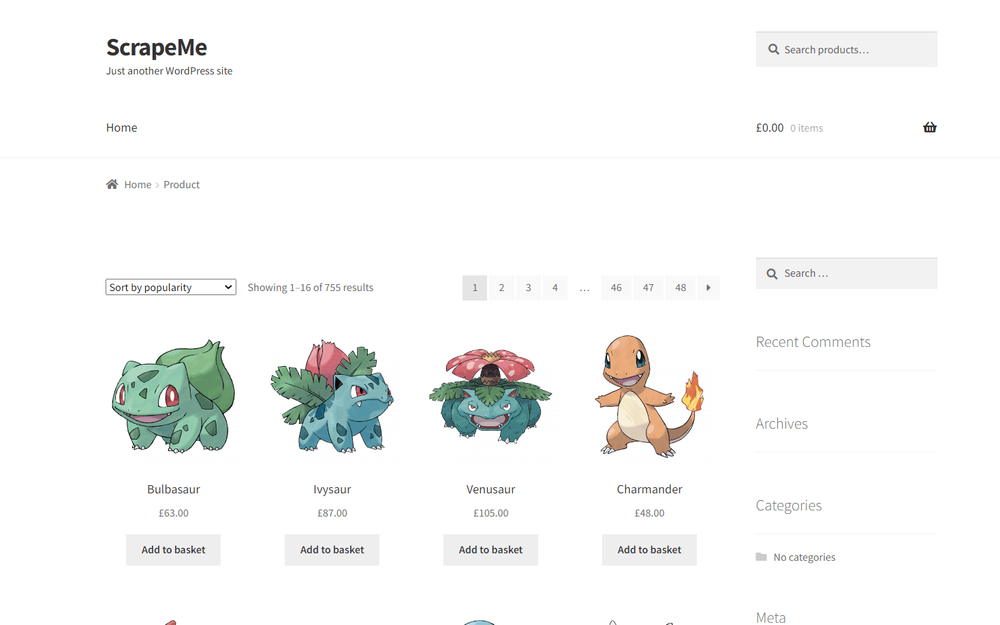
Et voilà! You now know how to do web scraping using C++ on dynamic-content sites.
Challenges of Web Scraping in C++
Web scraping with C++ is definitely efficient but not flawless. Many websites rely on anti-bot solutions to protect their data. Your requests may get blocked because of those technologies.
That's a huge problem and the biggest challenge when getting data from the internet with a script. There are, of course, some solutions. Take a look at our in-depth guide on how to do web scraping without getting blocked.
Most of these techniques are workarounds and tricks that might only work for a while. A better alternative to avoid blocks is ZenRows, a full-featured web scraping API that provides premium proxies and headless browser capabilities and can bypass the anti-scraping measures for you.
Conclusion
This step-by-step tutorial explained how to perform web scraping with C++. You saw the basics and dug into more complex topics. You have become a C++ data extraction ninja!
Now, you know:
- Why C++ is great for efficient scraping.
- The basics of scraping in C++.
- How to web crawl in C++.
- How to use a headless browser in C++ to extract data from JavaScript-rendered sites.
Unfortunately, anti-scraping technologies can stop you anytime, but you can bypass them all with ZenRows, a scraping tool with the best built-in anti-bot bypass features on the market. All you need to get the desired data is a single API call.
[출처] https://www.zenrows.com/blog/c-plus-plus-web-scraping#c-plus-plus-good-for-web-scraping
C++는 여전히 매우 효율적인 언어입니다. 수많은 페이지나 매우 큰 페이지를 구문 분석해야 하는 경우 C++ 웹 스크래핑의 성능에 놀랄 수도 있습니다! 이 단계별 튜토리얼에서는 libcurl 및 libxml2 라이브러리를 사용하여 C++에서 데이터 스크래핑을 수행하는 방법을 배웁니다.
뛰어들어보자!
C++가 웹 스크래핑에 좋은가요?
C++는 특히 리소스 사용량이 중요한 경우 웹 스크래핑에 실행 가능한 옵션입니다. 동시에 대부분의 개발자는 다른 언어를 선택하는 경향이 있습니다. 그 이유는 사용하기가 더 쉽고, 더 큰 커뮤니티를 갖고 있으며, 더 많은 라이브러리가 제공되기 때문입니다.
예를 들어, Python 웹 스크래핑은 광범위한 패키지 덕분에 인기 있는 선택입니다. Node.js를 사용한 JavaScript 도 일반적으로 사용됩니다. 우리 기사에서 웹 스크래핑에 가장 적합한 프로그래밍 언어 에 대해 자세히 알아볼 수 있습니다 .
C++를 사용하면 성능이 중요할 때 큰 차이를 만들 수 있습니다. 낮은 수준의 특성으로 인해 빠르고 효율적이기 때문입니다. 대규모 웹 스크래핑 작업을 처리하는 데 적합한 도구입니다.


C++ 웹 스크래핑 라이브러리: 전제조건
C++는 웹용으로 설계된 언어는 아니지만 인터넷에서 데이터를 추출하는 데 사용할 수 있는 몇 가지 좋은 도구가 있습니다.
C++로 웹 스크레이퍼를 구축하려면 다음이 필요합니다.
- libcurl : cURL을 기반으로 구축된 C 및 C++용 오픈 소스 및 사용하기 쉬운 HTTP 클라이언트입니다.
- libxml2 : XPath를 기반으로 하는 완전한 요소 선택 API를 갖춘 HTML 및 XML 파서입니다.
libcurl은 웹에서 웹 페이지를 검색하는 데 도움이 됩니다. 그런 다음 HTML 콘텐츠를 구문 분석하고 libxml2를 사용하여 데이터를 추출할 수 있습니다.
설치 방법을 보기 전에 IDE에서 C++ 프로젝트를 초기화하세요.
Windows에서는 Visual Studio와 C++를 사용할 수 있습니다 . C/C++ 확장이 포함된 Visual Studio Code는 macOS 또는 Linux에서 작동합니다. 지침에 따라 로컬 컴파일러를 기반으로 프로젝트를 만듭니다.
다음 scraper.cpp파일로 초기화하세요.
#include <iostream>

int main() {
    std::cout << "Hello, World!";
    return 0;
}
이 main()함수에는 스크래핑 논리가 포함됩니다.
다음으로 공식 가이드 에 설명된 대로 C++ 패키지 관리자를 설치 vcpkg하고 VS IDE에서 설정합니다 .
libcurl을 설치하려면 다음을 실행하세요.
vcpkg install curl
그런 다음 libxml2를 설치하려면 다음을 실행하십시오.
vcpkg install libxml2
libxml2는 많은 기능을 제공하지만 다음 두 헤더 파일의 기능만 필요합니다.
HTMLparser.h: HTML 파서용 인터페이스입니다.XPath.h: XPath 쿼리를 수행하기 위한 API입니다.
첫 번째는 HTML 문서를 구문 분석하는 데 도움이 되고 두 번째는 HTML 문서에서 원하는 요소를 선택하는 데 도움이 됩니다.
파일 위에 다음 세 줄을 추가하여 두 라이브러리를 가져옵니다 scraper.cpp.
#include <curl/curl.h>
#include "libxml/HTMLparser.h"
#include "libxml/xpath.h"
환상적입니다! 이제 C++를 사용한 데이터 스크래핑의 기본 사항을 배울 준비가 되었습니다!
C++에서 웹 스크레이핑하는 방법
C++로 웹 스크래핑을 수행하려면 다음을 수행해야 합니다.
- libcurl을 사용하여 대상 페이지를 다운로드합니다.
- 검색된 HTML 문서를 구문 분석하고 libxml2를 사용하여 데이터를 긁어냅니다.
- 수집된 데이터를 파일로 내보냅니다.
대상 사이트로 우리는 Pokémon에서 영감을 받은 제품의 페이지가 매겨진 목록이 포함된 전자 상거래인 ScrapeMe를 사용합니다.
빌드하려는 C++ 스파이더는 모든 제품 데이터를 검색할 수 있습니다.
C++를 이용하여 웹스크래핑을 해보자!
1단계: 대상 페이지를 요청하여 스크랩
libcurl을 사용하여 요청하려면 매번 반복하지 않으려는 상용구 작업이 필요합니다. GETcURL 인스턴스를 초기화하고 이를 사용하여 매개변수로 전달된 URL에 대한 HTTP 요청을 실행하는 재사용 가능한 함수로 이를 캡슐화합니다 . 그런 다음 서버에서 반환한 HTML 문서를 문자열로 반환합니다.
std::string get_request(std::string url) {
    // initialize curl locally
    CURL *curl = curl_easy_init();
    std::string result;

    if (curl) {
        // perform the GET request
        curl_easy_setopt(curl, CURLOPT_URL, url.c_str());
        curl_easy_setopt(curl, CURLOPT_WRITEFUNCTION, [](void *contents, size_t size, size_t nmemb, std::string *response) {
            ((std::string*) response)->append((char*) contents, size * nmemb);
            return size * nmemb; });
        curl_easy_setopt(curl, CURLOPT_WRITEDATA, &result);
        curl_easy_perform(curl);

        // free up the local curl resources
        curl_easy_cleanup(curl);
    }

    return result;
}
libcurl의 작동 방식에 대해 의문이 있는 경우 문서의 공식 튜토리얼을 살펴보세요 .
이제 HTML 콘텐츠를 문자열로 검색하는 main()함수 에서 이를 사용합니다.scraper.cpp
#include <iostream>
#include <curl/curl.h>
#include "libxml/HTMLparser.h"
#include "libxml/xpath.h"

// std::string get_request(std::string url) { ... }

int main() {
    // initialize curl globally
    curl_global_init(CURL_GLOBAL_ALL);

    // download the target HTML document
    // and print it
    std::string html_document = get_request("https://scrapeme.live/shop/");
    std::cout << html_document;

    // scraping logic...

    // free up the global curl resources
    curl_global_cleanup();

    return 0;
}
스크립트는 다음을 인쇄합니다.
<!doctype html>
<html lang="en-GB">
<head>
<meta charset="UTF-8">
<meta name="viewport" content="width=device-width, initial-scale=1, maximum-scale=2.0">
<link rel="profile" href="http://gmpg.org/xfn/11">
<link rel="pingback" href="https://scrapeme.live/xmlrpc.php">
<title>Products – ScrapeMe</title>
<!-- Omitted for brevity... -->
엄청난! 이것이 대상 페이지의 HTML 코드입니다!
2단계: C++를 사용하여 원하는 HTML 데이터 구문 분석
HTML 문서를 검색한 후 이를 libxml2에 제공합니다.
htmlDocPtr doc = htmlReadMemory(html_document.c_str(), html_document.length(), nullptr, nullptr, HTML_PARSE_NOERROR);
htmlReadMemory()HTML 문자열을 구문 분석하고 XPath 선택기를 적용할 수 있는 트리를 구축합니다.
효과적인 선택기 전략을 정의하려면 대상 사이트를 검사하십시오. 브라우저에서 제품 HTML 노드를 마우스 오른쪽 버튼으로 클릭하고 "검사" 옵션을 선택합니다. 다음 DevTools 섹션이 열립니다:
li.productHTML 코드를 분석하고 아래 XPath 선택기를 사용하여 모든 요소를 가져올 수 있음을 확인하세요 .
//li[contains(@class, 'product')]
모든 HTML 제품을 검색하려면 이를 사용하십시오.
xmlXPathContextPtr context = xmlXPathNewContext(doc);
xmlXPathObjectPtr product_html_elements = xmlXPathEvalExpression((xmlChar *) "//li[contains(@class, 'product')]", context);
xmlXPathNewContext()XPath 컨텍스트를 전체 문서로 설정합니다. 다음으로 xmlXPathEvalExpression()위에서 정의한 선택기 전략을 적용합니다.
특정 제품에서 스크랩해야 할 유용한 정보는 다음과 같습니다.
- .
<a>_ - 제품 이미지는
<img>. - 에 제품 이름이 있습니다
<h2>. - 제품 가격은
<span>.
이 데이터를 저장하려면 새 데이터 구조를 정의해야 합니다.
struct PokemonProduct {
    std::string url;
    std::string image;
    std::string name;
    std::string price;
};
C++에서 a는 struct동일한 이름으로 그룹화된 다양한 데이터 필드의 모음입니다.
페이지에 여러 제품이 있으므로 다음의 배열이 필요합니다 PokemonProduct.
std::vector<PokemonProduct> pokemon_products;
C++에서 벡터 기능을 활성화하는 것을 잊지 마세요:
#include <vector>
제품 노드 목록을 반복하고 원하는 데이터를 추출합니다.
for (int i = 0; i < product_html_elements->nodesetval->nodeNr; ++i) {
    // get the current element of the loop
    xmlNodePtr product_html_element = product_html_elements->nodesetval->nodeTab[i];

    // set the context to restrict XPath selectors
    // to the children of the current element
    xmlXPathSetContextNode(product_html_element, context);

    xmlNodePtr url_html_element = xmlXPathEvalExpression((xmlChar *) ".//a", context)->nodesetval->nodeTab[0];
    std::string url = std::string(reinterpret_cast<char *>(xmlGetProp(url_html_element, (xmlChar *) "href")));
    xmlNodePtr image_html_element = xmlXPathEvalExpression((xmlChar *) ".//a/img", context)->nodesetval->nodeTab[0];
    std::string image = std::string(reinterpret_cast<char *>(xmlGetProp(image_html_element, (xmlChar *) "src")));
    xmlNodePtr name_html_element = xmlXPathEvalExpression((xmlChar *) ".//a/h2", context)->nodesetval->nodeTab[0];
    std::string name = std::string(reinterpret_cast<char *>(xmlNodeGetContent(name_html_element)));
    xmlNodePtr price_html_element = xmlXPathEvalExpression((xmlChar *) ".//a/span", context)->nodesetval->nodeTab[0];
    std::string price = std::string(reinterpret_cast<char *>(xmlNodeGetContent(price_html_element)));

    PokemonProduct pokemon_product = {url, image, name, price};
    pokemon_products.push_back(pokemon_product);
}
엄청난! pokemon_products관심 있는 모든 제품 데이터가 포함됩니다!
루프 후에는 libxml2에 의해 할당된 리소스를 해제해야 합니다.
// free up libxml2 resources
xmlXPathFreeContext(context);
xmlFreeDoc(doc);
이제 원하는 데이터를 추출할 수 있게 되면 다음 단계는 출력을 얻는 것입니다. 다음에는 최종 코드도 살펴보겠습니다.
3단계: 데이터를 CSV로 내보내기
남은 것은 데이터를 CSV와 같은 보다 유용한 형식으로 내보내는 것입니다. 추가 라이브러리가 필요하지 않습니다. .csv파일을 열고 구조를 CSV 레코드로 변환한 PokemonProduct후 파일에 추가하기 만 하면 됩니다 .
// create the CSV file of output
std::ofstream csv_file("products.csv");
// populate it with the header
csv_file << "url,image,name,price" << std::endl;
// populate the CSV output file
for (int i = 0; i < pokemon_products.size(); ++i) {
    // transform a PokemonProduct instance to a
    // CSV string record
    PokemonProduct p = pokemon_products.at(i);
    std::string csv_record = p.url + "," + p.image + "," + p.name + "," + p.price;
    csv_file << csv_record << std::endl;
}
// free up the resources for the CSV file
csv_file.close();
모두 합치면 스크레이퍼에 대한 최종 코드가 생성됩니다 .
#include <iostream>
#include <curl/curl.h>
#include "libxml/HTMLparser.h"
#include "libxml/xpath.h"
#include <vector>

std::string get_request(std::string url) {
    // initialize curl locally
    CURL *curl = curl_easy_init();
    std::string result;

    if (curl) {
        // perform the GET request
        curl_easy_setopt(curl, CURLOPT_URL, url.c_str());
        curl_easy_setopt(curl, CURLOPT_WRITEFUNCTION, [](void *contents, size_t size, size_t nmemb, std::string *response) {
            ((std::string*) response)->append((char*) contents, size * nmemb);
            return size * nmemb;
        });
        curl_easy_setopt(curl, CURLOPT_WRITEDATA, &result);
        curl_easy_perform(curl);

        // free up the local curl resources
        curl_easy_cleanup(curl);
    }

    return result;
}

// to store the scraped data of interest
// for each product
struct PokemonProduct {
    std::string url;
    std::string image;
    std::string name;
    std::string price;
};

int main() {
    // initialize curl globally
    curl_global_init(CURL_GLOBAL_ALL);
    // retrieve the HTML content of the target page
    std::string html_document = get_request("https://scrapeme.live/shop/");

    // parse the HTML document returned by the server
    htmlDocPtr doc = htmlReadMemory(html_document.c_str(), html_document.length(), nullptr, nullptr, HTML_PARSE_NOERROR);

    // initialize the XPath context for libxml2
    // to the entire document
    xmlXPathContextPtr context = xmlXPathNewContext(doc);
    // get the product HTML elements
    xmlXPathObjectPtr product_html_elements = xmlXPathEvalExpression((xmlChar *) "//li[contains(@class, 'product')]", context);

    // to store the scraped products
    std::vector<PokemonProduct> pokemon_products;

    // iterate the list of product HTML elements
    for (int i = 0; i < product_html_elements->nodesetval->nodeNr; ++i) {
        // get the current element of the loop
        xmlNodePtr product_html_element = product_html_elements->nodesetval->nodeTab[i];

        // set the context to restrict XPath selectors
        // to the children of the current element
        xmlXPathSetContextNode(product_html_element, context);
        xmlNodePtr url_html_element = xmlXPathEvalExpression((xmlChar *) ".//a", context)->nodesetval->nodeTab[0];
        std::string url = std::string(reinterpret_cast<char *>(xmlGetProp(url_html_element, (xmlChar *) "href")));
        xmlNodePtr image_html_element = xmlXPathEvalExpression((xmlChar *) ".//a/img", context)->nodesetval->nodeTab[0];
        std::string image = std::string(reinterpret_cast<char *>(xmlGetProp(image_html_element, (xmlChar *) "src")));
        xmlNodePtr name_html_element = xmlXPathEvalExpression((xmlChar *) ".//a/h2", context)->nodesetval->nodeTab[0];
        std::string name = std::string(reinterpret_cast<char *>(xmlNodeGetContent(name_html_element)));
        xmlNodePtr price_html_element = xmlXPathEvalExpression((xmlChar *) ".//a/span", context)->nodesetval->nodeTab[0];
        std::string price = std::string(reinterpret_cast<char *>(xmlNodeGetContent(price_html_element)));

        PokemonProduct pokemon_product = {url, image, name, price};
        pokemon_products.push_back(pokemon_product);
    }

    // free up libxml2 resources
    xmlXPathFreeContext(context);
    xmlFreeDoc(doc);

    // create the CSV file of output
    std::ofstream csv_file("products.csv");

    // populate it with the header
    csv_file << "url,image,name,price" << std::endl;

    // populate the CSV output file
    for (int i = 0; i < pokemon_products.size(); ++i) {
        // transform a PokemonProduct instance to a
        // CSV string record
        PokemonProduct p = pokemon_products.at(i);
        std::string csv_record = p.url + "," + p.image + "," + p.name + "," + p.price;
        csv_file << csv_record << std::endl;
    }

    // free up the resources for the CSV file
    csv_file.close();

    // free up the global curl resources
    curl_global_cleanup();

    return 0;
}
웹 스크래핑 C++ 스크립트를 실행하여 products.csv파일을 생성합니다. 이를 열면 아래와 같은 출력이 표시됩니다.
잘하셨어요!
C++를 사용한 웹 크롤링
대상 웹사이트에는 여러 제품 페이지가 있습니다. 그렇죠? 완전히 긁어내려면 모든 페이지를 찾아서 방문해야 합니다. 이것이 바로 웹 크롤링에 관한 것입니다.
먼저 모든 페이지 매김 페이지를 찾을 수 있는 방법을 찾아야 합니다. DevTools를 사용하여 페이지 매기기 번호 HTML 요소를 검사하는 것부터 시작하세요.
다음을 사용하여 선택할 수 있습니다.
//li/a[contains(@class, 'page-numbers')]
웹 크롤링을 구현하려면 다음 단계를 따르세요.
- 페이지를 방문하세요.
- 페이지 매김 링크 요소를 가져옵니다.
- 새로 검색된 URL을 대기열에 추가합니다.
- 새 페이지로 주기를 반복합니다.
이를 달성하려면 동일한 페이지를 두 번 방문하지 않도록 지원하는 데이터 구조가 필요합니다(자세한 내용은 아래 참조).
#include <iostream>
#include <curl/curl.h>
#include "libxml/HTMLparser.h"
#include "libxml/xpath.h"
#include <vector>

// std::string get_request(std::string url) { ... }

// struct PokemonProduct { ... }

int main() {
    // initialize curl globally
    curl_global_init(CURL_GLOBAL_ALL);

    std::vector<PokemonProduct> pokemon_products;

    // web page to start scraping from
    std::string first_page = "https://scrapeme.live/shop/page/1/";
    // initialize the list of pages to scrape
    std::vector<std::string> pages_to_scrape = {first_page};
    // initialize the list of pages discovered
    std::vector<std::string> pages_discovered = {first_page};

    // current iteration
    int i = 1;
    // max number of iterations allowed
    int max_iterations = 5;

    // until there is still a page to scrape or
    // the limit gets hit
    while (!pages_to_scrape.empty() && i <= max_iterations) {
        // get the first page to scrape
        // and remove it from the list
        std::string page_to_scrape = pages_to_scrape.at(0);
        pages_to_scrape.erase(pages_to_scrape.begin());

        std::string html_document = get_request(pages_to_scrape);
        htmlDocPtr doc = htmlReadMemory(html_document.c_str(), html_document.length(), nullptr, nullptr, HTML_PARSE_NOERROR);

        // scraping logic...

        // re-initialize the XPath context to
        // restore it to the entire document
        context = xmlXPathNewContext(doc);

        // extract the list of pagination links
        xmlXPathObjectPtr pagination_html_elements = xmlXPathEvalExpression((xmlChar *)"//a[@class='page-numbers']", context);

        // iterate over it to discover new links to scrape
        for (int i = 0; i < pagination_html_elements->nodesetval->nodeNr; ++i) {
            xmlNodePtr pagination_html_element = pagination_html_elements->nodesetval->nodeTab[i];

            // extract the pagination URL
            xmlXPathSetContextNode(pagination_html_element, context);
            std::string pagination_link = std::string(reinterpret_cast<char *>(xmlGetProp(pagination_html_element, (xmlChar *) "href")));
            // if the page discovered is new
            if (std::find(pages_discovered.begin(), pages_discovered.end(), pagination_link) == pages_discovered.end())
            {
                // if the page discovered should be scraped
                pages_discovered.push_back(pagination_link);
                if (std::find(pages_to_scrape.begin(), pages_to_scrape.end(), pagination_link) == pages_to_scrape.end())
                {
                    pages_to_scrape.push_back(pagination_link);
                }
            }
        }

        // free up libxml2 resources
        xmlXPathFreeContext(context);
        xmlFreeDoc(doc);

        // increment the iteration counter
        i++;
    }

    // export logic...

    return 0;
}
이 C++ 데이터 스크래핑 스크립트는 웹페이지를 크롤링하고 스크래핑한 후 새로운 페이지 매기기 URL을 가져옵니다. 이러한 링크를 알 수 없으면 크롤링 대기열에 추가합니다. 대기열이 비어 있거나 max_iterations제한에 도달할 때까지 이 논리를 반복합니다.
while주기 가 끝나면 pokemon_products방문한 페이지에서 발견된 모든 제품이 포함됩니다. 즉, 방금 ScrapeMe를 크롤링한 것입니다! 축하해요!
C++의 헤드리스 브라우저 스크래핑
일부 사이트는 렌더링이나 데이터 검색을 위해 JavaScript를 사용합니다. 이 경우 간단한 HTML 파서를 사용하여 데이터를 추출할 수 없으며 브라우저에서 웹 페이지를 렌더링할 수 있는 도구가 필요합니다. 존재하며 헤드리스 브라우저 라고 불립니다 .
Selenium은 가장 인기 있는 헤드리스 브라우저 중 하나이며 webdriverxxC++ 바인딩입니다.
설치하려면 프로젝트의 루트 폴더에서 다음 명령을 실행하세요.
git clone https://github.com/durdyev/webdriverxx
cd webdriverxx
mkdir build
cd build && cmake ..
sudo make && sudo make install
Windows 사용자인 경우 WSL( Linux용 Windows 하위 시스템 ) 에서 실행하세요 .
그런 다음 Selenium Grid 서버를 다운로드하여 설치하고 설정한 후 실행합니다. 이것이 에서 요구하는 유일한 전제 조건입니다 webdriverxx.
다음 코드를 사용하여 ScrapeMe에서 데이터를 추출하도록 Chrome 인스턴스를 제어합니다. 이는 앞서 본 웹 스크래핑 C++ 논리를 번역한 것입니다. FindElements()및 메소드를 사용하면 FindElement()HTML 요소를 선택할 수 있습니다 webdriverxx.
#include <iostream>
#include <vector>
#include <webdriverxx/webdriver.h>

struct PokemonProduct {
    std::string url;
    std::string image;
    std::string name;
    std::string price;
};

int main() {
    webdriverxx::WebDriver driver = Start(Chrome());
    // visit the target page in the controlled browser
    driver.Navigate("https://scrapeme.live/shop/");

    // perform an XPath query
    webdriverxx::WebElements product_html_elements = driver.FindElements(webdriverxx::By::XPath("//li[contains(@class, 'product')]"));

    // To store the scraped products
    std::vector<PokemonProduct> pokemon_products;

    // Iterate over the list of product HTML elements
    for (auto& product_html_element : product_html_elements) {
        std::string url = product_html_element.FindElement(webdriverxx::By::XPath(".//a")).GetAttribute("href");
        std::string image = product_html_element.FindElement(webdriverxx::By::XPath(".//a/img")).GetAttribute("src");
        std::string name = product_html_element.FindElement(webdriverxx::By::XPath(".//a/h2")).GetText();
        std::string price = product_html_element.FindElement(webdriverxx::By::XPath(".//a/span")).GetText();

        PokemonProduct pokemon_product = {url, image, name, price};
        pokemon_products.push_back(pokemon_product);
    }

    // stop the Chrome driver
    driver.Stop();

    // create the CSV file of output
    std::ofstream csv_file("products.csv");

    // populate it with the header
    csv_file << "url,image,name,price" << std::endl;

    // populate the CSV output file
    for (int i = 0; i < pokemon_products.size(); ++i) {
        // transform a PokemonProduct instance to a
        // CSV string record
        PokemonProduct p = pokemon_products.at(i);
        std::string csv_record = p.url + "," + p.image + "," + p.name + "," + p.price;
        csv_file << csv_record << std::endl;
    }

    // free up the resources for the CSV file
    csv_file.close();

    return 0;
}
헤드리스 브라우저는 페이지에서 인간의 모든 상호 작용을 수행할 수 있는 강력한 도구라는 점을 명심하세요. 또한 HTTP 클라이언트와 파서가 꿈꿔왔던 작업도 수행할 수 있습니다. webdriverxx예를 들어 아래와 같이 현재 뷰포트의 스크린샷을 찍는 데 사용할 수 있습니다 .
webdriverxx::WebDriver driver = Start(Chrome());

// visit the target page in the controlled browser
driver.Navigate("https://scrapeme.live/shop/");

// take a screenshot in Base64
webdriverxx::string screenshot_data = driver.GetScreenshot();

// initialize the screenshot file
std::ofstream screenshot_file("screenshot.png"=);
csv_file << screenshot_data;
csv_file.close();
그러면 다음이 생성됩니다.
그럼 짜잔! 이제 동적 콘텐츠 사이트에서 C++를 사용하여 웹 스크래핑을 수행하는 방법을 알았습니다.
C++에서 웹 스크래핑의 과제
C++를 사용한 웹 스크래핑은 확실히 효율적이지만 완벽하지는 않습니다. 많은 웹사이트는 데이터를 보호하기 위해 안티봇 솔루션에 의존합니다. 이러한 기술로 인해 귀하의 요청이 차단될 수 있습니다.
이는 스크립트를 사용하여 인터넷에서 데이터를 가져올 때 큰 문제이자 가장 큰 과제입니다. 물론 몇 가지 해결책이 있습니다. 차단되지 않고 웹 스크래핑을 수행하는 방법에 대한 심층 가이드를 살펴보세요 .
이러한 기술의 대부분은 일시적으로만 작동할 수 있는 해결 방법 및 요령입니다. 차단을 피하기 위한 더 나은 대안은 프리미엄 프록시와 헤드리스 브라우저 기능을 제공하고 스크래핑 방지 조치를 우회할 수 있는 모든 기능을 갖춘 웹 스크래핑 API인 ZenRows 입니다.
결론
이 단계별 튜토리얼에서는 C++로 웹 스크래핑을 수행하는 방법을 설명했습니다. 기본 사항을 살펴보고 더 복잡한 주제를 자세히 살펴보았습니다. 당신은 C++ 데이터 추출 전문가가 되었습니다!
이제 당신은 알고 있습니다 :
- C++가 효율적인 스크래핑에 적합한 이유
- C++에서 스크래핑의 기본 사항입니다.
- C++로 웹 크롤링하는 방법.
- C++에서 헤드리스 브라우저를 사용하여 JavaScript로 렌더링된 사이트에서 데이터를 추출하는 방법.
불행하게도 스크래핑 방지 기술은 언제든지 멈출 수 있지만, 시장에서 최고의 안티 봇 우회 기능을 내장한 스크래핑 도구인 ZenRows를 사용하면 이 모든 것을 우회할 수 있습니다. 원하는 데이터를 얻는 데 필요한 것은 단일 API 호출뿐입니다.
[출처] https://www.zenrows.com/blog/c-plus-plus-web-scraping#c-plus-plus-good-for-web-scraping
광고 클릭에서 발생하는 수익금은 모두 웹사이트 서버의 유지 및 관리, 그리고 기술 콘텐츠 향상을 위해 쓰여집니다.