
- 전체
- Sample DB
- database modeling
- [표준 SQL] Standard SQL
- G-SQL
- 10-Min
- ORACLE
- MS SQLserver
- MySQL
- SQLite
- postgreSQL
- 데이터아키텍처전문가 - 국가공인자격
- 데이터 분석 전문가 [ADP]
- [국가공인] SQL 개발자/전문가
- NoSQL
- hadoop
- hadoop eco system
- big data (빅데이터)
- stat(통계) R 언어
- XML DB & XQuery
- spark
- DataBase Tool
- 데이터분석 & 데이터사이언스
- Engineer Quality Management
- [기계학습] machine learning
- 데이터 수집 및 전처리
- 국가기술자격 빅데이터분석기사
- 암호화폐 (비트코인, cryptocurrency, bitcoin)
MS SQLserver SQL Server PIVOT : ms sql server Row Column Pivot 로우 컬럼변환
2020.06.13 21:02
SQL Server PIVOT : ms sql server Row Column Pivot 로우 컬럼변환
Summary: in this tutorial, you will learn how to use the SQL Server PIVOT operator to convert rows to columns.
Setting up the goals
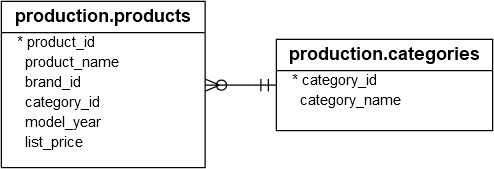
For the demonstration, we will use the production.products and production.categories tables from the sample database:
The following query finds the number of products for each product category:
SELECT category_name, COUNT(product_id) product_count FROM production.products p INNER JOIN production.categories c ON c.category_id = p.category_id GROUP BY category_name;
Here is the output:
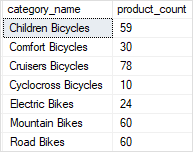
Our goal is to turn the category names from the first column of the output into multiple columns and count the number of products for each category name as the following picture:

In addition, we can add the model year to group the category by model year as shown in the following output:

Introduction to SQL Server PIVOT operator
SQL Server PIVOT operator rotates a table-valued expression. It turns the unique values in one column into multiple columns in the output and performs aggregations on any remaining column values.
You follow these steps to make a query a pivot table:
- First, select a base dataset for pivoting.
- Second, create a temporary result by using a derived table or common table expression (CTE)
- Third, apply the
PIVOToperator.
Let’s apply these steps in the following example.
First, select category name and product id from the production.products and production.categories tables as the base data for pivoting:
SELECT category_name, product_id FROM production.products p INNER JOIN production.categories c ON c.category_id = p.category_id
Second, create a temporary result set using a derived table:
SELECT * FROM ( SELECT category_name, product_id FROM production.products p INNER JOIN production.categories c ON c.category_id = p.category_id ) t
Third, apply the PIVOT operator:
SELECT * FROM ( SELECT category_name, product_id FROM production.products p INNER JOIN production.categories c ON c.category_id = p.category_id ) t PIVOT( COUNT(product_id) FOR category_name IN ( [Children Bicycles], [Comfort Bicycles], [Cruisers Bicycles], [Cyclocross Bicycles], [Electric Bikes], [Mountain Bikes], [Road Bikes]) ) AS pivot_table;
This query generates the following output:


Now, any additional column which you add to the select list of the query that returns the base data will automatically form row groups in the pivot table. For example, you can add the model year column to the above query:
SELECT * FROM ( SELECT category_name, product_id, model_year FROM production.products p INNER JOIN production.categories c ON c.category_id = p.category_id ) t PIVOT( COUNT(product_id) FOR category_name IN ( [Children Bicycles], [Comfort Bicycles], [Cruisers Bicycles], [Cyclocross Bicycles], [Electric Bikes], [Mountain Bikes], [Road Bikes]) ) AS pivot_table;
Here is the output:
Generating column values
In the above query, you had to type each category name in the parentheses after the IN operator manually. To avoid this, you can use the QUOTENAME() function to generate the category name list and copy them over the query.
First, generate the category name list:
DECLARE @columns NVARCHAR(MAX) = ''; SELECT @columns += QUOTENAME(category_name) + ',' FROM production.categories ORDER BY category_name; SET @columns = LEFT(@columns, LEN(@columns) - 1); PRINT @columns;
The output will look like this:
[Children Bicycles],[Comfort Bicycles],[Cruisers Bicycles],[Cyclocross Bicycles],[Electric Bikes],[Mountain Bikes],[Road Bikes]
In this snippet:
- The
QUOTENAME()function wraps the category name by the square brackets e.g.,[Children Bicycles] - The
LEFT()function removes the last comma from the @columns string.
Second, copy the category name list from the output and paste it to the query.
Dynamic pivot tables
If you add a new category name to the production.categories table, you need to rewrite your query, which is not ideal. To avoid doing this, you can use dynamic SQL to make the pivot table dynamic.
In this query, instead of passing a fixed list of category names to the PIVOT operator, we construct the category name list and pass it to an SQL statement, and then execute this statement dynamically using the stored procedure sp_executesql.
DECLARE @columns NVARCHAR(MAX) = '', @sql NVARCHAR(MAX) = ''; -- select the category names SELECT @columns+=QUOTENAME(category_name) + ',' FROM production.categories ORDER BY category_name; -- remove the last comma SET @columns = LEFT(@columns, LEN(@columns) - 1); -- construct dynamic SQL SET @sql =' SELECT * FROM ( SELECT category_name, model_year, product_id FROM production.products p INNER JOIN production.categories c ON c.category_id = p.category_id ) t PIVOT( COUNT(product_id) FOR category_name IN ('+ @columns +') ) AS pivot_table;'; -- execute the dynamic SQL EXECUTE sp_executesql @sql;
In this tutorial, you have learned how to use the SQL Server PIVOT table to convert rows to columns.
[출처] https://www.sqlservertutorial.net/sql-server-basics/sql-server-pivot/
광고 클릭에서 발생하는 수익금은 모두 웹사이트 서버의 유지 및 관리, 그리고 기술 콘텐츠 향상을 위해 쓰여집니다.
