
- 전체
- Sample DB
- database modeling
- [표준 SQL] Standard SQL
- G-SQL
- 10-Min
- ORACLE
- MS SQLserver
- MySQL
- SQLite
- postgreSQL
- 데이터아키텍처전문가 - 국가공인자격
- 데이터 분석 전문가 [ADP]
- [국가공인] SQL 개발자/전문가
- NoSQL
- hadoop
- hadoop eco system
- big data (빅데이터)
- stat(통계) R 언어
- XML DB & XQuery
- spark
- DataBase Tool
- 데이터분석 & 데이터사이언스
- Engineer Quality Management
- [기계학습] machine learning
- 데이터 수집 및 전처리
- 국가기술자격 빅데이터분석기사
- 암호화폐 (비트코인, cryptocurrency, bitcoin)
범용 커넥션 풀 라이브러리 : connection pool Libzdb
2017.03.17 14:49
범용 커넥션 풀 라이브러리 : connection pool Libzdb
libzdb-3.1.tar.gz
A small, easy to use Open Source Database Connection Pool Library with the following features:
- Thread safe Database Connection Pool
- Connect to multiple database systems
- Zero runtime configuration, connect using a URL scheme
- Supports MySQL, PostgreSQL, SQLite and Oracle
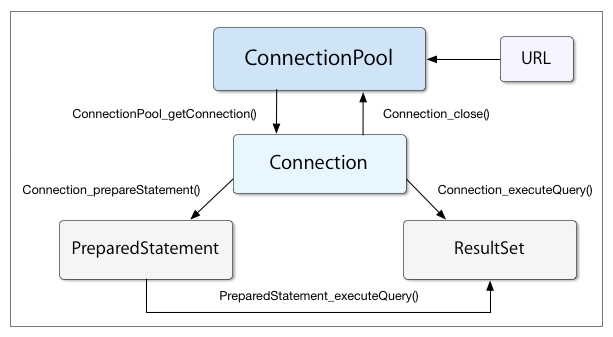
Clickable API documentation
Connection URL:
The URL given to a Connection Pool at creation time specify a database connection on the standard URL format. The format of the connection URL is defined as:
database://[user:password@][host][:port]/database[?propertyName1][=propertyValue1][&propertyName2][=propertyValue2]...
The property names user and password are always recognized and specify how to login to the database. Other properties depends on the database server in question. User name and password can alternatively be specified in the auth-part of the URL. If port number is omitted, the default port number for the database server is used.
MySQL:
Here is an example on how to connect to a MySQL database server:
mysql://localhost:3306/test?user=root&password=swordfish
In this case the username, root and password, swordfish are specified as properties to the URL. An alternative is to use the auth-part of the URL to specify authentication information:
mysql://root:swordfish@localhost:3306/test
See mysql options for all properties that can be set for a mysql connection URL.
SQLite:
For a SQLite database the connection URL should simply specify a database file, since a SQLite database is just a file in the filesystem. SQLite uses pragma commands for performance tuning and other special purpose database commands. Pragma syntax on the form, name=value can be added as properties to the URL and will be set when the Connection is created. In addition to pragmas, the following properties are supported:
- heap_limit=value [KB] - Make SQLite auto-release unused memory if memory usage goes above the specified value.
An URL for connecting to a SQLite database might look like:
sqlite:///var/sqlite/test.db?synchronous=normal&heap_limit=8000&foreign_keys=on
PostgreSQL:
The URL for connecting to a PostgreSQL database server might look like:


postgresql://localhost:5432/test?user=root&password=swordfish
As with the MySQL URL, the username and password are specified as properties to the URL. Likewise, the auth-part of the URL can be used instead to specify the username and the password:
postgresql://root:swordfish@localhost/test?use-ssl=true
In this example we have also omitted the port number to the server, in which case the default port number, 5432, for PostgreSQL is used. In addition we have added an extra parameter to the URL, so connection to the server is done over a secure SSL connection.
See postgresql options for all properties that can be set for a postgresql connection URL.
Oracle:
The URL for connecting to an Oracle database server might look like:
oracle://localhost:1521/test?user=scott&password=tiger
The auth-part of the URL can be used instead to specify the username and the password. In addition, you may specify a service name in the URL instead if you have setup a tnsnames.ora configuration file.
oracle:///servicename?user=scott&password=tiger
Examples:
To obtain a connection pool for a MySQL database, the code below can be used. The exact same code can be used for PostgreSQL, SQLite and Oracle, the only change needed is to modify the Connection URL. Here we connect to the database test on localhost and start the pool with the default 5 initial connections.
ConnectionPool, Connection and ResultSet:
URL_T url = URL_new("mysql://localhost/test?user=root&password=swordfish");
ConnectionPool_T pool = ConnectionPool_new(url);
ConnectionPool_start(pool);

Connection_T con = ConnectionPool_getConnection(pool);
ResultSet_T result = Connection_executeQuery(con,
                     "select id, name, image from employee where salary > %d", aNumber);
while (ResultSet_next(result))
{
     int id = ResultSet_getInt(result, 1);
     const char *name = ResultSet_getString(result, 2);
     int blobSize;
     const void *image = ResultSet_getBlob(result, 3, &blobSize);
     [..]
}
Here is another example where a generated result is selected and printed:
ResultSet_T r = Connection_executeQuery(con, "SELECT count(*) FROM users");
printf("Number of users: %s\n", ResultSet_next(r) ? ResultSet_getString(r, 1) : "no users");
Prepared statement:
PreparedStatement_T p = Connection_prepareStatement(con,
                        "INSERT INTO employee(name, picture) VALUES(?, ?)");
PreparedStatement_setString(p, 1, "Kamiya Kaoru");
PreparedStatement_setBlob(p, 2, jpeg, jpeg_size);
PreparedStatement_execute(p);
Here, we use a Prepared Statement to execute a query which returns a Result Set:
PreparedStatement_T p = Connection_prepareStatement(con,
                        "SELECT id FROM employee WHERE name LIKE ?");
PreparedStatement_setString(p, 1, "%Kaoru%");
ResultSet_T r = PreparedStatement_executeQuery(p);
while (ResultSet_next(r))
       printf("employee.id = %d\n", ResultSet_getInt(r, 1));
광고 클릭에서 발생하는 수익금은 모두 웹사이트 서버의 유지 및 관리, 그리고 기술 콘텐츠 향상을 위해 쓰여집니다.
