
- 전체
- Sample DB
- database modeling
- [표준 SQL] Standard SQL
- G-SQL
- 10-Min
- ORACLE
- MS SQLserver
- MySQL
- SQLite
- postgreSQL
- 데이터아키텍처전문가 - 국가공인자격
- 데이터 분석 전문가 [ADP]
- [국가공인] SQL 개발자/전문가
- NoSQL
- hadoop
- hadoop eco system
- big data (빅데이터)
- stat(통계) R 언어
- XML DB & XQuery
- spark
- DataBase Tool
- 데이터분석 & 데이터사이언스
- Engineer Quality Management
- [기계학습] machine learning
- 데이터 수집 및 전처리
- 국가기술자격 빅데이터분석기사
- 암호화폐 (비트코인, cryptocurrency, bitcoin)
ORACLE [oracle] Introduction to Oracle GROUP BY clause
2020.05.01 21:36
Introduction to Oracle GROUP BY clause
The GROUP BY clause is used in a SELECT statement to group rows into a set of summary rows by values of columns or expressions. The GROUP BY clause returns one row per group.
The GROUP BY clause is often used with aggregate functions such as AVG(), COUNT(), MAX(), MIN() and SUM(). In this case, the aggregate function returns the summary information per group. For example, given groups of products in several categories, the AVG() function returns the average price of products in each category.
The following illustrates the syntax of the Oracle GROUP BY clause:
SELECT column_list FROM T GROUP BY c1,c2,c3;
The GROUP BY clause appears after the FROM clause. In case WHERE clause is presented, the GROUP BY clause must be placed after the WHERE clause as shown in the following query:
SELECT column_list FROM T WHERE condition GROUP BY c1, c2, c3;
The GROUP BY clause groups rows by values in the grouping columns such as c1, c2 and c3. The GROUP BY clause must contain only aggregates or grouping columns.
If you want to specify multiple levels of grouping that should be computed at once, you use the following ROLLUP syntax:
SELECT column_list FROM T GROUP BY ROLLUP(c1,c2,c3);
Please check it out the ROLLUP tutorial for the more information.
Oracle GROUP BY examples
We will use the following orders and order_items in the sample database for the demonstration:
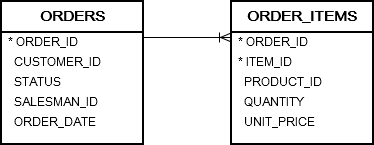
A) Oracle GROUP BY basic example
The following statement uses the GROUP BY clause to find unique order statuses from the orders table:
SELECT status FROM orders GROUP BY status;

This statement has the same effect as the following statement that uses the DISTINCT operator:
SELECT DISTINCT status FROM orders;
B) Oracle GROUP BY with an aggregate function example
The following statement returns the number of orders by customers:
SELECT customer_id, COUNT( order_id ) FROM orders GROUP BY customer_id ORDER BY customer_id;


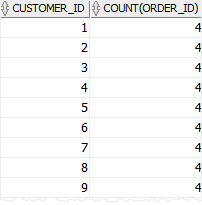
In this example, we grouped the orders by customers and used the COUNT() function to return the number of orders per group.
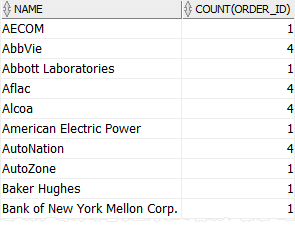
To get more meaningful data, you can join the orders table with the customers table as follows:
SELECT name, COUNT( order_id ) FROM orders INNER JOIN customers USING(customer_id) GROUP BY name ORDER BY name;
Here is the result:
C) Oracle GROUP BY with an expression example
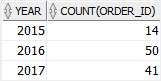
The following example groups the orders by year and returns the number of orders per year.
SELECT EXTRACT(YEAR FROM order_date) YEAR, COUNT( order_id ) FROM orders GROUP BY EXTRACT(YEAR FROM order_date) ORDER BY YEAR;
In this example, we used the EXTRACT() function to get the year information from the order’s dates.
Unlike the previous examples, we used an expression that returns the year in the GROUP BY clause.
The following picture illustrates the result:
D) Oracle GROUP BY with WHERE clause example
This example uses the GROUP BY clause with a WHERE clause to return the number of shipped orders for every customer:
SELECT name, COUNT( order_id ) FROM orders INNER JOIN customers USING(customer_id) WHERE status = 'Shipped' GROUP BY name ORDER BY name;
Here is the output:

Note that the Oracle always evaluates the condition in the WHERE clause before the GROUP BY clause.
E) Oracle GROUP BY with ROLLUP example
The following statement computes the sales amount and groups them by customer_id, status, and (customer_id, status):
SELECT customer_id, status, SUM( quantity * unit_price ) sales FROM orders INNER JOIN order_items USING(order_id) GROUP BY ROLLUP( customer_id, status );

In this tutorial, you have learned how to use the Oracle GROUP BY clause to group rows into groups.
[출처] https://www.oracletutorial.com/oracle-basics/oracle-group-by/
광고 클릭에서 발생하는 수익금은 모두 웹사이트 서버의 유지 및 관리, 그리고 기술 콘텐츠 향상을 위해 쓰여집니다.
