
- 전체
- Sample DB
- database modeling
- [표준 SQL] Standard SQL
- G-SQL
- 10-Min
- ORACLE
- MS SQLserver
- MySQL
- SQLite
- postgreSQL
- 데이터아키텍처전문가 - 국가공인자격
- 데이터 분석 전문가 [ADP]
- [국가공인] SQL 개발자/전문가
- NoSQL
- hadoop
- hadoop eco system
- big data (빅데이터)
- stat(통계) R 언어
- XML DB & XQuery
- spark
- DataBase Tool
- 데이터분석 & 데이터사이언스
- Engineer Quality Management
- [기계학습] machine learning
- 데이터 수집 및 전처리
- 국가기술자격 빅데이터분석기사
- 암호화폐 (비트코인, cryptocurrency, bitcoin)
[데이터분석 & 데이터 사이언스] How To Create a Data Science Portfolio Website
How To Create a Data Science Portfolio Website
Build and deploy your own data science portfolio website from scratch

If you are an aspiring data scientist like me, you already know the importance of having a data science portfolio that stands out.
You have attended online courses, acquired a number of skills, and worked on data science projects. You also write the occasional blog post showcasing your work on Medium.
All these things do make your resume look great. However, putting up multiple links on your resume is messy, might make it difficult for recruiters to find and understand your work properly.
I strongly recommend building a data science portfolio website to showcase all the work you do. When potential employers are looking to hire, all they have to do is click on your website link to know everything about you!
Having your own website will definitely give you an edge at securing a job, and is also a great way to tell a story about yourself.


I’ve been playing with the idea of creating a data science website for myself, and finally got around to doing it a few days ago. Here are a few tips for you:
Building from scratch
When deciding to create a data science portfolio website, I wasn’t sure whether or not to build it from scratch.
As data scientists our focus is less on web design and more on developing models. We are also less familiar with markup languages like HTML, and it is a lot faster to use website builders such as Wix.
However, I decided to take this as an opportunity to learn some web design, and decided to build from scratch using HTML, CSS and Jquery.
Building from scratch also gave me a lot of freedom to customize my website and make it look exactly like I wanted it to. If you have the time, I suggest you build from scratch too.
It’s always fun to learn something new!
Also, building from scratch doesn’t necessarily mean you have to map out the entire design and write out every line of HTML by yourself. I strongly recommend using Bootstrap, an open-source HTML CSS framework for your layout.
This will give your site a responsive design and structure you can easily work with.
Here are some tutorials I found useful when trying to build from scratch:
- How to Make Website using HTML and CSS
- How to Create a Portfolio Gallery
- Code a Stylish Portfolio Design in HTML and CSS
There are also templates with beautiful, responsive design that you can use. The HTML, CSS, and Jquery is all provided for you. All you have to do is tweak the code to match your needs.
Some templates I thought were nice:
- W3 CSS Templates
- Portfolio Website Templates
- 38 Free Portfolio Website Templates For All Creative Professionals
Some reference websites for inspiration:
- Julia Nikulski’s data science portfolio
- David Venturi’s data science portfolio
- My data science portfolio (I am still in the process of tweaking and adding new sections in, and learning new things along the way).
More important than your layout, however, is your content. If you only have one chance to impress potential employers, what would you showcase?
Everything that makes you stand out should be highlighted. What are you the most passionate about? Why data science? What are the most important set of skills you have? Have you worked on any important projects?
Here’s a recommendation on how you should structure your website:
- Home: This is the first page that people will see when they visit your website. Make sure it grabs attention, and that it provides some information on the content of your site. For example:


This is a responsive slider with three pages that I created using Bootstrap for my home page.
2. About: This is the section where you tell your story. Provide a brief description on your skills, interest, and what you bring to the table. Keep it short and simple!
3. Projects: This is probably one of the most important section. As an aspiring data scientist, a lot of us may not have previous work experience with a great company to showcase our skills.
This is where projects come in. They are a great way to demonstrate the skills you have acquired as a data scientist. This way, you are not just telling people you have the skills, but you are showing them.
I would suggest only showcasing unique projects with interesting findings in this section. Don’t put up simple projects you worked on as a beginner, projects which don’t have a story to tell, or yet another project everyone else seems to be working on.
Some examples of projects you shouldn’t add to your portfolio: Titanic Kaggle competition, Iris Flowers dataset, MNIST digit classification with Tensorflow.
These will not help your resume to stand out, and is exactly what you should avoid.


Also, try to add projects that help you showcase a large variety of skills. For example, include projects that demonstrate your skills in:
- Data Collection
- Data Preprocessing
- Data Visualization
- Data Analytics
- ETL Pipelines
- Machine Learning
Showcasing your ability in all these areas will allow recruiters to understand the variety of tasks you can perform.
For example:

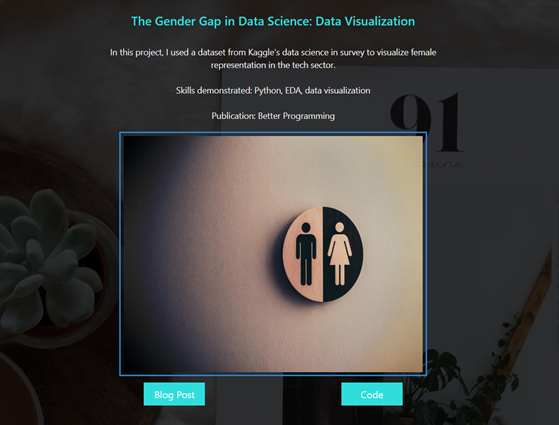
Above is an example of a project I added to my portfolio site. I published a blog post on my project on Medium, and put the code in Github.
I linked both of them to my site, along with a brief description on my project.
4. Certifications: If you are an aspiring data scientist with no solid education background in the field (such as a Master’s or PhD in data science), then you would have had to self learn.
Add any online courses, MOOC’s, or certificates you received on your portfolio. This will show your dedication towards learning the subject.
5. Skills: This is the section where you tell a potential employer what you can do. Add all the skills you have acquired along the way, such as data wrangling, analytics, and visualization.
You can back these skills up with the projects you showcased in the earlier section, to further highlight what you bring to the table.
6. Contact: Make it as easy as possible for potential employers to get in touch with you. Add your contact details at the bottom of your site.
Finally, add links to everything you would want to add on your resume. Provide a link to your Kaggle, LinkedIn, Github or Medium profile so that it can be easily accessed.
Deploying your website
The traditional way to host your website would be to first buy a domain name. Then, you will need to select a hosting provider, and upload your website.
Some popular web hosting providers include Bluehost and Hostgator, and you can check out their pricing plans.
For my portfolio website, I decided to use Github pages for hosting. It is completely free. You don’t need to purchase a domain name, it generates a URL for you. Mine is: https://natassha.github.io/natasshaselvaraj/.
If you choose to host your site on Github pages, you will find this tutorial useful. All you need to do is create a new repository and add your codes to it.
Github pages will take files straight from your repository, run it through a build process, and publish it.
And… That’s it!
You now have an idea on how to create and deploy your own data science portfolio. If you have some time on your hands and an interest in learning new things, you should definitely try it.
Creating your own website (even if it’s just a simple, static one), from scratch can be a frustrating and time consuming process.
However, I think the feeling of satisfaction is worth it. Plus, you now have a new cool way of demonstrating your skills, which is pretty great.
[출처] https://towardsdatascience.com/how-to-create-a-data-science-portfolio-website-dcba6bf00994
광고 클릭에서 발생하는 수익금은 모두 웹사이트 서버의 유지 및 관리, 그리고 기술 콘텐츠 향상을 위해 쓰여집니다.
