
- 전체
- Sample DB
- database modeling
- [표준 SQL] Standard SQL
- G-SQL
- 10-Min
- ORACLE
- MS SQLserver
- MySQL
- SQLite
- postgreSQL
- 데이터아키텍처전문가 - 국가공인자격
- 데이터 분석 전문가 [ADP]
- [국가공인] SQL 개발자/전문가
- NoSQL
- hadoop
- hadoop eco system
- big data (빅데이터)
- stat(통계) R 언어
- XML DB & XQuery
- spark
- DataBase Tool
- 데이터분석 & 데이터사이언스
- Engineer Quality Management
- [기계학습] machine learning
- 데이터 수집 및 전처리
- 국가기술자격 빅데이터분석기사
- 암호화폐 (비트코인, cryptocurrency, bitcoin)
[Spark & Oracle] Reading Data From Oracle Database With Apache Spark
Reading Data From Oracle Database With Apache Spark
In this quick tutorial, learn how to use Apache Spark to read and use the RDBMS directly without having to go into the HDFS and store it there.
In this article, I will connect Apache Spark to Oracle DB, read the data directly, and write it in a DataFrame.
Following the rapid increase in the amount of data we produce in daily life, big data technology has entered our lives very quickly. Instead of traditional solutions, we are now using tools with the capacity to solve our business quickly and efficiently. The use of Apache Spark is a common technology that can fulfill our needs.
Apache Spark is based on a framework that can process data very quickly and distributedly. In this article, I will not describe Apache Spark technology in detail, so those who are interested in the details should check out the Apache Spark documentation.
The preferred method to process the data we store in our RDBMS databases with Apache Spark is to migrate the data to Hadoop first (HDFS), distributively read the data we have stored in Hadoop (HDFS), and process it with Apache Spark. As those with Hadoop ecosystem experience know, we are exchanging data between the Hadoop ecosystem and other systems (RDBMS-NoSQL) with tools that integrate into the Hadoop ecosystem with Sqoop. Sqoop is a data transfer tool that is easy to use, common, and efficient.
There is some cost involved in moving the data to be processed to the Hadoop environment before the RDBMS, and then importing the data to be processed with Apache Spark. The fact that we do not use the data that we have moved to HDFS will cause us to lose a certain amount of space in HDFS, and it will also increase the processing time. Instead of this method, there is a way with Apache Spark that reads and uses the RDBMS directly without having to go to the HDFS and store it there — especially afterward.
Let's see how to do this.
The technologies and versions I used are as follows:
-
Hadoop: Hadoop 2.7.1
-
Apache Spark: Apache Spark 2.1.0
-
Oracle database: Oracle 11g R2, Enterprise Edition
-
Linux: SUSE Linux
To do this, we need to have the ojdbc6.jar file in our system. You can use this link to download it.
We will create tables in the Oracle database that we will read from Oracle and insert sample data in them.


Now we are starting Apache Spark from the linux terminal with Pyspark interface (Python Interface).
 We started Apache Spark. Now let's write the Python code to read the data from the database and run it.
Let's take a look at the contents of this dataframe as we write to the empDF dataframe.
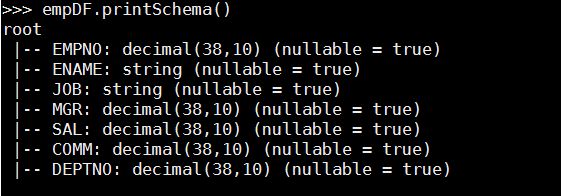
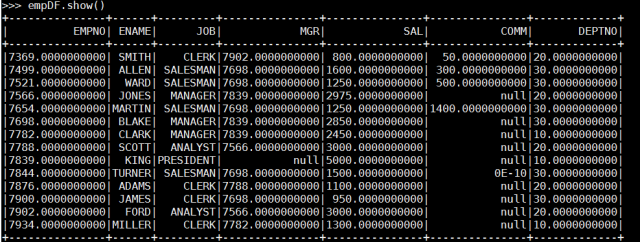
Yes, I connected directly to the Oracle database with Apache Spark. Likewise, it is possible to get a query result in the same way.

It is very easy and practical to use, as you can see from the examples made above.
With this method, it is possible to load large tables directly and in parallel, but I will do the performance evaluation in another article.
[출처] https://dzone.com/articles/read-data-from-oracle-database-with-apache-spark
광고 클릭에서 발생하는 수익금은 모두 웹사이트 서버의 유지 및 관리, 그리고 기술 콘텐츠 향상을 위해 쓰여집니다.
