
- 전체
- Sample DB
- database modeling
- [표준 SQL] Standard SQL
- G-SQL
- 10-Min
- ORACLE
- MS SQLserver
- MySQL
- SQLite
- postgreSQL
- 데이터아키텍처전문가 - 국가공인자격
- 데이터 분석 전문가 [ADP]
- [국가공인] SQL 개발자/전문가
- NoSQL
- hadoop
- hadoop eco system
- big data (빅데이터)
- stat(통계) R 언어
- XML DB & XQuery
- spark
- DataBase Tool
- 데이터분석 & 데이터사이언스
- Engineer Quality Management
- [기계학습] machine learning
- 데이터 수집 및 전처리
- 국가기술자격 빅데이터분석기사
- 암호화폐 (비트코인, cryptocurrency, bitcoin)
database modeling [DB modeling, DB 모델링] 바쁜 데이터 전문가를 위한 7가지 무료 데이터베이스 다이어그래밍 도구 : 7 free database diagramming tools for busy data folks
2025.01.19 22:23
[DB modeling, DB 모델링] 바쁜 데이터 전문가를 위한 7가지 무료 데이터베이스 다이어그래밍 도구 : 7 free database diagramming tools for busy data folks
바쁜 데이터 전문가를 위한 7가지 무료 데이터베이스 다이어그래밍 도구
게시자: Sheridan Gaenger
데이터 아키텍처를 계획하는 것은 혼란스러울 수 있습니다. 한 Reddit 사용자는 데이터세트를 아키텍처하는 것을 다음과 비교하기도 했습니다. It's Always Sunny in Philadelphia의 Pepe Silvia 밈:

은유는 ~의 호의로 제공됩니다. Reddit의 u/not-ned-flanders
하지만 데이터베이스 아키텍처를 파악하는 데 돈과 정신 건강을 모두 소모할 필요는 없습니다. 엄청나게 유용할 뿐만 아니라 무료인 데이터베이스 다이어그래밍 도구가 많이 있습니다. 그리고 이러한 도구는 생각을 형성하고 데이터베이스부터 Atlassian Analytics(바로 저희입니다! ????)와 같은 BI 도구에 이르기까지 나머지 데이터 스택에 대한 견고한 기반을 만드는 데 도움이 될 수 있습니다.
우리는 앞서 나가서 여러분이 사용할 수 있도록 최고의 무료 데이터베이스 다이어그래밍 도구 7개를 모아서 각 도구의 작동 원리와 무료인 이유를 설명드리겠습니다.
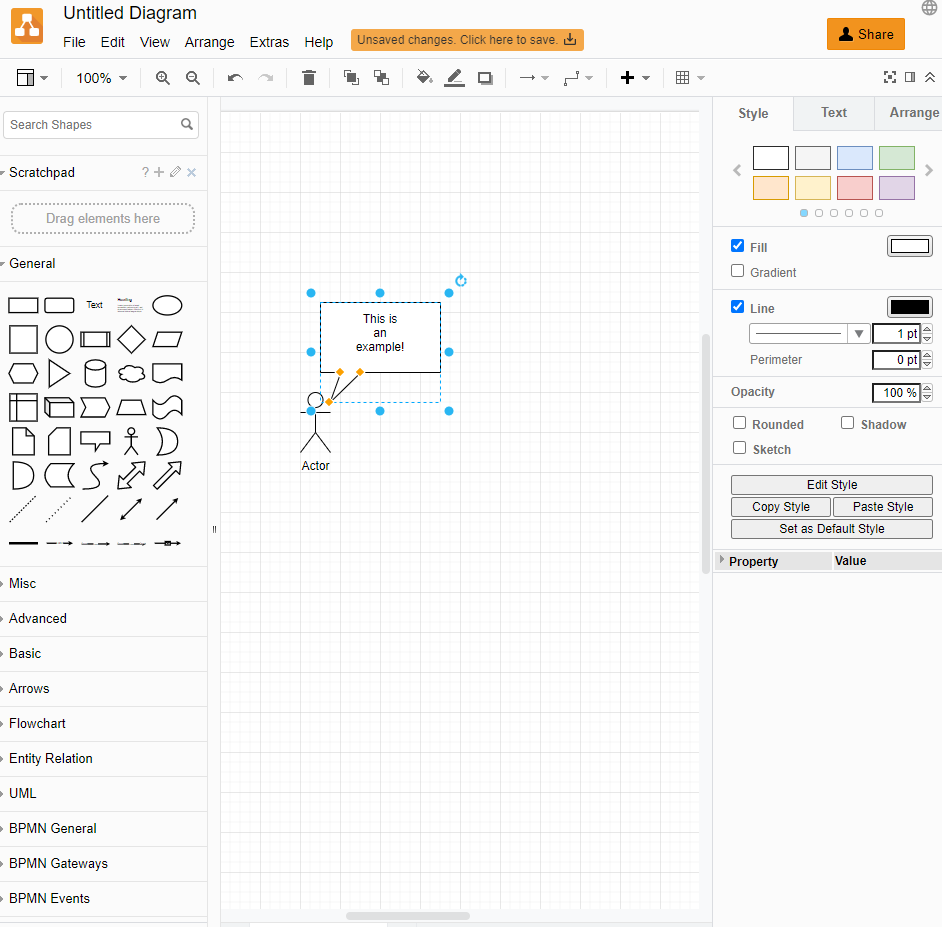
1. 다이어그램.넷
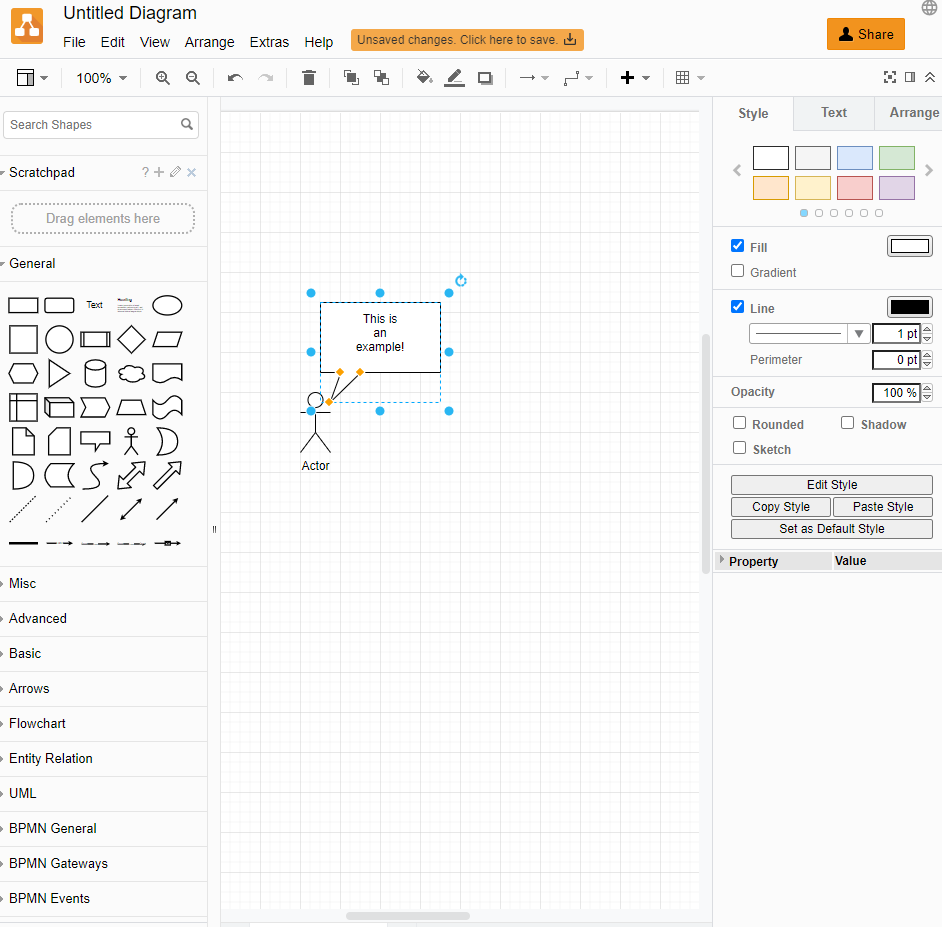
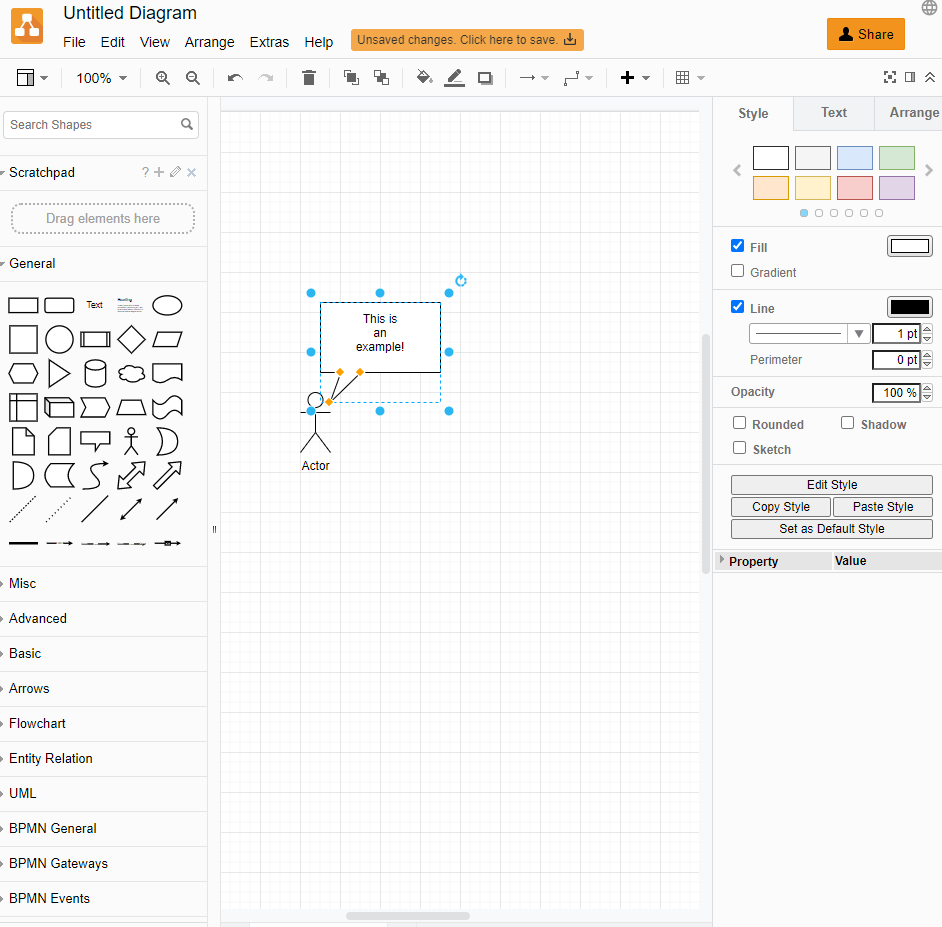
다이어그램.net (전에 그리기.io)는 번거로움이 없는 브라우저 기반 오픈소스 데이터베이스 다이어그래밍 도구입니다. 거의 모든 사람이 무료로 사용할 수 있습니다. Atlassian 제품 생태계의 애드온으로 사용하려는 경우에만 요금이 부과됩니다.
작동 원리
Diagrams.net은 계정을 만들거나, 청구 정보를 입력하거나, 다이어그램을 저장할 위치를 선택하지 않고도 바로 드래그 앤 드롭 인터페이스로 여러분을 안내합니다. 사이트를 방문하여 다이어그램을 작성하기만 하면 됩니다.
다이어그램.net 무료입니다 Atlassian 에코시스템과 함께 사용하고 싶지 않다면예를 들어, 이것을 다음과 같이 사용하려는 경우 Jira 애드온, 한 달에 최대 2달러를 지불해야 합니다.
왜 무료인가요?
Diagrams.net의 사명은 " 모든 사람에게 무료 고품질 다이어그래밍 소프트웨어를 제공하는 것"입니다. 이 사명을 수행하기 위해 Diagrams.net 팀은 "회사가 우리에게 돈을 지불할 때는 우리가 가치를 더했기 때문이지, 그들이 갇혀 있기 때문이어서는 안 됩니다."라고 말합니다 . 그래서 그들은 무료 도구를 만들고 다른 모든 것이 무료인 동안 요금을 부과하는 하나의 생태계(Atlassian)를 선택하여 자금을 조달하기로 했습니다.
2. 디비다이어그램
디비다이어그램.io 개발자와 데이터 분석가를 위한 무료 온라인 데이터베이스 다이어그래밍 도구입니다. 코드 기반 사용자 인터페이스를 사용하며 최대 10개의 다이어그램을 무료로 만들 수 있습니다.
작동 원리
Diagrams.net과 비슷하게 dbdiagram 웹 앱을 방문하여 바로 작업을 시작할 수 있습니다. 하지만 드래그 앤 드롭 인터페이스 대신, 왼쪽 필드에 있는 스키마에 새 테이블을 각각 코딩해야 합니다. 테이블이 오른쪽 인터페이스에 있으면 드래그 앤 드롭할 수 있습니다. Dbdiagram은 최대 10개의 다이어그램까지 무료입니다. 그 후에는 월 입니다 .
왜 무료인가요?
Dbdiagram은 프리미엄 모델을 추구하는데, 이 모델에서는 도구에 충분히 의존하게 되어 11번째 다이어그램에 9달러를 지불할 의향이 생깁니다. 이를 달성하기 위해 그들은 실제로 좋은 초기 경험에 투자합니다.
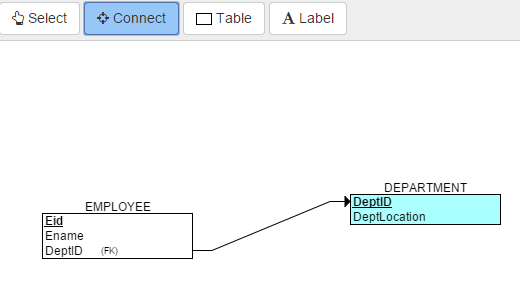
3. ERD 플러스
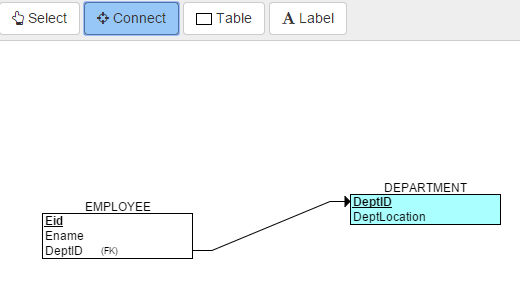
ERD 플러스 교육 목적으로 설계된 기본 웹 기반 데이터베이스 다이어그래밍 도구로 다음과 함께 작동합니다. 그 교과서. 완전히 무료이며, 이 목록의 다른 옵션만큼 보기 좋지는 않지만 학습에 적합한 도구입니다.
작동 원리
ERD Plus를 바로 사용해 볼 수 있지만 모든 기능을 사용하려면 계정을 만들어야 합니다 . ERD Plus는 드래그 앤 드롭 도구이지만 UI 관점에서 보면 매우 간단합니다.
왜 무료인가요?
ERD Plus는 -의 비용이 드는 동반 교과서와 함께 작동하도록 설계된 학습 도구입니다 . 하지만 교과서 없이도 꽤 많이 사용할 수 있습니다.
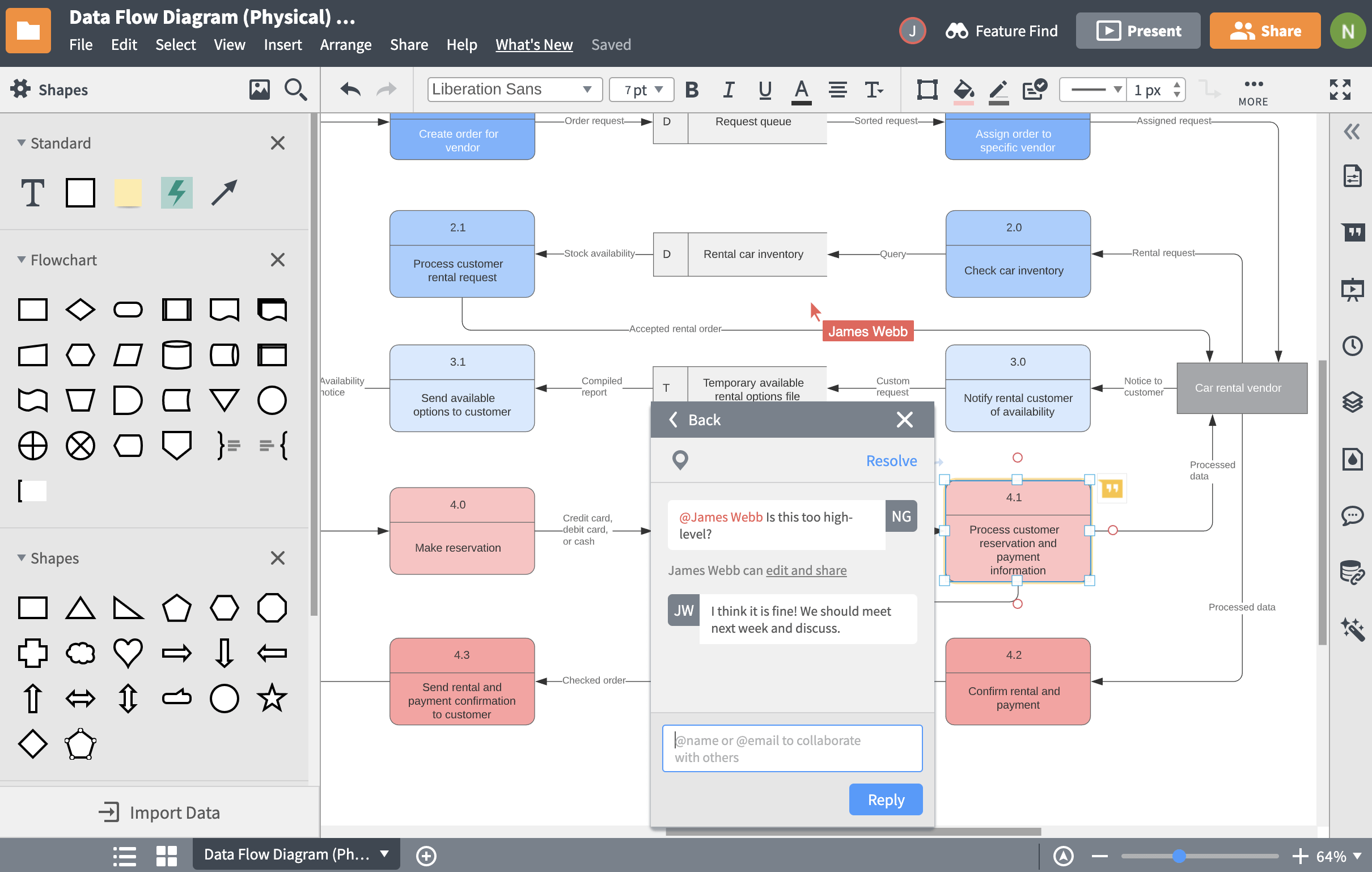
4. 루시드차트
루시드차트 는 조직도와 애자일 플래닝과 같은 데이터베이스의 다이어그램을 만드는 데 도움이 되는 온라인 다이어그래밍 도구입니다. 시작하기 위한 강력한 템플릿 라이브러리가 있으며, 이 목록에 있는 모든 도구 중에서 가장 보기 좋은 다이어그램을 만들 수 있습니다.
작동 원리
무료 계정을 만들고 100개의 전문 템플릿 라이브러리를 사용하거나 처음부터 다이어그래밍을 시작하세요. Lucidchart는 아마도 여기에 나열된 가장 완벽한 기능을 갖춘 드래그 앤 드롭 다이어그래밍 도구일 것이며, 협업 브레인스토밍에서 ER 다이어그래밍에 이르기까지 많은 사용 사례를 포괄합니다.

원천: https://www.lucidchart.com/pages/examples/database-design-tool
루시드차트는 최대 3개 문서까지 무료. 그 후, 개인은 월 .95, 팀은 월 입니다. 두 유료 플랜 모두 무제한 문서를 허용합니다.
왜 무료인가요?
dbdiagram과 마찬가지로 Lucidchart도 네 번째 문서에 비용을 지불하고 더 큰 워크플로에 도구를 통합하고 싶을 만큼 훌륭한 제품을 만들고자 합니다.
5. 퀵DBD
퀵DBD (또는 Quick Database Diagrams)는 속도에 초점을 맞춘 무료 온라인 데이터베이스 다이어그래밍 도구입니다. 코딩과 드래그 앤 드롭 기능을 결합하여 다이어그램을 만드는 데 도움을 줍니다.
작동 원리
Diagrams.net 과 dbdiagram 처럼 계정을 만들지 않고도 QuickDBD에 바로 들어갈 수 있습니다 . 하지만 파일을 저장하려면 계정을 만들어야 합니다. 왼쪽 필드에 스키마를 코딩해야 하며, 코딩이 완료되면 오른쪽 인터페이스에 테이블이 나타나며, 여기서 드래그 앤 드롭할 수 있습니다.

원천: https://www.quickdatabasediagrams.com/
QuickDBD의 무료 버전은 하나의 다이어그램으로 제한됩니다. 프로 플랜 월 14달러에 30개의 다이어그램을 제공하지만, Pro 플랜을 무료로 제공하는 프로모션을 진행하는 것으로 알려져 있습니다.
왜 무료인가요?
QuickBDB도 프리미엄 모델을 따르며, 첫 번째 다이어그램부터 충분히 멋진 경험을 제공하여 계속 사용하기 위해 기꺼이 비용을 지불하게 만드는 것을 목표로 합니다.
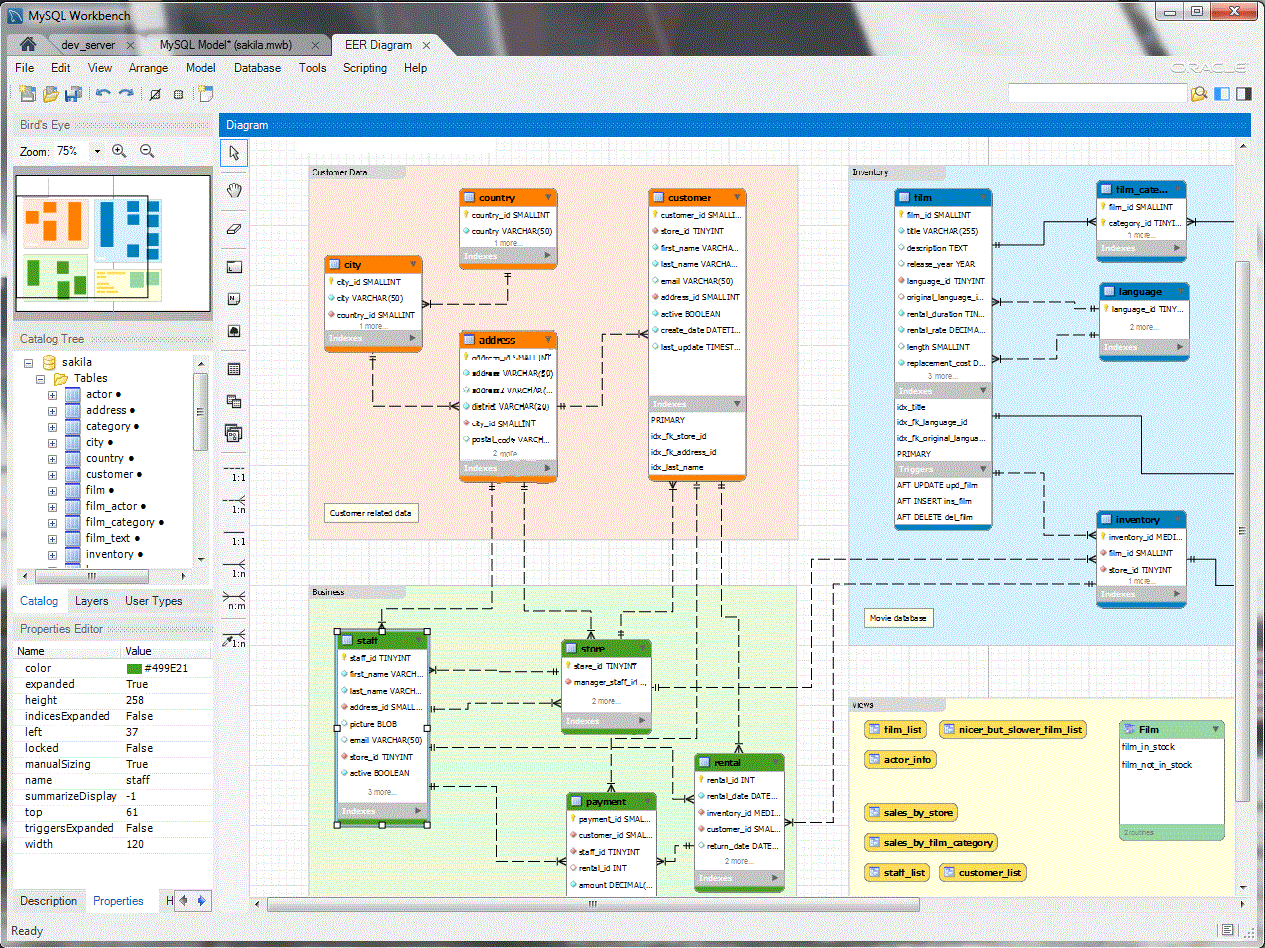
6. MySQL Workbench 커뮤니티 에디션
MySQL Workbench 커뮤니티 에디션 MySQL Community Edition에서만 작동하는 무료 시각적 데이터베이스 디자인 도구입니다. 단순히 다이어그래밍을 넘어서 데이터베이스 성능을 모니터링하고 SQL 쿼리를 만드는 기능을 포함합니다.
작동 원리
커뮤니티 에디션을 다운로드하면 순수한 드래그 앤 드롭 인터페이스로 사용하거나 스키마를 직접 코딩할 수 있습니다. 여기에 나열된 도구 중 가장 강력한 도구이며, MySQL의 "스위스 군용 칼"이라고 생각할 수 있으며 데이터베이스 다이어그래밍이 하나의 도구입니다.
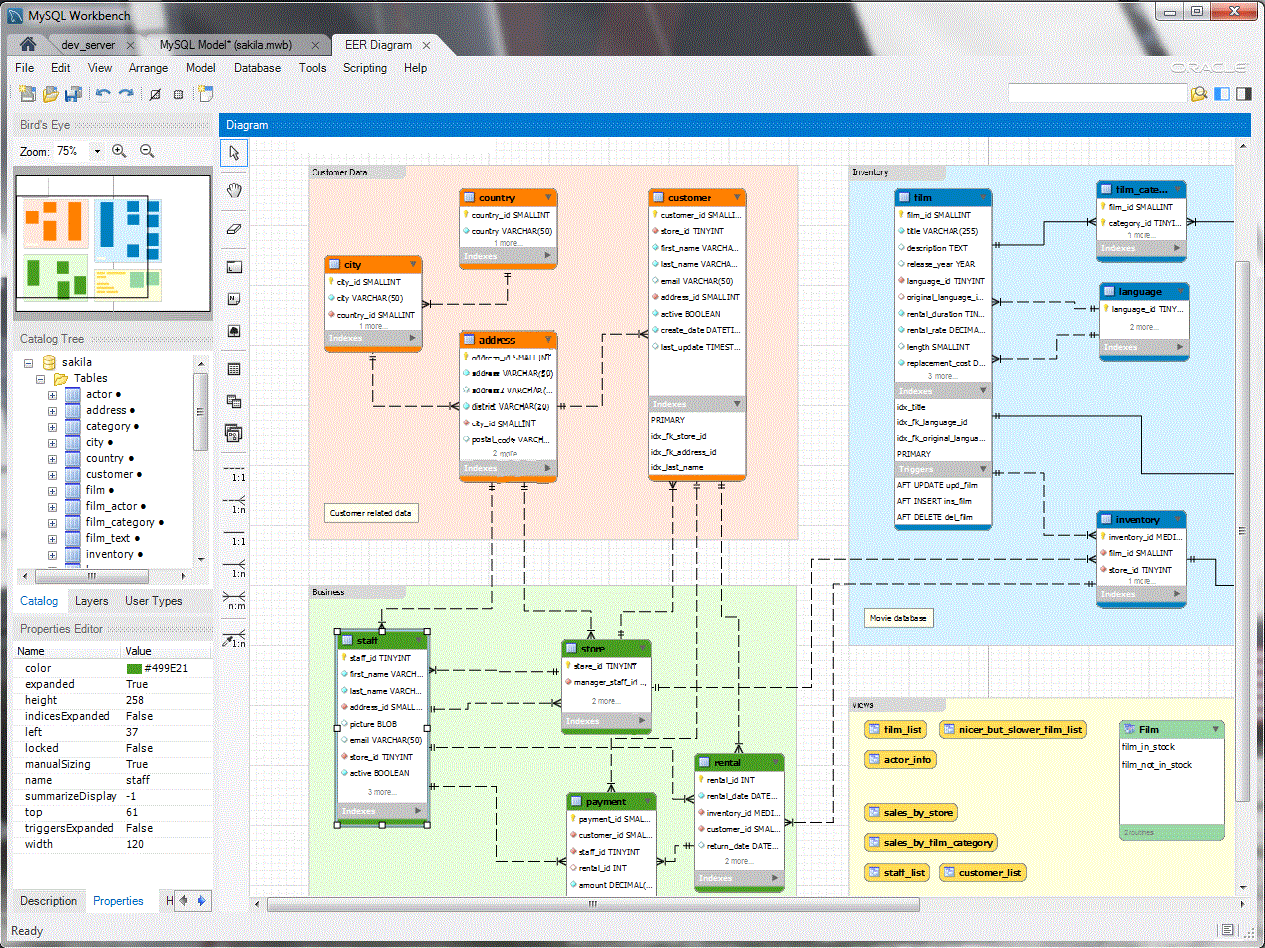
원천: https://www.mysql.com/products/workbench/
MySQL Workbench의 커뮤니티 에디션은 무료입니다. 엔터프라이즈 에디션 하지만 전문적인 지원과 컨설팅을 포함하면 가격이 상당히 비쌉니다.
왜 무료인가요?
Oracle이 소유한 MySQL은 무료이며 오픈 소스입니다. 그들은 주로 대기업을 대상으로 하는 지원 구독 및 컨설팅 서비스를 통해 수익을 창출합니다.
7. SQLDBM 1.0.1
SQLDBM 소개 는 코드를 사용할 필요가 없는 데이터베이스 다이어그래밍 도구입니다. 무료 평가판은 계정을 만들거나 돈을 지불하지 않고도 상당한 다이어그래밍을 할 수 있을 만큼 강력합니다.
작동 원리
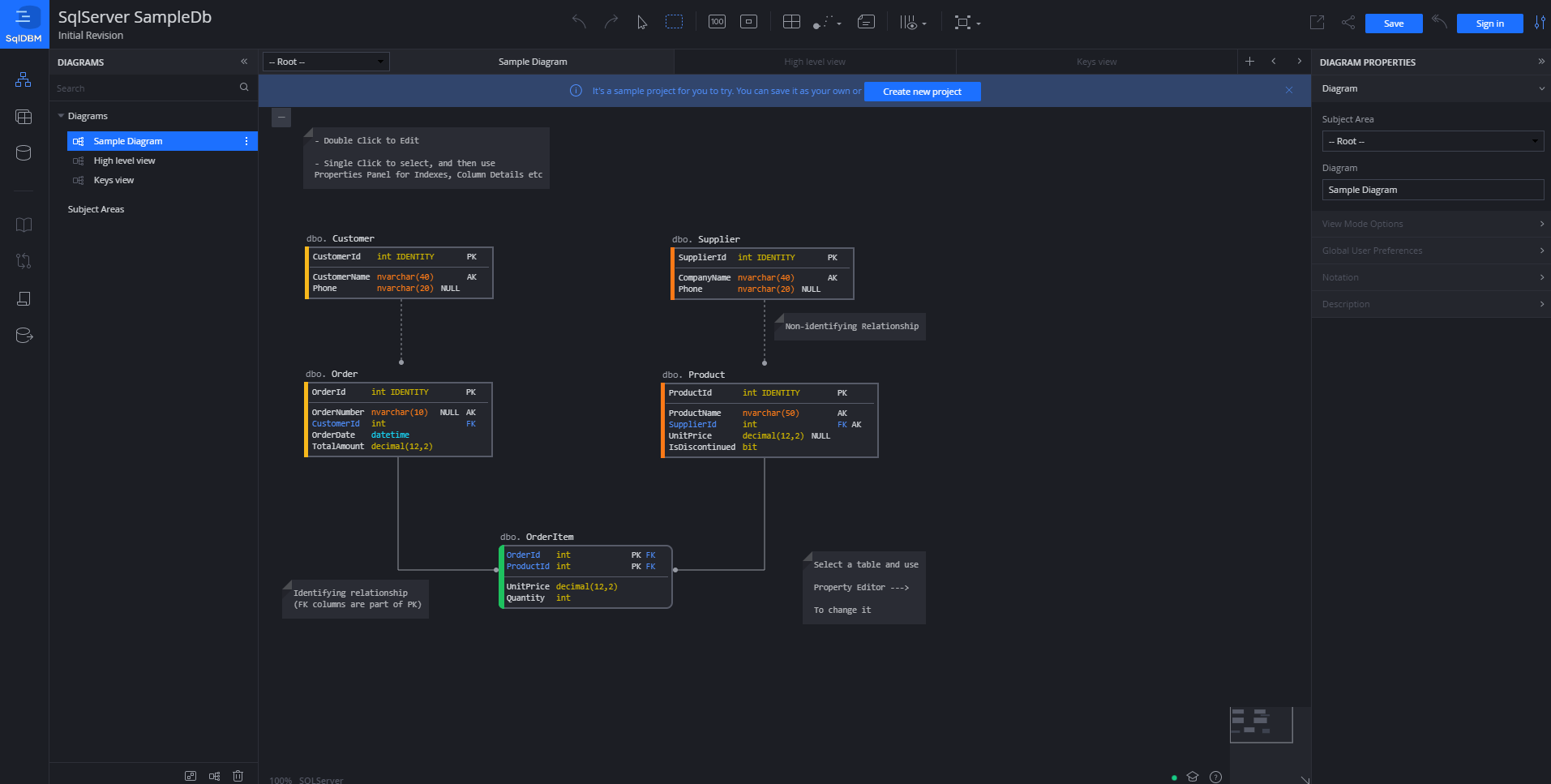
SqlDBM의 무료 체험판 페이지로 이동하여 온라인에서 무료로 시작하세요. SqlDBM은 주로 강력한 스키마 탐색 기능을 갖춘 드래그 앤 드롭 도구로, 샘플 데이터로 테스트하거나 자체 데이터베이스를 연결하여 테스트할 수 있습니다.

원천: https://app.sqldbm.com/ SQLServer 샘플 데이터 사용
SqlDBM 무료 체험판은 대화형이며 긴급 상황에서도 잘 작동할 수 있습니다. 하지만 일정 기간 동안 사용하려면 비용을 지불해야 합니다. 그들의 계획 중 하나가장 저렴한 가격은 한 달에 25달러입니다.
왜 무료인가요?
무료 체험판으로도 꽤 많은 것을 얻을 수 있고, SqlDBM은 고객이 코드가 필요 없는 시스템에 반해서 모든 기능을 사용하기 위해 기꺼이 비용을 지불할 의향이 있을 때까지는 사용할 수 없습니다.
[출처] https://www.atlassian.com/data/databases/7-free-database-diagramming-tools-for-busy-data-folks
7 free database diagramming tools for busy data folks
Posted by: Sheridan Gaenger
Planning your data architecture can feel chaotic — one Reddit user even compared architecting your dataset to that Pepe Silvia meme from It’s Always Sunny in Philadelphia:
Metaphor courtesy of u/not-ned-flanders on Reddit
But figuring out your database architecture doesn’t have to cost you money along with your sanity. There are many database diagramming tools that are not only incredibly useful but also free. And these tools can help you shape your thinking and create a solid foundation for the rest of your data stack, from your database to BI tools like Atlassian Analytics (that’s us! ????).
We went ahead and gathered seven of the top free database diagramming tools here for you to explain how each one works and why they’re free in the first place.
1.Diagrams.net
Diagrams.net (formerly Draw.io) is a no-fuss, browser-based, open-source database diagramming tool. It’s free for just about anyone to use — the only time you’re charged is if you’d like to use it as an add-on for the Atlassian ecosystem of products.
How it works
Diagrams.net drops you right into a drag-and-drop interface without requiring you to create an account, enter billing information, or even choose where you want to save your diagram. Just visit the site and start diagramming.
Diagrams.net is free unless you want to use it with the Atlassian ecosystem. If, for instance, you want to use it as a Jira add-on, you will have to pay 17072 per month maximum.
Why it's free
The mission of Diagrams.net is to “provide free, high quality diagramming software for everyone.” To follow through on this mission, the Diagrams.net team says, “When companies pay us money it should be because we add value, not because they are locked in.” So they chose to make a free tool and keep it funded by choosing one ecosystem to charge for (which is Atlassian) while all others are free.
2. dbdiagram
Dbdiagram.io is a free online database diagraming tool for developers and data analysts. It uses a code-based user interface, and you can create up to 10 diagrams for free.
How it works
Similar to Diagrams.net, you can visit the dbdiagram web app and start working right away. But instead of a drag-and-drop interface, you have to code each new table into your schema in a field on the left. Once your table is in the interface on the right, you can then drag and drop it. Dbdiagram is free for up to 10 diagrams. After that, it’s /month.
Source: https://dbdiagram.io/home
Why it's free
Dbdiagram goes after a freemium model, where you’ll become reliant on the tool enough that you’re willing to pay for that 11th diagram. In order to achieve this, they really invest in a good initial experience.


3. ERD Plus
ERD Plus is a bare-bones, web-based, database-diagramming tool designed for educational purposes, working in tandem with its textbook. It’s completely free and is a decent tool for learning, even if it’s not as nice looking as other options on this list.
How it works
You can try ERD Plus right away, but if you want to use all of its features, you’ll need to create an account. ERD Plus is drag-and-drop tool, but it’s very simple from a UI perspective.
Source: https://erdplus.com/faq
Why it's free
ERD Plus is a learning tool that’s designed to work with its accompanying textbook, which costs -. You can still get quite a bit of use out of it without the textbook, though.
4. Lucidchart
Lucidchart is an online diagramming tool that can help you diagram your database, among other things, such as organization charts and agile planning. It has a robust library of templates to get you started, and it can make the best-looking diagrams out of any tool on this list.
How it works
Create a free account, and start diagramming using a library of 100 professional templates or starting from scratch. Lucidchart is perhaps the most fully featured drag-and-drop diagramming tool listed here, encompassing many use cases, from collaborative brainstorming to ER diagramming.
Source: https://www.lucidchart.com/pages/examples/database-design-tool
Lucidchart is free for up to three documents. After that, it’s .95 per month for individuals and per month for teams. Both paid plans allow for unlimited documents.
Why it's free
Like dbdiagram, Lucidchart hopes to create such a good product that you feel the need to pay for that fourth document and integrate the tool into your larger workflow.
5. QuickDBD
QuickDBD (or Quick Database Diagrams) is a free online database diagramming tool that focuses on speed. It uses a combination of coding and drag-and-drop functionality to help you create a diagram.
How it works
Like Diagrams.net and dbdiagram, you can hop right into QuickDBD without creating an account. But if you want to save your files, you’ll need to create an account. You have to code your schema in the left field, and, once coded, your tables will appear in the right interface, where you can then drag and drop it.
Source: https://www.quickdatabasediagrams.com/
The free version of QuickDBD limits you to one diagram. Their Pro plan allows for 30 diagrams at per month, although they’re known to run promotions offering the Pro plan for free.
Why it's free
QuickBDB also follows the freemium model and aims to provide a slick enough experience with your first diagram that you’re willing to pay to keep using it.
6. MySQL Workbench Community Edition
MySQL Workbench Community Edition is a free visual database design tool that works with only MySQL Community Edition. It does much more than just diagramming, including the ability to monitor database performance and create SQL queries.
How it works
Download the Community Edition and you can use it as a pure drag-and-drop interface, or you can code your schema directly. It’s the most robust tool listed here, and you can think of it as a “Swiss Army Knife” for MySQL, with database diagramming being one tool.
Source: https://www.mysql.com/products/workbench/
The Community Edition of MySQL Workbench is free. The Enterprise Edition carries a hefty price tag, though, including professional support and consulting.
Why it's free
MySQL, which is owned by Oracle, is free and open-source. They make money through support subscriptions and consulting services aimed mainly at large enterprise businesses.
7. SqlDBM
SqlDBM is a database diagramming tool that doesn’t require code to use. Its free trial is robust enough to do quite a bit of diagramming without needing to create an account or pay money.
How it works
Head to SqlDBM’s free trial page to get started online for free. SqlDBM is mainly a drag-and-drop tool with robust schema exploration capabilities, which you can test with sample data or by hooking up your own database.
Source: https://app.sqldbm.com/ using SQLServer Sample Data
SqlDBM free trial is interactive and can work well in a pinch. But if you want to use it for any length of time, you’ll have to pay for one of their plans, the least expensive of which is per month.
Why it's free
The free trial can get you pretty far, and SqlDBM relies on your falling in love with their no-code system so much that you’re willing to shell out for the full experience.
[출처] https://www.atlassian.com/data/databases/7-free-database-diagramming-tools-for-busy-data-folks


광고 클릭에서 발생하는 수익금은 모두 웹사이트 서버의 유지 및 관리, 그리고 기술 콘텐츠 향상을 위해 쓰여집니다.
