
Below we will see how kafka can be integrated with Flume as a Source, Channel and Sink. If you are new to Flume and Kafka, you can refer FLUME and KAFKA.
Let us Start :
- Using Kafka as a SOURCE for Flume:
We want to pass messages to a Kafka Producer, which will go through Flume channel (In-Memory) and finally getting Stored in Flume Sink (say HDFS).
Start Zookeeper & Kafka Services and create a Topic ‘testing’ :nohup ./${kafka_home}/bin/zookeeper-server-start.sh ${kafka_home}/conf/zookeeper.properties &nohup ./${kafka_home}/bin/kafka-server-start.sh ${kafka_home}/conf/server.properties &./${kafka_home}/bin/kafka-topic.sh --create --zookeeper localhost:2181 --replication-factor 1 --partitions 1 --topic testing./${kafka_home}/bin/kafka-topic.sh --list --zookeeper localhost:2181Set-up Flume Conf:
vi ${flume_home}/conf/excercise5.conf and add below contents:## Configuring Components a1.sources=source1 a1.channels=channel1 a1.sinks=sink1## Configuring Source a1.sources.source1.type=org.apache.flume.source.kafka.KafkaSource a1.sources.source1.zookeeperConnect=localhost:2181 a1.sources.source1.topic=testing a1.sources.source1.groupId=flume a1.sources.source1.channels=channel1 a1.sources.source1.interceptors=i1 a1.sources.source1.interceptors.i1.type=timestamp a1.sources.source1.kafka.consumer.timeout.ms=100
## Configuring Channel
a1.channels.channel1.type=memory
a1.channels.channel1.capacity=10000
a1.channels.channel1.transactionCapacity=1000
## Configuring sink a1.sinks.sink1.type=hdfs a1.sinks.sink1.channel=channel1
a1.sinks.sink1.hdfs.path=/tmp/kafka/%{topic}/%y-%m-%d
## Number of seconds to wait before rolling current file
a1.sinks.sink1.hdfs.rollInterval=5
## File size to trigger roll, in byte
a1.sinks.sink1.hdfs.rollSize=1024
## Number of events written to file before it rolled
a1.sinks.sink1.hdfs.rollCount=10
## DataStrem - Stores data instead of ASCII values of data
a1.sinks.sink1.hdfs.fileType=DataStream
Start Flume agent:
./${flume_home}/bin/flume-ng agent -c ${flume_home}/conf/ -f ${flume_home/conf/exercise5.conf --name a1 -Dflume.root.logger=INFO,consolePass your Messages from Kafka Producer and Monitor the Flume agent window:
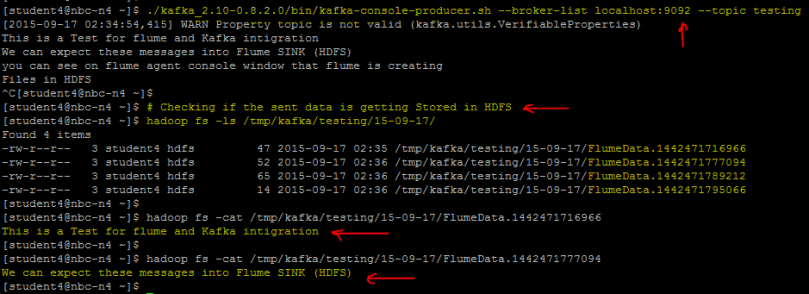
./${kafka_home}/bin/kafka-console-producer.sh --broker-list localhost:9092 --topic testing                                                                    [2015-09-17 02:34:54,415] WARN Property topic is not valid (kafka.utils.VerifiableProperties)
This is a Test for flume and Kafka intigration
We can expect these messages into Flume SINK (HDFS)
you can see on flume agent console window that flume is creating
Files in HDFS
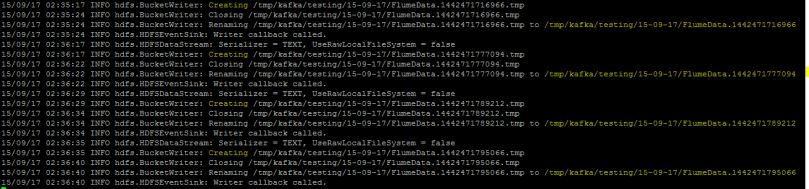
You can see from Flume agent window that it would be storing those messages to the sink (HDFS):
- Using Kafka as a SINK for Flume:
Now we will pass messages from Netcat (Flume Source), which will go through Flume channel (In-Memory), finally getting Stored into Kafka and Can be accessed from Kafka Consumers.
Create a new topic ‘testing3’:[student4@nbc-n4 flume]$ ~/kafka_2.10-0.8.2.0/bin/kafka-topics.sh --create --zookeeper localhost:2181 --replication-factor 1 --partitions 1 --topic testing3Listing the Topics:
[student4@nbc-n4 flume]$ ~/kafka_2.10-0.8.2.0/bin/kafka-topics.sh --list --zookeeper localhost:2181
testing
testing3
Set-up Flume Conf:
[student4@nbc-n4 flume]$ cat confFiles/exercise6.conf
##Configuring Components
a1.sources=source1
a1.channels=channel1
a1.sinks=sink1
## Configuring Source
a1.sources.source1.channels=channel1
a1.sources.source1.type=netcat
a1.sources.source1.bind=10.11.12.122
a1.sources.source1.port=44444
## Configuring Channel a1.channels.channel1.type=memory a1.channels.channel1.capacity=10000 a1.channels.channel1.transactionCapacity=1000## Configuring Sink a1.sinks.sink1.type=org.apache.flume.sink.kafka.KafkaSink a1.sinks.sink1.topic=testing2 a1.sinks.sink1.zookeeperConnect=localhost:2181 a1.sinks.sink1.brokerList=localhost:9092 a1.sinks.sink1.channel=channel1 a1.sinks.sink1.batchSize=20
Start Flume Agent:
./${flume_home}/bin/flume-ng agent -c ${flume_home}/conf/ -f ${flume_home/conf/exercise5.conf --name a1 -Dflume.root.logger=INFO,consolePass the Messages using Netcat and Access the same message via Kafka-consumers:
-
[student4@nbc-n4 ~]$ # Passing Messages via Netcat
[student4@nbc-n4 ~]$ nc 10.11.12.122 44444
Hi
OK
This is Kafka-Flume Integration Testing
OK
We are using Kafka as Sink here
OK
You can access these message from Kafka-Consumers
OK
[student4@nbc-n4 ~]$ # Checking these messages in Kafka
[student4@nbc-n4 ~]$ ./kafka_2.10-0.8.2.0/bin/kafka-console-consumer.sh --zookeeper localhost:2181 --topic testing3 --from-beginning
Hi
This is Kafka-Flume Integration Testing
We are using Kafka as Sink here
You can access these message from Kafka-Consumers
3. Using Kafka as a CHANNEL for Flume:
Now we will pass messages from Netcat (Flume Source), which will go through Kafka Topics (act as channel) and finally, can be accessed from Kafka Consumers.
Below is the configuration file:[student4@nbc-n4 flume]$ cat confFiles/exercise7.conf #Name the components on this agent a1.sources = r1 a1.channels = c1
#Describe/configure the source
a1.sources.r1.type = netcat
a1.sources.r1.bind = localhost
a1.sources.r1.port = 44444
a1.channels.c1.type = org.apache.flume.channel.kafka.KafkaChannel
a1.channels.c1.capacity = 10000
a1.channels.c1.transactionCapacity = 1000
a1.channels.c1.brokerList=localhost:9092
a1.channels.c1.topic=testing3
a1.channels.c1.zookeeperConnect=localhost:2181
#Bind the source and sink to the channel
a1.sources.r1.channels = c1
Using above config file, you can try sending messages via Netcat and access them via Kafka-consumers.


