Tensorflow Serving Tutorial 텐서플로우 서빙 설명

Tensorflow Serving Tutorial


딥러닝 모델을 만들면, 만들고 끝!이 아닌 Product에 모델을 배포해야 합니다. 이 모델을 추가하는 과정을 어떻게 할 수 있을까요? 그리고 직접 API를 만드는 것과 Tensorflow Serving API을 사용하는 것의 차이점은 무엇일까요? 이런 궁금증을 해결하기 위해 다양한 자료를 보고 정리한 글입니다. 시리즈물로 정리할 예정이며 이번 글에선 Tensorflow Serving Tutorial에 대해서만 작성했습니다. 잘못된 내용이 있으면 말씀해 주세요!!!

수정 사항

  • 2019.09.01
    • 글을 작성할 당시엔 estimator가 많이 사용되지 않아 그 예제를 작성하진 않았습니다. 요샌 estimator도 많이 사용되는데, 관련해서 flask-tensorflow estimator로 serving하는 Repo를 발견해 공유드립니다
    • 차금강님의 flask-tensorflow Github
    • 깔끔하게 코드를 작성해주셔서 매우 유용합니다 :)

관련 글

  • Tensorflow Serving Tutorial(현재 글)
  • Tensorflow Serving My Model
  • Serving with Google CloudML
  • Serving with Flask

Model Serving


  • Model Serving한다는 것은 inference를 의미. 대표적인 3가지 방법
  • Tensorflow Serving
    • Python : tensorflow-serving-api 사용
    • 다른 언어 : bazel 빌드
    • Serving시 Python 사용하면 퍼포먼스가 상대적으로 좋지 않음
    • 어려운 이유
      • C++ code. Tensorflow 사용하는 사람들은 대부분 Python만 익숙
      • Kubernetes, gRPC, bazel? 모르는 용어 투성이
      • Compile 필요하고 오래 걸림
  • Google Cloud CloudML
    • 장점 : 쉬움! CloudML이 다 해줌
    • 단점 : 비용 발생
  • Flask를 사용한 API
    • 장점 : 빠르게 Prototype 만들 때 사용 가능
    • 단점 : 초당 API Request가 많은 대용량 서비스라면 사용하기 힘듬(퍼포먼스 이슈)
  • 정리하면 Tensorflow Serving보다 다른 방법(CloudML, Flask)은 상대적으로 쉬운 편이고, CloudML은 노드 시간당 비용이 발생하고, Flask 사용한 방법은 대용량 Request에 버티기 힘듬
  • 결국 주어진 상황에 따라 선택하면 될 듯(유저에게 사용하는 API가 아니고, 사내 자동화를 위해서라면 초당 Request가 적을테니 Flask 사용해도 OK)

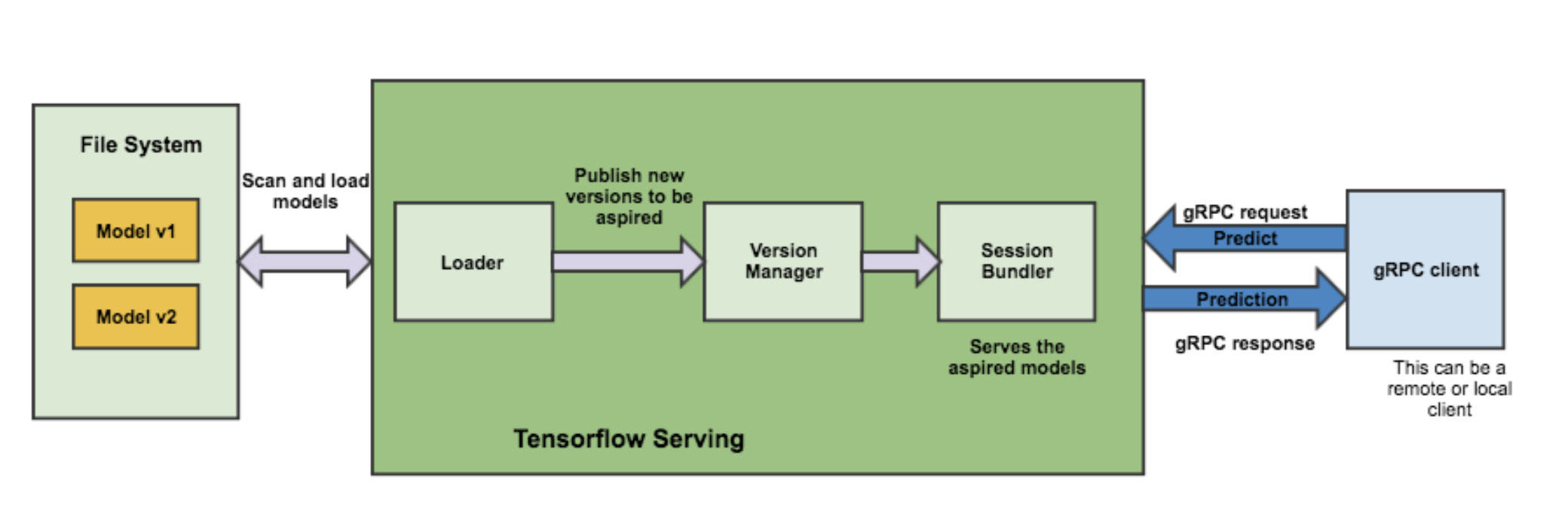
Architecture

경축! 아무것도 안하여 에스천사게임즈가 새로운 모습으로 재오픈 하였습니다.
어린이용이며, 설치가 필요없는 브라우저 게임입니다.
https://s1004games.com

  • 파란색 : Client
  • 초록색 : Server
  • 연두색 : 여러 Model들(v1, v2 …)
  • gRPC
    • RPC의 일종
    • GET / POST만 존재

Component

  • Servables
    • 클라이언트가 계산을 수행하는데 사용하는 기본 object(perform computation)
    • model 저장
    • 4개의 component의 중심
  • Loaders
    • servable(model)의 life cycle을 관리
    • manager를 위한 임시 저장소(temporary storage for the manager)
  • Sources
    • contain servables
    • gateway
    • loader로 올림
    • 모델의 다른 버전을 track
  • Managers
    • full lifecycle 관리

Install


  • 1) Bazel
  • 2) Tensorflow-serving-api

(공통) Ubuntu(Docker)

  • docker ubuntu 16.04 이미지를 통해 컨테이너 실행
  • Dockerfile
FROM ubuntu:16.04
		
RUN apt-get update && apt-get install -y software-properties-common && add-apt-repository ppa:deadsnakes/ppa && \
    apt-get update && apt-get install -y python3.6 python3.6-dev python3-pip git 
	
RUN ln -sfn /usr/bin/python3.6 /usr/bin/python3 && ln -sfn /usr/bin/python3 /usr/bin/python && ln -sfn /usr/bin/pip3 /usr/bin/pip
  • build
docker build -t docker-ubuntu16-python3.6 .
  • docker run
docker run -it docker-ubuntu16-python3.6 bash

1) Bazel

  • 소스코드 직접 빌드시 사용
  • Bazel 0.5.4 이상 version
  • 필요한 패키지 설치
sudo apt-get install pkg-config zip g++ zlib1g-dev unzip
  • Installer 실행
chmod +x bazel-0.15.0-installer-linux-x86_64.sh
./bazel-0.15.0-installer-linux-x86_64.sh --user
  • Environment 설정
export PATH="$PATH:$HOME/bin"

gRPC

  • dependencies 설치
sudo apt-get update && sudo apt-get install -y \
        automake \
        build-essential \
        curl \
        libcurl3-dev \
        git \
        libtool \
        libfreetype6-dev \
        libpng12-dev \
        libzmq3-dev \
        pkg-config \
        python-dev \
        python-numpy \
        python-pip \
        software-properties-common \
        swig \
        zip \
        zlib1g-dev
  • gRPC 설치
pip3 install grpcio
  • tensorflow serving clone
  • bazel build(뒤에 … 꼭 포함해야 함)
cd serving
bazel build -c opt --local_resources 5000,1.0,1.0 tensorflow_serving/…

2) Tensorflow-serving-api

  • Bazel을 설치하지 않고(=빌드하지 않고) 그냥 Python에서 사용하고 싶은 경우
  • Tensorflow Serving 배포 URI를 패키지 소스로 추가
echo "deb [arch=amd64] http://storage.googleapis.com/tensorflow-serving-apt stable tensorflow-model-server tensorflow-model-server-universal" | sudo tee /etc/apt/sources.list.d/tensorflow-serving.list

curl https://storage.googleapis.com/tensorflow-serving-apt/tensorflow-serving.release.pub.gpg | sudo apt-key add -
  • TensorFlow ModelServer 설치
sudo apt-get update && sudo apt-get install tensorflow-model-server
  • 공식적으론 Python2만 지원, 비공식적으로 Python3 존재
  • 설치(Python2)
pip3 install tensorflow-serving-api
  • 설치(Python3)
pip3 install tensorflow-serving-api-python3

Test

  • serving에서 제공하는 sample 모델 사용
  • tensorflow_model_server를 띄운 상태에서 Client가 Request
  • 설치와 마찬가지로 1) Bazel 2) tensorflow-serving-api로 나눠서 설명

공통

  • Sample Model 다운(serving folder에서 실행)
python tensorflow_serving/example/mnist_saved_model.py /tmp/mnist_model
  • model_base_path에 model.pb 파일과 variables 폴더를 저장하면 됨. saved_model github 참고해서 구현

1) Bazel

  • Tensorflow server 실행
bazel-bin/tensorflow_serving/model_servers/tensorflow_model_server --port=9000 --model_name=mnist --model_base_path=/tmp/mnist_model/
  • Client Request
bazel-bin/tensorflow_serving/example/mnist_client --num_tests=1000 --server=localhost:9000

2) Tensorflow-serving-api

  • python을 사용했지만 3점대(python3)도 몇가지 문법만 수정하면 정상 작동함!
  • Tensorflow server 실행
tensorflow_model_server --port=9000 --model_name=mnist --model_base_path=/tmp/mnist_model/
  • Client Request
python tensorflow_serving/example/mnist_client.py --num_tests=1000 --server=localhost:9000
  • 동시에 여러 모델을 추가하고 싶을 경우 config file 생성하고 실행 시 model_config_file path 지정
model_config_list: {
  config: {
    name: "Model1",
    base_path: "/path/to/model1",
    model_platform: "tensorflow"
  },
  config: {
    name: "Model2",
    base_path: "/path/to/model1",
    model_platform: "tensorflow"
  },
}
  • 실행
bazel-bin/tensorflow_serving/model_servers/tensorflow_model_server --port=9000 --model_config_file=<path_to_your_config_on_disk>

Reference

[출처] https://zzsza.github.io/data/2018/07/12/tensorflow-serving-tutorial/


본 웹사이트는 광고를 포함하고 있습니다.
광고 클릭에서 발생하는 수익금은 모두 웹사이트 서버의 유지 및 관리, 그리고 기술 콘텐츠 향상을 위해 쓰여집니다.
번호 제목 글쓴이 날짜 조회 수
공지 오라클 기본 샘플 데이터베이스 졸리운_곰 2014.01.02 86325
공지 [SQL컨셉] 서적 "SQL컨셉"의 샘플 데이타 베이스 SAMPLE DATABASE of ORACLE 가을의 곰을... 2013.02.10 78780
공지 [G_SQL] Sample Database 가을의 곰을... 2012.05.20 95533
14 [SQLite]10만 TPS와 10억 행 처리: SQLite의 놀라운 효율성 졸리운_곰 2025.12.05 1184
13 [sqlite] SQlite source code analysis-architecture file 졸리운_곰 2021.04.12 1809
12 [SQLite] SQLite 사용자 함수 추가 졸리운_곰 2021.04.12 1665
11 {SQLite] SQLite 페이지 핸들링(3) - 레코드 포맷 졸리운_곰 2021.04.12 1668
10 [SQLite] SQLite 페이지 핸들링(2) - SQLite의 페이지 포맷 file 졸리운_곰 2021.04.12 1496
9 [SQLite] SQLite 페이지 핸들링(1) - SQLite의 구조 file 졸리운_곰 2021.04.12 1487
8 [C/C++ 자료구조] SQLite 의 모든 것 (4부) - Java 에서 사용하기 Database/SQLite file 졸리운_곰 2021.04.12 1663
7 [C/C++] SQLite 의 모든 것 (3부) - C++ 에서 사용하기 Database/SQLite 졸리운_곰 2021.04.12 1720
6 [C/C++ 자료구조] SQLite 의 모든 것 (2부) - Download & Build Database/SQLite file 졸리운_곰 2021.04.12 1668
5 [C/C++ 자료구조] SQLite 의 모든 것 (1부) - 소개 및 FAQ Database/SQLite file 졸리운_곰 2021.04.12 1332
4 SQLite-sync.com version 3 file 졸리운_곰 2017.07.03 2018
3 DB Browser for SQLite file 졸리운_곰 2017.04.26 1652
2 Getting started with SQLite in C# file 졸리운_곰 2017.04.24 1828
1 SQLite C/C++ Tutorial 졸리운_곰 2017.04.24 1497
대표 김성준 주소 : 경기 용인 분당수지 U타워 등록번호 : 142-07-27414
통신판매업 신고 : 제2012-용인수지-0185호 출판업 신고 : 수지구청 제 123호 개인정보보호최고책임자 : 김성준 sjkim70@stechstar.com
대표전화 : 010-4589-2193 [fax] 02-6280-1294 COPYRIGHT(C) stechstar.com ALL RIGHTS RESERVED