
- 전체
- Native Apps
- WinJS App
- C# Apps
- XAML
- VB.net
- VisualC.net
- C++
- MFC
- visual studio mobile app dev
- Azure ms cloud service
- Asp.net
- 인공지능 (AI)
- wpf
- UWP
- MAUI
- asp.net
[Windows Programming] A brief history of Windows UI platforms : Windows UI 플랫폼의 간략한 역사
2023.09.04 23:51
[Windows Programming] A brief history of Windows UI platforms : Windows UI 플랫폼의 간략한 역사
A brief history of Windows UI platforms
Over the years, UI guidelines and paradigms have constantly shifted as hardware and platforms evolved. We moved from screens with 640 x 480 resolution to 4K or even 8K screens, from mouse and keyboard only to touch and digital pens. Consequently, Microsoft has created multiple UI platforms over time, with the goal of offering developers the opportunity to build modern applications; each of them represented the state of the art for the time when they were released.
The first platform was called Microsoft Foundation Class Library (MFC), which was a C++ object-oriented UI library released by Microsoft in 1992. It was a wrapper around most of the Win32 and Component Object Model (COM) APIs. Thanks to MFC, developers were able to build UIs with the most common Windows controls and build complex interfaces made up of multiple windows, panels, and so on. MFC was a considerable success, and it's still heavily used today by many developers. The following screenshot shows the look and feel of a typical MFC application:

Figure 1.1 – A Windows application that uses MFC as a UI framework
However, as years passed by, it started to show limitations in supporting modern devices and features such as high-resolution screens and touch inputs. Additionally, it can be used only by C++ developers, while many developers over time have migrated to managed languages such as C#, which are easier to learn and support.
In 2002, Microsoft released the first version of .NET Framework with the goal of improving developer productivity. By running applications inside a virtual environment called Common Language Runtime (CLR), developers could get out-of-the-box features such as security, memory, and exception handling that, in the past, needed to be manually managed. Additionally, by introducing languages such as C# and VB.NET, Microsoft reduced the learning curve required to master a programming language and start building software. As part of .NET Framework, Microsoft included a platform to build Windows desktop applications called Windows Forms. It's an event-driven platform, which makes it easier to build complex applications by wrapping the existing Windows UI common controls and Windows APIs in managed code. The development experience is mostly UI-based – developers create UIs with a visual designer by dragging and dropping the available controls inside a window. Then, they can write code that reacts to the events exposed by the various controls, such as the click of a button or the selection of an item from a list. The following screenshot shows the development experience provided by Visual Studio to build Windows Forms applications:
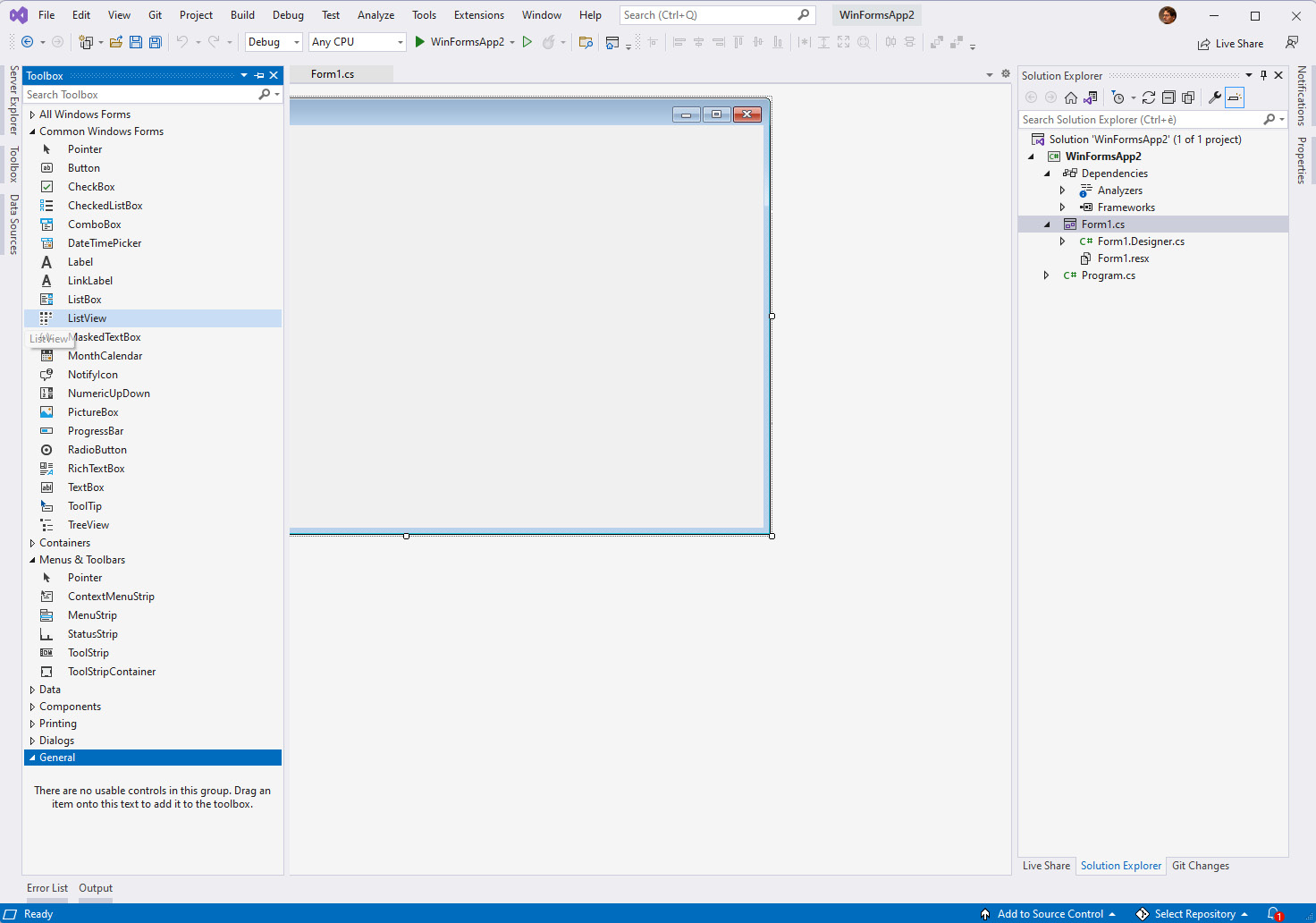
Figure 1.2 – The Windows Forms designer in Visual Studio
The platform kept evolving across the various releases of .NET Framework, until it reached full maturity with version 2.0.
With the release of .NET Core 3.0, Windows Forms has been integrated into the modern .NET development stack for the first time. This choice has enabled developers to access all the latest enhancements in the platform, such as newer versions of the C# language, performance improvements, or the latest Windows APIs. However, when it comes to building the UI, it still lacks many of the features you would expect from a modern platform, such as support for responsive layouts and new input experiences.
In 2006, as part of the release of .NET Framework 3.0, Microsoft unveiled Windows Presentation Foundation (WPF), the next evolution of the Microsoft UI platform. WPF introduced, for the first time, features that are still used today by modern UI platforms (including the Windows App SDK), such as XAML (which stands for Extensible Application Markup Language), binding, and dependency properties. WPF still supports building the UI with a designer, but it isn't as essential as it was for Windows Forms. WPF, in fact, decouples the UI from the business logic by describing the UI with XAML, an XML-based language. Additionally, WPF added support for features such as 2D/3D rendering, hardware acceleration, animations, and vector graphics. As with Windows Forms, .NET Core 3.0 welcomed WPF as a first-class citizen in the new development platform, enabling WPF developers to get access to the latest versions of runtimes, languages, and developer tools. Compared to Windows Forms, WPF is a more robust UI platform, capable of delivering more modern experiences, as you can see in the following screenshot:
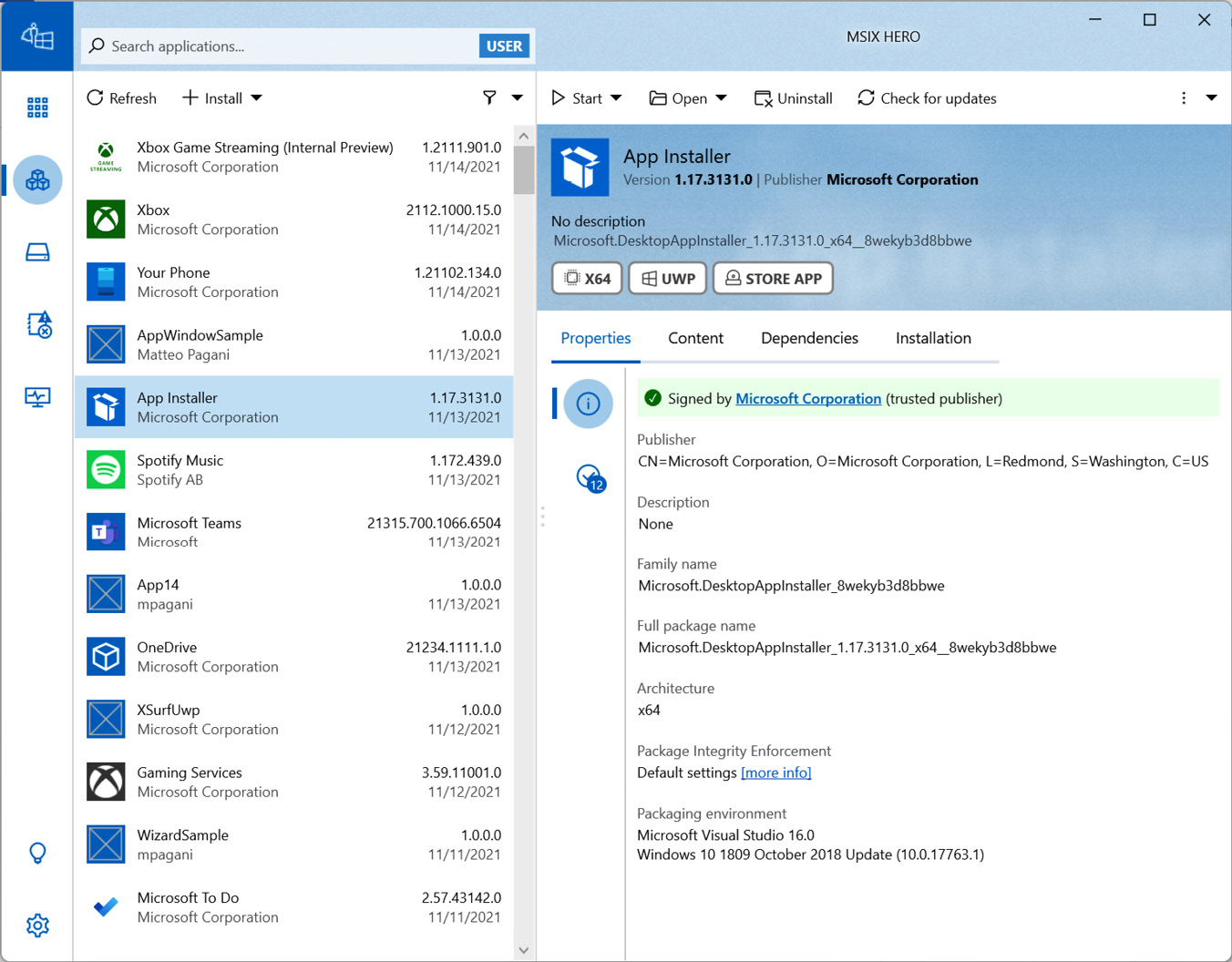
Figure 1.3 – MSIX Hero is a good example of an application that delivers a great user experience by using the WPF capabilities
However, it still has limitations, such as poor support to high Dots-Per-Inch (DPI) devices, touchscreens, digital inking experiences, and accessibility.
In 2015, with the release of Windows 10, Microsoft released UWP, which is an extension of Windows Runtime that was introduced in Windows 8. UWP is a modern development platform that enables developers to build secure and robust applications that run inside a sandbox; it gives access to all the new features added in Windows 10, such as tiles, notifications, and Windows Hello; it's based on a new UI platform called Fluent Design, which offers built-in support to responsive layout, touch and digital pen, accessibility, and so on. Many built-in Windows applications, such as Microsoft Store, are built with UWP and WinUI:
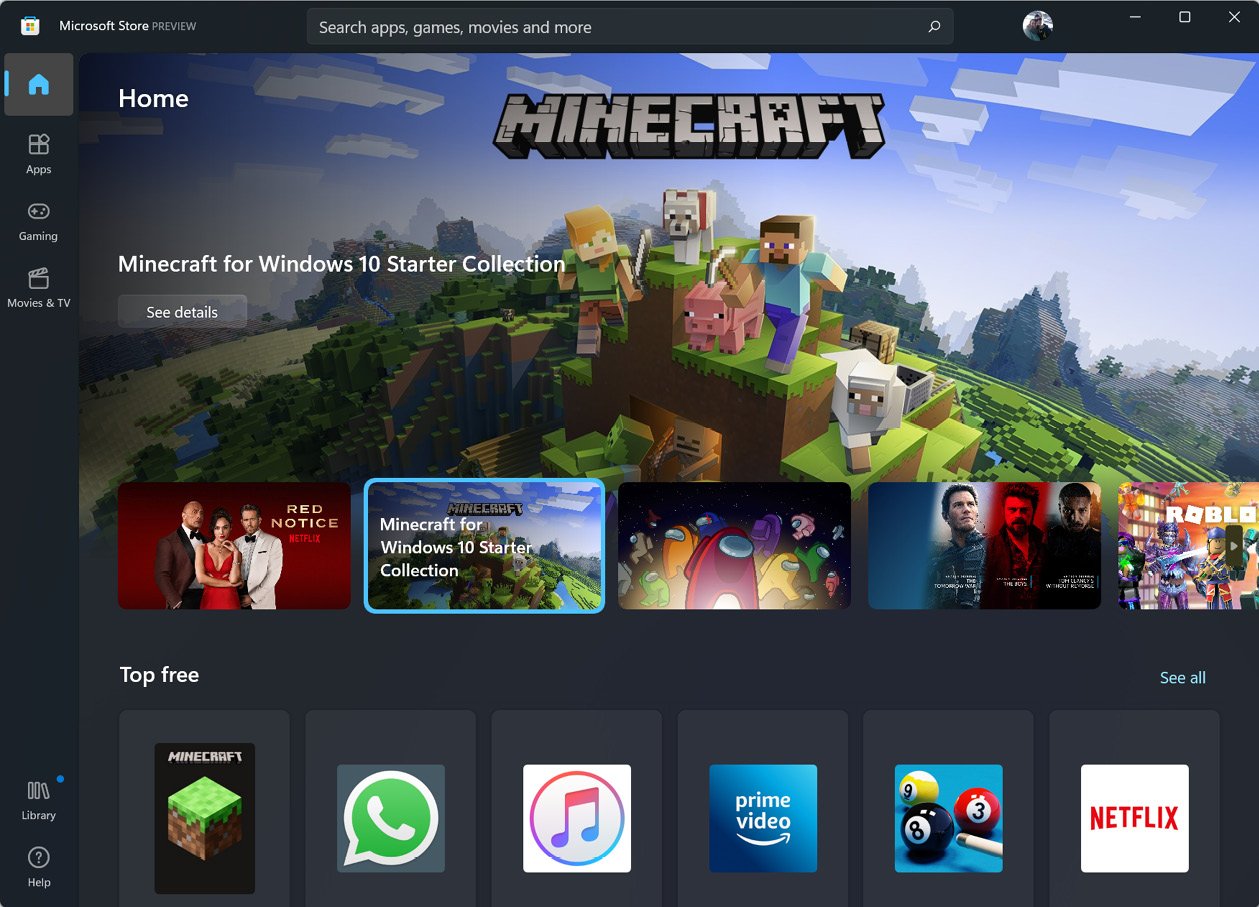
Figure 1.4 – Microsoft Store in Windows is a UWP application
In the first releases of UWP, the UI framework (like all the other development APIs) was built in the operating system. Over time, this approach created multiple challenges, both to Microsoft and developers:
- Despite Windows 10 adopting a much more aggressive update strategy compared to prior versions, by releasing two upgrades per year, it still forced the development team to address issues and add new UI controls and features only twice per year.
- If a developer wanted to use the new UI controls or features added to the latest version of Windows 10, all their users had to upgrade their machines to that version as well. This was a challenge, especially in enterprise environments, where the upgrade pace is slower than in the consumer world.
To overcome these challenges, in October 2018, Microsoft released the first public release of the Windows UI library, called WinUI 2.0. With this release, Microsoft detached most of the UI controls and features from the operating system and moved them inside a library, which is distributed as a NuGet package. The library enabled Microsoft to release more frequent updates (the current life cycle is four releases per year) and developers to get access to the latest UI enhancements without forcing their user base to upgrade to the latest Windows 10 version.
------------------------------------------
Windows UI 플랫폼의 간략한 역사
수년에 걸쳐 UI 지침하드웨어와 플랫폼이 발전함에 따라 패러다임도 끊임없이 변화해 왔습니다. 640 x 480 해상도의 화면에서 4K 또는 심지어 8K 화면으로, 마우스와 키보드 전용에서 터치 및 디지털 펜으로 전환했습니다. 결과적으로 Microsoft는 개발자에게 제공한다는 목표로 시간이 지남에 따라 여러 UI 플랫폼을 만들었습니다.최신 애플리케이션을 구축할 수 있는 기회 각각은 출시 당시의 최신 기술을 대표했습니다.
첫 번째 플랫폼은 C++ 객체 지향 UI 라이브러리인 MFC ( Microsoft Foundation Class Library)였습니다.1992년에 Microsoft에서 출시했습니다. 래퍼였습니다.대부분의 Win32 및 COM ( 구성 요소 개체 모델 ) API와 관련이 있습니다. MFC 덕분에 개발자는 가장 일반적인 Windows 컨트롤을 사용하여 UI를 구축하고 여러 창, 패널 등으로 구성된 복잡한 인터페이스를 구축할 수 있었습니다. MFC는 상당한 성공을 거두었으며 오늘날에도 많은 개발자가 많이 사용하고 있습니다. 다음 스크린샷은 일반적인 MFC 애플리케이션의 모양과 느낌을 보여줍니다.
그림 1.1 – MFC를 UI 프레임워크로 사용하는 Windows 애플리케이션
하지만 시간이 지나면서 고해상도 화면, 터치 입력 등 최신 기기와 기능을 지원하는 데 한계가 나타나기 시작했습니다. 또한 C++ 개발자만 사용할 수 있지만 시간이 지남에 따라 많은 개발자가 배우고 지원하기 더 쉬운 C#과 같은 관리되는 언어로 마이그레이션했습니다.
2002년에 Microsoft는 개발자 생산성 향상을 목표로 .NET Framework의 첫 번째 버전을 출시했습니다. 애플리케이션을 실행하여CLR ( 공용 언어 런타임 ) 이라는 가상 환경 내에서 개발자는 과거에는 수동으로 관리해야 했던 보안, 메모리, 예외 처리 등의 기본 기능을 얻을 수 있었습니다. 또한 Microsoft는 C# 및 VB.NET과 같은 언어를 도입하여프로그래밍 언어를 마스터하고 소프트웨어 구축을 시작하는 데 필요한 학습 곡선입니다. .NET Framework의 일부로 Microsoft는 다음을 포함했습니다.Windows Forms 라는 Windows 데스크톱 애플리케이션을 구축하기 위한 플랫폼입니다 . 기존 Windows UI 공용 컨트롤과 Windows API를 관리 코드로 래핑하여 복잡한 애플리케이션을 보다 쉽게 구축할 수 있는 이벤트 기반 플랫폼입니다. 개발 경험은 대부분 UI 기반입니다. 개발자는 창 내부에 사용 가능한 컨트롤을 끌어다 놓는 방식으로 비주얼 디자이너를 사용하여 UI를 만듭니다. 그런 다음 버튼 클릭이나 목록에서 항목 선택과 같은 다양한 컨트롤에 의해 노출되는 이벤트에 반응하는 코드를 작성할 수 있습니다. 다음 스크린샷은 Windows Forms 애플리케이션을 빌드하기 위해 Visual Studio에서 제공하는 개발 환경을 보여줍니다.


그림 1.2 - Visual Studio의 Windows Forms 디자이너
플랫폼은 버전 2.0으로 완전히 성숙해질 때까지 다양한 .NET Framework 릴리스에서 계속 발전했습니다.
.NET Core 3.0이 출시되면서 Windows Forms처음으로 최신 .NET 개발 스택에 통합되었습니다. 이러한 선택을 통해 개발자는 최신 버전의 C# 언어, 성능 개선 또는 최신 Windows API와 같은 플랫폼의 모든 최신 향상된 기능에 액세스할 수 있게 되었습니다. 그러나 UI 구축에 있어서는 반응형 레이아웃 지원, 새로운 입력 환경 등 최신 플랫폼에서 기대할 수 있는 많은 기능이 여전히 부족합니다.
2006년 .NET Framework 3.0 출시의 일부로 Microsoft는 Microsoft UI의 차세대 버전인 WPF ( Windows Presentation Foundation )를 공개했습니다.플랫폼. WPF에서는 XAML ( Extensible Application Markup Language 의 약어 ), 바인딩 및 종속성 속성 과 같이 오늘날에도 최신 UI 플랫폼(Windows App SDK 포함)에서 여전히 사용되는 기능을 처음으로 도입했습니다 . WPF여전히 디자이너를 사용한 UI 구축을 지원하지만 Windows Forms만큼 필수적이지는 않습니다. 실제로 WPF는 XML 기반 언어인 XAML로 UI를 설명하여 비즈니스 로직에서 UI를 분리합니다. 또한 WPF는 2D/3D 렌더링, 하드웨어 가속, 애니메이션 및 벡터 그래픽과 같은 기능에 대한 지원을 추가했습니다. Windows Forms와 마찬가지로 .NET Core 3.0에서는 WPF를 새로운 개발 플랫폼의 최우선 요소로 환영하여 WPF 개발자가 최신 버전의 런타임, 언어 및 개발자 도구에 액세스할 수 있도록 했습니다. Windows Forms에 비해 WPF는 다음 스크린샷에서 볼 수 있듯이 보다 현대적인 환경을 제공할 수 있는 보다 강력한 UI 플랫폼입니다.
그림 1.3 – MSIX Hero는 WPF 기능을 사용하여 뛰어난 사용자 환경을 제공하는 애플리케이션의 좋은 예입니다.
그러나 여전히높은 DPI ( 인치당 도트 수 ) 장치, 터치스크린, 디지털 잉크 에 대한 지원 부족 등의 제한 사항경험과 접근성.
2015년 Windows 10 출시와 함께 Microsoft는 Windows 8에 도입된 Windows 런타임의 확장인 UWP를 출시했습니다. UWP는 개발자가 샌드박스 내에서 실행되는 안전하고 강력한 애플리케이션을 구축할 수 있는 최신 개발 플랫폼입니다. 타일, 알림, Windows Hello 등 Windows 10에 추가된 모든 새로운 기능에 대한 액세스를 제공합니다. 그것은 기반이다반응형 디자인을 기본적으로 지원하는 Fluent Design이라는 새로운 UI 플랫폼에서레이아웃, 터치 및 디지털 펜, 접근성 등. Microsoft Store 와 같은 많은 기본 제공 Windows 애플리케이션은 UWP 및 WinUI를 사용하여 구축되었습니다.
그림 1.4 – Windows의 Microsoft Store는 UWP 애플리케이션입니다.
UWP의 첫 번째 릴리스에서는 UI 프레임워크(다른 모든 개발 API와 마찬가지로)가 운영 체제에 구축되었습니다. 시간이 지남에 따라 이 접근 방식은 Microsoft와 개발자 모두에게 여러 가지 과제를 안겨주었습니다.
- Windows 10은 이전 버전에 비해 훨씬 더 공격적인 업데이트 전략을 채택했음에도 불구하고 매년 2번의 업그레이드를 출시함으로써 개발 팀은 여전히 문제를 해결하고 1년에 두 번만 새로운 UI 컨트롤과 기능을 추가해야 했습니다.
- 개발자가 최신 버전의 Windows 10에 추가된 새로운 UI 컨트롤이나 기능을 사용하려는 경우 모든 사용자도 자신의 컴퓨터를 해당 버전으로 업그레이드해야 했습니다. 특히 소비자 환경보다 업그레이드 속도가 느린 기업 환경에서는 이는 어려운 일이었습니다.
이러한 과제를 극복하기 위해 Microsoft는 2018년 10월 첫 번째 공개 릴리스를 출시했습니다.WinUI 2.0 이라는 Windows UI 라이브러리의 이번 릴리스에서 Microsoft는 대부분의 UI 컨트롤을 분리했습니다.및 운영 체제의 기능을 NuGet 패키지로 배포되는 라이브러리 내부로 옮겼습니다. 이 라이브러리를 통해 Microsoft는 더 자주 업데이트(현재 수명 주기는 연간 4개 릴리스)를 출시할 수 있었고 개발자는 사용자 기반을 최신 Windows 10 버전으로 업그레이드하지 않고도 최신 UI 개선 사항에 액세스할 수 있었습니다.
[출처] https://subscription.packtpub.com/book/programming/9781803235660/2/ch02lvl1sec04/a-brief-history-of-windows-ui-platforms
광고 클릭에서 발생하는 수익금은 모두 웹사이트 서버의 유지 및 관리, 그리고 기술 콘텐츠 향상을 위해 쓰여집니다.
댓글 0
| 번호 | 제목 | 글쓴이 | 날짜 | 조회 수 |
|---|---|---|---|---|
| 7 |
[윈도우즈 앱 개발]CaptureManager SDK - Capturing, Recording and Streaming Video and Audio from Web-Cams
 | 졸리운_곰 | 2021.04.13 | 264 |
| 6 |
Window 7 Enterprise 64bit에 vb6 (visual studio 6.0 ent버젼) 설치
| 졸리운_곰 | 2018.12.04 | 529 |
| 5 |
[VS2008] 코드 난독화 (Dotfuscator Community Edition 사용)
| 졸리운_곰 | 2017.07.01 | 612 |
| 4 | GUID를 문자열로... 문자열을 GUID로 | 가을의곰 | 2017.06.10 | 293 |
| 3 |
Hooking 이란?
| 졸리운_곰 | 2015.06.16 | 525 |
| 2 |
윈도우즈 후킹 기초
| 졸리운_곰 | 2015.06.16 | 318 |
| 1 |
윈도우 메시지 후킹
| 졸리운_곰 | 2015.06.16 | 2284 |