
- 전체
- Native Apps
- WinJS App
- C# Apps
- XAML
- VB.net
- VisualC.net
- C++
- MFC
- visual studio mobile app dev
- Azure ms cloud service
- Asp.net
- 인공지능 (AI)
- wpf
- UWP
- MAUI
- asp.net
C# Apps A replacement for MemoryStream
2017.05.20 12:21
A replacement for MemoryStream
 sebastianfriston, 19 Mar 2012 CPOL
memorytributary_src.zip
Download source - 2.13 KBExplains the cause of the OutOfMemoryExceptions which commonly occur when using MemoryStream, and introduces a replacement which uses a dynamic list of memory segments as a backing store, as opposed to a single array, making it more resilient with large datasets.
Introduction
This article explains the cause of the ambiguous OutOfMemoryException that is common when using MemoryStream with large datasets, and introduces a class, MemoryTributary, which is intended as an alternative to .NET's MemoryStream that is capable of handling large amounts of data.
Background
When attempting to use MemoryStream with relatively large datasets (in the order of tens of MB), it is common to encounter the OutOfMemoryException. This is not due to, as the name would imply, having reached limitations of the system memory, but in fact those of the process' virtual address space.
When a process requests memory from Windows, the memory manager is not allocating address space from RAM, but 'pages' - chunks (typically 4KB) of storage - which can exist in the RAM, or on disk, or anywhere the memory manager decides to store them. The pages are mapped into the address space of the process, so, for example, when the process attempts to access the memory starting at [0xAF758000], it is in reality accessing the byte at the beginning of [Page 496], wherever Page 496 happens to be. The process therefore can allocate as much memory as it likes so long as the disk space holds out, and can map as much of it as will fit into its virtual address space at any one time - provided, that is, these allocations are made in a large number of small chunks.
This is because the process address space is fragmented: large sections are taken up by the Operating System, others for the executable image, libraries, and all the other previous allocations. Once the memory manager has allocated a set of pages equivalent to the requested size, the process must map them into its address space - but if the address space does not contain a contiguous section of the requested size, the pages cannot be mapped, and the allocation fails with the OutOfMemoryException.
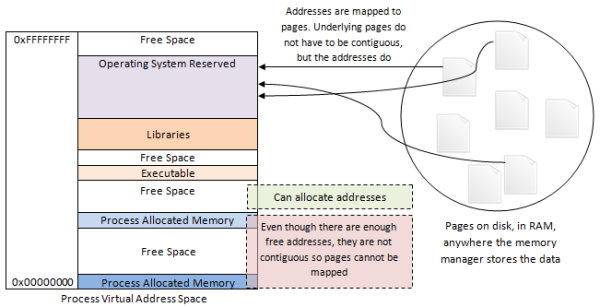
The process is not running out of space, or even addresses: it is running out of sequential addresses. To see this (if you are on 64 bit), target the following program at x86 and run it, then target it at x64 and see how much farther it gets.
Hide Copy Code
static void Main(string[] args)
{
    List<byte[]> allocations = new List<byte[]>();
    for (int i = 0; true; i++)
    {
        try
        {
            allocations.Add(new byte[i * i * 10]);
        }
        catch (OutOfMemoryException e)
        {
            Console.Write(string.Format("Performed {0} allocations",i));
        }
    }
}
The current implementation of MemoryStream uses a single byte array as a backing store. When a write is attempted to a position in the stream, larger than the size of this array, it is doubled in size. Depending on the behaviour of the program, the backing store of MemoryStream can soon require more contiguous memory than is available in the virtual address space.
Using the code
The solution is to not require contiguous memory to store the data contained in the stream. MemoryTributaryuses a dynamic list of 4KB blocks as the backing store, which are allocated on demand as the stream is used.
MemoryTributary derives from Stream and so is used like any other Stream, such as MemoryStream.
MemoryTributary however is intended as an alternative to MemoryStream not a drop-in replacement, due to a number of caveats:
MemoryTributarydoes not implement all ofMemoryStream's constructors (because currently there are no artificial capacity limits). It is capable of initialising from abyte[].MemoryTriburarysubclassesStream, notMemoryStream, and so cannot be used in place where a member acceptsMemoryStreamexplicitly.MemoryTributarydoes not implementGetBuffer()as there is no single backing buffer to return; the functional equivalent isToArray()but use this with caution.
When using MemoryTributary, be aware of the following:
Hide Copy Code


//A new MemoryTributary object: length is 0, position is 0, no memory has been allocated
MemoryTributary d = new MemoryTributary();

//returns -1 because Length is 0, no memory allocated
int a = d.ReadByte();

//Length now reports 10000 bytes, but no memory is allocted
d.SetLength(10000);

//three blocks of memory are now allocated,
//but b is undefined because they have not been initialised
int b = d.ReadByte();
- Blocks are allocated on demand when accessed (e.g., by a read or write call). Before a read takes place, the Position is checked against the Length to ensure the read operation is performed within the bounds of the stream; Length is just a sanity check however and does not correspond to the current amount of allocated memory, but rather how much has been written to the stream. Setting Length does not allocate memory, but it does allow reads to proceed on undefined data.
- Memory is allocated in sequential blocks, that is, if the first block to be accessed is block 3, blocks 1 and 2 are automatically allocated.
MemoryTributaryincludes the methodToArray()but this is unsafe as it unavoidably suffers from the problem that this class' existence is trying to solve: the need to allocate a large amount of contiguous memory.- Instead, use
MemoryTributary'sReadFrom()andWriteTo()methods to haveMemoryTributaryinteract with other streams when operating on large amounts of data.
Performance Metrics
Performance both in terms of capacity and speed, of MemoryStream and MemoryTributary, is difficult to predict as it is dependant on a number of factors, one of the most significant being the fragmentation and memory usage of the current process - a process which allocates a lot of memory will use up large contiguous sections faster than one that does not - it is possible though to get an idea of the relative performance characteristics of the two by taking measurements in controlled conditions.
The tables below compare the capacity and access times of MemoryTributary and MemoryStream. In all cases the process instance tested only the target stream (i.e. a new process was created so a test on MemoryStream did not impact one on MemoryTributary, and no allocations were made other than for the purpose of reading or writing).
Capacity
To perform this test, a loop wrote the contents of a 1MB array to the target stream over and over until the stream threw an OutOfMemoryException, which was caught and the total number of writes before the exception was returned.
| Stream | Average Stream Length Before Exception (MB) |
MemoryStream |
488 |
MemoryTributary |
1272 |
(This test process targeted x86.)
Speed (Access Times)
For these measurements, a set amount of data was written to, then read from the stream. The data was written in random lengths between 1KB and 1MB, to and from a 1MB byte array. A Stopwatch instance was used to determine the amount of time it took to write, then read, the specified amount of data. These are applicable only to sequential accesses as no seeks were made, other than for the start of the read process.
Each process executed its test six times, on the same object, so the variations between the results for a given stream for a given test, indicate the time taken allocating memory vs. that taken accessing it.
| Stream Test Execution Times (ms) | ||||
| Amount written and read (MB) | MemoryStream | MemoryTributary (4KB Block) | MemoryTributary (64KB Block) | MemoryTributary (1MB Block) |
| 10 | 10 | 13 | 11 | 7 |
| 3 | 5 | 3 | 3 | |
| 3 | 6 | 3 | 3 | |
| 3 | 5 | 3 | 3 | |
| 4 | 5 | 3 | 3 | |
| 3 | 6 | 3 | 3 | |
| 100 | 100 | 148 | 123 | 52 |
| 34 | 54 | 42 | 35 | |
| 34 | 48 | 35 | 34 | |
| 35 | 47 | 36 | 35 | |
| 34 | 48 | 36 | 35 | |
| 35 | 51 | 35 | 35 | |
| 500 | 516 | 390 | 290 | 237 |
| 167 | 222 | 184 | 170 | |
| 168 | 186 | 154 | 167 | |
| 167 | 187 | 151 | 168 | |
| 167 | 186 | 151 | 168 | |
| 167 | 185 | 153 | 168 | |
| 1,000 | 1185 | 1585 | 1299 | 485 |
| 347 | 547 | 431 | 344 | |
| 343 | 463 | 350 | 345 | |
| 338 | 462 | 350 | 345 | |
| 3377 | 461 | 349 | 345 | |
| 339 | 465 | 351 | 343 | |
The results indicate that MemoryTributary can store approximately double the data of MemoryStream in ideal conditions. The access times depend on the block setting of MemoryTributary; the initial allocations are marginally faster than MemoryStream but access times are equivalent. The smaller the block the more allocations must be made, but the less susceptible to memory fragmentation the instance becomes.
The attached source has a default block size of 64KB, which is set by the blockSize member.
Points of Interest
See Eric Lippert's post entitled '“Out Of Memory” Does Not Refer to Physical Memory' for a full explanation of the cause of the OutOfMemoryException.
The methods of MemoryTributary access the appropriate blocks via private properties - the idea being that the way the blocks are stored could be easily swapped out if the simple List<> becomes untenable, without having to alter every member of the class. MemoryTributary has been tested with a few hundred MB, and fails with the OutOfMemoryException when the amount reaches approximately 1GB.
The MSDN page for MemoryStream is here.
Yes, tributary is the most creative synonym for stream I could come up with.
History
- 15/03/2012 - First version.
- 19/03/2012
- Updated
Read()method to use alongcounter internally as opposed to anint; to support streams of 10s of GB. - Updated article with performance measurements.
- When a capacity is passed to
MemoryTributary's constructor,MemoryTributarywill now allocate the equivalent number of blocks.
- Updated
License
This article, along with any associated source code and files, is licensed under The Code Project Open License (CPOL)
[출처] https://www.codeproject.com/Articles/348590/A-replacement-for-MemoryStream
광고 클릭에서 발생하는 수익금은 모두 웹사이트 서버의 유지 및 관리, 그리고 기술 콘텐츠 향상을 위해 쓰여집니다.
