Scientific graphics in C# - [part 2]

Scientific graphics in C# - part 2

Posted on October 9, 2011 by Sol

The code for this tutorial is on GitHub: https://github.com/sol-prog/GraphDemo2.

GraphDemo2-master.zip

In the first part of this tutorial I've shown you how to plot some data on a Windows Form using C#. It is time now to improve the graphical aspect of our DemoGraph, we will start by properly formatting the numbers from the x axis, we could do this by modifying the Plot.cs class:

1 ...
2 chart.Series.Add("Series0");
3 chart.Series[0].ChartType = SeriesChartType.Line;
4 chart.ChartAreas[0].AxisX.LabelStyle.Format = "{F2}";
5 ...

The above line of code will show the numbers from the x axis as two digits floating numbers:
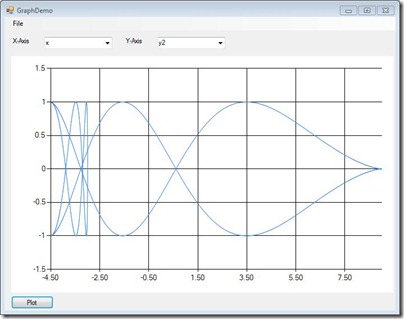
Csharp 2D graphic

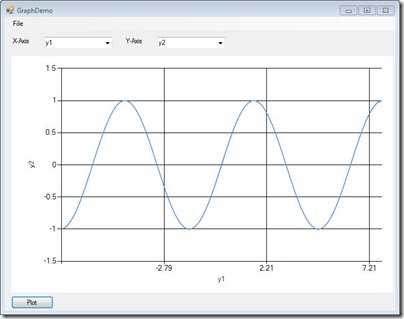
Definitely better! A further improvement will be to add names on the axes, this way when you will save a picture you will know which variable was plotted on which axis. We will use the header from the input file to get these names:
 1 ...
 2 public Plot(Read rr, ComboBox xBox, ComboBox yBox, Chart chart)
 3 {
 4 	int indX = xBox.SelectedIndex;
 5 	int indY = yBox.SelectedIndex;
 6 	float[,] data = rr.get_Data();
 7 	int nLines = rr.get_nLines();
 8 	string []header = rr.get_Header();
 9 
10 	chart.Series.Clear(); //ensure that the chart is empty
11 	chart.Series.Add("Series0");
12 	chart.Series[0].ChartType = SeriesChartType.Line;
13 	chart.ChartAreas[0].AxisX.LabelStyle.Format = "{F2}";
14 	chart.ChartAreas[0].AxisX.Title = header[indX];
15 	chart.ChartAreas[0].AxisY.Title = header[indY];
16 ...

Csharp 2D graphic 2

Obviously in the above picture we need to do something about the number of grid lines corresponding to the x axis, suppose we want to see six grid lines instead of three, we can achieve this by specifying the length of the grid interval and (equally important for the overall aspect) the length of the label interval:

 1 ...
 2 public Plot(Read rr, ComboBox xBox, ComboBox yBox, Chart chart)
 3 {
 4 	int indX = xBox.SelectedIndex;
 5 	int indY = yBox.SelectedIndex;
 6 	float[,] data = rr.get_Data();
 7 	int nLines = rr.get_nLines();
 8 	int nColumns = rr.get_nColumns();
 9 	string []header = rr.get_Header();
10 
11 	chart.Series.Clear(); //ensure that the chart is empty
12 	chart.Series.Add("Series0");
13 	chart.Series[0].ChartType = SeriesChartType.Line;
14 	chart.ChartAreas[0].AxisX.LabelStyle.Format = "{F2}";
15 	chart.ChartAreas[0].AxisX.Title = header[indX];
16 	chart.ChartAreas[0].AxisY.Title = header[indY];
17 
18 	float x_grids = 6;
19 	float[] ext = get_Extrema(data, nLines, nColumns, indX);
20 	chart.ChartAreas[0].AxisX.MajorGrid.Interval = (ext[1] - ext[0]) / x_grids;
21 	chart.ChartAreas[0].AxisX.LabelStyle.Interval = (ext[1] - ext[0]) / x_grids;
22 	chart.ChartAreas[0].AxisX.MajorTickMark.Interval = (ext[1] - ext[0]) / x_grids;
23 ...

We will also need an auxiliary function that will return the minima and maxima of data column corresponding to the x axis:

경축! 아무것도 안하여 에스천사게임즈가 새로운 모습으로 재오픈 하였습니다.
어린이용이며, 설치가 필요없는 브라우저 게임입니다.
https://s1004games.com

 1 class Plot
 2 {
 3 	public Plot(Read rr, ComboBox xBox, ComboBox yBox, Chart chart)
 4 	{
 5 		...
 6 	}
 7 
 8 	private float []get_Extrema(float[,] data,int nL,int nC,int idx)
 9 	{
10 		float min = data[0, idx],max = data[0, idx];
11 		float[] res = new float[2];
12 		for (int i = 1; i < nL; i++)
13 		{
14 			if (min > data[i, idx]) min = data[i, idx];
15 			if (max < data[i, idx]) max = data[i, idx];
16 		}
17 		res[0] = min; res[1] = max;
18 		return res;
19 	}
20 }

Of course a similar procedure can be applied if you need to customize the properties of the y axis. With the above code this is how our application looks:
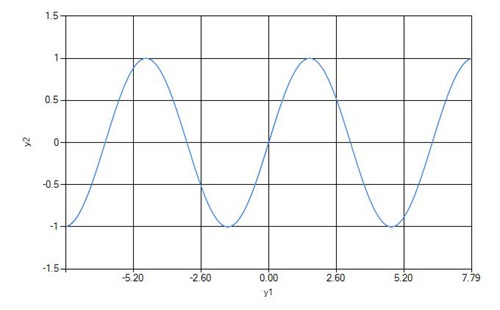
Csharp 2D graphic 3

A further enhancement will be to change the format in which a picture is saved from jpg to a higher quality tiff file. Unfortunately the Chart control doesn't include the possibility to save an image as a PostScript file. However, tiff files are accepted even for journal publications, so if you need a high quality output just change jpg to tiff in the Save function.

In a real life application you won't use hard coded values for the number of grid lines of an axis, or for the color of a graph - you will add a Settings panel to your application from which the user will be able to change these parameters. This tutorial was made only for illustrative purposes so I wasn't always careful with all the little details of a robust application.


[출처] https://solarianprogrammer.com/2011/10/09/scientific-graphics-in-c-part-2/


본 웹사이트는 광고를 포함하고 있습니다.
광고 클릭에서 발생하는 수익금은 모두 웹사이트 서버의 유지 및 관리, 그리고 기술 콘텐츠 향상을 위해 쓰여집니다.
번호 제목 글쓴이 날짜 조회 수
64 [C# Apps] Editor3D: A Windows.Forms Render Control with interactive 3D Editor in C# Editor3D: C#의 대화형 3D 편집기가 포함된 Windows.Forms 렌더 컨트롤 file 졸리운_곰 2023.09.03 543
63 [C# app] Pythonnet – .NET Core와 Python의 간단한 결합 : Pythonnet – A Simple Union of .NET Core and Python You’ll Love file 졸리운_곰 2023.03.11 183
62 [C# app] Gidon C# 플러그인 프레임워크에 Python 애플리케이션 포함 : Embedding Python Applications within Gidon C# Plugin Framework file 졸리운_곰 2023.03.07 252
61 [C# App] Gidon - Avalonia 기반 MVVM 플러그인 IoC 컨테이너 : Gidon - Avalonia based MVVM Plugin IoC Container file 졸리운_곰 2023.03.07 168
60 [VS2019] [C#] WinForm에 MySQL 연동하기 file 졸리운_곰 2022.12.25 228
59 [C#] sqlite on C# 예제로 배우는 C# 프로그래밍 file 졸리운_곰 2021.01.30 401
58 Selenium C# Webdriver Tutorial: NUnit Example file 졸리운_곰 2020.01.03 236
57 [C# 인공지능] 유전 알고리즘 : 유전 알고리즘으로 컴퓨터 자동 프로그래밍 AI-Programmer file 졸리운_곰 2019.12.28 391
56 C# 기초로 한글 검색기(초성 포함) 만들기 [Step by Step] file 졸리운_곰 2019.12.11 1832
55 (C#.NET 한글 프로그램 제작) 한글 조립 및 분해 하기 (유니코드 Unicode) file 졸리운_곰 2019.12.11 463
54 C#에서 유니코드를 이용한 한글 자모 분리와 결합 졸리운_곰 2019.12.11 1359
53 [C#] GUID 생성. file 졸리운_곰 2019.02.27 329
52 MetaWeblogAPI C# 코드 샘플 졸리운_곰 2019.02.08 367
51 A Look into the Future - Source Code Generation by the Bots file 졸리운_곰 2019.01.23 315
50 Machine Learning with ML.Net and C#/VB.Net file 졸리운_곰 2018.12.14 585
» Scientific graphics in C# - [part 2] file 졸리운_곰 2018.12.06 5191
48 Scientific graphics in C# [part 1] file 졸리운_곰 2018.12.06 235
47 Application Trial Maker file 졸리운_곰 2018.11.22 341
46 C# 프로젝트에서 C++ 코드 사용 : Use C++ codes in a C# project — unmanaged C++ solution 졸리운_곰 2018.10.30 375
45 C# 으로 구현하는 간단한 뉴럴네트워크 : Implementing Simple Neural Network in C# file 졸리운_곰 2018.10.30 520
대표 김성준 주소 : 경기 용인 분당수지 U타워 등록번호 : 142-07-27414
통신판매업 신고 : 제2012-용인수지-0185호 출판업 신고 : 수지구청 제 123호 개인정보보호최고책임자 : 김성준 sjkim70@stechstar.com
대표전화 : 010-4589-2193 [fax] 02-6280-1294 COPYRIGHT(C) stechstar.com ALL RIGHTS RESERVED