Introduction
A simple way to find the configuration of a Web Server is by using any one of the HTTP request methods HEAD and GET. When an HTTP request is made for a resource on the Web Server, in response, the Server along with other information sends its own configuration.
The HTTP Response from Web Server contains meta-information in the form of HTTP headers and the message body. The application parses the response for the “Server” header field, which contains the server configuration. The application can also find if a server permits HTTP HEAD requests and the difference in response for different User Agents.
The name and functionality of this tool was inspired by the “HTTP spy” utility provided in 3d Traceroute (http://www.d3tr.de/httpserverspy.html).
Background
RFC 2616 defines Hypertext Transfer Protocol (HTTP) as an application-level protocol for distributed, collaborative, hypermedia information systems. HTTP requests are used for retrieving files from a Web Server. HTTP is a text based protocol consisting of requests and related responses.
HTTP Methods
The most common HTTP request methods are GET and POST. The GET method is used to get a resource from the HTTP Server while POST can send information to the web server. HEAD is identical to GET, except that the former doesn't expect the server to send message body in response. The HEAD method can be used for obtaining meta-information about the entity implied by the request without transferring the entity-body itself. This method is often used for testing hypertext links for validity, accessibility, and recent modification.
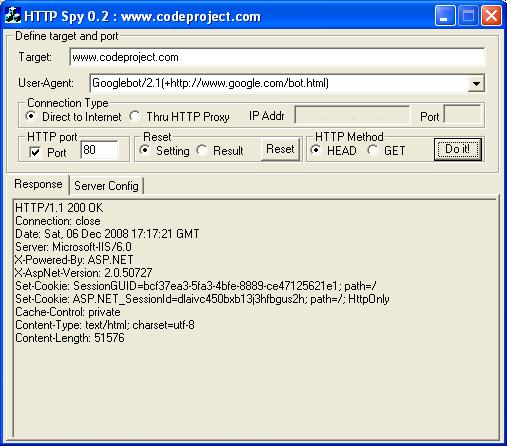
“HTTP Spy” can send HTTP HEAD and GET request methods to the Web Server. Some web server hosts (e.g. www.msn.com) do not permit HTTP HEAD requests. However, almost all web servers support the GET request, which is the most popular/default method used by HTTP clients (especially by Browsers). The GET and HEAD methods don't have the significance of taking any action other than retrieval, so are considered "safe".
HTTP Client Functionality
The underlying transport protocol that does the communication on behalf of HTTP is TCP, which is a connection-oriented protocol. A connection would require the server host name and port number, on which the Web Server application would be waiting for servicing requests from clients. For HTTP the most commonly used port no is 80. However, any free port can be used, and in this case, usually needs to be specified explicitly in the HTTP URI. For example if www.site.com accepts HTTP connections on port 8080 then the HTTP request URI should specify this port number. The HTTP port is specified just after a colon “:”, which follows the hostname (i.e. www.site.com:8080). If the HTTP port is not specified explicitly then by default the HTTP client will use port 80. This would result in TCP connection error, in case the web server is not listening on port 80. However, HTTP Spy doesn't make this a rule, i.e. the HTTP port can be mentioned in the HTTP port edit box instead of explicitly specifying it in the URI.
The application can change its identify (to different browsers or bots), depending on the User Agent selection. This can be used for checking the difference (if any) in the response from a server for the different User Agents.
HTTP Proxy Support
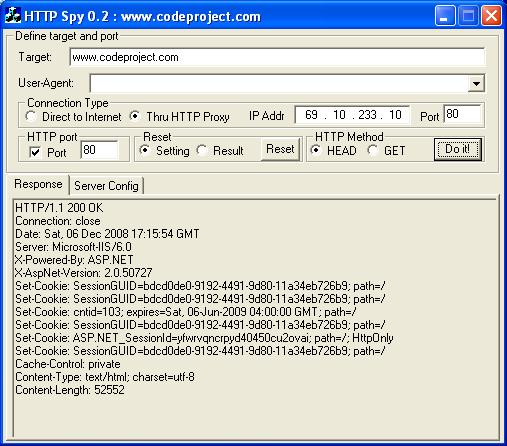
The new version supports connecting to HTTP servers through the HTTP proxy. HTTP proxy is usually used to restrict web access in an enterprise LAN. The main purpose is to allow a single public IP address to be shared among all LAN users for accessing the internet.
To use this feature, the HTTP proxy IP address and its port number should be specified, along with the HTTP server to be queried. The application makes TCP connection to the proxy server and sends the HTTP request to it. The HTTP proxy, on behalf of the user forwards the request to the Web Server. The resulting response from Web Server is then conveyed back to the user by the proxy server.
Implementation
Class HttpSocket has methods that implement HTTP methods. It creates a TCP connection to the HTTP server or proxy server as required by the application. Before that, it parses the HTTP URI, to separate the host, HTTP port information (if specified) and the requested resource on the web server. This is later used to construct the HTTP headers for the request.
A separate child thread performs the HTTP processing for each request. After the completion of the request, the child thread exits.
Conclusion
The application assumes that the meta-information, send by the web server contains its configuration (in the HTTP, nevertheless, there can be exceptions (e.g. www.yahoo.com).
Likes painting and photography too.
소개
웹 서버의 구성을 찾는 간단한 방법은 HTTP 요청 방법 중 하나를 사용하는 것 입니다 HEAD . GET웹 서버의 리소스에 대해 HTTP 요청이 이루어지면 이에 대한 응답으로 서버는 다른 정보와 함께 자체 구성을 보냅니다.
웹 서버의 HTTP 응답에는 HTTP 헤더 및 메시지 본문 형식의 메타정보가 포함되어 있습니다. 애플리케이션은 서버 구성이 포함된 "Server" 헤더 필드에 대한 응답을 구문 분석합니다. 또한 애플리케이션은 서버가 HTTP HEAD 요청을 허용하는지 여부와 다양한 사용자 에이전트에 대한 응답의 차이를 확인할 수 있습니다.
이 도구의 이름과 기능은 3d Traceroute( http://www.d3tr.de/httpserverspy.html )에서 제공되는 "HTTP 스파이" 유틸리티에서 영감을 받았습니다.
배경
RFC 2616은 HTTP(Hypertext Transfer Protocol)를 분산형 협업 하이퍼미디어 정보 시스템을 위한 애플리케이션 수준 프로토콜로 정의합니다. HTTP 요청은 웹 서버에서 파일을 검색하는 데 사용됩니다. HTTP는 요청과 관련 응답으로 구성된 텍스트 기반 프로토콜입니다.
HTTP 메소드
가장 일반적인 HTTP 요청 방법은 GET 및 입니다 POST. 이 GET 메소드는 HTTP 서버에서 자원을 가져오는 동시에 POST 웹 서버에 정보를 보내는 데 사용됩니다. 전자는 서버가 응답으로 메시지 본문을 보낼 것으로 예상하지 않는다는 점을 제외하면 와 HEAD 동일합니다 . GET이 HEAD 방법은 Entity-Body 자체를 전송하지 않고 요청에 의해 암시된 엔터티에 대한 메타정보를 얻는 데 사용될 수 있습니다. 이 방법은 하이퍼텍스트 링크의 유효성, 접근성 및 최근 수정 사항을 테스트하는 데 자주 사용됩니다.
HEAD “HTTP 스파이”는 HTTP 와 GET 요청 메소드를 웹 서버로 보낼 수 있습니다 . 일부 웹 서버 호스트(예: www.msn.com )는 HTTP 요청을 허용하지 않습니다 HEAD . 그러나 거의 모든 웹 서버는 GET HTTP 클라이언트(특히 브라우저)에서 사용되는 가장 널리 사용되는 기본 방법인 요청을 지원합니다. GET 및 메소드 HEAD 는 검색 이외의 조치를 취하는 의미가 없으므로 "안전한" 것으로 간주됩니다.
HTTP 클라이언트 기능
HTTP를 대신하여 통신을 수행하는 기본 전송 프로토콜은 연결 지향 프로토콜인 TCP입니다. 연결에는 웹 서버 애플리케이션이 클라이언트의 요청 처리를 기다리는 서버 호스트 이름과 포트 번호가 필요합니다. HTTP의 경우 가장 일반적으로 사용되는 포트 번호는 80입니다. 그러나 모든 무료 포트를 사용할 수 있으며 이 경우 일반적으로 HTTP URI에 명시적으로 지정해야 합니다. 예를 들어 www.site.com이 포트 8080에서 HTTP 연결을 허용하는 경우 HTTP 요청 URI는 이 포트 번호를 지정해야 합니다. HTTP 포트는 호스트 이름 뒤에 오는 콜론 ":" 바로 뒤에 지정됩니다(예: www.site.com:8080). HTTP 포트가 명시적으로 지정되지 않으면 기본적으로 HTTP 클라이언트는 포트 80을 사용합니다. 이로 인해 웹 서버가 포트 80에서 수신 대기하지 않는 경우 TCP 연결 오류가 발생합니다. 그러나 HTTP Spy는 이를 규칙으로 만들지 않습니다. 즉, HTTP 포트를 URI에 명시적으로 지정하는 대신 HTTP 포트 편집 상자에서 언급할 수 있습니다.
응용 프로그램은 사용자 에이전트 선택에 따라 해당 ID를 다른 브라우저 또는 봇으로 변경할 수 있습니다. 이는 다양한 사용자 에이전트에 대한 서버 응답의 차이(있는 경우)를 확인하는 데 사용할 수 있습니다.
HTTP 프록시 지원
새 버전은 HTTP 프록시를 통한 HTTP 서버 연결을 지원합니다. HTTP 프록시는 일반적으로 엔터프라이즈 LAN에서 웹 액세스를 제한하는 데 사용됩니다. 주요 목적은 인터넷에 액세스하기 위해 모든 LAN 사용자가 단일 공용 IP 주소를 공유할 수 있도록 하는 것입니다.
이 기능을 사용하려면 쿼리할 HTTP 서버와 함께 HTTP 프록시 IP 주소와 해당 포트 번호를 지정해야 합니다. 응용 프로그램은 프록시 서버에 TCP 연결을 만들고 HTTP 요청을 보냅니다. 사용자를 대신하여 HTTP 프록시가 요청을 웹 서버에 전달합니다. 그런 다음 웹 서버의 결과 응답은 프록시 서버를 통해 사용자에게 다시 전달됩니다.
구현
클래스 HttpSocket 에는 HTTP 메서드를 구현하는 메서드가 있습니다. 애플리케이션의 요구에 따라 HTTP 서버 또는 프록시 서버에 대한 TCP 연결을 생성합니다. 그 전에는 HTTP URI를 구문 분석하여 호스트, HTTP 포트 정보(지정된 경우) 및 웹 서버에서 요청된 리소스를 분리합니다. 이는 나중에 요청에 대한 HTTP 헤더를 구성하는 데 사용됩니다.
별도의 하위 스레드가 각 요청에 대해 HTTP 처리를 수행합니다. 요청이 완료되면 하위 스레드가 종료됩니다.
결론
애플리케이션은 웹 서버가 보내는 메타 정보에 해당 구성이 포함되어 있다고 가정합니다(HTTP에는 예외가 있을 수 있음(예: www.yahoo.com ).
특허
작성자
기술 리드
 인도
인도
그림과 사진도 좋아합니다.

