
- 전체
- android studio
- Android SDK
- Android NDK
- Android ADK
- Android Etc. Lib.
- Android dalvik VM
- Android 보안
- PhoneGap
- AOSP 개발
- MIT App Inventor 2
- kivy (python)
- ionic framework
- Kotlin (코틀린)
- React Native
android studio [Android Studio] Android Native App 에서 mysql , php 연결 : PHP MySQL REST API for Android
2021.12.02 01:33
[Android Studio] Android Native App 에서 mysql , php 연결 : PHP MySQL REST API for Android
PHP MySQL REST API for Android
php-mysql-rest-api-for-android-bundle.zip
PHP REST API backed up with a MySQL database is a very common schematic of an Enterprise mobile application. When the scenario requires data to be stored in a centralized manner, then this architecture should be used.Otherwise, the local database in the mobile can be used for the storage and retrieval of information.
In this tutorial, we are creating a PHP RESTful service to read data from a (MySQL) database table. Also, I am providing an example Android project code for invoking this RESTful service.
In a previous tutorial, we have seen then basics about PHP RESTful services. I strongly recommend you to go through it before continuing this tutorial.
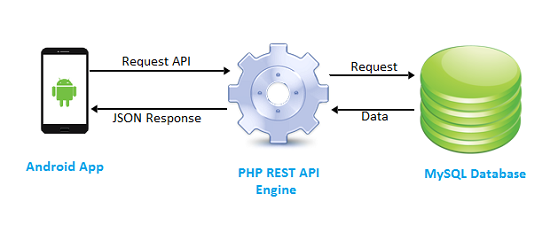
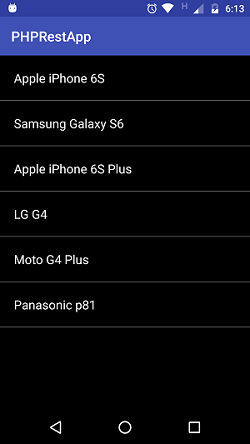
In this example, we are calling the PHP REST API from an android application. In the server side, the API service reads data from the database and sends the response in JSON format. After receiving the response, the Android application displays the row of items in a ListView by parsing the JSON data.
If you want to see how to handle JSON data with PHP with detailed notes and examples, then the linked article will be a perfect tutorial on this.
PHP REST API that Reads MySQL Records
We have a database table containing the list of mobile phone model names. Our REST API fetches the list of mobile names from the database and sends the response in JSON. This REST API contains three parts. These are, the REST controller, service class, and the DAO.
RestController.php
The REST call lands on this controller. It calls the service to prepare a response.
<?php
require_once("MobileRestHandler.php");

$view = "";
if(isset($_GET["view"]))
	$view = $_GET["view"];
/*
controls the RESTful services
URL mapping
*/
switch($view){

	case "all":
		// to handle REST Url /mobile/list/
		$mobileRestHandler = new MobileRestHandler();
		$mobileRestHandler->getAllMobiles();
		break;

	case "" :
		//404 - not found;
		break;
}
?>
MobileRestHanler.php
Service class invokes DAO function to read data from the database table. Since our application requests JSON type data, the service class prepares the response in JSON format.
<?php
require_once("SimpleRest.php");
require_once("Mobile.php");

class MobileRestHandler extends SimpleRest {

	function getAllMobiles() {

		$mobile = new Mobile();
		$rawData = $mobile->getAllMobile();

		if(empty($rawData)) {
			$statusCode = 404;
			$rawData = array('error' => 'No mobiles found!');
		} else {
			$statusCode = 200;
		}

		$requestContentType = 'application/json';//$_POST['HTTP_ACCEPT'];
		$this ->setHttpHeaders($requestContentType, $statusCode);

		$result["output"] = $rawData;

		if(strpos($requestContentType,'application/json') !== false){
			$response = $this->encodeJson($result);
			echo $response;
		}
	}

	public function encodeJson($responseData) {
		$jsonResponse = json_encode($responseData);
		return $jsonResponse;
	}
}
?>
Mobile.php
<?php
require_once("dbcontroller.php");
/*
A domain Class to demonstrate RESTful web services
*/
Class Mobile {
	private $mobiles = array();
	/*
		you should hookup the DAO here
	*/
	public function getAllMobile(){
		$query = "SELECT * FROM tbl_mobile";
		$dbcontroller = new DBController();
		$this->mobiles = $dbcontroller->executeSelectQuery($query);
		return $this->mobiles;
	}
}
?>
Android App – PHP REST API Access
In this example, we are creating a simple Android app for accessing MySQL data using a REST API in PHP. We are having a ListView element in the MainActivity.


We are creating a ListView Adapter to add the list of items returned as the API response. Then we set this adapter to the ListView element to display MySQL data rows.
On launching the MainActivity, we invoke the AsyncTask to access PHP MySQL REST API. We use “HTTPConnectionRequest” class to set params and send the request to the API. The following code shows the MainActivity class.
package com.phppot.code.phprestapp;

import android.app.Activity;
import android.app.ProgressDialog;
import android.content.Context;
import android.os.AsyncTask;
import android.support.v4.app.Fragment;
import android.support.v4.app.FragmentTransaction;
import android.support.v7.app.AppCompatActivity;
import android.os.Bundle;
import android.text.format.DateUtils;
import android.util.Log;
import android.view.View;
import android.widget.AdapterView;
import android.widget.ArrayAdapter;
import android.widget.ListView;

import org.json.JSONArray;
import org.json.JSONException;
import org.json.JSONObject;

import java.lang.ref.WeakReference;
import java.util.Date;
import java.util.HashMap;

public class MainActivity extends AppCompatActivity {
    private String apiPath = "http://10.0.2.2/phpsamples/php-mysql-rest-api-for-android/mobile/list/";
    private ProgressDialog processDialog;
    private JSONArray restulJsonArray;
    private int success = 0;

    private ListView listView;

    @Override
    protected void onCreate(Bundle savedInstanceState) {
        super.onCreate(savedInstanceState);
        setContentView(R.layout.activity_main);

        listView = (ListView) findViewById(R.id.mobile_name_list);
        new ServiceStubAsyncTask(this, this).execute();
    }

    private class ServiceStubAsyncTask extends AsyncTask<Void, Void, Void> {

        private Context mContext;
        private Activity mActivity;
        String response = "";
        HashMap<String, String> postDataParams;

        public ServiceStubAsyncTask(Context context, Activity activity) {
            mContext = context;
            mActivity = activity;
        }

        @Override
        protected void onPreExecute() {
            super.onPreExecute();
            processDialog = new ProgressDialog(mContext);
            processDialog.setMessage("Please  Wait ...");
            processDialog.setCancelable(false);
            processDialog.show();
        }

        @Override
        protected Void doInBackground(Void... arg0) {

            postDataParams = new HashMap<String, String>();
            postDataParams.put("HTTP_ACCEPT", "application/json");

            HttpConnectionService service = new HttpConnectionService();
            response = service.sendRequest(apiPath, postDataParams);
            try {
                success = 1;
                JSONObject resultJsonObject = new JSONObject(response);
                restulJsonArray = resultJsonObject.getJSONArray("output");
            } catch (JSONException e) {
                success = 0;
                e.printStackTrace();
            }
            return null;
        }

        @Override
        protected void onPostExecute(Void result) {
            super.onPostExecute(result);

            if (processDialog.isShowing()) {
                processDialog.dismiss();
            }

            if (success == 1) {
                if (null != restulJsonArray) {
                    ArrayAdapter listViewAdapter = new ArrayAdapter<String>(mContext, R.layout.mobile_name_listview);

                    for (int i = 0; i < restulJsonArray.length(); i++) {
                        try {
                            JSONObject jsonObject = restulJsonArray.getJSONObject(i);
                            listViewAdapter.add(jsonObject.get("name"));
                        } catch (JSONException e) {
                            e.printStackTrace();
                        }
                    }
                    listView.setAdapter(listViewAdapter);
                }
            }
        }

    }//end of async task
}
and the XML content files are,
activity_main.xml
<?xml version="1.0" encoding="utf-8"?>
<RelativeLayout xmlns:android="http://schemas.android.com/apk/res/android"
    xmlns:tools="http://schemas.android.com/tools"
    android:layout_width="match_parent"
    android:layout_height="match_parent"
    android:paddingBottom="@dimen/activity_vertical_margin"
    android:paddingLeft="@dimen/activity_horizontal_margin"
    android:paddingRight="@dimen/activity_horizontal_margin"
    android:paddingTop="@dimen/activity_vertical_margin"
    tools:context="com.phppot.code.phprestapp.MainActivity"
    android:background="#000000"
    android:padding="0dp">

    <ListView
        android:layout_width="match_parent"
        android:layout_height="match_parent"
        android:id="@+id/mobile_name_list"
        android:layout_alignParentBottom="false"
        android:layout_centerHorizontal="true"
        android:layout_marginBottom="124dp"
        android:layout_alignParentTop="true"
        android:divider="#5e5e5f"
        android:dividerHeight="1dp"
        android:drawSelectorOnTop="true"
        android:layout_margin="0dp"
        android:padding="0dp" />
</RelativeLayout>
mobile_name_listview.xml
<?xml version="1.0" encoding="utf-8"?>
<TextView  xmlns:android="http://schemas.android.com/apk/res/android"
        android:layout_width="wrap_content"
        android:layout_height="wrap_content"
        android:text="New Text"
        android:id="@+id/list_item"
    android:textColor="#FFFFFF"
    android:background="#000"
    android:textSize="18dp"
    android:paddingTop="20dp"
    android:paddingBottom="20dp" />
Output:
[출처] https://phppot.com/php/php-mysql-rest-api-for-android/
광고 클릭에서 발생하는 수익금은 모두 웹사이트 서버의 유지 및 관리, 그리고 기술 콘텐츠 향상을 위해 쓰여집니다.
