
- 전체
- Sample DB
- database modeling
- [표준 SQL] Standard SQL
- G-SQL
- 10-Min
- ORACLE
- MS SQLserver
- MySQL
- SQLite
- postgreSQL
- 데이터아키텍처전문가 - 국가공인자격
- 데이터 분석 전문가 [ADP]
- [국가공인] SQL 개발자/전문가
- NoSQL
- hadoop
- hadoop eco system
- big data (빅데이터)
- stat(통계) R 언어
- XML DB & XQuery
- spark
- DataBase Tool
- 데이터분석 & 데이터사이언스
- Engineer Quality Management
- [기계학습] machine learning
- 데이터 수집 및 전처리
- 국가기술자격 빅데이터분석기사
- 암호화폐 (비트코인, cryptocurrency, bitcoin)
spark [SPARK][Python][pySpark][아콘 소프트][나무기술] Real-world Python workloads on Spark: Standalone clusters : 스파크 예제 논란, driver-host 불필요
2021.04.03 17:48
[SPARK][Python][pySpark][아콘 소프트][나무기술] Real-world Python workloads on Spark: Standalone clusters : 스파크 예제 논란, driver-host 불필요
Real-world Python workloads on Spark: Standalone clusters
There are countless articles and forum posts about running Python on Spark, but most assume that the work to be submitted is contained in a single .py file: spark-submit wordcount.py — done!
What if your Python program is more than just a script? Perhaps it generates dynamic SQL for Spark to execute, or refreshes models using Spark’s output. As your Python code becomes more of an app (with a directory structure, configuration files, and library dependencies), submitting it to Spark requires a bit more consideration.
Below are the alternatives I recently considered when taking one such Python application to production using Spark 2.3. This first article focuses on Spark standalone clusters. A separate article covers EMR Spark (YARN).
I am far from an authority on Spark let alone Python. My decisions attempted to balance correctness with ease of deployment, and the limitations imposed by the app with those of the cluster. Let me know what you think.
Trending AI Articles:
1. Predicting buying behavior using Machine Learning
2. Understanding and building Generative Adversarial Networks(GANs)
3. Building a Django POST face-detection API using OpenCV and Haar Cascades
Sample Python application
To simulate a complete application, the scenarios below assume a Python 3 application with the following structure:
project.py
data/
    data_source.py
    data_source.ini
data_source.ini contains various configuration parameters:
[spark]
app_name = My PySpark App
master_url = spark://sparkmaster:7077
data_source.py is a module responsible for sourcing and processing data in Spark, making math transformations with NumPy, and returning a Pandas dataframe to the client. Dependencies:
from pyspark import SparkConf, SparkContext
from pyspark.sql import SparkSession
from pyspark.sql.types import StructType, StructField, FloatTypeimport pandas as pd
import numpy as np
import configparser
It defines a DataSource class that creates a SparkContext and SparkSession on initialization…
class DataSource:
    def __init__(self):        config = configparser.ConfigParser()
        config.read('./data/data_source.ini')
        master_url = config['spark']['master_url']
        app_name = config['spark']['app_name']        conf = SparkConf().setAppName(app_name) \
                          .setMaster(master_url)        self.sc = SparkContext(conf=conf)
        self.spark = SparkSession.builder \
                                 .config(conf=conf) \
                                 .getOrCreate()
…and a get_data() method that:
- Creates an RDD from a NumPy normal distribution.
- Applies a function to double the value of every element.
- Converts the RDD into a Spark dataframe and defines a temp view on top.
- Applies a Python UDF that squares the contents of every dataframe element using SQL.
- Returns the results to the client as a Pandas dataframe.
def get_data(self, num_elements=1000) -> pd.DataFrame:    mu, sigma = 2, 0.5
    v = np.random.normal(mu, sigma, num_elements)
    rdd1 = self.sc.parallelize(v)    def mult(x): return x * np.array([2])
    rdd2 = rdd1.map(mult).map(lambda x: (float(x),))    schema = StructType([StructField("value", FloatType(), True)])
    df1 = self.spark.createDataFrame(rdd2, schema)
    df1.registerTempTable("test")    def square(x): return x ** 2
    self.spark.udf.register("squared", square)
    df2 = self.spark.sql("SELECT squared(value) squared FROM test")    return df2.toPandas()
project.py is our main program, acting as a client of the above module:
from data.data_source import DataSourcedef main():
    src = DataSource()
    df = src.get_data(num_elements=100000)
    print(f"Got Pandas dataframe with {df.size} elements")
    print(df.head(10))main()
Clone the repo: https://bitbucket.org/calidoteam/pyspark.git
Before we begin, let’s review the options available when submitting work to Spark.
spark-submit, client and cluster modes
- Spark supports various cluster managers: Standalone (i.e. built into Spark), Hadoop’s YARN, Mesos, Kubernetes, all of which control how your workload runs on a set of resources.
spark-submitis the only interface that works consistently with all cluster managers. For Python applications,spark-submitcan upload and stage all dependencies you provide as .py, .zip or .egg files when needed.- In client mode, your Python program (i.e. driver) will run on the same host where
spark-submitruns. It is in your best interest to make sure such host is close to your worker nodes to reduce network latency. - In cluster mode, your Python program (i.e. driver) and dependencies will be uploaded to and run from some worker node. This is useful when submitting jobs from a remote host. As of Spark 2.4.0 cluster mode is not an option when running on Spark standalone.
- Alternatively, it is possible to bypass
spark-submitby configuring theSparkSessionin your Python app to connect to the cluster. This requires the right configuration and matching PySpark binaries. Your Python app will effectively be running in client mode: It will run from wherever host you launched it.
The following sections describe several deployment alternatives and what configuration was required in each.
#1: Direct connect to Spark (client mode, no spark-submit)
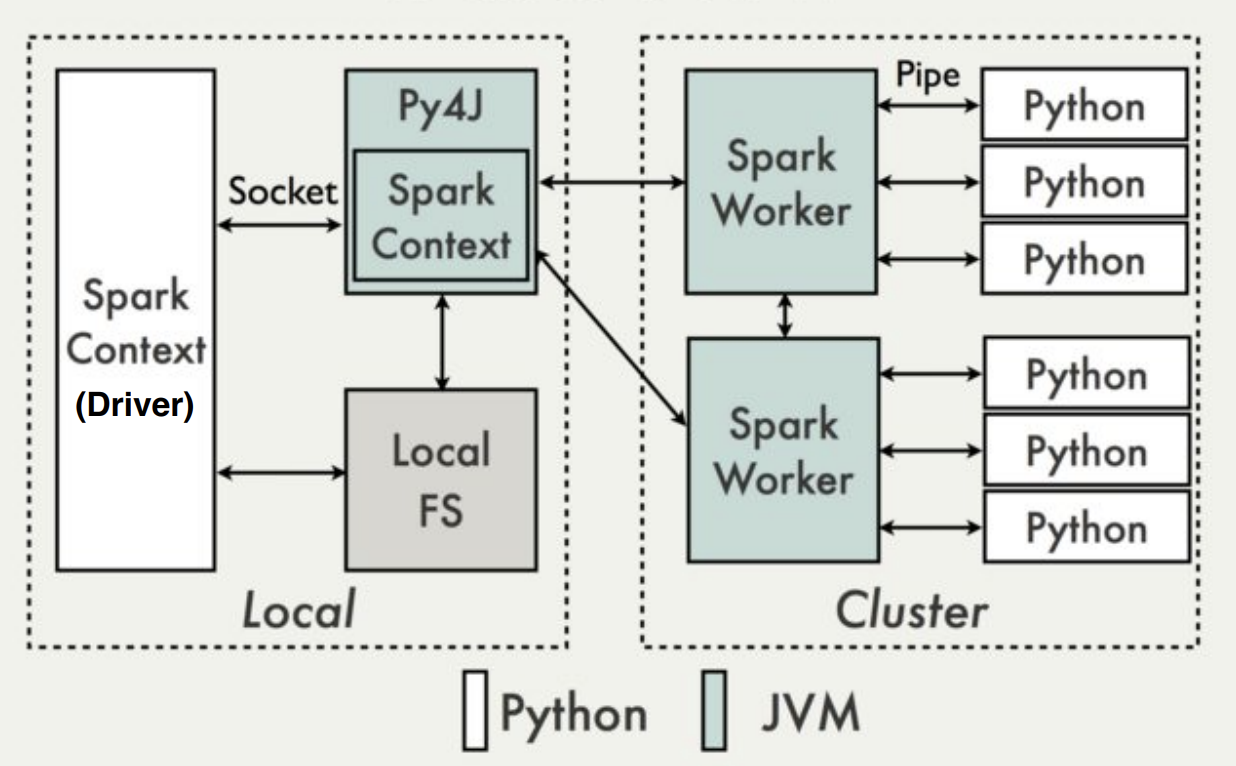
This is the simplest deployment scenario: The Python app directly establishes a spark context by pointing to a Spark master URL, and uses it to submit work:
conf = SparkConf().setAppName("My PySpark App") \
                  .setMaster("spark://192.168.1.10:7077")sc = SparkContext(conf=conf)spark = SparkSession.builder \
                    .config(conf=conf) \
                    .getOrCreate()
In a standalone cluster, resources get allocated for the duration of the job, and the default configuration gives client applications all available resources, thus requiring minor tuning for multi-tenant environments. Executor processes (JVM or python) are launched by Worker processes local to each node.
This resembles a traditional client-server application in that the client simply “connects” to a “remote” cluster. Recommendations:


Ensure there is plenty of bandwidth between your driver and the cluster. Most of the network activity happens between the driver and its executors, so this “remote” cluster must actually be within close proximity (LAN).
Improve Java-Python serialization by enabling Apache Arrow: Python workloads (NumPy, Pandas and other transformations applied to Spark RDDs, dataframes and datasets) require by default lots of serialization and deserialization to and from Java and Python processes and will quickly degrade performance. Starting with Spark 2.3, enabling Apache Arrow (included in the steps listed below) makes those transfers vastly more efficient.
Deploy dependencies across all cluster nodes and driver host. This includes downloading and installing Python 3, pip-installing PySpark (must match the version of the target cluster), PyArrow, as well as other library dependencies:
sudo yum install python36pip install pyspark==2.3.1
pip install pyspark[sql]
pip install numpy pandas msgpack sklearn
Note: While installing a large library like PySpark (~200MB), you might run into an error ending in “MemoryError". If so, try:
pip install --no-cache-dir pyspark==2.3.1
Configuration and environment variables: On the client side, $SPARK_HOME must point to the location where pip installed PySpark:
$ pip show pysparkName: pyspark
Version: 2.3.1
Summary: Apache Spark Python API
Home-page: https://github.com/apache/spark/tree/master/python
Author: Spark Developers
Author-email: dev@spark.apache.org
License: http://www.apache.org/licenses/LICENSE-2.0
Location: /opt/anaconda/lib/python3.6/site-packages
Requires: py4j$ export SPARK_HOME=/opt/anaconda/lib/python3.6/site-packages
On every cluster node, set additional default parameters and environment variables. Specifically, for Python apps:
$SPARK_HOME/conf/spark-defaults.sh
spark.sql.execution.arrow.enabled true
$SPARK_HOME/conf/spark-env.sh
export PYSPARK_PYTHON=/usr/bin/python3: Python executable, all nodes.export PYSPARK_DRIVER_PYTHON=/usr/bin/python3: Python executable for the driver, if different from executor nodes.
Note: Environment variables are read from wherever spark-submit is launched, not necessarily from within cluster hosts.
Running it
Submitting the workload to the cluster is simply matter of running the Python application (e.g. spark-submit is not required):
$ cd my-project-dir/
$ python3 project.py
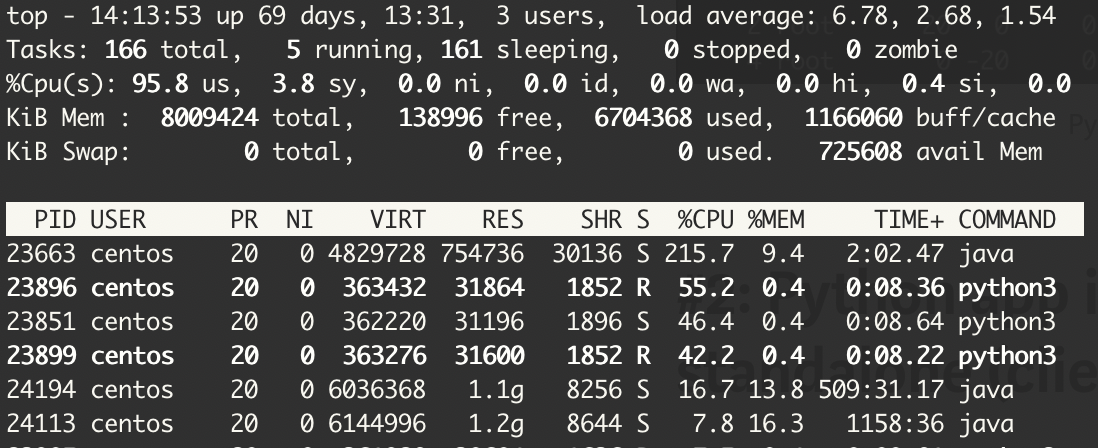
At runtime, it’s possible to see slave nodes running multiple python3 processes working on the job:

#2: Containerized app (client mode, no spark-submit)
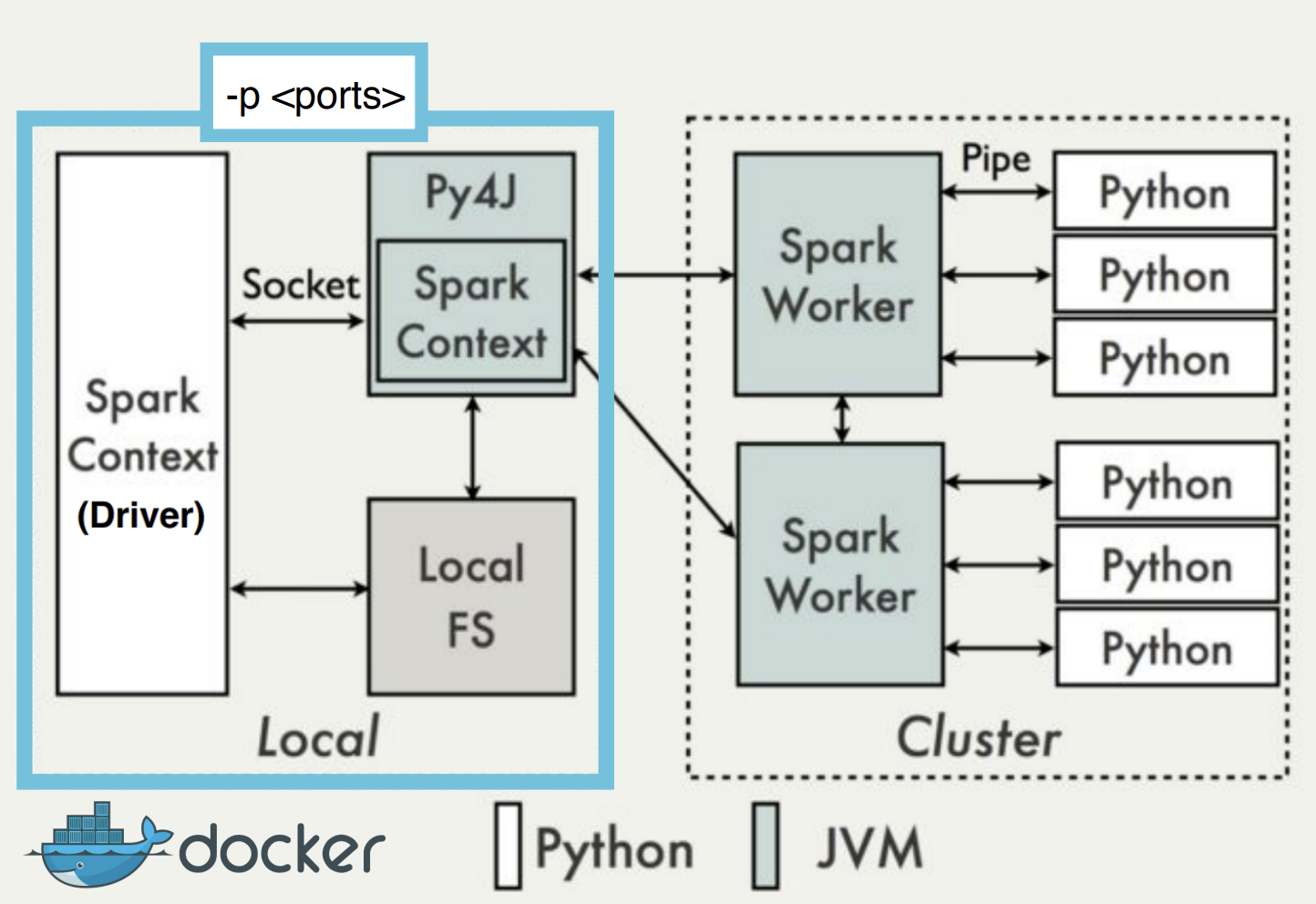
This is an extension of the previous scenario whereby it be desirable to run the Python app as a Docker container as part of a CI/CD pipeline, for portability reasons, etc.
In addition to the configuration recommended for the previous scenario, the following is required:
Build the container to include all dependencies: Start from an image that includes Python 3 and/or the Java 8 OpenJDK, then pip-install PySpark, PyArrow and all other libraries required by the application.
Configure Spark driver host and ports, open them in the container: This is required in order for executors to reach the driver inside the container. Spark properties for the driver can be set programmatically (spark.conf.set(“property”, “value”)):
spark.driver.host : host_ip_address (e.g. 192.168.1.10)
spark.driver.port : static_port (e.g. 51400)
spark.driver.bindAddress : container_internal_ip (e.g. 10.192.6.81)
spark.driver.blockManagerPort : static_port (e.g. 51500)
In Docker, ports then can be exposed to the outside from the command line using the -p option: -p 51400:51400 -p 51500:51500. Other articles suggest simply publishing this port range: -p 5000–5010:5000–5010
Running it
As with the previous scenario, running the container will start the Python driver program:
docker run -p 51400:51400 -p 51500:51500 <docker_image_url>
#3: Python app via spark-submit (client mode)
This scenario is virtually identical to scenario #1 and included here only for clarity. The only difference is the fact that the Python app is launched using the spark-submitprocess. Cluster events are sent to stdout in addition to log files:
$ cd my-project-dir/
$ ls -l rwxrwxr-x. 3 centos centos  70 Feb 25 02:11 data
-rw-rw-r--. 1 centos centos 220 Feb 25 01:09 project.py$ spark-submit project.py
Notes:
- In my experience, it wasn’t necessary to pass dependent subdirectories/files when calling
spark-submitas long as it was invoked from the project root directory (my-project-dir/). - Since the sample app already specifies a master URL, it isn’t necessary to pass one to
spark-submit. Otherwise, a more complete command would be:
$ spark-submit --master spark://sparkcas1:7077 --deploy-mode client project.py
- As of Spark 2.3, it is not possible to submit Python apps in cluster mode to a standalone Spark cluster. Doing so yields an error:
$ spark-submit --master spark://sparkcas1:7077 --deploy-mode cluster project.pyError: Cluster deploy mode is currently not supported for python applications on standalone clusters.
Takeaways— Python on Spark standalone clusters:
- Although standalone clusters aren’t popular in production (maybe because commercially supported distributions include a cluster manager), they have a smaller footprint and do a good job as long as multi-tenancy and dynamic resource allocation aren’t a requirement.
- For Python apps, deployment options are limited to client mode.
- Using Docker to containerize the Python app has all the expected advantages and is well suited for client mode deployments.
[출처] https://becominghuman.ai/real-world-python-workloads-on-spark-standalone-clusters-2246346c7040
광고 클릭에서 발생하는 수익금은 모두 웹사이트 서버의 유지 및 관리, 그리고 기술 콘텐츠 향상을 위해 쓰여집니다.

