
- 전체
- JAVA 일반
- JAVA 수학
- JAVA 그래픽
- JAVA 자료구조
- JAVA 인공지능
- JAVA 인터넷
- Java Framework
- Java GUI (AWT,SWING,SWT,JFACE)
- SWT and RCP (web RAP/RWT)[eclipse], EMF
JAVA 자료구조 Java code example to export from database to CSV file
2020.09.24 16:20
Java code example to export from database to CSV file
Exporting data from database to CSV files is a common task of any software applications. In this article, I will guide you how to write Java code to read data from a database and write to a CSV file.
The technique is simple. We use JDBC to read data from database and use File I/O to write CSV file. And a JDBC driver library for the underlying database is necessary (MySQL is used in this post).
Suppose that we have a table with the following structure:
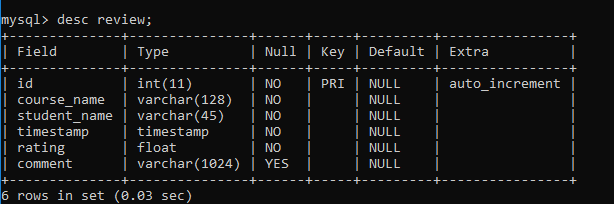
And this table contains some data like this:
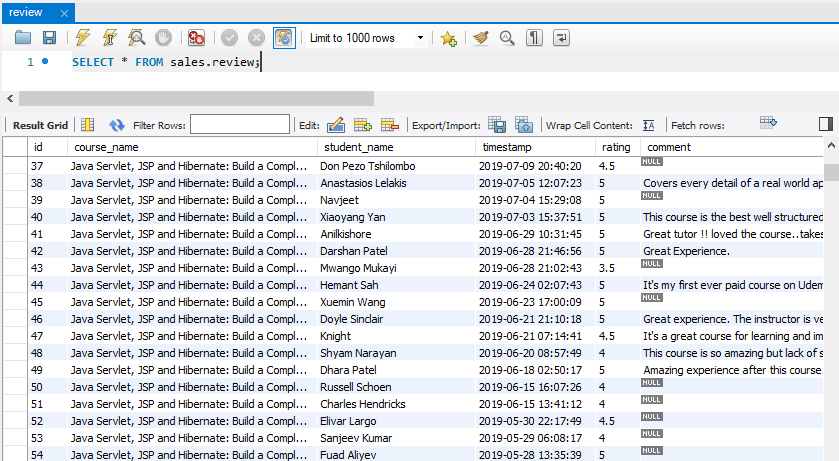
First, you will learn how to write Java code to export data from this table to a CSV file. And then I will share with you how to write general, reusable code that works with any table.
1. Simple Java code example to export from database to CSV file
The following code is for a simple Java program that connects to a MySQL database reads all rows from the review table and write that data to a CSV file:
|
1
2
3
4
5
6
7
8
9
10
11
12
13
14
15
16
17
18
19
20
21
22
23
24
25
26
27
28
29
30
31
32
33
34
35
36
37
38
39
40
41
42
43
44
45
46
47
48
49
50
51
52
53
54
55
56
57
58
59
60
61
62
63
64
65
|
package net.codejava;import java.io.*;import java.sql.*;/** * A simple Java program that exports data from database to CSV file. * @author Nam Ha Minh * (C) Copyright codejava.net */public class SimpleDb2CsvExporter { public static void main(String[] args) { String jdbcURL = "jdbc:mysql://localhost:3306/sales"; String username = "root"; String password = "password"; String csvFilePath = "Reviews-export.csv"; try (Connection connection = DriverManager.getConnection(jdbcURL, username, password)) { String sql = "SELECT * FROM review"; Statement statement = connection.createStatement(); ResultSet result = statement.executeQuery(sql); BufferedWriter fileWriter = new BufferedWriter(new FileWriter(csvFilePath)); // write header line containing column names fileWriter.write("course_name,student_name,timestamp,rating,comment"); while (result.next()) { String courseName = result.getString("course_name"); String studentName = result.getString("student_name"); float rating = result.getFloat("rating"); Timestamp timestamp = result.getTimestamp("timestamp"); String comment = result.getString("comment"); if (comment == null) { comment = ""; // write empty value for null } else { comment = "\"" + comment + "\""; // escape double quotes } String line = String.format("\"%s\",%s,%.1f,%s,%s", courseName, studentName, rating, timestamp, comment); fileWriter.newLine(); fileWriter.write(line); } statement.close(); fileWriter.close(); } catch (SQLException e) { System.out.println("Datababse error:"); e.printStackTrace(); } catch (IOException e) { System.out.println("File IO error:"); e.printStackTrace(); } }} |
As you can see in this program, it is written for a specific table whose column names are known. Run this program and you would see the Reviews-export.csv file is generated with the following content:



Note that the values of the ID field are not exported. The values of some columns are put inside double quotes so it is still valid if the text contains commas.
2. Advanced Java code example to export from database to CSV file
Let’s see how to code a more generic program that can work with any tables. Following is code of the full program:
|
1
2
3
4
5
6
7
8
9
10
11
12
13
14
15
16
17
18
19
20
21
22
23
24
25
26
27
28
29
30
31
32
33
34
35
36
37
38
39
40
41
42
43
44
45
46
47
48
49
50
51
52
53
54
55
56
57
58
59
60
61
62
63
64
65
66
67
68
69
70
71
72
73
74
75
76
77
78
79
80
81
82
83
84
85
86
87
88
89
90
91
92
93
94
95
96
97
98
99
100
101
102
103
|
package net.codejava;import java.io.*;import java.sql.*;import java.text.*;import java.util.*;/** * An advanced Java program that exports data from any table to CSV file. * @author Nam Ha Minh * (C) Copyright codejava.net */public class AdvancedDb2CsvExporter { private BufferedWriter fileWriter; public void export(String table) { String jdbcURL = "jdbc:mysql://localhost:3306/sales"; String username = "root"; String password = "password"; String csvFileName = getFileName(table.concat("_Export")); try (Connection connection = DriverManager.getConnection(jdbcURL, username, password)) { String sql = "SELECT * FROM ".concat(table); Statement statement = connection.createStatement(); ResultSet result = statement.executeQuery(sql); fileWriter = new BufferedWriter(new FileWriter(csvFileName)); int columnCount = writeHeaderLine(result); while (result.next()) { String line = ""; for (int i = 2; i <= columnCount; i++) { Object valueObject = result.getObject(i); String valueString = ""; if (valueObject != null) valueString = valueObject.toString(); if (valueObject instanceof String) { valueString = "\"" + escapeDoubleQuotes(valueString) + "\""; } line = line.concat(valueString); if (i != columnCount) { line = line.concat(","); } } fileWriter.newLine(); fileWriter.write(line); } statement.close(); fileWriter.close(); } catch (SQLException e) { System.out.println("Datababse error:"); e.printStackTrace(); } catch (IOException e) { System.out.println("File IO error:"); e.printStackTrace(); } } private String getFileName(String baseName) { DateFormat dateFormat = new SimpleDateFormat("yyyy-MM-dd_HH-mm-ss"); String dateTimeInfo = dateFormat.format(new Date()); return baseName.concat(String.format("_%s.csv", dateTimeInfo)); } private int writeHeaderLine(ResultSet result) throws SQLException, IOException { // write header line containing column names ResultSetMetaData metaData = result.getMetaData(); int numberOfColumns = metaData.getColumnCount(); String headerLine = ""; // exclude the first column which is the ID field for (int i = 2; i <= numberOfColumns; i++) { String columnName = metaData.getColumnName(i); headerLine = headerLine.concat(columnName).concat(","); } fileWriter.write(headerLine.substring(0, headerLine.length() - 1)); return numberOfColumns; } private String escapeDoubleQuotes(String value) { return value.replaceAll("\"", "\"\""); } public static void main(String[] args) { AdvancedDb2CsvExporter exporter = new AdvancedDb2CsvExporter(); exporter.export("review"); exporter.export("product"); } } |
You pass a table name to the export() method and it does all the heavy work. The CSV file name is generated based on the table name, followed by _Export and the current date time:
|
1
|
String csvFileName = getFileName(table.concat("_Export")); |
The method getFileName() is written as follows:
|
1
2
3
4
5
|
private String getFileName(String baseName) { DateFormat dateFormat = new SimpleDateFormat("yyyy-MM-dd_HH-mm-ss"); String dateTimeInfo = dateFormat.format(new Date()); return baseName.concat(String.format("_%s.csv", dateTimeInfo));} |
So if the table name is Review, then the CSV file name would be Review_Export_2019-10-14_20-52-55.csv. Adding timestamp to the CSV file name would be useful for the end users who will be able to differentiate each data export.
The writeHeaderLine() method writes the column names in first line of the CSV file. It uses ResultSetMetaData to get the names of the columns – that means it can work with any tables.
Note that the program doesn’t export values of the ID column (it is supposed to be always the first column).
Then you can use this program to export data from any tables you wish, like this:
|
1
2
3
4
|
AdvancedDb2CsvExporter exporter = new AdvancedDb2CsvExporter();exporter.export("review");exporter.export("product"); |
That’s Java code example to export data from database to CSV file. I hope you find this article helpful and use the code as a reference to export your down data.
Other Java Coding Tutorials:
- Java code example to insert data from CSV to database
- How to display images from database in JSP page with Java Servlet
- How to implement remember password (remember me) for Java web application
- How to code login and logout with Java Servlet, JSP and MySQL
- How to Code Hit Counter for Java web application
- 10 Common Mistakes Every Beginner Java Programmer Makes
- 10 Java Core Best Practices Every Java Programmer Should Know
- How to become a good programmer? 13 tasks you should practice now
- How to calculate MD5 and SHA hash values in Java
- Java File Encryption and Decryption Example
About the Author:
 Nam Ha Minh is certified Java programmer (SCJP and SCWCD). He started programming with Java in the time of Java 1.4 and has been falling in love with Java since then. Make friend with him on Facebook and watch his Java videos you YouTube.
[출처] https://www.codejava.net/coding/java-code-example-to-export-from-database-to-csv-file
광고 클릭에서 발생하는 수익금은 모두 웹사이트 서버의 유지 및 관리, 그리고 기술 콘텐츠 향상을 위해 쓰여집니다.
