[C/C++] Console Input/Output Functions in C
Dennis Ritchie develop the C language without compromising to its compact feature. To attain compactness he deliberately not provided everything related to input output in the definition of the language. So C language doesn’t contain any code to receive data from keyboard and send it on the screen. Then how are we using scanf() and printf() functions in C? Dennis Ritchie used the input/output functions of Operating System and linked them with C language. It means the printf() and scanf() function will work according to the OS you are using. Programmer does not have to bother about the working of those functions anyway.
Various input/output functions are available in C language. They are classified into two broad categories.
- Console Input/Output Functions – These functions receive input from keyboard and write them on the VDU (Visual Display Unit).
- File Input/Output Functions – These functions perform input/output operations on a floppy or hard disk.
Console Input/Output Functions in C
Keyboard and screen together called console. This is the behind the name of these functions. Console I/O functions further classified into
- Formatted Input/Output Functions
- Unformatted Input/Output Functions
Lets learn about them one by one.
Formatted Input/Output Functions in C
printf() and scanf() functions comes under this category. They provide the flexibility to receive the input in some fixed format and to give the output in desired format. As I already explained them in one previous article so I will not discuss them here. You can read about them here: printf() and scanf() in C.
sprintf() and sscanf() Function
These formatted console I/O functions works a bit different to printf() and scanf() functions. sprintf() function is quite similar to printf() function but instead of printing the output on screen, it stores it in the character array. Consider below example to understand this.
1
2
3
4
5
6
7
8
9
10
11
12
|
#include<stdio.h>
void main()
{
int j=32;
char cha='p';
float a=123.2;
char str[20];
sprintf(str,"%d %c %f",j,cha,a);
printf("%sn",str);
}
|
Explanation
As I said earlier sprintf() doesn’t print the output on screen. So I have printed the value of str using printf(). It just stores the data in string. In the above program, str will store the values of “j”, “cha” and “a”.
sscanf() is the counter part of sprintf() function. It allows the programmer to store the characters of string in some other variable. These two functions are used very rarely in C.
Unformatted Input/Output Functions in C
Functions like getch(), getche() and getchar() comes under this category. These functions store only one character. Till now we have used scanf() function to store values. Unfortunately we have to press enter key while using scanf() function to store the values in memory. In a condition when we have to store only one character these unformatted function comes very handy.
The header file used for these three functions is conio.h.
getch() function
This function is used to store only one character in memory. It does not echo or display that character on the screen while program execution.
getche() function
This function works similar to getch function. However it just echo or display that character on screen.
getchar() function
This function works entirely similar to getche function. It stores one character and display it on the screen. But we have to press the enter key to store one character while using this function.
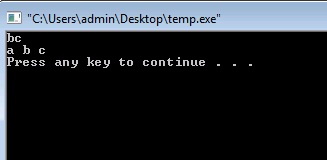
Consider below example to understand these functions.
1
2
3
4
5
6
7
8
9
10
11
12
13
|
#include<stdio.h>
#include<conio.h>
void main()
{
char ch1,ch2,ch3;
ch1=getch(); // it does not echo the character on screen
ch2=getche(); //echo's character on screen
ch3=getchar(); // Use Enter to store the value
printf("%c %c %cn",ch1,ch2,ch3);
}
|
Output

[출처] https://www.thecrazyprogrammer.com/2015/02/console-input-output-functions-in-c.html