
- 전체
- C/C++ 일반
- C/C++ 수학
- C/C++ 그래픽
- C/C++ 자료구조
- C/C++ 인공지능
- C/C++ 인터넷
- wxWidget
- GTK+
- UNIX or LINUX programming
- 리눅스 마스터 - 국가공인자격
- VC++/ MFC
- C#/CLI/.NET
- QT/기타UI
- Boost lib
- 오픈소스 C 분석자료
- MSA (마이크로서비스), Docker, kubernetes
- WSL(windows subsystem linux)
[visual studio] Bring Your MFC Application to the Web mfc 어플리케인 web 구동
Bring Your MFC Application to the Web


Table of Contents
- Introduction
- Dialog Code
- CppUI.h Setter and Getter
- JsUI.h Setter and Getter
- OnButtonClick Call
- Building in Emscripten
- Conclusion
- History
The example code is hosted at Github.
Introduction
Writing a full framework, frankly speaking, is a full-time job. The three UI control wrapper abstracts and hides away the implementation details of MFC and HTML, so that developer can write standard C++ code. Though I use MFC underneath, I strive to make my implementation to be as close as .NET Winform as possible. The reason is in terms of ease of use and elegance, MFC does not come even close to Winform. The use case is not to port existing Win32/MFC code using this approach. The intended use case is for porting a simple OpenGL demo: Emscripten has excellent support for bridging OpenGL and WebGL but none for the UI controls that exist outside the OpenGL window. At all times, I have written the C++ UI code and rewritten the same UI logic in JavaScript to control OpenGL animation. Below is a list of some caveats developer needs to be aware of before embarking on this effort.
- This only works for simple controls that exist both on Windows and HTML. Not for composite control like
CCheckListBox. Not for complicated control likeCListCtrl. Not for subclassed custom-drawn controls. - This does not work out for Single Document Interface (SDI) and Multiple Document Interface (MDI) as these hierarchical architectures are very difficult to port to HTML. I do not see this as a problem since Winform does not have SDI/MDI architecture and it manages to do very well on desktop application and is very popular with .NET developers.
- This approach does not work for UI layout: MFC has its UI designer and HTML5 relies on HTML/CSS to layout and style its controls. These two are very different technologies for laying out UI controls which I unable to reconcile. For the purpose of this article, I hand-wrote the HTML controls.
Qt does not have these problems as it handles the UI drawing and everything itself without using the equivalent HTML controls. For my approach, I have to settle for the lowest common denominator between Win32 and HTML. One advantage is HTML code download may be smaller for my approach as my UI work is delegated to HTML controls.
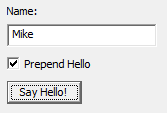
This is the UI of the MFC dialog.
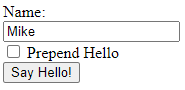
This is the UI of the HTML form.
Let's take a closer look at the source code.
Dialog Code
Before a single line is written for the dialog header, a header for UI controls must be included, depending on the presence of __EMSCRIPTEN__ macro.
#ifdef __EMSCRIPTEN__
    #include "JsUI.h"
#else
    #include "CppUI.h"
#endif
The Dialog class has different constructors for Emscripten and MFC. For the Emscripten version, it takes in the HTML control name while the MFC ones take in the pointers to MFC control. There is a OnButtonClick to handle button click. There are three controls, namely a textbox, checkbox, and button in this Dialog class.
class Dialog
{
public:
#ifdef __EMSCRIPTEN__
    Dialog(const char* TextBoxName,
           const char* CheckBoxName,
           const char* ButtonName);
#else
    Dialog(CEdit* pTextBox,
           CButton* pCheckBox,
           CButton* pButton);
#endif

    void OnButtonClick();

public:
    WATextBox m_TextBox;
    WACheckBox m_CheckBox;
    WAButton m_Button;
};
This is the implementation of the Dialog constructor. The title of m_TextBox is set to "Mike". An event handler is assigned to the m_Button.Clicked event. Notice how similar it is to C# Winform 1.0 events.
#include "Dialog.h"

#ifdef __EMSCRIPTEN__
Dialog::Dialog(const char* TextBoxName,
               const char* CheckBoxName,
               const char* ButtonName)
    : m_TextBox(TextBoxName)
    , m_CheckBox(CheckBoxName)
    , m_Button(ButtonName)
#else
Dialog::Dialog(CEdit* pTextBox,
               CButton* pCheckBox,
			   CButton* pButton)
    : m_TextBox(pTextBox)
    , m_CheckBox(pCheckBox)
    , m_Button(pButton)
#endif
{
    m_TextBox.SetText("Mike");
    m_Button.Clicked += EventHandler(&Dialog::OnButtonClick, this);
}
Inside OnButtonClick(), "Hello" is prepended to the text depending whether the checkbox is checked. And a MessageBox with the text is shown.
void Dialog::OnButtonClick()
{
    std::string text = m_TextBox.GetText();
    if (m_CheckBox.GetCheck())
        text = std::string("Hello ") + text;

    WAMessageBox(text);
}
CppUI.h Setter and Getter
This section gives a glimpse of how setter and getter are implemented in CppUI.h in general. Only the setter and getter for the checkbox is shown.


bool GetCheck() const
{
    return (m_pCheckBox->GetCheck() == BST_CHECKED);
}

void SetCheck(bool check)
{
    int v = check ? BST_CHECKED : BST_UNCHECKED;
    m_pCheckBox->SetCheck(check);
}
JsUI.h Setter and Getter
The setter and getter for the checkbox for JavaScript are implemented via calls to EM_ASM family of functions that allow JavaScript code to be embedded inside the C++ source code. The general idea is the same for accessing other type of controls.
bool GetCheck() const { int check = EM_ASM_INT({ var ctrl = document.getElementById(UTF8ToString([visual studio] Bring Your MFC Application to the Web mfc 어플리케인 web 구동
Bring Your MFC Application to the Web
This is a proof of concept (POC) that C++ on desktop and Emscripten can share the same UI code.For this demonstration, Microsoft Foundation Classes (MFC) is chosen as this is the C++ framework I am most familiar with and a pure Win32 approach is simply too much work. I only wrote the bare minimum code for three UI control wrappers and methods that I use and call.Table of Contents
- Introduction
- Dialog Code
- CppUI.h Setter and Getter
- JsUI.h Setter and Getter
- OnButtonClick Call
- Building in Emscripten
- Conclusion
- History
The example code is hosted at Github.
Introduction
Writing a full framework, frankly speaking, is a full-time job. The three UI control wrapper abstracts and hides away the implementation details of MFC and HTML, so that developer can write standard C++ code. Though I use MFC underneath, I strive to make my implementation to be as close as .NET Winform as possible. The reason is in terms of ease of use and elegance, MFC does not come even close to Winform. The use case is not to port existing Win32/MFC code using this approach. The intended use case is for porting a simple OpenGL demo: Emscripten has excellent support for bridging OpenGL and WebGL but none for the UI controls that exist outside the OpenGL window. At all times, I have written the C++ UI code and rewritten the same UI logic in JavaScript to control OpenGL animation. Below is a list of some caveats developer needs to be aware of before embarking on this effort.
- This only works for simple controls that exist both on Windows and HTML. Not for composite control like
CCheckListBox. Not for complicated control likeCListCtrl. Not for subclassed custom-drawn controls.- This does not work out for Single Document Interface (SDI) and Multiple Document Interface (MDI) as these hierarchical architectures are very difficult to port to HTML. I do not see this as a problem since Winform does not have SDI/MDI architecture and it manages to do very well on desktop application and is very popular with .NET developers.
- This approach does not work for UI layout: MFC has its UI designer and HTML5 relies on HTML/CSS to layout and style its controls. These two are very different technologies for laying out UI controls which I unable to reconcile. For the purpose of this article, I hand-wrote the HTML controls.
Qt does not have these problems as it handles the UI drawing and everything itself without using the equivalent HTML controls. For my approach, I have to settle for the lowest common denominator between Win32 and HTML. One advantage is HTML code download may be smaller for my approach as my UI work is delegated to HTML controls.
This is the UI of the MFC dialog.
This is the UI of the HTML form.
Let's take a closer look at the source code.
Dialog Code
Before a single line is written for the dialog header, a header for UI controls must be included, depending on the presence of
__EMSCRIPTEN__macro.C++#ifdef __EMSCRIPTEN__ #include "JsUI.h" #else #include "CppUI.h" #endifThe
Dialogclass has different constructors for Emscripten and MFC. For the Emscripten version, it takes in the HTML control name while the MFC ones take in the pointers to MFC control. There is aOnButtonClickto handle button click. There are three controls, namely atextbox,checkbox, andbuttonin thisDialogclass.C++class Dialog { public: #ifdef __EMSCRIPTEN__ Dialog(const char* TextBoxName, const char* CheckBoxName, const char* ButtonName); #else Dialog(CEdit* pTextBox, CButton* pCheckBox, CButton* pButton); #endif void OnButtonClick(); public: WATextBox m_TextBox; WACheckBox m_CheckBox; WAButton m_Button; };This is the implementation of the
Dialogconstructor. The title ofm_TextBoxis set to "Mike". An event handler is assigned to them_Button.Clickedevent. Notice how similar it is to C# Winform 1.0 events.C++#include "Dialog.h" #ifdef __EMSCRIPTEN__ Dialog::Dialog(const char* TextBoxName, const char* CheckBoxName, const char* ButtonName) : m_TextBox(TextBoxName) , m_CheckBox(CheckBoxName) , m_Button(ButtonName) #else Dialog::Dialog(CEdit* pTextBox, CButton* pCheckBox, CButton* pButton) : m_TextBox(pTextBox) , m_CheckBox(pCheckBox) , m_Button(pButton) #endif { m_TextBox.SetText("Mike"); m_Button.Clicked += EventHandler(&Dialog::OnButtonClick, this); }Inside
OnButtonClick(), "Hello" is prepended to thetextdepending whether thecheckboxis checked. And aMessageBoxwith thetextis shown.C++void Dialog::OnButtonClick() { std::string text = m_TextBox.GetText(); if (m_CheckBox.GetCheck()) text = std::string("Hello ") + text; WAMessageBox(text); }CppUI.h Setter and Getter
This section gives a glimpse of how setter and getter are implemented in CppUI.h in general. Only the setter and getter for the
checkboxis shown.C++bool GetCheck() const { return (m_pCheckBox->GetCheck() == BST_CHECKED); } void SetCheck(bool check) { int v = check ? BST_CHECKED : BST_UNCHECKED; m_pCheckBox->SetCheck(check); }JsUI.h Setter and Getter
The setter and getter for the
checkboxfor JavaScript are implemented via calls to EM_ASM family of functions that allow JavaScript code to be embedded inside the C++ source code. The general idea is the same for accessing other type of controls.C++bool GetCheck() const { int check = EM_ASM_INT({ var ctrl = document.getElementById(UTF8ToString($0)); return ctrl.checked; }, m_CheckBoxID.c_str()); return (check > 0); } void SetCheck(bool check) { EM_ASM_({ var ctrl = document.getElementById(UTF8ToString($0)); ctrl.checked = $1; }, m_CheckBoxID.c_str(), check); }OnButtonClick Call
Dialog::OnButtonClick()in C++ is called by MFC'sOnBnClickedBtnSayHello():C++void CTestMFCWebAssemblyDlg::OnBnClickedBtnSayHello() { m_pDialog->m_Button.CallClickHandler(); }
Dialog::OnButtonClick()in JavaScript is called by C function of the same name. Care must be taken that C++ does not mangle this name so this function is surrounded byextern"C". Right now, I manually connect the HTML5 button to call thisOnButtonClick()but I expected to be done transparently by a wizard or IDE or helper in the future.C++extern "C" { void EMSCRIPTEN_KEEPALIVE OnButtonClick() { g_pDialog->m_Button.CallClickHandler(); } };Building in Emscripten
This section is for the reader who desires to build the demo code using Emscripten on Windows Subsystem for Linux 2 (WSL2). Refer to this article on how to install Emscripten on Ubuntu WSL2. Assuming the source files and
Makefileare in /mnt/c/temp2/ folder, this is howmakecommand is called.(cd /mnt/c/temp2/ && make)/mnt/c/temp2/ folder on WSL2 refers to my C:\temp2 on Windows.
This is the command to delete the built binary, wa_dialog.js.
(cd /mnt/c/temp2/ && make clean)In the
Makefile, please remember to change theSRCFOLDERandOUTPUTaccordingly, if your folder is not /mnt/c/temp2/ and the output file is not wa_dialog.js.SRCFOLDER=/mnt/c/temp2 ... OUTPUT=/mnt/c/temp2/wa_dialog.jsConclusion
Reader may notice the
Dialogcode is concise. However, the three control wrappers for each platform (MFC and HTML) that has to be written and much plumbing code to get everything working perfectly. I do not expect anyone to write all this mind-numbing code by hand. Hopefully, in the future, there is some wizard/automation tools to alleviate and lessen the amount of manual work and focus on writing the business logic. Readers may feel that this toy example is easy but actually useless in the real world. The original plan for the article is to write a non-trivial dialog application involving canvas or OpenGL. In the end, I decided against it and keep the demo simple: as the old saying goes, learn how to walk before you run. Hope you have enjoyed reading this article!History
- 1st November, 2020: First release
License
This article, along with any associated source code and files, is licensed under The Code Project Open License (CPOL)
Shao Voon is from Singapore. His interest lies primarily in computer graphics, software optimization, concurrency, security, and Agile methodologies. His hobby is writing a free C++/DirectX photo slideshow application which can be viewed here.
[출처] https://www.codeproject.com/Articles/5284114/Bring-Your-MFC-Application-to-the-Web
 Singapore
[visual studio] Bring Your MFC Application to the Web mfc 어플리케인 web 구동
Bring Your MFC Application to the Web
Table of Contents
- Introduction
- Dialog Code
- CppUI.h Setter and Getter
- JsUI.h Setter and Getter
- OnButtonClick Call
- Building in Emscripten
- Conclusion
- History
The example code is hosted at Github.
Introduction
Writing a full framework, frankly speaking, is a full-time job. The three UI control wrapper abstracts and hides away the implementation details of MFC and HTML, so that developer can write standard C++ code. Though I use MFC underneath, I strive to make my implementation to be as close as .NET Winform as possible. The reason is in terms of ease of use and elegance, MFC does not come even close to Winform. The use case is not to port existing Win32/MFC code using this approach. The intended use case is for porting a simple OpenGL demo: Emscripten has excellent support for bridging OpenGL and WebGL but none for the UI controls that exist outside the OpenGL window. At all times, I have written the C++ UI code and rewritten the same UI logic in JavaScript to control OpenGL animation. Below is a list of some caveats developer needs to be aware of before embarking on this effort.
- This only works for simple controls that exist both on Windows and HTML. Not for composite control like
CCheckListBox. Not for complicated control likeCListCtrl. Not for subclassed custom-drawn controls. - This does not work out for Single Document Interface (SDI) and Multiple Document Interface (MDI) as these hierarchical architectures are very difficult to port to HTML. I do not see this as a problem since Winform does not have SDI/MDI architecture and it manages to do very well on desktop application and is very popular with .NET developers.
- This approach does not work for UI layout: MFC has its UI designer and HTML5 relies on HTML/CSS to layout and style its controls. These two are very different technologies for laying out UI controls which I unable to reconcile. For the purpose of this article, I hand-wrote the HTML controls.
Qt does not have these problems as it handles the UI drawing and everything itself without using the equivalent HTML controls. For my approach, I have to settle for the lowest common denominator between Win32 and HTML. One advantage is HTML code download may be smaller for my approach as my UI work is delegated to HTML controls.
This is the UI of the MFC dialog.
This is the UI of the HTML form.
Let's take a closer look at the source code.
Dialog Code
Before a single line is written for the dialog header, a header for UI controls must be included, depending on the presence of __EMSCRIPTEN__ macro.
#ifdef __EMSCRIPTEN__
    #include "JsUI.h"
#else
    #include "CppUI.h"
#endif
The Dialog class has different constructors for Emscripten and MFC. For the Emscripten version, it takes in the HTML control name while the MFC ones take in the pointers to MFC control. There is a OnButtonClick to handle button click. There are three controls, namely a textbox, checkbox, and button in this Dialog class.
class Dialog
{
public:
#ifdef __EMSCRIPTEN__
    Dialog(const char* TextBoxName,
           const char* CheckBoxName,
           const char* ButtonName);
#else
    Dialog(CEdit* pTextBox,
           CButton* pCheckBox,
           CButton* pButton);
#endif

    void OnButtonClick();

public:
    WATextBox m_TextBox;
    WACheckBox m_CheckBox;
    WAButton m_Button;
};
This is the implementation of the Dialog constructor. The title of m_TextBox is set to "Mike". An event handler is assigned to the m_Button.Clicked event. Notice how similar it is to C# Winform 1.0 events.
#include "Dialog.h"

#ifdef __EMSCRIPTEN__
Dialog::Dialog(const char* TextBoxName,
               const char* CheckBoxName,
               const char* ButtonName)
    : m_TextBox(TextBoxName)
    , m_CheckBox(CheckBoxName)
    , m_Button(ButtonName)
#else
Dialog::Dialog(CEdit* pTextBox,
               CButton* pCheckBox,
			   CButton* pButton)
    : m_TextBox(pTextBox)
    , m_CheckBox(pCheckBox)
    , m_Button(pButton)
#endif
{
    m_TextBox.SetText("Mike");
    m_Button.Clicked += EventHandler(&Dialog::OnButtonClick, this);
}
Inside OnButtonClick(), "Hello" is prepended to the text depending whether the checkbox is checked. And a MessageBox with the text is shown.
void Dialog::OnButtonClick()
{
    std::string text = m_TextBox.GetText();
    if (m_CheckBox.GetCheck())
        text = std::string("Hello ") + text;

    WAMessageBox(text);
}
CppUI.h Setter and Getter
This section gives a glimpse of how setter and getter are implemented in CppUI.h in general. Only the setter and getter for the checkbox is shown.
bool GetCheck() const
{
    return (m_pCheckBox->GetCheck() == BST_CHECKED);
}

void SetCheck(bool check)
{
    int v = check ? BST_CHECKED : BST_UNCHECKED;
    m_pCheckBox->SetCheck(check);
}
JsUI.h Setter and Getter
The setter and getter for the checkbox for JavaScript are implemented via calls to EM_ASM family of functions that allow JavaScript code to be embedded inside the C++ source code. The general idea is the same for accessing other type of controls.
bool GetCheck() const
{
    int check = EM_ASM_INT({
        var ctrl = document.getElementById(UTF8ToString($0));
        return ctrl.checked;
    }, m_CheckBoxID.c_str());

    return (check > 0);
}

void SetCheck(bool check)
{
    EM_ASM_({
        var ctrl = document.getElementById(UTF8ToString($0));
        ctrl.checked = $1;
    }, m_CheckBoxID.c_str(), check);
}
OnButtonClick Call
Dialog::OnButtonClick() in C++ is called by MFC's OnBnClickedBtnSayHello():
void CTestMFCWebAssemblyDlg::OnBnClickedBtnSayHello()
{
    m_pDialog->m_Button.CallClickHandler();
}
Dialog::OnButtonClick() in JavaScript is called by C function of the same name. Care must be taken that C++ does not mangle this name so this function is surrounded by extern "C". Right now, I manually connect the HTML5 button to call this OnButtonClick() but I expected to be done transparently by a wizard or IDE or helper in the future.
extern "C" {

    void EMSCRIPTEN_KEEPALIVE OnButtonClick()
    {
        g_pDialog->m_Button.CallClickHandler();
    }

};
Building in Emscripten
This section is for the reader who desires to build the demo code using Emscripten on Windows Subsystem for Linux 2 (WSL2). Refer to this article on how to install Emscripten on Ubuntu WSL2. Assuming the source files and Makefile are in /mnt/c/temp2/ folder, this is how make command is called.
(cd /mnt/c/temp2/ && make)
/mnt/c/temp2/ folder on WSL2 refers to my C:\temp2 on Windows.
This is the command to delete the built binary, wa_dialog.js.
(cd /mnt/c/temp2/ && make clean)
In the Makefile, please remember to change the SRCFOLDER and OUTPUT accordingly, if your folder is not /mnt/c/temp2/ and the output file is not wa_dialog.js.
SRCFOLDER=/mnt/c/temp2
...
OUTPUT=/mnt/c/temp2/wa_dialog.js
Conclusion
Reader may notice the Dialog code is concise. However, the three control wrappers for each platform (MFC and HTML) that has to be written and much plumbing code to get everything working perfectly. I do not expect anyone to write all this mind-numbing code by hand. Hopefully, in the future, there is some wizard/automation tools to alleviate and lessen the amount of manual work and focus on writing the business logic. Readers may feel that this toy example is easy but actually useless in the real world. The original plan for the article is to write a non-trivial dialog application involving canvas or OpenGL. In the end, I decided against it and keep the demo simple: as the old saying goes, learn how to walk before you run. Hope you have enjoyed reading this article!
History
- 1st November, 2020: First release
License
This article, along with any associated source code and files, is licensed under The Code Project Open License (CPOL)
[출처] https://www.codeproject.com/Articles/5284114/Bring-Your-MFC-Application-to-the-Web
OnButtonClick Call
Dialog::OnButtonClick() in C++ is called by MFC's OnBnClickedBtnSayHello():
void CTestMFCWebAssemblyDlg::OnBnClickedBtnSayHello()
{
    m_pDialog->m_Button.CallClickHandler();
}
Dialog::OnButtonClick() in JavaScript is called by C function of the same name. Care must be taken that C++ does not mangle this name so this function is surrounded by extern "C". Right now, I manually connect the HTML5 button to call this OnButtonClick() but I expected to be done transparently by a wizard or IDE or helper in the future.
extern "C" {

    void EMSCRIPTEN_KEEPALIVE OnButtonClick()
    {
        g_pDialog->m_Button.CallClickHandler();
    }

};
Building in Emscripten
This section is for the reader who desires to build the demo code using Emscripten on Windows Subsystem for Linux 2 (WSL2). Refer to this article on how to install Emscripten on Ubuntu WSL2. Assuming the source files and Makefile are in /mnt/c/temp2/ folder, this is how make command is called.
(cd /mnt/c/temp2/ && make)
/mnt/c/temp2/ folder on WSL2 refers to my C:\temp2 on Windows.
This is the command to delete the built binary, wa_dialog.js.
(cd /mnt/c/temp2/ && make clean)
In the Makefile, please remember to change the SRCFOLDER and OUTPUT accordingly, if your folder is not /mnt/c/temp2/ and the output file is not wa_dialog.js.
SRCFOLDER=/mnt/c/temp2
...
OUTPUT=/mnt/c/temp2/wa_dialog.js
Conclusion
Reader may notice the Dialog code is concise. However, the three control wrappers for each platform (MFC and HTML) that has to be written and much plumbing code to get everything working perfectly. I do not expect anyone to write all this mind-numbing code by hand. Hopefully, in the future, there is some wizard/automation tools to alleviate and lessen the amount of manual work and focus on writing the business logic. Readers may feel that this toy example is easy but actually useless in the real world. The original plan for the article is to write a non-trivial dialog application involving canvas or OpenGL. In the end, I decided against it and keep the demo simple: as the old saying goes, learn how to walk before you run. Hope you have enjoyed reading this article!
History
- 1st November, 2020: First release
License
This article, along with any associated source code and files, is licensed under The Code Project Open License (CPOL)
[출처] https://www.codeproject.com/Articles/5284114/Bring-Your-MFC-Application-to-the-Web
광고 클릭에서 발생하는 수익금은 모두 웹사이트 서버의 유지 및 관리, 그리고 기술 콘텐츠 향상을 위해 쓰여집니다.

