[visual c++] 오류 D8016 '/ZI'과(와) '/Gy-' 명령줄 옵션이 호환되지 않습니다.

/Zl(기본 라이브러리 이름 생략)

<sentencetext xmlns="http://www.w3.org/1999/xhtml">.obj 파일에서 기본 C 런타임 라이브러리 이름을 생략합니다.</sentencetext> <sentencetext xmlns="http://www.w3.org/1999/xhtml">기본적으로 컴파일러는 라이브러리의 이름을 .obj 파일에 넣어 링커를 정확한 라이브러리로 안내합니다.</sentencetext>


/Gy(함수 수준 링크 사용)

컴파일러가 개별 함수를 패키지된 함수의 형태로 패키지할 수 있습니다


project 속성 - 구성속성 - C/C++ - 코드생성 - 함수 수준 링크 사용 좌측의 값 변경(예(/Gy))
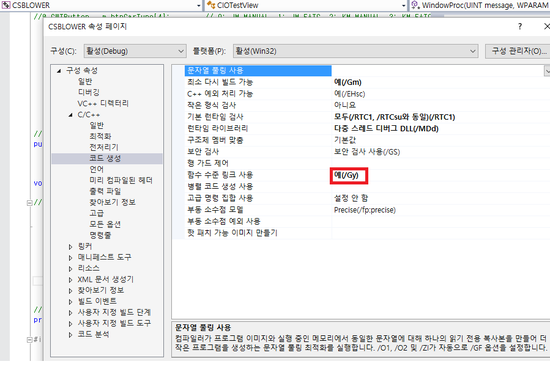
 

Visual Studio 개발 환경에서 이 컴파일러 옵션을 설정하려면

  1. Property Pages dialog box." xml:space="preserve"><sentencetext xmlns="http://www.w3.org/1999/xhtml">프로젝트의 속성 페이지 대화 상자를 엽니다.</sentencetext> How to: Open Project Property Pages.' xml:space="preserve"><sentencetext xmlns="http://www.w3.org/1999/xhtml">자세한 내용은 방법: 프로젝트 속성 페이지 열기를 참조하십시오.</sentencetext>

    경축! 아무것도 안하여 에스천사게임즈가 새로운 모습으로 재오픈 하였습니다.
    어린이용이며, 설치가 필요없는 브라우저 게임입니다.
    https://s1004games.com

  2. C/C++ folder.' xml:space="preserve"><sentencetext xmlns="http://www.w3.org/1999/xhtml">C/C++ 폴더를 클릭합니다.</sentencetext>

  3. Code Generation property page.' xml:space="preserve"><sentencetext xmlns="http://www.w3.org/1999/xhtml">코드 생성 속성 페이지를 클릭합니다.</sentencetext>

  4. Enable Function-Level Linking property.' xml:space="preserve"><sentencetext xmlns="http://www.w3.org/1999/xhtml">함수 수준 링크 사용 속성을 수정합니다.</sentencetext>


본 웹사이트는 광고를 포함하고 있습니다.
광고 클릭에서 발생하는 수익금은 모두 웹사이트 서버의 유지 및 관리, 그리고 기술 콘텐츠 향상을 위해 쓰여집니다.
번호 제목 글쓴이 날짜 조회 수
28 [Linux programming][turbo c] The libXbgi Library file 졸리운_곰 2023.02.05 255
27 [unix][linux][compiler] Yacc와 Lex 시작하기 file 졸리운_곰 2021.09.08 266
26 [Visual Studio 2019] Visual Studio로 Linux 원격 개발하기(Ubuntu 설치부터 SSH 서버접속까지) file 졸리운_곰 2021.08.29 271
25 [unix][emacs] 이맥스와 함께하는 개발환경 . emacs 튜토리얼 file 졸리운_곰 2021.08.18 319
24 [Linux][C/C++] cmake 사용법과 활용 file 졸리운_곰 2020.11.08 556
23 [CMake] Linux C/C++ cmake 시작하기 졸리운_곰 2020.11.08 400
22 [C++] CMake Build System file 졸리운_곰 2020.11.08 329
21 Windows 10에 한국어 입출력이 가능한 리눅스 데스크톱 설치하기 file 졸리운_곰 2020.06.29 291
20 wxwidgets 과 codeblock 설치(리눅스) 졸리운_곰 2019.12.25 229
19 ubuntu 18.04.2 LTS 개발환경 세팅 졸리운_곰 2019.12.25 224
18 Ubuntu 16.04 개발환경 세팅하기! 졸리운_곰 2017.03.21 361
17 tcl/tk 자료 secret 졸리운_곰 2017.02.23 0
16 CentOS xrdp 설정 (원격데스크탑) 졸리운_곰 2017.02.01 453
15 Five lightweight Linux desktop worlds for extreme open-sourcers file 졸리운_곰 2016.05.12 1023
14 Logging every shell command 졸리운_곰 2016.05.11 581
13 How to keep a detailed audit trail of what’s being done on your Linux systems file 졸리운_곰 2016.05.11 467
12 Docker의 소개와 간단한 사용법 file 졸리운_곰 2015.11.24 804
11 Make Self-Extracting Archives with makeself.sh 졸리운_곰 2015.11.07 369
10 리눅스 간단 배포 Linux simple deploy 제작 : make self file 졸리운_곰 2015.11.07 352
9 Joinc: Linux 커널에서의 디바이스 드라이버 작성 졸리운_곰 2015.06.16 844
대표 김성준 주소 : 경기 용인 분당수지 U타워 등록번호 : 142-07-27414
통신판매업 신고 : 제2012-용인수지-0185호 출판업 신고 : 수지구청 제 123호 개인정보보호최고책임자 : 김성준 sjkim70@stechstar.com
대표전화 : 010-4589-2193 [fax] 02-6280-1294 COPYRIGHT(C) stechstar.com ALL RIGHTS RESERVED