
- 전체
- 게임 일반 (make game basics)
- 모바일 기획 및 디자인
- GameMaker Studio
- Unity3D
- Cocos2D
- 3D Engine OGRE
- 3D Engine irrlicht
- copperCube
- corona SDK
- Windows Basic Game
- BaaS (Mobile Backend)
- phnegap & cordova
- ionic & anguler
- parse (backend)
- firebase (backend)
- Game Backend Server / Opt
- web assembly
- Smart Makers
- pyGame & Ren'Py
- 머드(MUD) 게임 만들기
- Xamarin(자마린)
- flutter (플루터 앱 개발)
- construct 2 / 3
- pocketbase
- RPG Maker 시리즈
- godot engine
- playmaker(unity)
- react native
게임 일반 (make game basics) [게임 일반] SharpMoku a Gomoku/Five in a Row Written in C# : SharpMoku a Gomoku/Five in a Row C#로 작성됨 : 오목게임 개발
2024.10.31 10:35
[게임 일반] SharpMoku a Gomoku/Five in a Row Written in C# : SharpMoku a Gomoku/Five in a Row C#로 작성됨 오목게임 개발
SharpMoku.zip SharpMoku-main.zip
SharpMoku a Gomoku/Five in a Row Written in C#

 18.3K
18.3K 714
714Introduction
This is a Gomoku/Five in a row game written in C#. I created this game because of the fond memories I have of playing it on a school computer.
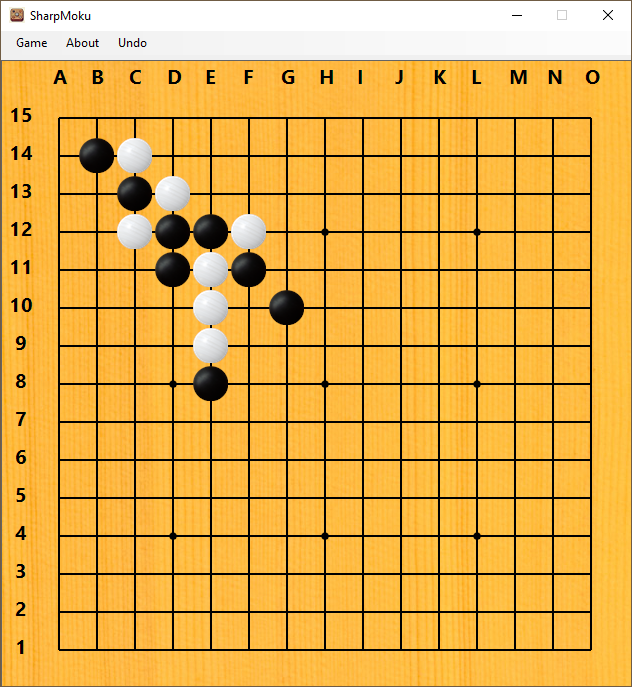
Overview
Gomoku is a board game where two players take turns placing pieces on a 9x9 or 15x15 board size.
The goal of this game is to be the first to form a row of five consecutive pieces, either horizontally, vertically, or diagonally.
The winner is the player who succeeds in doing so first.
Features
- The board can have dimensions of either 9x9 or 15x15.
- Mode Human vs Human, Human vs Bot, Bot vs Human
- Bot Level Normal, Hard
- It supports both images or colors for the stone and the board.
- Supports various types of themes
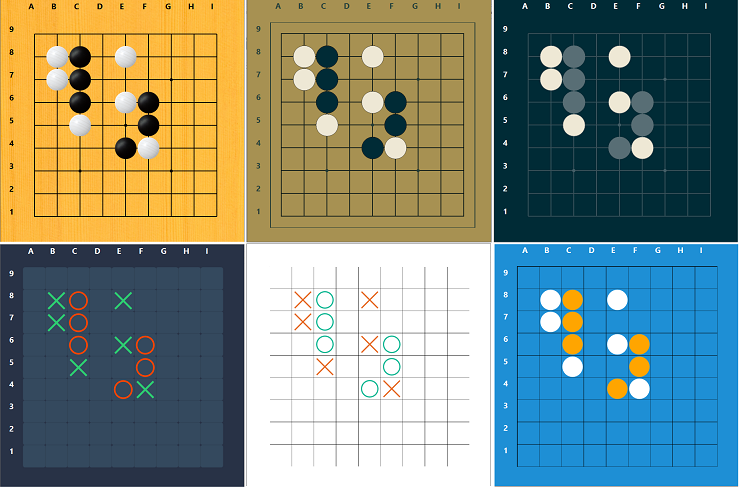
UI
This is a simple Gomoku program so we only need a form that contains one component to render the board.
UI\IUI.cs
This interface defines methods and events. We use FormSharpMoku to implement this interface.
public interface IUI
    {
        // Raise event CellClicked so the game object will handle the operation
        event Board.CellClickHandler CellClicked;

        void RenderUI();
        void MoveCursorTo(Position position);

        //To tell the game object that the bot has finished
        //moving a cursor to the position to put.
        event EventHandler HasFinishedMoveCursor;

        /*
         These three methods will be triggered from the Game Object.
         Game_GameFinished : UI will display the result.
         Game_BotThinking : UI will change the cursor to an hourglass.
         Game_BotFinishedThinking : UI will change the cursor back to the
                                    default cursor and allow the user to input
        */
        void Game_GameFinished(object sender, EventArgs e);
        void Game_BotThinking(object sender, EventArgs e);
        void Game_BotFinishedThinking(object sender, EventArgs e);
    }
FormSharpMoku.cs
This form implements IUI interface, it consists of PictureBoxGoMoku control.
UI\PictureBoxGoMoku.cs
This class inherits from the PictureBox control and consists of a collection of labels used to represent the stone and the board line.
- There are a total of 81 labels on a 9x9 board and 225 labels on a 15x15 board.
- In
PictureBoxGoMoKu Paint, it will only be responsible for rendering the notation and the background image, the rest of the board will be rendered by the labels themselves. The notation of the board can be both Gomoku notation (A-O for the rows, 1-15 for the columns) and the array index position (0-14 for both rows and columns), we use the latter for debugging purposes.
UI\LabelCustomPaint\GoMokuPaint.cs
To support various kinds of themes, there is more than one class we use to render the label, for the GoMoku theme, we use GoMokuPaint class to render.
PaintStone()- This method will render the stone, it also supports rendering an image, or just rendering a stone color.PaintBorder()- This method will draw a line on the label to make the border, it also draws an Intersection point.The method handles different kinds of drawing positions:
TopLeftCornerTopBorderTopRightCornerLeftBorderCenterRightBorderBottomLeftCorderBottomBorderBottomRightCorner
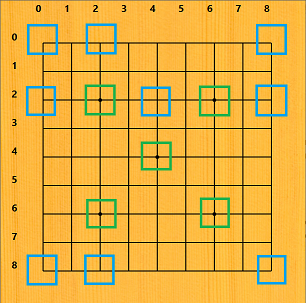
In this image, the blue color is a kind of label, and the green color is the label whose position is Center, but also has an Intersection point.
This is the code that shows only the case of the Center position, each position will be drawn in 2 lines and if it is an intersection, there will be a small circle in the center.
private void PaintBorder(Graphics g, ExtendLabel pLabel)
{
    Point fromPointX = Point.Empty;
    Point toPointX = Point.Empty;
    Point fromPointY = Point.Empty;
    Point toPointY = Point.Empty;

    int beginWidth = 0;
    int middleWidth = pLabel.Width / 2;
    int endWidth = pLabel.Width;
    int beginHeight = 0;
    int middleHeight = pLabel.Height / 2;
    int endHeight = pLabel.Height;

    switch (pLabel.CellAttribute.GoboardPosition)
    {
        case GoBoardPositionEnum.Center:
            fromPointY = new Point(middleWidth, beginHeight);
            toPointY = new Point(middleWidth, endHeight);

            fromPointX = new Point(beginWidth, middleHeight);
            toPointX = new Point(endWidth, middleHeight);
            break;
        //Omit the code for other position
    }

    g.DrawLine(penTable, fromPointY, toPointY);
    g.DrawLine(penTable, fromPointX, toPointX);

    g.CompositingMode = CompositingMode.SourceOver;

    if (pLabel.CellAttribute.IsIntersection)
    {
        RectangleF RecCircleIntersecton =
                   new RectangleF(middleWidth - 4, middleHeight - 4, 8, 8);
        g.FillEllipse(ShareGraphicObject.SolidBrush(penTable.Color),
                      RecCircleIntersecton);
    }
}
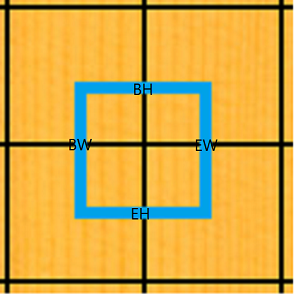
In this image, the blue color is the area of the label, BH means beginHeight, EH means endHeight, BW means beginWidth, EW means endWidth. Between beginHeigh and endHeight is the middleHeight and it is also the middleWidth.
For example, the label that has the Center position will need to draw two lines.
- The horizontal line at the
middleHeightfrombeginWidthtoendWidth. - The vertical line at the
middleWidthfrombeginHeighttoendHeight.
PaintNeighbour() - We don't use this method, but you can uncomment it if you would like it to show the neighbor for debugging purposes.
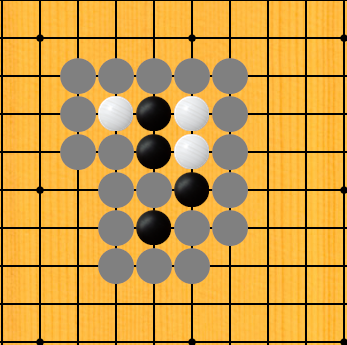
This image shows the neighbor cell of both black and white stone.
The purpose of the adjacent position will be discussed in the AI section.
The sequence diagram of when the user clicks.
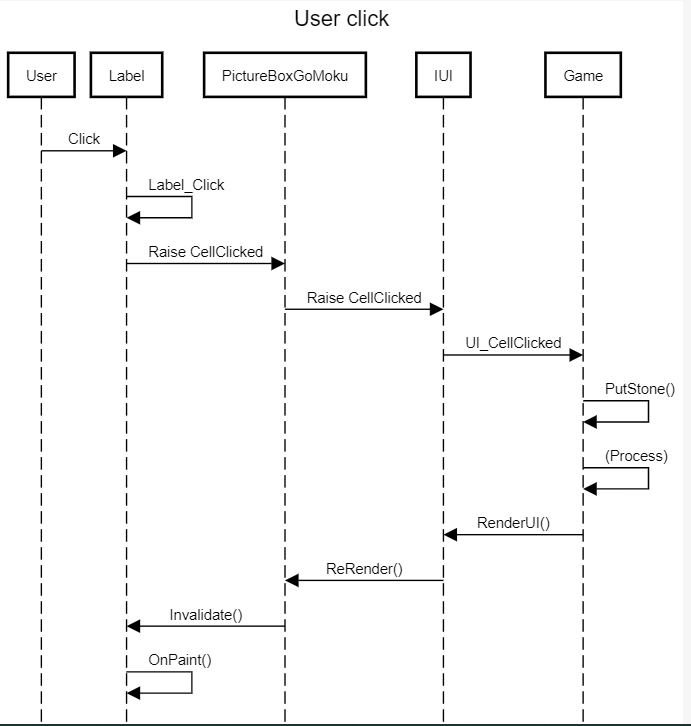
This is a sequence diagram when the user clicks. I omitted the detail in the (Process) section.
You can look into the sequence diagram of how to bot works in the Game.cs section.
Gomoku Game
The UI has been completed, and now we will discuss the game component, excluding the AI for now.
Board.cs
We store the value of the stone in a 2D array named Matrix, and we also use dicWhiteStone, dicBlackStone, and dicNeighbor to store the position of the Black and white stone and their neighbor. We store the duplicate data to reduce the time to search, supposing we need to know the neighbor position, we do not need to search through all the positions in the Matrix to calculate the neighbor position.
//Some part of the Board.cs
[Serializable]
public class Board
{
    public delegate void CellClickHandler
           (object sender, PositionEventArgs positionClick);

    // 2d array to store cell value
    public int[,] Matrix;

    /*
     * dicWhiteStone store WhiteStone position
     * dicBlackStone store WhiteStone position
     * dicNieghbor store position of the stone next to both white and black stone
     */
    public Dictionary<String, SharpMoku.Position> dicWhiteStone
       { get; private set; } = new Dictionary<String, SharpMoku.Position>();
    public Dictionary<String, SharpMoku.Position> dicBlackStone
       { get; private set; } = new Dictionary<String, SharpMoku.Position>();
    public Dictionary<String, SharpMoku.Position> dicNeighbor
       { get; private set; } = new Dictionary<string, Position>();

    public int BoardSize { get; private set; }

    public enum WinStatus
    {
        BlackWon=-1,
        NotDecidedYet=0,
        WhiteWon=1,
        Draw=2
    }

    // Represent the value of the cell in the board
    public enum CellValue
    {
        Black=-1,
        Empty=0,
        White=1,
    }

    public enum Turn
    {
        Black=-1,
        White=1
    }
    public Turn CurrentTurn { get; private set; } = Turn.Black;
    public CellValue CurrentTurnCellValue
    {
        get
        {
            if(CurrentTurn == Turn.Black)
            {
                return CellValue.Black;
            }

            return CellValue.White;
        }
    }
    public Board (int boardSize)
    {
        if(boardSize != 9 &&
            boardSize != 15)
        {
            throw new ArgumentException($"Board size is invalid {boardSize},
                      program only accept 9 and 15 as valid value");
        }
        this.BoardSize = boardSize;
        Matrix = new int[this.BoardSize, this.BoardSize];
    }

    public Board(Board board)
    {
        Matrix = new int[board.Matrix.GetLength(0), board.Matrix.GetLength(1)];
        dicWhiteStone = new Dictionary<string, Position>();
        dicBlackStone = new Dictionary<string, Position>();
        dicNeighbor = new Dictionary<string, Position>();

        this.Matrix = board.Matrix.Clone() as int[,];
        this.dicWhiteStone = new Dictionary<string,
                             Position>(board.dicWhiteStone);
        this.dicBlackStone = new Dictionary<string,
                             Position>(board.dicBlackStone);
        this.dicNeighbor = new Dictionary<string,
                           Position>(board.dicNeighbor);
        this.listHistory = new List<Position>(board.listHistory);
        this.BoardSize = board.BoardSize;
        this.CurrentTurn = board.CurrentTurn;
    }

    public void PutStone(int pRow, int pCol, CellValue cellValue)
    {
        /* 1.Assign value into the matrix
         * 2.Add the postion value into Hash
         * 3.Add postion into history
         * 4.Add Empty neighbor
         */
        Matrix[pRow, pCol] = (int)cellValue;
        SharpMoku.Position newPosition = new Position(pRow, pCol);
        GetHshByCellValue(cellValue).Add
                (newPosition.PositionString(), newPosition);
        listHistory.Add(newPosition);
        AddEmptyNeighborOf(newPosition);
    }
If we put the black stone into row 0, column 0 using PutStone(0,0, -1)
These things will happen:
- Set
Matrix[0,0]to-1. - Add
dicBlackStonewithposition(0,0)value. - Add
position(0,0)into alistHistory(program use this value forUndo()) - Add
dicNeighborwithposition(1,0)andposition(0,1).
When we call Undo(), the program will also need to adjust the neighbor position.
Game.cs
The role of this class is the middle man between the UI and the board object, UI will only raise an event, then the game object will decide what to do next,
All of the business logic will be in the Game and board, the UI only knows how to render the graphic.
When the user clicks on the board, it will raise an event to the UI_CellClicked() method, in the UI_CellClicked(), the program will check the status of the game and board and then proceed to do PutStone(positionClick.Value, board.CurrentTurnCellValue).
public class Game
{
     public Board board = null;
     private UI.IUI UI = null;
     public enum GameStateEnum
     {
        NotBegin,
        Playing,
        End
     }
     public enum GameModeEnum
     {
        PlayerVsBot = 0,
        BotVsPlayer = 1,
        PlayerVsPlayer = 2,

     }
     public Board.WinStatus WinResult { get; private set; } =
                                        Board.WinStatus.NotDecidedYet;
     public Board.Turn TheWinner { get; private set; }
     public ILog log = null;
     public GameModeEnum GameMode { get; private set; } = GameModeEnum.PlayerVsBot;
     public GameStateEnum GameState { get; private set; } = GameStateEnum.NotBegin;
        /*
         * GameFinished event to tell the UI to display the result
         * BotThinking to tell the UI to change the cursor to an hourglass
         * BotFinishedThinking to tell the UI to move the cursor to the position
         * that Bot needs to put the stone
         */
     public event EventHandler GameFinished;
     public event EventHandler BotThinking;
     public event EventHandler BotFinishedThinking;

     private void ExplicitConstructor(UI.IUI ui,
        Board board,
        int boardSize,
        IEvaluate pbot,
        int botSearchDepth,
        GameModeEnum gameMode)
        {
        this.UI = ui;
        this.GameMode = gameMode;
        this.BotSearchDepth = botSearchDepth;
        if (pbot != null)
        {
            bot = pbot;
        }
        WinResult = Board.WinStatus.NotDecidedYet;

        this.UI.CellClicked -= UI_CellClicked;
        this.UI.HasFinishedMoveCursor -= UI_HasFinishedMoveCursor;
        this.GameFinished -= UI.Game_GameFinished;
        this.BotThinking -= UI.Game_BotThinking;
        this.BotFinishedThinking -= UI.Game_BotFinishedThinking;

        this.UI.CellClicked += UI_CellClicked;
        this.UI.HasFinishedMoveCursor += UI_HasFinishedMoveCursor;

        this.board = (board != null)
            ? board
            : new Board(boardSize);

        this.GameFinished += UI.Game_GameFinished;
        this.BotThinking += UI.Game_BotThinking;
        this.BotFinishedThinking += UI.Game_BotFinishedThinking;
        }
        public Game(UI.IUI ui, Board board,
        IEvaluate pbot,
        int botSearchDepth,
        GameModeEnum gameMode
        )
     {
        ExplicitConstructor(ui, board, 0, pbot, botSearchDepth, gameMode);
     }
     public Game(UI.IUI ui, int boardSize,
        IEvaluate pbot,
        int botSearchDepth,
        GameModeEnum gameMode
     )
    {
        ExplicitConstructor(ui, null, boardSize, pbot, botSearchDepth, gameMode);
    }
    public bool CanUndo => board == null
        ? false
        : board.CanUndo;

    private void UI_HasFinishedMoveCursor(object sender, EventArgs e)
    {
        PutStone(botMoveToPostion, (Board.CellValue)board.CurrentTurn);
    }
    public void PutStone(Position position)
    {
        PutStone(position, this.board.CurrentTurnCellValue);
    }

    public void PutStone(Position position, Board.CellValue turn)
    {
        board.PutStone(position, turn);
        this.UI.RenderUI();

        WinResult = board.CheckWinStatus();

        if (WinResult == Board.WinStatus.NotDecidedYet)
        {
            this.board.SwitchTurn();
            bool IsBotTurn = (GameMode == GameModeEnum.PlayerVsBot && !IsPlayer1Turn) ||
                        (GameMode == GameModeEnum.BotVsPlayer && IsPlayer1Turn);
            if (IsBotTurn)
            {
                BotThinking?.Invoke(this, null);
                BotMove();
            }
            return;
        }

        this.GameState = GameStateEnum.End;
        WinStatusEventArgs statusEvent = new WinStatusEventArgs(WinResult);
        GameFinished?.Invoke(this, statusEvent);
     }

     public void NewGame()
     {
        this.GameState = GameStateEnum.Playing;

        if (this.GameMode == GameModeEnum.BotVsPlayer)
        {
            System.Threading.Thread.Sleep(20);
            BotMove();
        }
     }

     // This method is being used by humans only.
     private void UI_CellClicked(object o, Board.PositionEventArgs positionClick)
     {
        Boolean isPlayerClickDespiteItisBotTurn =
               (this.GameMode == GameModeEnum.PlayerVsBot &&
                this.board.CurrentTurn != Board.Turn.Black) ||
               (this.GameMode == GameModeEnum.BotVsPlayer &&
                this.board.CurrentTurn != Board.Turn.White);

        Boolean isClickedOnNonEmptyCell = board.Matrix[positionClick.Value.Row,
                positionClick.Value.Col] != (int)Board.CellValue.Empty;
        Boolean isClickedOInValidPosition = !board.IsValidPosition(positionClick.Value);

        if (GameState != GameStateEnum.Playing
            || isClickedOInValidPosition
            || isPlayerClickDespiteItisBotTurn
            || isClickedOnNonEmptyCell)
        {
            return;
        }

        PutStone(positionClick.Value, board.CurrentTurnCellValue);
     }

     public int BotSearchDepth { get; private set; } = 2;
     private Position botMoveToPostion;
     private IEvaluate bot = new EvaluateV3();
     private void BotMove()
     {
        SharpMoku.Board cloneBoard = new Board(this.board);

        Minimax miniMax = new Minimax(cloneBoard, bot, this.log);

        botMoveToPostion = miniMax.calculateNextMove(BotSearchDepth);
        BotFinishedThinking?.Invoke(this, null);
        UI.MoveCursorTo(botMoveToPostion);
	}
}
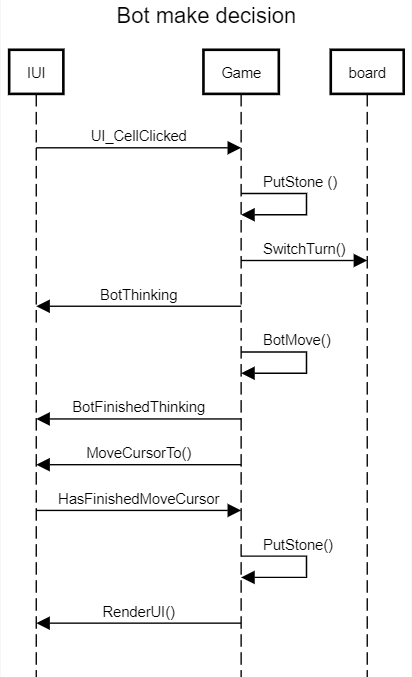
This sequence diagram explains the detail part that was omitted from the first diagram. After the game object called PutStone, if the game result is not decided, it will
- switch the turn because now it is the bot's turn.
- Raise the
BotThinkingevent to tell the UI to change the cursor to an hourglass and to block the input from the user. - After that call
BotMove()method, this method will use theMinimaxfunction to find a good position. - Raise
BotFinishedThinkingevent to tell the UI to change the cursor back to normal. - IUI calls
MoveCursorToto mouse your mouse position to the position the bot desires. - Raise
HasFinishedMouveCursorto the game object, so it canPutStone()by itself. - Tell the UI to Render the board.
AI
Now come to the AI part, for the search function, I use the standard Minimax Alpha-Beta Pruning. For the node that the program searches, the program will not search the node that is not a neighbor because the Gomoku board is so big,
For the 15x15 board size, it has more than 200 positions for the first level, and it will have more than 40,000 positions for the second level Therefore, we aim to minimize the number of nodes by limiting our search to approximately 30 neighbor positions per level.
We can do this because in Gomoku to win the game, the position that you put must be next to the existing stone position.
AI\Minimax.cs
board.generateNeighboreMoves() is the method to get the neighbor position.
if it is the first level, we allow to get a neighbor at the radius 2 from the existing stone position.
This class allows you to inject an evaluator object and then call
evaluator.evaluateBoard().
We separate an evaluator object from the Minimax class because we would like to allow the Minimax to switch between various kinds of evaluator functions.
As of now, we only use EvaluateV3.cs but I would like to mention EvaluateV2.cs for educational purposes.
        private MoveScore minimaxSearchAlphaBeta
        (int depth, SharpMoku.Board board, Boolean IsMax,
                         double AlphaValue, double BetaValue)
        {
            NumberOfNodes++;
            NumberOfNodeInEachLevel[depth]++;
            // Last depth (terminal node), evaluate the current board score.
            String tabString = GetTab(depth);
            MoveScore movescore = new MoveScore();
            Log($"{tabString}depth{depth}");

            if (depth == 0)
            {
                movescore = new MoveScore(evaluator.evaluateBoard(board, !IsMax));
                Log($"{tabString}Evaluate happens here");
                Log($"{tabString}Score::{movescore.Score}");

                return movescore;
            }

            /*If it is first level, the radiusNeighbor can be 2
             * because it will not have too much node.
            */
            int radiusNeighbour = (depth == FirstLevelDepth)
                ? 2
                : 1;
            List<Position> allNeighborPossibleMoves = null;
            if (radiusNeighbour == 2)
            {
                allNeighborPossibleMoves = board.generateNeighboreMoves(radiusNeighbour);
                if (allNeighborPossibleMoves.Count > 30)
                {
                    allNeighborPossibleMoves = board.generateNeighboreMoves(1);
                }
            }
            else
            {
                allNeighborPossibleMoves = board.generateNeighboreMoves(1);
            }

            // If there is no possible move left,
            // treat this node as a terminal node and return the score.
            bool IsNothingLeftToSearch = (allNeighborPossibleMoves.Count == 0);

            if (IsNothingLeftToSearch)
            {
                movescore = new MoveScore(evaluator.evaluateBoard(board, !IsMax));
                return movescore;
            }

            /*If we reach this stage it means
             * There are valid moves
             */

            MoveScore bestMove = new MoveScore();
            int depthChild = 0;
            Boolean isMaxChild = false;
            depthChild = depth - 1;
            isMaxChild = !IsMax;

            bestMove.Row = allNeighborPossibleMoves[0].Row;
            bestMove.Col = allNeighborPossibleMoves[0].Col;
            bestMove.Score = IsMax
                            ? int.MinValue
                            : int.MaxValue;
            int iCountMove = 0;
            Log($"{tabString}No of neighbor::{allNeighborPossibleMoves.Count }");
            foreach (Position move in allNeighborPossibleMoves)
            {
                iCountMove++;
                Log($"{tabString}{iCountMove}.   move::{move.PositionString()}");
                board.PutStoneAndSwitchTurn(move);
                movescore = minimaxSearchAlphaBeta
                            (depthChild, board, isMaxChild, AlphaValue, BetaValue);
                movescore.Row = move.Row;
                movescore.Col = move.Col;

                Log($"{tabString}Score::{movescore.Score }");
                //  board.Undo();

                if (board.IsFull)
                {
                    Log("{tabString}board.IsFull");
                    return movescore;
                }
                board.Undo();

                if (IsMax)
                {
                    AlphaValue = Math.Max(movescore.Score, AlphaValue);
                    if (movescore.Score >= BetaValue)
                    {
                        Log($"{tabString}moveScoe >= Beta");
                        return movescore;
                    }
                    bestMove = MoveScore.Max(bestMove, movescore);
                }
                else
                {
                    BetaValue = Math.Min(movescore.Score, BetaValue);
                    if (movescore.Score > AlphaValue)
                    {
                        Log($"{tabString}moveScore > Alpha");
                        return movescore;
                    }
                    bestMove = MoveScore.Min(bestMove, movescore);
                }
            }
            return bestMove;
        }
AI\EvaluateV1.cs
This class just chooses a random position.
AI\EvaluateV2.cs
This is the popular Gomoku evaluator function, the idea of this evaluator function is we try to search the whole board to find the pattern in Horizontal, Vertical, and Diagonal direction.
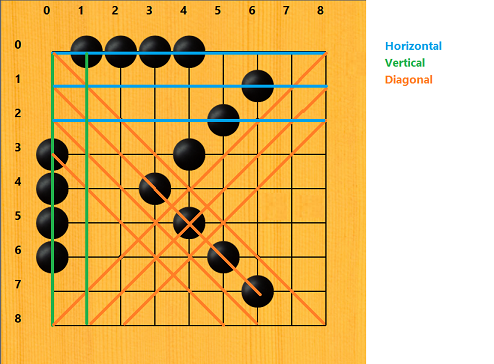
For a 15x15 dimensions board, there will be 88 lines. 15 lines from Horizontal.
15 lines from Vertical.
58 lines from both directions of the diagonal each direction has 29 lines.
In each line we search to find the pattern, the more consecutive stones we have, the higher score we get unless our pattern was blocked by the opponent's stone.
To give the score, who is the current is also needs to be accounted for, for example, if we have 4 stones in a row and now it is our turn, we can guarantee that we will win but if the current turn is the opponent, we will not get much benefit from this pattern because the opponent can block us from getting the winning position.
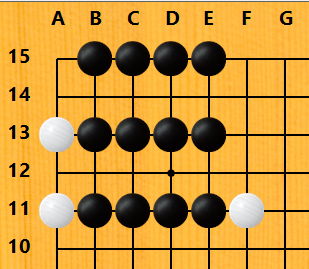
These 3 lines have 4 stones in a row, the difference is:
- Line #15 has no block from the opponent.
- Line #13 has one block on the left from the opponent.
- Line #11 has 2 blocks on both left and right from the opponent.
I will use
X to represent our stone,
- to represent the blank space,
O to represent the opponent's stone.
The Score in this table is not an extract value, they are just an idea, that can be adjusted.
The function only needs Pattern, whose turn is as the parameters,
I show the Number of block columns on this table just to make it easier to look at.
| Pattern | Number of blocks | Whose turn | Score | Description |
| XXXXX | 0 | (N/A) | 50000000 | 5 in a row. We can win the game |
| -XXXX- | 0 | Our turn | 1000000 | 4 in a row with no block, can confirm to win because it has 4 stones already and this is my turn |
| OXXXX- | 1 | Our turn | 1000000 | 4 in a row with one block on the left, can confirm to win because it has 4 stones already and this is my turn |
| OXXXX- | 1 | Opponent turn | 1000 | 4 in a row with one block, but it is the opponent's turn, so our opponent can block us |
| -XXX- | 0 | Our turn | 200 | 3 in a row with no block, this is not bad it has the potential to win |
| OXXXXO | 2 | (N/A) | 0 | 4 in a row with 2 blocks from the left and right. This is useless because our pattern was blocked by the opponent's stone at both sides |
This evaluation algorithm is o.k. I can play with it, but when I increase the depth of the bot, the game is too slow.
I found two issues with this pattern:
- The number of the cells we check is too huge, there are about 900 cells from 225 + 225 + 450 (horizontal, vertical, 2 directions of diagonal).
- This algorithm does not give much score for patterns like this XXX-XO compared to XXXX-O, both patterns can be won by putting a single stone, but for the first pattern, the algorithm just sees it as 2 patterns of 2 consecutive stones.
XXX-XO and XXX------XO have the same score despite the first one can make us win by a single stone.
AI\EvaluateV3.cs
Since EvaluateV2 is not good enough, I tried to search for another solution, I found the JavaScript GoMoku program by Anton Midrenok
https://codepen.io/mudrenok/pen/gpMXgg
This EvaluateV3 is a port to C# with the reflection at some part of the code.
The idea of this function is, that when the program evaluates, it does not need to scan the whole board, it just needs to search 36 cells from the position it wants to put the stone.
Supposing we would like to know the score of the position 7,7.
These are the positions that it will search.
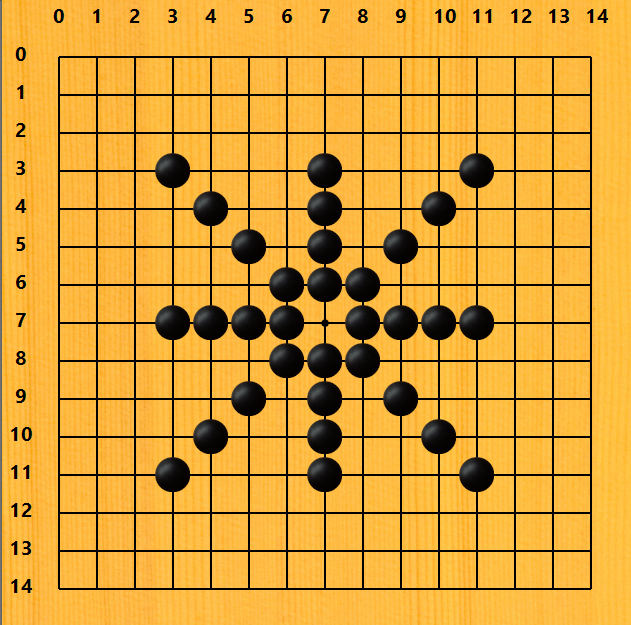
There are four directions:
- North to South for Vertical
- West to East for Horizontal
- NorthEast to SouthWest and NorthWest to SouthEast for both diagonals
Each direction will search for 9 cells only, the position itself, and the other 8 cells in the line. In each line, we search for these kinds of patterns.
These are examples of the patterns and the scores.
- Some of the score values are "Depend on how many and another factor" Please look into the
getScoreByPattern()for more understanding.
| Pattern Name | Sample of Pattern | Score |
|---|---|---|
Stone5 |
XXXXX | 1000000000 |
Stone4WithNoBlock |
-XXXX- | 100000000 |
Stone3WithNoBlock |
-XXX--,--XXX-,-X-XX-,-XX-X- | 10000000 |
Stone2WithNoBlock |
--XX--,-X-X--,--X-X-,-XX---,---XX-,-X--X- | Depend on how many and another factor |
Stone4WithBlock |
OX-XXX,OXX-XX,OXXX-X,OXXXX-,-XXXXO,X-XXXO,XX-XXO,XXX-XO, | Depend on how many and another factor |
Stone3WithBlock |
OXXX--,OXX-X-,OX-XX-,--XXXO,-X-XXO,-XX-XO, | Depend on how many and another factor |
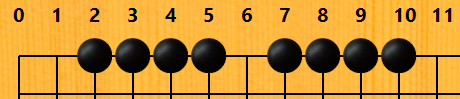
GetListAllDirection()- This function will get the list of patterns from 4 directions.GetCellValueInDirection()- This function will get the pattern from the putposition(positionCheck).Supposing you need to check the pattern on the position row 0, column 6. West to East direction. There are three steps:
- First loop check 4 cells [0,5],[0,4],[0,3],[0,2] then insert into
listCell. - Add 0,6 cell value into the list.
- Second loop check 4 cells [0,7][0,8],[0,9],[0,10] then add into
listCell.
The reason why the first loop we insert at the 0 position is
we would like to have the data like this
2,3,4,5,6,7,8,9,10
The order of the first loop is 5,4,3,2 but we need to get 2,3,4,5 so
we insert it at the 0 position so that we can get 2,3,4,5.
For the second loop, its sequence is 6, 7, 8, 9, 10 which is already what we want.

This image shows the position of the cell that needs to be checked.
- First loop check 4 cells [0,5],[0,4],[0,3],[0,2] then insert into
getScoreByPattern()- This function will calculate the score by a giving pattern.C#Shrink ▲public List<List<int>> GetListAllDirection (SharpMoku.Board board, Position checkPosition, SharpMoku.Board.CellValue cellValue) { Position positionDeltaNorthSouth = new Position(1, 0); Position positionDeltaWestEast = new Position(0, 1); Position positionDeltaNorthWest = new Position(1, 1); Position positionDeltaNorthEast = new Position(1, -1); /* *Prepare to go though all 8 directions * 4 have 4 lists of News because each list go both way * For example NorthSouth mean from the position to north * and from the postion to south */ List<int> listNorthSouth = GetCellValueInDirection(board.Matrix, cellValue, checkPosition, positionDeltaNorthSouth); List<int> listWestEast = GetCellValueInDirection(board.Matrix, cellValue, checkPosition, positionDeltaWestEast); List<int> listNorthWest = GetCellValueInDirection(board.Matrix, cellValue, checkPosition, positionDeltaNorthWest); List<int> listNorthEast = GetCellValueInDirection(board.Matrix, cellValue, checkPosition, positionDeltaNorthEast); List<List<int>> listAllDirection = new List<List<int>>() { listNorthSouth , listWestEast , listNorthWest , listNorthEast }; return listAllDirection; } public List<int> GetCellValueInDirection(int[,] matrix, SharpMoku.Board.CellValue cellValue, Position positionCheck, Position positionDelta) { int i; List<int> listCell = new List<int>(); bool IsCheckPostionIsNotmatchWithCellValue = matrix[positionCheck.Row, positionCheck.Col] != (int)cellValue; HashSet<String> hshCellInaRow = new HashSet<string>(); if (IsCheckPostionIsNotmatchWithCellValue) { return listCell; } int opponentCellvalue = -(int)cellValue; //First loop Insert cell #1 for (i = 1; i < 5; i++) { Position nextPosition = new Position(positionCheck.Row - positionDelta.Row * i, positionCheck.Col - positionDelta.Col * i); if (nextPosition.Row < 0 || nextPosition.Row >= matrix.GetLength(0) || nextPosition.Col < 0 || nextPosition.Col >= matrix.GetLength(0)) { break; } var nextValue = matrix[nextPosition.Row, nextPosition.Col]; if(!hshCellInaRow.Contains ( nextPosition.PositionString())) { listCell.Insert(0, nextValue); //We insert at the 0 position } if ((int)nextValue == opponentCellvalue) { break; } } listCell.Add((int)cellValue); //The cell itself #2 //Add #3 for (i = 1; i < 5; i++) { Position nextPosition = new Position(positionCheck.Row + positionDelta.Row * i, positionCheck.Col + positionDelta.Col * i); if (nextPosition.Row < 0 || nextPosition.Row >= matrix.GetLength(0) || nextPosition.Col < 0 || nextPosition.Col >= matrix.GetLength(0)) { break; } var nextValue = matrix[nextPosition.Row, nextPosition.Col]; if (!hshCellInaRow.Contains(nextPosition.PositionString())) { listCell.Add(nextValue);//We add it to the last position } if ((int)nextValue == opponentCellvalue) { // listCell.Insert(0, nextValue); break; } //listCell.Insert(0, nextValue); } return listCell; } public int getScoreByPattern(NumberofScorePattern numberofPattern) { if (numberofPattern.Winning > 0) { return CONST_winScore * numberofPattern.Winning; } if (numberofPattern.Stone4 > 0) { return CONST_winGuarantee; } if (numberofPattern.BlockStone4 > 1) { return CONST_winGuarantee / 10; } if (numberofPattern.Stone3 > 0 && numberofPattern.BlockStone4 > 0) { return CONST_winGuarantee / 100; } if (numberofPattern.Stone3 > 1) { return CONST_winGuarantee / 1000; } if (numberofPattern.Stone3 == 1) { switch (numberofPattern.Stone2) { case 3: return 40000; case 2: return 38000; case 1: return 35000; default: return 3450; } } if (numberofPattern.BlockStone4 == 1) { switch (numberofPattern.Stone2) { case 3: return 4500; case 2: return 4200; case 1: return 4100; default: return 4050; } } switch (numberofPattern.BlockStone3) { case 3: if (numberofPattern.Stone2 == 1) return 2800; break; case 2: switch (numberofPattern.Stone2) { case 2: return 3000; case 1: return 2900; } break; case 1: switch (numberofPattern.Stone2) { case 3: return 3400; case 2: return 3300; case 1: return 3100; } break; } switch (numberofPattern.Stone2) { case 4: return 2700; case 3: return 2500; case 2: return 2000; case 1: return 1000; } return 0; }
This evaluation function is very strong and it solves two issues that Evaluate2 has.
- The number of cells we check is not too huge anymore.
- This algorithm is better at handling the pattern like this XXX-XO
Testing
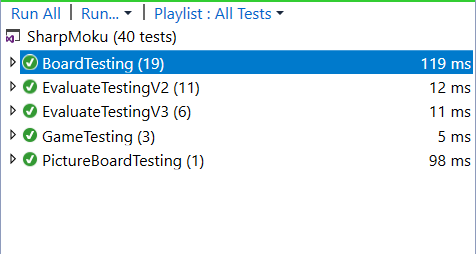
You can just run the scripts from Visual Studio.
What Can We Do to Improve
For the UI, if I need to rewrite the board object again, I might consider not using the array of labels to render the board and the stone.
It might be better if all of the objects we see on the board just be painted by a single picturebox object.
For the AI, it is already strong enough, but it can be stronger if we implement some of the opening algorithms and also use Zobrist hash.
References
- https://en.wikipedia.org/wiki/Gomoku
- https://blog.theofekfoundation.org/artificial-intelligence/2015/12/11/minimax-for-gomoku-connect-five/
- https://codepen.io/mudrenok/pen/gpMXgg
History
- 3rd January, 2023: Initial version
- 4th January, 2023: Tried to fix download link
License
This article, along with any associated source code and files, is licensed under The MIT License


SharpMoku a Gomoku/Five in a Row C#로 작성됨
소개
이것은 C#로 작성된 고모쿠/5연승 게임입니다. 저는 학교 컴퓨터에서 플레이했던 추억 때문에 이 게임을 만들었습니다.
개요
고모쿠는 두 명의 플레이어가 9x9 또는 15x15 보드 크기에 조각을 차례로 배치하는 보드 게임입니다.
이 게임의 목표는 수평, 수직 또는 대각선으로 연속된 5개의 조각 행을 가장 먼저 형성하는 것입니다.
가장 먼저 성공하는 플레이어가 승리합니다.
특징
- 보드의 크기는 9x9 또는 15x15입니다.
- 모드 인간 대 인간, 인간 대 로봇, 로봇 대 인간
- 봇 레벨 일반, 하드
- 돌과 보드의 이미지나 색상을 모두 지원합니다.
- 다양한 유형의 테마 지원
사용자 인터페이스
간단한 Gomoku 프로그램이므로 보드를 렌더링하기 위해 하나의 구성 요소만 포함된 양식만 필요합니다.
UI\IUI.cs
이 인터페이스는 메서드와 이벤트를 정의합니다. 우리는 FormSharpMoku이 인터페이스를 구현하는 데 사용합니다.
public interface IUI
    {
        // Raise event CellClicked so the game object will handle the operation
        event Board.CellClickHandler CellClicked;

        void RenderUI();
        void MoveCursorTo(Position position);

        //To tell the game object that the bot has finished
        //moving a cursor to the position to put.
        event EventHandler HasFinishedMoveCursor;

        /*
         These three methods will be triggered from the Game Object.
         Game_GameFinished : UI will display the result.
         Game_BotThinking : UI will change the cursor to an hourglass.
         Game_BotFinishedThinking : UI will change the cursor back to the
                                    default cursor and allow the user to input
        */
        void Game_GameFinished(object sender, EventArgs e);
        void Game_BotThinking(object sender, EventArgs e);
        void Game_BotFinishedThinking(object sender, EventArgs e);
    }
폼샤프모쿠.cs
이 양식은 IUI 인터페이스를 구현하며 PictureBoxGoMoku컨트롤로 구성됩니다.
UI\PictureBoxGoMoku.cs
이 클래스는 PictureBox컨트롤에서 상속받고, 돌과 보드 라인을 나타내는 데 사용되는 레이블 컬렉션으로 구성됩니다.
- 9x9 보드에는 총 81개의 라벨이 있고, 15x15 보드에는 총 225개의 라벨이 있습니다.
- 에서
PictureBoxGoMoKu Paint, 그것은 표기법과 배경 이미지만 렌더링하는 것을 담당할 것이고, 나머지 보드는 레이블 자체에 의해 렌더링될 것입니다. 보드의 표기법은 Gomoku 표기법(행의 경우 AO, 열의 경우 1-15)과 배열 인덱스 위치(행과 열 모두 0-14)가 될 수 있으며, 우리는 디버깅 목적으로 후자를 사용합니다.
UI\라벨사용자 정의 페인트\GoMoku 페인트.cs
다양한 테마를 지원하기 위해 레이블을 렌더링하는 데 사용하는 클래스가 두 개 이상 있습니다 GoMokuPaint. GoMoku 테마의 경우 클래스를 사용하여 렌더링합니다.
PaintStone()- 이 방법은 돌을 렌더링하는 것 외에도 이미지 렌더링이나 돌 색상 렌더링도 지원합니다.PaintBorder()- 이 방법은 테두리를 만들기 위해 라벨에 선을 그으며, 교차점도 그립니다.이 방법은 다양한 종류의 그리기 위치를 처리합니다.
TopLeftCornerTopBorderTopRightCornerLeftBorderCenterRightBorderBottomLeftCorderBottomBorderBottomRightCorner
이 이미지에서 파란색은 일종의 라벨이고, 녹색은 위치가 인 라벨 Center이지만 교차점도 있습니다.
이는 위치의 경우만 보여주는 코드로 Center, 각 위치는 2개의 선에 그려지고 교차점인 경우 중앙에 작은 원이 생깁니다.
private void PaintBorder(Graphics g, ExtendLabel pLabel)
{
    Point fromPointX = Point.Empty;
    Point toPointX = Point.Empty;
    Point fromPointY = Point.Empty;
    Point toPointY = Point.Empty;

    int beginWidth = 0;
    int middleWidth = pLabel.Width / 2;
    int endWidth = pLabel.Width;
    int beginHeight = 0;
    int middleHeight = pLabel.Height / 2;
    int endHeight = pLabel.Height;

    switch (pLabel.CellAttribute.GoboardPosition)
    {
        case GoBoardPositionEnum.Center:
            fromPointY = new Point(middleWidth, beginHeight);
            toPointY = new Point(middleWidth, endHeight);

            fromPointX = new Point(beginWidth, middleHeight);
            toPointX = new Point(endWidth, middleHeight);
            break;
        //Omit the code for other position
    }

    g.DrawLine(penTable, fromPointY, toPointY);
    g.DrawLine(penTable, fromPointX, toPointX);

    g.CompositingMode = CompositingMode.SourceOver;

    if (pLabel.CellAttribute.IsIntersection)
    {
        RectangleF RecCircleIntersecton =
                   new RectangleF(middleWidth - 4, middleHeight - 4, 8, 8);
        g.FillEllipse(ShareGraphicObject.SolidBrush(penTable.Color),
                      RecCircleIntersecton);
    }
}
이 이미지에서 파란색은 라벨의 영역이고, BH는 beginHeight, EH는 endHeight, BW는 beginWidth, EW는 를 의미합니다 endWidth. 와 사이 beginHeigh 는 endHeight 이고 middleHeight 또한 입니다 middleWidth.
예를 들어, 위치를 나타내는 레이블은 Center두 개의 선을 그려야 합니다.
middleHeight에서beginWidth까지 의 수평선endWidth.middleWidth에서beginHeight까지 의 수직선endHeight.
PaintNeighbour() - 우리는 이 방법을 사용하지 않지만, 디버깅 목적으로 이웃을 보여주고 싶다면 주석 처리를 제거할 수 있습니다.
이 이미지는 검은색과 흰색 돌의 이웃 셀을 보여줍니다.
인접 위치의 목적은 AI 섹션에서 논의됩니다.
사용자가 클릭할 때의 시퀀스 다이어그램.
이것은 사용자가 클릭할 때의 시퀀스 다이어그램입니다. (프로세스) 섹션에서 세부 사항을 생략했습니다. Game.cs
섹션 에서 봇이 작동하는 방법의 시퀀스 다이어그램을 살펴볼 수 있습니다 .
오목 게임
UI는 완성되었으며, 이제 AI를 제외한 게임 구성 요소에 대해 논의해 보겠습니다.
보드.cs
우리는 돌의 값을 이라는 이름의 2D 배열에 저장하고 Matrix, 또한 dicWhiteStone, dicBlackStone, 를 사용하여 dicNeighbor흑백 돌과 그 이웃의 위치를 저장합니다. 우리는 검색 시간을 줄이기 위해 중복 데이터를 저장합니다. 이웃 위치를 알아야 한다고 가정하면, Matrix이웃 위치를 계산하기 위해 의 모든 위치를 검색할 필요가 없습니다.
//Some part of the Board.cs
[Serializable]
public class Board
{
    public delegate void CellClickHandler
           (object sender, PositionEventArgs positionClick);

    // 2d array to store cell value
    public int[,] Matrix;

    /*
     * dicWhiteStone store WhiteStone position
     * dicBlackStone store WhiteStone position
     * dicNieghbor store position of the stone next to both white and black stone
     */
    public Dictionary<String, SharpMoku.Position> dicWhiteStone
       { get; private set; } = new Dictionary<String, SharpMoku.Position>();
    public Dictionary<String, SharpMoku.Position> dicBlackStone
       { get; private set; } = new Dictionary<String, SharpMoku.Position>();
    public Dictionary<String, SharpMoku.Position> dicNeighbor
       { get; private set; } = new Dictionary<string, Position>();

    public int BoardSize { get; private set; }

    public enum WinStatus
    {
        BlackWon=-1,
        NotDecidedYet=0,
        WhiteWon=1,
        Draw=2
    }

    // Represent the value of the cell in the board
    public enum CellValue
    {
        Black=-1,
        Empty=0,
        White=1,
    }

    public enum Turn
    {
        Black=-1,
        White=1
    }
    public Turn CurrentTurn { get; private set; } = Turn.Black;
    public CellValue CurrentTurnCellValue
    {
        get
        {
            if(CurrentTurn == Turn.Black)
            {
                return CellValue.Black;
            }

            return CellValue.White;
        }
    }
    public Board (int boardSize)
    {
        if(boardSize != 9 &&
            boardSize != 15)
        {
            throw new ArgumentException($"Board size is invalid {boardSize},
                      program only accept 9 and 15 as valid value");
        }
        this.BoardSize = boardSize;
        Matrix = new int[this.BoardSize, this.BoardSize];
    }

    public Board(Board board)
    {
        Matrix = new int[board.Matrix.GetLength(0), board.Matrix.GetLength(1)];
        dicWhiteStone = new Dictionary<string, Position>();
        dicBlackStone = new Dictionary<string, Position>();
        dicNeighbor = new Dictionary<string, Position>();

        this.Matrix = board.Matrix.Clone() as int[,];
        this.dicWhiteStone = new Dictionary<string,
                             Position>(board.dicWhiteStone);
        this.dicBlackStone = new Dictionary<string,
                             Position>(board.dicBlackStone);
        this.dicNeighbor = new Dictionary<string,
                           Position>(board.dicNeighbor);
        this.listHistory = new List<Position>(board.listHistory);
        this.BoardSize = board.BoardSize;
        this.CurrentTurn = board.CurrentTurn;
    }

    public void PutStone(int pRow, int pCol, CellValue cellValue)
    {
        /* 1.Assign value into the matrix
         * 2.Add the postion value into Hash
         * 3.Add postion into history
         * 4.Add Empty neighbor
         */
        Matrix[pRow, pCol] = (int)cellValue;
        SharpMoku.Position newPosition = new Position(pRow, pCol);
        GetHshByCellValue(cellValue).Add
                (newPosition.PositionString(), newPosition);
        listHistory.Add(newPosition);
        AddEmptyNeighborOf(newPosition);
    }
검은색 돌을 행 0, 열 0에 놓으면 PutStone(0,0, -1)
다음과 같은 일이 발생합니다.
Matrix[0,0]로 설정됨-1.dicBlackStone가치 를 더하세요position(0,0).- (프로그램에서 이 값을 사용합니다 )
position(0,0)에 추가합니다 .listHistoryUndo() - 와 를 추가
dicNeighbor하여 더합니다 .position(1,0)position(0,1)
를 호출하면 Undo()프로그램은 이웃의 위치도 조정해야 합니다.
게임.cs
이 클래스의 역할은 UI와 보드 객체 사이의 중개자입니다. UI는 이벤트를 발생시킬 뿐이며, 게임 객체는 다음에 무엇을 할지 결정합니다.
모든 비즈니스 로직은 게임과 보드에 있고, UI는 그래픽을 렌더링하는 방법만 알고 있습니다.
사용자가 보드를 클릭하면 UI_CellClicked()메서드에 이벤트가 발생하고, UI_CellClicked()프로그램은 게임과 보드의 상태를 확인한 후 다음 작업을 진행합니다 PutStone(positionClick.Value, board.CurrentTurnCellValue).
public class Game
{
     public Board board = null;
     private UI.IUI UI = null;
     public enum GameStateEnum
     {
        NotBegin,
        Playing,
        End
     }
     public enum GameModeEnum
     {
        PlayerVsBot = 0,
        BotVsPlayer = 1,
        PlayerVsPlayer = 2,

     }
     public Board.WinStatus WinResult { get; private set; } =
                                        Board.WinStatus.NotDecidedYet;
     public Board.Turn TheWinner { get; private set; }
     public ILog log = null;
     public GameModeEnum GameMode { get; private set; } = GameModeEnum.PlayerVsBot;
     public GameStateEnum GameState { get; private set; } = GameStateEnum.NotBegin;
        /*
         * GameFinished event to tell the UI to display the result
         * BotThinking to tell the UI to change the cursor to an hourglass
         * BotFinishedThinking to tell the UI to move the cursor to the position
         * that Bot needs to put the stone
         */
     public event EventHandler GameFinished;
     public event EventHandler BotThinking;
     public event EventHandler BotFinishedThinking;

     private void ExplicitConstructor(UI.IUI ui,
        Board board,
        int boardSize,
        IEvaluate pbot,
        int botSearchDepth,
        GameModeEnum gameMode)
        {
        this.UI = ui;
        this.GameMode = gameMode;
        this.BotSearchDepth = botSearchDepth;
        if (pbot != null)
        {
            bot = pbot;
        }
        WinResult = Board.WinStatus.NotDecidedYet;

        this.UI.CellClicked -= UI_CellClicked;
        this.UI.HasFinishedMoveCursor -= UI_HasFinishedMoveCursor;
        this.GameFinished -= UI.Game_GameFinished;
        this.BotThinking -= UI.Game_BotThinking;
        this.BotFinishedThinking -= UI.Game_BotFinishedThinking;

        this.UI.CellClicked += UI_CellClicked;
        this.UI.HasFinishedMoveCursor += UI_HasFinishedMoveCursor;

        this.board = (board != null)
            ? board
            : new Board(boardSize);

        this.GameFinished += UI.Game_GameFinished;
        this.BotThinking += UI.Game_BotThinking;
        this.BotFinishedThinking += UI.Game_BotFinishedThinking;
        }
        public Game(UI.IUI ui, Board board,
        IEvaluate pbot,
        int botSearchDepth,
        GameModeEnum gameMode
        )
     {
        ExplicitConstructor(ui, board, 0, pbot, botSearchDepth, gameMode);
     }
     public Game(UI.IUI ui, int boardSize,
        IEvaluate pbot,
        int botSearchDepth,
        GameModeEnum gameMode
     )
    {
        ExplicitConstructor(ui, null, boardSize, pbot, botSearchDepth, gameMode);
    }
    public bool CanUndo => board == null
        ? false
        : board.CanUndo;

    private void UI_HasFinishedMoveCursor(object sender, EventArgs e)
    {
        PutStone(botMoveToPostion, (Board.CellValue)board.CurrentTurn);
    }
    public void PutStone(Position position)
    {
        PutStone(position, this.board.CurrentTurnCellValue);
    }

    public void PutStone(Position position, Board.CellValue turn)
    {
        board.PutStone(position, turn);
        this.UI.RenderUI();

        WinResult = board.CheckWinStatus();

        if (WinResult == Board.WinStatus.NotDecidedYet)
        {
            this.board.SwitchTurn();
            bool IsBotTurn = (GameMode == GameModeEnum.PlayerVsBot && !IsPlayer1Turn) ||
                        (GameMode == GameModeEnum.BotVsPlayer && IsPlayer1Turn);
            if (IsBotTurn)
            {
                BotThinking?.Invoke(this, null);
                BotMove();
            }
            return;
        }

        this.GameState = GameStateEnum.End;
        WinStatusEventArgs statusEvent = new WinStatusEventArgs(WinResult);
        GameFinished?.Invoke(this, statusEvent);
     }

     public void NewGame()
     {
        this.GameState = GameStateEnum.Playing;

        if (this.GameMode == GameModeEnum.BotVsPlayer)
        {
            System.Threading.Thread.Sleep(20);
            BotMove();
        }
     }

     // This method is being used by humans only.
     private void UI_CellClicked(object o, Board.PositionEventArgs positionClick)
     {
        Boolean isPlayerClickDespiteItisBotTurn =
               (this.GameMode == GameModeEnum.PlayerVsBot &&
                this.board.CurrentTurn != Board.Turn.Black) ||
               (this.GameMode == GameModeEnum.BotVsPlayer &&
                this.board.CurrentTurn != Board.Turn.White);

        Boolean isClickedOnNonEmptyCell = board.Matrix[positionClick.Value.Row,
                positionClick.Value.Col] != (int)Board.CellValue.Empty;
        Boolean isClickedOInValidPosition = !board.IsValidPosition(positionClick.Value);

        if (GameState != GameStateEnum.Playing
            || isClickedOInValidPosition
            || isPlayerClickDespiteItisBotTurn
            || isClickedOnNonEmptyCell)
        {
            return;
        }

        PutStone(positionClick.Value, board.CurrentTurnCellValue);
     }

     public int BotSearchDepth { get; private set; } = 2;
     private Position botMoveToPostion;
     private IEvaluate bot = new EvaluateV3();
     private void BotMove()
     {
        SharpMoku.Board cloneBoard = new Board(this.board);

        Minimax miniMax = new Minimax(cloneBoard, bot, this.log);

        botMoveToPostion = miniMax.calculateNextMove(BotSearchDepth);
        BotFinishedThinking?.Invoke(this, null);
        UI.MoveCursorTo(botMoveToPostion);
	}
}
이 시퀀스 다이어그램은 첫 번째 다이어그램에서 생략된 세부 부분을 설명합니다. 게임 객체가 호출된 후 PutStone게임 결과가 결정되지 않으면
- 이제 봇의 차례이므로 턴을 바꾸세요.
BotThinkingUI에 커서를 모래시계로 바꾸고 사용자 입력을 차단하도록 이벤트를 발생시킵니다 .- 해당 호출
BotMove()메서드 이후에, 이 메서드는Minimax함수를 사용하여 좋은 위치를 찾습니다. BotFinishedThinkingUI에 커서를 다시 정상으로 변경하라고 알리는 이벤트를 발생시킵니다 .- IUI는
MoveCursorTo마우스를 봇이 원하는 위치로 이동시킵니다. HasFinishedMouveCursor게임 객체를 키우면PutStone()그 자체로 존재할 수 있습니다.- UI에 보드를 렌더링하라고 지시합니다.
일체 포함
이제 AI 부분으로 넘어가서, 검색 기능을 위해 저는 표준 Minimax Alpha-Beta Pruning을 사용합니다. 프로그램이 검색하는 노드의 경우, 프로그램은 Gomoku 보드가 너무 크기 때문에 이웃이 아닌 노드를 검색하지 않습니다.
15x15 보드 크기의 경우, 첫 번째 레벨에 200개 이상의 위치가 있고, 두 번째 레벨에 40,000개 이상의 위치가 있습니다. 따라서 레벨당 약 30개의 이웃 위치로 검색을 제한하여 노드 수를 최소화하는 것을 목표로 합니다.
Gomoku에서 게임에서 이기려면 배치하는 위치가 기존 스톤 위치 옆에 있어야 하기 때문에 이렇게 할 수 있습니다.
AI\미니맥스.cs
board.generateNeighboreMoves()이웃 위치를 가져오는 방법입니다.
첫 번째 레벨인 경우 기존 돌 위치에서 반경 2에 이웃을 가져오도록 허용합니다.
이 클래스를 사용하면 평가자 객체를 주입한 다음 호출할 수 있습니다
evaluator.evaluateBoard(). 다양한 종류의 평가자 함수 간에 전환 할 수 있도록 하기 위해
평가자 객체를 클래스에서 분리합니다 . 지금은 EvaluateV3.cs 만 사용하지만 교육 목적으로 EvaluateV2.cs를 언급하고 싶습니다 .MinimaxMinimax
        private MoveScore minimaxSearchAlphaBeta
        (int depth, SharpMoku.Board board, Boolean IsMax,
                         double AlphaValue, double BetaValue)
        {
            NumberOfNodes++;
            NumberOfNodeInEachLevel[depth]++;
            // Last depth (terminal node), evaluate the current board score.
            String tabString = GetTab(depth);
            MoveScore movescore = new MoveScore();
            Log($"{tabString}depth{depth}");

            if (depth == 0)
            {
                movescore = new MoveScore(evaluator.evaluateBoard(board, !IsMax));
                Log($"{tabString}Evaluate happens here");
                Log($"{tabString}Score::{movescore.Score}");

                return movescore;
            }

            /*If it is first level, the radiusNeighbor can be 2
             * because it will not have too much node.
            */
            int radiusNeighbour = (depth == FirstLevelDepth)
                ? 2
                : 1;
            List<Position> allNeighborPossibleMoves = null;
            if (radiusNeighbour == 2)
            {
                allNeighborPossibleMoves = board.generateNeighboreMoves(radiusNeighbour);
                if (allNeighborPossibleMoves.Count > 30)
                {
                    allNeighborPossibleMoves = board.generateNeighboreMoves(1);
                }
            }
            else
            {
                allNeighborPossibleMoves = board.generateNeighboreMoves(1);
            }

            // If there is no possible move left,
            // treat this node as a terminal node and return the score.
            bool IsNothingLeftToSearch = (allNeighborPossibleMoves.Count == 0);

            if (IsNothingLeftToSearch)
            {
                movescore = new MoveScore(evaluator.evaluateBoard(board, !IsMax));
                return movescore;
            }

            /*If we reach this stage it means
             * There are valid moves
             */

            MoveScore bestMove = new MoveScore();
            int depthChild = 0;
            Boolean isMaxChild = false;
            depthChild = depth - 1;
            isMaxChild = !IsMax;

            bestMove.Row = allNeighborPossibleMoves[0].Row;
            bestMove.Col = allNeighborPossibleMoves[0].Col;
            bestMove.Score = IsMax
                            ? int.MinValue
                            : int.MaxValue;
            int iCountMove = 0;
            Log($"{tabString}No of neighbor::{allNeighborPossibleMoves.Count }");
            foreach (Position move in allNeighborPossibleMoves)
            {
                iCountMove++;
                Log($"{tabString}{iCountMove}.   move::{move.PositionString()}");
                board.PutStoneAndSwitchTurn(move);
                movescore = minimaxSearchAlphaBeta
                            (depthChild, board, isMaxChild, AlphaValue, BetaValue);
                movescore.Row = move.Row;
                movescore.Col = move.Col;

                Log($"{tabString}Score::{movescore.Score }");
                //  board.Undo();

                if (board.IsFull)
                {
                    Log("{tabString}board.IsFull");
                    return movescore;
                }
                board.Undo();

                if (IsMax)
                {
                    AlphaValue = Math.Max(movescore.Score, AlphaValue);
                    if (movescore.Score >= BetaValue)
                    {
                        Log($"{tabString}moveScoe >= Beta");
                        return movescore;
                    }
                    bestMove = MoveScore.Max(bestMove, movescore);
                }
                else
                {
                    BetaValue = Math.Min(movescore.Score, BetaValue);
                    if (movescore.Score > AlphaValue)
                    {
                        Log($"{tabString}moveScore > Alpha");
                        return movescore;
                    }
                    bestMove = MoveScore.Min(bestMove, movescore);
                }
            }
            return bestMove;
        }
AI\평가V1.cs
이 클래스는 무작위로 위치를 선택합니다.
AI\평가V2.cs
이것은 인기 있는 고모쿠 평가 함수이고, 이 평가 함수의 아이디어는 수평, 수직, 대각선 방향의 패턴을 찾기 위해 보드 전체를 검색한다는 것입니다.
15x15 치수의 보드에는 88개의 선이 있습니다. 수평에서 15개의 선.
수직에서 15개의 선.
대각선의 양쪽 방향으로 58개의 선, 각 방향으로 29개의 선이 있습니다.
각 줄에서 패턴을 찾기 위해 검색하는데, 연속된 돌이 많을수록 상대방의 돌에 의해 패턴이 막히지 않는 한 더 높은 점수를 얻습니다.
점수를 주기 위해 현재 돌이 누구인지도 고려해야 합니다. 예를 들어, 돌이 4개 연속으로 있고 이제 우리 차례라면 이길 수 있지만 현재 차례가 상대방이라면 상대방이 우리가 승리하는 위치를 차지하지 못하도록 막을 수 있기 때문에 이 패턴에서 많은 이점을 얻을 수 없습니다.
이 3개 줄에는 4개의 돌이 일렬로 놓여 있는데, 차이점은 다음과 같습니다.
- 15번 라인에는 상대방이 차단하지 않았습니다.
- 13번 라인은 상대방의 왼쪽에 블록이 하나 있습니다.
- 11번 라인에는 상대방의 좌우에 각각 2개의 블록이 있습니다.
우리의 돌을 X 로, 빈 공간을
- 로, 상대방의 돌을
O 로 표시 하겠습니다 .
이 표의 점수는 추출 값이 아니라 단지 조정 가능한 아이디어일 뿐입니다.
이 함수는 매개변수로 차례가 되는 패턴만 필요로 하며,
이 표에 블록 열의 개수를 표시하여 보기 쉽게 했습니다.
| 무늬 | 블록의 개수 | 누구의 차례인가 | 점수 | 설명 |
| XXXXXXXX | 0 | (해당 없음) | 50000000 | 5연승. 우리는 경기에서 이길 수 있어요 |
| -XXXX- | 0 | 우리 차례 | 1000000 | 블록이 없는 4줄의 경우 이미 4개의 돌이 있고 내 차례이므로 승리가 확정됩니다. |
| OXXXX- | 1 | 우리 차례 | 1000000 | 왼쪽에 블록이 하나 있는 4줄의 경우 이미 돌이 4개 있고 내 차례이므로 승리로 확정할 수 있습니다. |
| OXXXX- | 1 | 상대 턴 | 1000 | 4연속으로 1번 블록이 있는데 상대 턴이라 상대가 블록할 수 있음 |
| -트리플 엑스- | 0 | 우리 차례 | 200 | 3연속 블록 없음, 나쁘지 않아 승리 가능성 있음 |
| OXXXXO | 2 | (해당 없음) | 0 | 좌우 2블록씩 4줄로. 상대의 돌이 양쪽에서 우리 패턴을 막았기 때문에 쓸모가 없다. |
이 평가 알고리즘은 괜찮아요. 가지고 놀 수는 있지만, 봇의 깊이를 늘리면 게임이 너무 느려요.
이 패턴에서 두 가지 문제점을 발견했습니다.
- 우리가 검사해야 할 셀의 개수가 너무 많습니다. 225 + 225 + 450(수평, 수직, 대각선 2방향)까지 약 900개의 셀이 있습니다.
- 이 알고리즘은 XXXX-O에 비해 XXX-XO와 같은 패턴에 대해 많은 점수를 주지 않습니다. 두 패턴 모두 돌 하나를 놓아서 이길 수 있지만, 첫 번째 패턴의 경우 알고리즘은 이를 2개의 연속된 돌로 된 2개의 패턴으로 간주합니다.
XXX-XO와 XXX------XO는 첫 번째 패턴이 돌 하나를 놓아 이길 수 있음에도 불구하고 점수가 같습니다.
AI\평가V3.cs
충분하지 않아서 EvaluateV2다른 해결책을 찾아보았고, Anton Midrenok의 JavaScript GoMoku 프로그램을 찾았습니다.
https://codepen.io/mudrenok/pen/gpMXgg
이것은 EvaluateV3코드의 일부에 반사가 있는 C#으로 포팅한 것입니다.
이 함수의 아이디어는 프로그램이 평가할 때 전체 보드를 스캔할 필요가 없고, 돌을 놓을 위치에서 36개 셀만 검색하면 된다는 것입니다.
7,7 위치의 점수를 알고 싶다고 가정해 보겠습니다.
이것이 검색할 위치입니다.
방향은 4가지가 있습니다.
- 수직을 위한 북쪽에서 남쪽으로
- 수평을 위한 서쪽에서 동쪽으로
- 대각선 모두 북동쪽에서 남서쪽, 북서쪽에서 남동쪽으로
각 방향은 9개 셀만 검색하고, 위치 자체와 라인의 다른 8개 셀을 검색합니다. 각 라인에서 우리는 이런 종류의 패턴을 검색합니다.
이는 패턴과 점수의 예입니다.
- 일부 점수 값은 "숫자와 다른 요인에 따라 달라짐"입니다.
getScoreByPattern()더 자세한 내용은 을 참조하세요.
| 패턴 이름 | 패턴 샘플 | 점수 |
|---|---|---|
Stone5 |
XXXXXXXX | 1000000000 |
Stone4WithNoBlock |
-XXXX- | 100000000 |
Stone3WithNoBlock |
-XXX--,--XXX-,-X-XX-,-XX-X- | 10000000 |
Stone2WithNoBlock |
--XX--,-XX--,--XX-,-XX---,---XX-,-X--X- | 숫자와 다른 요인에 따라 다릅니다 |
Stone4WithBlock |
OX-XXX,OXX-XX,OXXX-X,OXXXX-,-XXXXO,X-XXXO,XX-XXO,XXX-XO, | 숫자와 다른 요인에 따라 다릅니다 |
Stone3WithBlock |
OXXX--,OXX-X-,OX-XX-,--XXXO,-X-XXO,-XX-XO, | 숫자와 다른 요인에 따라 다릅니다 |
GetListAllDirection()- 이 함수는 4개 방향에서 패턴 목록을 가져옵니다.GetCellValueInDirection()- 이 함수는 put 에서 패턴을 가져옵니다position(positionCheck).위치 행 0, 열 6에서 패턴을 확인해야 한다고 가정합니다. 서쪽에서 동쪽 방향입니다. 세 단계가 있습니다.
- 첫 번째 루프는 4개의 셀 [0,5],[0,4],[0,3],[0,2]를 확인한 다음 .에 삽입합니다
listCell. - 목록에 0.6 셀 값을 추가합니다.
- 두 번째 루프는 4개의 셀 [0,7][0,8],[0,9],[0,10]을 확인한 다음
listCell.에 추가합니다.
첫 번째 루프를 0 위치에 삽입하는 이유는 2,3,4,5,6,7,8,9,10
과 같은 데이터를 원하기 때문입니다 . 첫 번째 루프의 순서는 5,4,3,2이지만 2,3,4,5를 얻어야 하므로 0 위치에 삽입하여 2,3,4,5를 얻습니다. 두 번째 루프의 경우 시퀀스는 6, 7, 8, 9, 10으로 이미 원하는 순서입니다. 이 이미지는 확인해야 하는 셀의 위치를 보여줍니다.
- 첫 번째 루프는 4개의 셀 [0,5],[0,4],[0,3],[0,2]를 확인한 다음 .에 삽입합니다
getScoreByPattern()- 이 기능은 기부 패턴에 따라 점수를 계산합니다.기음#축소 ▲public List<List<int>> GetListAllDirection (SharpMoku.Board board, Position checkPosition, SharpMoku.Board.CellValue cellValue) { Position positionDeltaNorthSouth = new Position(1, 0); Position positionDeltaWestEast = new Position(0, 1); Position positionDeltaNorthWest = new Position(1, 1); Position positionDeltaNorthEast = new Position(1, -1); /* *Prepare to go though all 8 directions * 4 have 4 lists of News because each list go both way * For example NorthSouth mean from the position to north * and from the postion to south */ List<int> listNorthSouth = GetCellValueInDirection(board.Matrix, cellValue, checkPosition, positionDeltaNorthSouth); List<int> listWestEast = GetCellValueInDirection(board.Matrix, cellValue, checkPosition, positionDeltaWestEast); List<int> listNorthWest = GetCellValueInDirection(board.Matrix, cellValue, checkPosition, positionDeltaNorthWest); List<int> listNorthEast = GetCellValueInDirection(board.Matrix, cellValue, checkPosition, positionDeltaNorthEast); List<List<int>> listAllDirection = new List<List<int>>() { listNorthSouth , listWestEast , listNorthWest , listNorthEast }; return listAllDirection; } public List<int> GetCellValueInDirection(int[,] matrix, SharpMoku.Board.CellValue cellValue, Position positionCheck, Position positionDelta) { int i; List<int> listCell = new List<int>(); bool IsCheckPostionIsNotmatchWithCellValue = matrix[positionCheck.Row, positionCheck.Col] != (int)cellValue; HashSet<String> hshCellInaRow = new HashSet<string>(); if (IsCheckPostionIsNotmatchWithCellValue) { return listCell; } int opponentCellvalue = -(int)cellValue; //First loop Insert cell #1 for (i = 1; i < 5; i++) { Position nextPosition = new Position(positionCheck.Row - positionDelta.Row * i, positionCheck.Col - positionDelta.Col * i); if (nextPosition.Row < 0 || nextPosition.Row >= matrix.GetLength(0) || nextPosition.Col < 0 || nextPosition.Col >= matrix.GetLength(0)) { break; } var nextValue = matrix[nextPosition.Row, nextPosition.Col]; if(!hshCellInaRow.Contains ( nextPosition.PositionString())) { listCell.Insert(0, nextValue); //We insert at the 0 position } if ((int)nextValue == opponentCellvalue) { break; } } listCell.Add((int)cellValue); //The cell itself #2 //Add #3 for (i = 1; i < 5; i++) { Position nextPosition = new Position(positionCheck.Row + positionDelta.Row * i, positionCheck.Col + positionDelta.Col * i); if (nextPosition.Row < 0 || nextPosition.Row >= matrix.GetLength(0) || nextPosition.Col < 0 || nextPosition.Col >= matrix.GetLength(0)) { break; } var nextValue = matrix[nextPosition.Row, nextPosition.Col]; if (!hshCellInaRow.Contains(nextPosition.PositionString())) { listCell.Add(nextValue);//We add it to the last position } if ((int)nextValue == opponentCellvalue) { // listCell.Insert(0, nextValue); break; } //listCell.Insert(0, nextValue); } return listCell; } public int getScoreByPattern(NumberofScorePattern numberofPattern) { if (numberofPattern.Winning > 0) { return CONST_winScore * numberofPattern.Winning; } if (numberofPattern.Stone4 > 0) { return CONST_winGuarantee; } if (numberofPattern.BlockStone4 > 1) { return CONST_winGuarantee / 10; } if (numberofPattern.Stone3 > 0 && numberofPattern.BlockStone4 > 0) { return CONST_winGuarantee / 100; } if (numberofPattern.Stone3 > 1) { return CONST_winGuarantee / 1000; } if (numberofPattern.Stone3 == 1) { switch (numberofPattern.Stone2) { case 3: return 40000; case 2: return 38000; case 1: return 35000; default: return 3450; } } if (numberofPattern.BlockStone4 == 1) { switch (numberofPattern.Stone2) { case 3: return 4500; case 2: return 4200; case 1: return 4100; default: return 4050; } } switch (numberofPattern.BlockStone3) { case 3: if (numberofPattern.Stone2 == 1) return 2800; break; case 2: switch (numberofPattern.Stone2) { case 2: return 3000; case 1: return 2900; } break; case 1: switch (numberofPattern.Stone2) { case 3: return 3400; case 2: return 3300; case 1: return 3100; } break; } switch (numberofPattern.Stone2) { case 4: return 2700; case 3: return 2500; case 2: return 2000; case 1: return 1000; } return 0; }
이 평가 함수는 매우 강력하며 두 가지 문제를 해결합니다 Evaluate2.
- 우리가 검사하는 셀의 수는 더 이상 그렇게 많지 않습니다.
- 이 알고리즘은 XXX-XO와 같은 패턴을 처리하는 데 더 좋습니다.
테스트
Visual Studio에서 스크립트를 실행하면 됩니다.
개선을 위해 무엇을 할 수 있습니까?
UI의 경우, 보드 객체를 다시 작성해야 하는 경우, 보드와 돌을 렌더링하는 데 레이블 배열을 사용하지 않는 것을 고려할 수 있습니다.
보드에서 보이는 모든 객체가 단일 picturebox객체로만 칠해지면 더 좋을 수 있습니다.
AI의 경우 이미 충분히 강력하지만, 일부 오프닝 알고리즘을 구현하고 Zobrist 해시를 사용하면 더욱 강력해질 수 있습니다.
참고문헌
- https://en.wikipedia.org/wiki/Gomoku
- https://blog.theofekfoundation.org/artificial-intelligence/2015/12/11/minimax-for-gomoku-connect-five/
- https://codepen.io/mudrenok/pen/gpMXgg
역사
- 2023년 1월 3 일 : 초기 버전
- 2023년 1월 4 일 : 다운로드 링크 수정 시도
특허
이 문서는 관련된 모든 소스 코드 및 파일과 함께 MIT 라이선스 에 따라 라이선스됩니다.
[출처] https://www.codeproject.com/Articles/5375122/SharpMoku-a-Gomoku-Five-in-a-Row-Written-in-Csharp
광고 클릭에서 발생하는 수익금은 모두 웹사이트 서버의 유지 및 관리, 그리고 기술 콘텐츠 향상을 위해 쓰여집니다.
댓글 0
| 번호 | 제목 | 글쓴이 | 날짜 | 조회 수 |
|---|---|---|---|---|
| 5 |
[GameMaker Studio] Neural Network in Game Maker Studio – part 4
 | 졸리운_곰 | 2023.07.07 | 462 |
| 4 |
[GameMaker Studio] Neural Network in Game Maker Studio – part 3
| 졸리운_곰 | 2023.07.07 | 413 |
| 3 |
[GameMaker Studio] Neural Network in Game Maker Studio – part 2
| 졸리운_곰 | 2023.07.07 | 506 |
| 2 |
[GameMaker Studio] Neural Network in Game Maker Studio – part 1
| 졸리운_곰 | 2023.07.07 | 378 |
| 1 |
[GameMaker] [한글판] 게임메이커 8 (Game Maker 8)
| 졸리운_곰 | 2022.04.05 | 213 |