[javascript] How to append HTML code to a div using JavaScript ?

here are two ways to append HTML code to a div through JavaScript

  • Using the innerHTML attribute
  • Using the insertAdjacentHTML() method

Using the innerHTML attribute:
To append using the innerHTML attribute, first select the element (div) where you want to append the code. Then, add the code enclosed as strings using the += operator on innerHTML.

Syntax:

element.innerHTML += "additional HTML code"

or

element.innerHTML = element.innerHTML + "additional HTML code"

Example:


<!DOCTYPE html>
<html>
  
<head>
    <title>How to Append HTML Code to a Div using Javascript</title>
    <style>
        body {
            text-align: center;
              
            padding: 5%;
        }
        h1{
            color:green;
        }
    </style>
</head>
  
<body>
    <div id="add_to_me">
        <h1>GeeksforGeeks</h1>
        <p>This is the text which has already been typed into the div</p>
    </div>
  
    <button onclick="addCode()">Add Stuff</button>
    <script>
        function addCode() {
            document.getElementById("add_to_me").innerHTML += 
              "<h3>This is the text which has been inserted by JS</h3>";
        }
    </script>
</body>
  
</html>
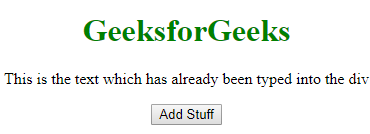
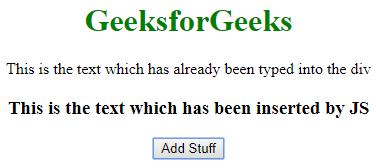
  • Output:
  • Before Clicking the Button:
  • After Clicking the Button:

    Note: This method basically destroys all the content of the div and recreates it. So, if you have any listeners attached to the child nodes of that div, they will be lost.

    Using the insertAdjacentHTML() method

    경축! 아무것도 안하여 에스천사게임즈가 새로운 모습으로 재오픈 하였습니다.
    어린이용이며, 설치가 필요없는 브라우저 게임입니다.
    https://s1004games.com

    HTML code can be appended to a div using the insertAdjacentHTML() method. However, you need to select an element inside the div to add the code. This method takes two parameters:


    Syntax:

    elementInsideDiv.insertAdjacentHTML('afterend', 'additional HTML code');
    

    Example:

    <!DOCTYPE html>
    <html>
      
    <head>
        <title>How to Append HTML Code to a Div using Javascript</title>
        <style>
            body {
                text-align: center;
                padding: 5%;
            }
          h1{
            color: green
              }
        </style>
    </head>
      
    <body>
        <div id="add_to_me">
            <h1>GeeksforGeeks</h1>
            <p id="add_after_me">
              This is the text which has already been typed into the div</p>
        </div>
      
        <button onclick="addCode()">Add Stuff</button>
        <script>
            function addCode() {
                document.getElementById("add_after_me").insertAdjacentHTML("afterend",
                    "<h3>This is the text which has been inserted by JS</h3>");
            }
        </script>
    </body>
      
    </html>
      1. The position (in the document) where you want to insert the code (‘afterbegin’, ‘beforebegin’, ‘afterend’, ‘beforeend’)
      2. The HTML code you want to insert enclosed in quotes
      • Output:
      • Before Clicking the Button:
      • After Clicking the Button:

        [출처] https://www.geeksforgeeks.org/how-to-append-html-code-to-a-div-using-javascript/


본 웹사이트는 광고를 포함하고 있습니다.
광고 클릭에서 발생하는 수익금은 모두 웹사이트 서버의 유지 및 관리, 그리고 기술 콘텐츠 향상을 위해 쓰여집니다.
번호 제목 글쓴이 날짜 조회 수
61 [web design][웹디자인][알아봅시다] 왕초보 피그마 기초 사용법???? 셀러님들 지금 당장 피그마 시작하세요! 그대로 따라만 해서 피그마 정복하기 졸리운_곰 2025.07.21 369
60 CSS selector 졸리운_곰 2024.08.02 735
59 [Web Design][웹 디자인] Sass(SCSS) 완전 정복! 졸리운_곰 2022.07.31 461
58 [HTML] HTML5 공간 분할 : 레이아웃(Layout) file 졸리운_곰 2021.09.06 603
57 [HTML5] HTML 공간 분할 file 졸리운_곰 2021.09.06 601
56 [웹제작][웹디자인] 시각화 대시보드 를 만들기 위해 고려해야 하는 4가지 file 졸리운_곰 2021.09.05 686
55 웹사이트 디자인하는 방법 file 졸리운_곰 2020.12.30 486
54 카드형 디자인/갤러리/리스트 코딩하기. file 졸리운_곰 2020.12.04 731
53 HTML DIV tag - 테두리 그리기 STYLE - BORDER 졸리운_곰 2020.08.26 252
52 CSS :: 버튼(Button) 예쁘게 꾸미기, 여러개의 버튼 그룹화 하기 file 졸리운_곰 2020.08.26 1033
51 [button] CSS - Button - 버튼스타일 (버튼크기, 버튼색깔, 버튼비활성화, 버튼그룹, 이미지위버튼) 졸리운_곰 2020.08.26 2340
50 GUI 디자이너를 위한 색상 참고 사이트 file 졸리운_곰 2020.08.04 678
49 생산성을 빠르게 높여주는, 프런트엔드 개발 툴 10가지 file 졸리운_곰 2020.04.10 642
48 Mustache 공유 file 졸리운_곰 2019.12.29 407
47 Mustache 템플릿 문법 수많은 언어에서 지원되는 초간단 템플릿 문법 졸리운_곰 2019.12.29 332
46 HTML/CSS기초_drop down 메뉴 만들기 file 졸리운_곰 2019.12.21 1289
45 반응형이란 무엇인가? 졸리운_곰 2019.11.20 526
44 <인터넷, 블로그팁: 마진(margin)과 패딩(padding)의 차이점이 뭘까?> file 졸리운_곰 2019.11.01 660
43 CSS / 반응형 레이아웃 만들기 file 졸리운_곰 2019.02.08 755
42 Responsive Web ② - 반응형 웹을 위한 레이아웃 설계 방법 file 졸리운_곰 2019.02.08 684
대표 김성준 주소 : 경기 용인 분당수지 U타워 등록번호 : 142-07-27414
통신판매업 신고 : 제2012-용인수지-0185호 출판업 신고 : 수지구청 제 123호 개인정보보호최고책임자 : 김성준 sjkim70@stechstar.com
대표전화 : 010-4589-2193 [fax] 02-6280-1294 COPYRIGHT(C) stechstar.com ALL RIGHTS RESERVED