
- 전체
- C/C++ 일반
- C/C++ 수학
- C/C++ 그래픽
- C/C++ 자료구조
- C/C++ 인공지능
- C/C++ 인터넷
- wxWidget
- GTK+
- UNIX or LINUX programming
- 리눅스 마스터 - 국가공인자격
- VC++/ MFC
- C#/CLI/.NET
- QT/기타UI
- Boost lib
- 오픈소스 C 분석자료
- MSA (마이크로서비스), Docker, kubernetes
- WSL(windows subsystem linux)
UNIX or LINUX programming Five lightweight Linux desktop worlds for extreme open-sourcers
2016.05.12 14:17
Five lightweight Linux desktop worlds for extreme open-sourcers
Need a slim-line work environment? We recommend the best

Screenshots Linux long ago reached parity with Windows and OS X. That's great for the average user looking to make the switch from either platform to Linux. Indeed distros like Ubuntu, with its Unity desktop, make switching relatively painless.
All of the common tools most users want in Windows are also available in Unity, GNOME and other Linux desktops, whether that's music players, office apps, photo editors, web browsers or video players.
But some users aren't after feature parity. In fact, if you've got older hardware or are running a server, or don't need all the "features" in today's desktop environments, projects like Unity or GNOME Shell are overkill. Worse, all those features could render your older hardware nearly unusable.
Luckily, there's a whole other world of Linux. There are dozens of smaller distros that specialize in lightweight desktops that do the basics – manage windows, and offer file browsers, launchers and sometimes a menu bar of some sort – but otherwise stay out of the way. The point, after all, is the applications. Why waste RAM running a fancy desktop when all you want to do in interact with the apps you're running? If you have the RAM to spare, well, sure, why not? But not all of us do.
I became interested in lightweight desktops when I got an EeePC that, while quite capable (I wrote this article on it) has just 2GB of RAM. Install Ubuntu with Unity on the EeePC, and you'll be using 770MB of RAM just idling. That's well over a third of the available RAM before you so much as open a file browser.
The Xfce desktop makes a good lightweight alternative to Unity and GNOME. For a while that was my desktop of choice, but even Xfce starts up using 580MB of RAM. Better, but trying to run Gimp on top of Xfce required patience (yes, I sometimes edit photos on the EeePC.)
Openbox
Eventually I discovered even lighter "desktop" options like Openbox. Openbox is not really a desktop, it's a window manager, but when paired with other tools like a menu bar and file manager, it can form the basis of a very fast, lightweight desktop.
Using Debian Minimal as a base, installing Openbox, Thunar and Tint2 got my memory use down in the double digits. There are ways to make an even lighter weight desktop – for example, you could ditch the file manager and do everything from the command line – but at some point there are diminishing returns. The RAM you save from ditching the file manager may not be worth the time you lose working without a drag-and-drop interface to manage your files.
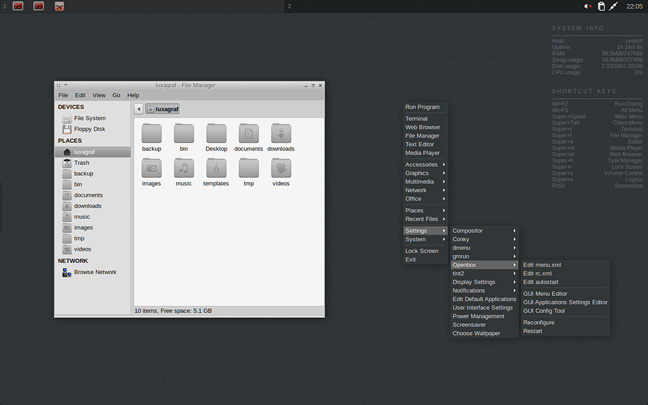
Openbox meets Debian in Crunchbang
While I set up Debian Minimal and experimented with Arch, I eventually settled on Crunchbang, a nicely configured Openbox setup based on Debian.
If you want to tinker with every little thing, doing it yourself is the way to go. If you want a nice looking, clean, simple setup that doesn't require three days to get right, a lightweight distro like Crunchbang is the way to go.
Earlier this year, however, Crunchbang's lead developer threw in the towel –running a Linux distro, even a small, lightweight one, is no small undertaking.
Though my version of Crunchbang Waldorf (the last official release) continues to run just fine some bugs surfaced when I tried to update to Debian 8. So I started looking for alternatives.
Crunchbang++
Before I dive into these alternatives, let's start with the community project that came out of Crunchbang's demise - the cleverly named Crunchbang++.
The project recently put out a 1.0 release, which is largely Crunchbang Waldorf with some theme improvements and updated to work with Debian 8 Jessie. The result is pretty much the Crunchbang you've always loved. The theme updates are minimal, Crunchbang++ retains its predecessor's clean, simple look with monochrome icons and minimal color throughout. Openbox is still the basis of the desktops with Tint2 providing a menu bar and Thunar (also a part of Xfce) serving as the default file manager.
In short, this is the Crunchbang you've been looking for. With the update to Debian 8 you should be able to get at least a couple more good years out of Crunchbang with Crunchbang++ 1.0.
That said, it's much easier to put together a distro shortly after the demise of another, when enthusiasm for continuing the project is high. Whether or not Crunchbang++ can maintain this momentum over time remains to be seen. While I'm optimistic that it can, I also prefer not to put all my SSH keys in a single basket as it were.
SparkyLinux (with Openbox)
Before Crunchbang++ reached a stable release, I experimented with SparkyLinux. This relatively small distro is available in a wide variety of desktop flavors, but I've only tested the lightweight Openbox option.
Like Crunchbang++, Sparky is built on a Debian base, so package-wise things are very close. SparkyLinux uses a mix of its own repos and Debian Testing, so if you're looking for a more stable way to run a minimal setup on Debian Testing, this might be a better bet than telling Crunchbang to use Testing packages (which has been unpredictable in my experience).


Sparky has a very different look and feel to Crunchbang++, not quite as refined, but in some ways it's simpler and less resource intensive than Crunchbang++. For example, the default file manager is PCManFM, which is little bit lighter than Thunar. SparkyLinux opts for a bottom menu bar and a more verbose default Conky setup as well.
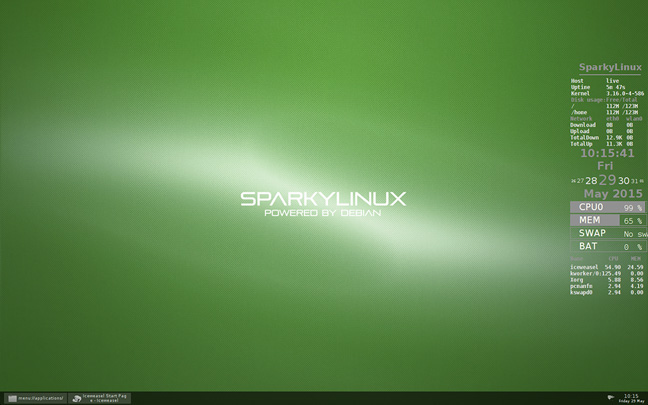
A Sparky Openbox little number...
I should note that while I had no trouble installing SparkyLinux on actual hardware, it would not play nice in virtual machines, so if you want to try it you may want to make some room on your hard drive and install it alongside whatever you're using now.
DIY Debian/Arch
Since both Sparky and Crunchbang++ are based on Debian it's worth asking why not just install the Debian base system and add the handful of packages you need yourself? If you want to create a custom, highly personalized, lightweight Linux desktop that's literally everything you want and nothing you don't, this is the way to go.
The only downside is that building your ultimate setup is time consuming. In my experience "a handful" of packages actually turns out to be thousands and you'll get to find out about each package manager's shortcomings when it comes to installing and managing dependencies.
Arch is, of course a very DIY distro. That's a big part of the "Arch way," and provided you can get through the arduous installation process, Arch makes a fantastic base for a minimal Linux desktop.
I tested Arch with Openbox, Tint2 and Thunar, essentially rolling my own Arch-based Crunchbang and was relatively happy with the results. That said, it took me the better part of a week to get everything set up and all the hardware quirks worked out – the same is true of my Debian minimal setup – and in the end, I got Crunchbang.
If you don't mind putting in the time, going the DIY route with either Arch or Debian will get you the most highly customized, everything-you-want, nothing-you-don't setup. Just be prepared to invest some time.
LXDE-based distros
Openbox is not for everyone. If you want something with a bit more hand holding and fewer config files, the LXQt project is worth a look. LXQt is the likely successor to the LXDE project. As the name hints, LXQt is LXDE rewritten in Qt. The project hasn't hit 1.0 yet, but in my testing it has been pretty stable.
LXQt and its predecessor offer a more graphical-based set of configuration tools, and for the most part there's no need to mess with startup scripts and file-based configuration tools. LXQt is also a full-fledged desktop, rather than a windows manager with some supplemental tools, which makes it a gentle intro to lightweight Linux.
There are quite a few LXQt/LXDE-based distros out there, though most have not made the leap to LXQt just yet. For a minimal LXDE setup I suggest starting with a Debian or Arch base, and then install LXDE from the command line once the base system is installed.
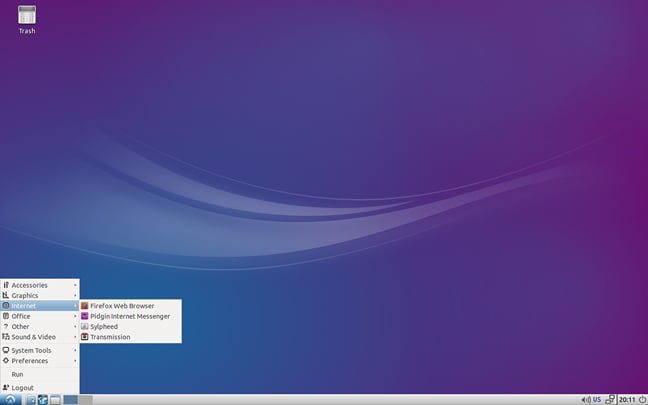
Lubuntu ... a good place for lightweight-novices to start
If you'd like something a little more pre-configured, Lubuntu, the LXDE-based variant of Ubuntu makes a good starting point (under the hood, Lubuntu uses Openbox as a window manager.) Lubuntu is making the switch to LXQt this year when Ubuntu 15.10 comes out, and beta versions will be available for download in the next couple of months if you'd like to try it.
Conclusion
There's an almost overwhelming variety of lightweight Linux distros and desktops out there, far more than I can cover here. And, of course, lightweight is relative. Even what stripped down versions of Xfce like Debian, or the recently announced Xubuntu-core, offer are slim jims next to the hardware-taxing requirements of desktops like GNOME 3 or Unity.
If it's your first time stepping out of the everything-and-the-kitchen-sink world of GNOME, KDE and Unity, you might want to start with LXQt. If you're not afraid of the little challenge, or if you have hardware that's really lagging, Crunchbang++ would be my top pick for lightweight Linux setups. ®
[출처] http://www.theregister.co.uk/2015/07/09/lightweight_linuxes/?page=1
광고 클릭에서 발생하는 수익금은 모두 웹사이트 서버의 유지 및 관리, 그리고 기술 콘텐츠 향상을 위해 쓰여집니다.
