
- 전체
- Native Apps
- WinJS App
- C# Apps
- XAML
- VB.net
- VisualC.net
- C++
- MFC
- visual studio mobile app dev
- Azure ms cloud service
- Asp.net
- 인공지능 (AI)
- wpf
- UWP
- MAUI
- asp.net
Loading an assembly using Reflection and invoking static methods from it

Syed Fasih, 14 May 2010
Invoking static methods from an assembly at runtime using Reflection.
Introduction
In this article, I will show how to load an assembly at runtime using Reflection and to invoke static methods from it.
Background
Reflection is Microsoft's extra-ordinary feature. Before we begin, we must know some very important concepts about assemblies. Assemblies are the building blocks of .NET Framework. An assembly is a collection of types and resources that are built to work together, and form a logical unit of functionality.
An assembly contains modules, modules contain types, and types contain members. Using Reflection, we can create an instance of a type, can invoke a type's methods, or access its fields and properties. For this tutorial, the above statement is enough. For a detailed information, click here.
Using the code
This tutorial consists of two projects:
- Utllity (the Class Library)
- LoadAssembly (application that will load Utility using Reflection)
The Utility Class Library consists of two methods:
Encrypt(takes a string as input and returns the encrypted string as output)- Decrypt (takes an encrypted string as input and returns the original string)
I will not discuss the utility code as it is not needed to. The utility code is as under:


Hide Shrink  Copy Code
using System;
using System.Collections.Generic;
using System.Linq;
using System.Text;
using System.IO;
using System.Security.Cryptography;

namespace Utility
{
    public static class Cryptography
    {
        /// <summary>
        /// Author : Syed Fasih-ud-Din
        /// Dated : 15, March 2009  @  12:10
        /// Description : Decrypts Encrypted Text to Original Message
        /// </summary>
        /// <param name="EncryptedText">Encrypted string</param>
        /// <returns></returns>
        public static string Decrypt(this string EncryptedText)
        {
            byte[] bytes = Encoding.UTF8.GetBytes("LcB!ZLtd");
            byte[] rgbIV = Encoding.UTF8.GetBytes("!nforM@#");
            byte[] buffer = Convert.FromBase64String(EncryptedText);
            MemoryStream stream = new MemoryStream();
            try
            {
                DES des = new DESCryptoServiceProvider();
                CryptoStream stream2 = new CryptoStream(stream,
                   des.CreateDecryptor(bytes, rgbIV), CryptoStreamMode.Write);
                stream2.Write(buffer, 0, buffer.Length);
                stream2.FlushFinalBlock();
            }
            catch (Exception ex)
            {
                throw new Exception(ex.Message);
            }


            return Encoding.UTF8.GetString(stream.ToArray());
        }

        /// <summary>
        /// Author : Syed Fasih-ud-Din
        /// Dated : 15, March 2009  @  12:10
        /// Description : Encrypts Plain Text to Unreadable Form
        /// </summary>
        /// <param name="PlainText">Plain Text intended to Encrypt</param>
        /// <returns></returns>
        public static string Encrypt(this string PlainText)
        {
            byte[] bytes = Encoding.UTF8.GetBytes("LcB!ZLtd");
            byte[] rgbIV = Encoding.UTF8.GetBytes("!nforM@#");
            byte[] buffer = Encoding.UTF8.GetBytes(PlainText);
            MemoryStream stream = new MemoryStream();

            try
            {
                DES des = new DESCryptoServiceProvider();
                CryptoStream stream2 = new CryptoStream(stream,
                   des.CreateEncryptor(bytes, rgbIV), CryptoStreamMode.Write);
                stream2.Write(buffer, 0, buffer.Length);
                stream2.FlushFinalBlock();
            }
            catch (Exception ex)
            {
                throw new Exception(ex.Message);
            }


            return Convert.ToBase64String(stream.ToArray());
        }
    }
}
LoadAssembly
The LoadAssembly project will load the assembly using Reflection and will invoke the methods. The code with the explanation is as under.
The variables that will be used in the application are:
Hide Copy Code
// Will be holding the Types in the Assembly
Type[] TypesInAssembly = null;
// Will hold the Fully Qualified Name of the Assembly i.e. Namespace.Class
string AssemblyName = string.Empty;
// Will be holding the Full path of the Assembly
string AssemblyPath = string.Empty;
// Will hold the Path of the Currently Executing Assembly
// i.e. the Project EXE filr
string ExecutingAssemblyPath = string.Empty;
// These will hold the results of Encryption
// and Decryption from the loadedAssembly
object Result, DecryptedResult = null;
Form load
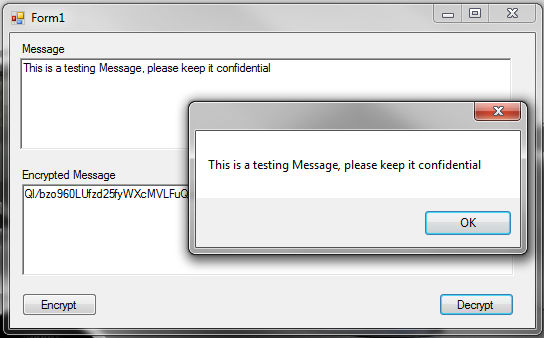
On the Form load, the application will load Utility.dll, which then will be used by the button events to invoke the methods. The Form load event code is shown here:
Hide Copy Code
//Getting Application Startup Path
ExecutingAssemblyPath = Application.StartupPath;

//Getting the Exact Directory where the application is running
ExecutingAssemblyPath =
   System.IO.Path.GetDirectoryName(ExecutingAssemblyPath);

//Creating Full Path of Assembly
AssemblyPath = ExecutingAssemblyPath + "\" +
  ConfigurationManager.AppSettings["Location"].ToString() +
  ConfigurationManager.AppSettings["Assembly"].ToString();

//Loading An Assembly From desired path
System.Reflection.Assembly MyAssembly =
       System.Reflection.Assembly.LoadFrom(AssemblyPath);

//Getting Assembly Types (i.e. classes) here we have only 1 class
TypesInAssembly = MyAssembly.GetTypes();

//Creating Full Name of Assembly i.e. Namespace.ClassName
AssemblyName = TypesInAssembly[0].Namespace + "." + TypesInAssembly[0].Name;

//Getting Methods in Assembly Types
System.Reflection.MethodInfo[] MethodsCollection = TypesInAssembly[0].GetMethods();
Invoking methods
Before you do an invoke, you must know about invoking a static method. For a static method to be invoked, there is a parameter named 'target'. If you are invoking a static method, then leave this parameter as blank, this will be ignored by the framework. If your method is not static, then you have to provide the instance of the class and that instance will be creating the CreateInstance method. In our case, we are calling a static method.
Here are the button events that will be invoking the Utility.dll member methods:
Hide Shrink Copy Code
private void bttnEncrypt_Click(object sender, EventArgs e)
{
    try
    {
        //Invoke Loaded Assembly Method
        Result = TypesInAssembly[0].InvokeMember("Encrypt",
           System.Reflection.BindingFlags.InvokeMethod, System.Type.DefaultBinder,
           "", new object[] { txtMessage.Text });
        txtEcnryptedMessage.Text = Result.ToString();
    }
    catch (Exception ex)
    {
       MessageBox.Show(ex.Message);
    }
}
private void bttnDecrypt_Click(object sender, EventArgs e)
{
    try
    {
        //Invoke Loaded Assembly Method
        DecryptedResult = TypesInAssembly[0].InvokeMember("Decrypt",
            System.Reflection.BindingFlags.InvokeMethod, System.Type.DefaultBinder,
            "", new object[] { txtEcnryptedMessage.Text });
        MessageBox.Show(DecryptedResult.ToString());
    }
    catch (Exception ex)
    {

          MessageBox.Show(ex.Message);
    }
}
License
This article, along with any associated source code and files, is licensed under The Code Project Open License (CPOL)
[출처] https://www.codeproject.com/Articles/81224/Loading-an-assembly-using-Reflection-and-invoking
광고 클릭에서 발생하는 수익금은 모두 웹사이트 서버의 유지 및 관리, 그리고 기술 콘텐츠 향상을 위해 쓰여집니다.
댓글 0
| 번호 | 제목 | 글쓴이 | 날짜 | 조회 수 |
|---|---|---|---|---|
| 15 | C# getMethod : Call Method by Name | 졸리운_곰 | 2017.07.01 | 258 |
| 14 | Reflection for C++ | 졸리운_곰 | 2017.07.01 | 343 |
| 13 |
Load an EXE File and Run It from Memory
 | 졸리운_곰 | 2017.07.01 | 333 |
| 12 |
.Net code injection 닷넷 코드 인젝션
| 졸리운_곰 | 2017.07.01 | 298 |
| 11 |
Three Ways to Inject Your Code into Another Process
| 졸리운_곰 | 2017.07.01 | 547 |
| 10 |
Visual C++를 사용하여 플랫폼 간 앱 제작
| 졸리운_곰 | 2015.08.16 | 645 |
| 9 |
webdav c++ lib 라이브러러
| 졸리운_곰 | 2015.05.11 | 395 |
| 8 | Use Visual Studio C++ 6.0 on Windows 8.1 64bit : 윈도우 8.1에서 비주얼 스투디오 6.0 사용하기 | 졸리운_곰 | 2015.05.09 | 632 |
| 7 |
Visual Studio 2013을 사용하여 앱 개발
| 졸리운_곰 | 2014.05.30 | 842 |
| 6 |
C++로 작성한 Windows 스토어 앱용 로드맵
| 졸리운_곰 | 2014.05.30 | 570 |
| 5 |
블로그 뷰어 앱 만들기(C++)
| 졸리운_곰 | 2014.05.30 | 3956 |
| 4 |
C++ Windows 스토어 앱에서 파일 선택기 사용(자습서 4/4)
| 졸리운_곰 | 2014.05.30 | 762 |
| 3 |
C++ Windows 스토어 앱에서 탐색 및 보기 추가(자습서 3/4)
| 졸리운_곰 | 2014.05.30 | 594 |
| 2 |
C++ Windows 스토어 앱의 수명 주기 및 상태 관리(자습서 2/4)
| 졸리운_곰 | 2014.05.30 | 496 |
| 1 |
기본 C++ Windows 스토어 앱 만들기(자습서 1/4)
| 졸리운_곰 | 2014.05.30 | 857 |