
- 전체
- Native Apps
- WinJS App
- C# Apps
- XAML
- VB.net
- VisualC.net
- C++
- MFC
- visual studio mobile app dev
- Azure ms cloud service
- Asp.net
- 인공지능 (AI)
- wpf
- UWP
- MAUI
- asp.net
C# Apps .NET Object Spy and InvokeRemote
2017.07.01 16:46
.NET Object Spy and InvokeRemote
bjarneds, 5 Mar 2007
A tool for browsing public and private members in any running .NET application (and a generic InvokeRemote method that wraps the code injection).
Contents
Introduction
During software development, a good debugger is invaluable. Likewise, when a runtime exception occurs, .NET's exception information (in particular, the call stack) provides invaluable help. However, sometimes you run into problems where something is not right, and to narrow down the problem, you need to investigate some internal state and data in the application. This is not always easy using the debugger, because there is seldom a natural place to put a breakpoint. It becomes even harder when the application is deployed; the only option is usually if you have left some code in the application to dump the internal state and data in question.
The tool Managed Spy and the article about Windows Forms Spy (wfspy) got me hooked on the idea, that it ought to be possible to use reflection to read out public and private members in any running .NET application. The solution presented here does - unlike the others - not stop at the selected control (window); it presents a browsable hierarchy of fields and properties. And unlike Managed Spy, the objects do not have to be serializable; the entire object browser is injected into the address space of the spied application. On the other hand, this solution does not offer any trace features.
The Solution
The solution to the problem described above is implemented as a tool named .NET Object Spy. The main window is small and simple, but easy to use:
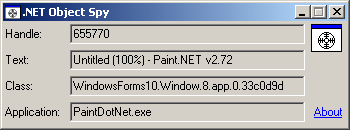
Drag the crosshair to another window, and it will be framed, and the main properties are displayed in the main window. Once released, you get this menu:

Select the first option, and the browser is displayed (running in the address space of the selected application):
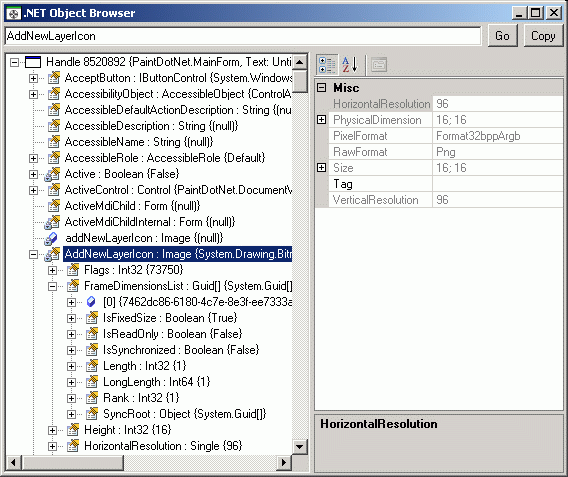
You may right-click on a node to bring up a context menu. This allows you to refresh the node (including children).
The top line in the window shows the "path" to the currently selected object, e.g. Controls[0].Size.Width. You can also type this in and go directly to the corresponding node. You can even call parameterless methods using this, e.g. Controls[0].GetHashCode() or FindForm().Location.X. The Copy button copies the "path" to the clipboard. The is intended as a help to ObjectSpyEvaluator, which is explained later.
The Implementation
The solution contains three assemblies, which are described in detail in the following paragraphs:
- InjectLib - A C++ library that wraps the code injection as a generic method,
Injector.InvokeRemote - ObjectSpy - A C# executable that contains the main window
- ObjectSpyLib - A C# library that contains the browser, which is injected into the spied application
InjectLib (InvokeRemote)
A spinoff from this solution is a generic method with this signature (C# syntax):
Hide Copy Code
object Injector.InvokeRemote(IntPtr hWnd, string assemblyFile,
            string typeName, string methodName, object[] args)
This wraps the injection process in a generic way that can be used for other purposes. The hWnd parameter identifies the window (and thus the process) in which your code should be injected. The assemblyFile specifies the code that should be injected, typeName specifies a class in this assembly, and methodName specifies a static method on this class. The method is called with the supplied arguments, and may optionally have a return value.
There are different methods to inject code into another process (see the CodeProject article Three Ways to Inject Your Code into Another Process). This solution is based on the same approach that most other tools use, Windows hooks (see Using Hooks for details on Windows Hooks). The steps performed by InvokeRemote are:
- Create a Windows message hook, using the Win32 API function
SetWindowsHookEx - Serialize the parameters to shared memory
- Send a custom message to the hook, to request its service
- The hook (i.e., code injected in the target process) now:
- Deserializes the parameters from shared memory
- Loads the requested assembly
- Invokes the requested method with the specified parameters
- Serializes any return value to shared memory
- Remove the hook
- Deserialize the return value from shared memory and return it to the caller
SetWindowsHookEx requires the address of the hook function. This must be exported from the library, which cannot be done from C#. Therefore, this library is made as a mixed-mode C++ library, using Visual Studio 2005's C++/CLI support. I.e., the library contains both native and managed code.


The memory shared between the two processes is simply a data segment created in the library, i.e., it has a fixed size. For this library, it means that the serialized version of the parameters to InvokeRemote must fit within 2000 bytes (obviously, they must also be serializable). The same limitations apply to the return value. An alternative approach could be memory mapped files (see this article on the MSDN Library).
The hook function caused a couple of interesting problems:
Problem #1: To make a nice wrapping of the serialization/deserialization, the parameters to the message hook are wrapped in a serializable RequestMessage class, declared in the InjectLib library itself. Despite this, the deserialization in step 4a above failed, complaining that it was unable to find the InjectLib library - obviously ignoring that it was running it in this exact moment! Searching the Internet indicated that this situation may occur if the library is loaded using LoadFrom. Although it is Windows itself that loads the library when it is injected, the suggested solution solved the problem: subscribe to the event AppDomain.CurrentDomain.AssemblyResolve. This event occurs when the CLR cannot find an assembly, and lets you return the assembly yourself.
Problem #2: When the message hook tries to load the assembly specified in the InvokeRemote call (step 4b above), it cannot find it. This is solved by using Assembly.LoadFrom instead of Assembly.Load. The message hook appends the path of InjectLib, assuming that the requested assembly is located in the same place. Otherwise, the requested assembly would have to be placed in the GAC or in the spied application's folder. A solution similar to problem #1 could probably also be used.
ObjectSpy
ObjectSpy is the executable that contains the main window. It is written in C#, and makes several Win32 API calls to find window handles and extract information etc. (for declaring API calls in C#, pinvoke.net is very useful). The implementation of the crosshair approach is highly inspired by the WinSpy demo project in Robert Kuster's article about three ways to inject code into another process. Apart from these API calls, the code is very straightforward, and ends calling InjectLib's InvokeRemote method:
Hide Copy Code
Injector.InvokeRemote(hWnd, "ObjectSpyLib.dll",
    "Bds.ObjectSpy.ObjectSpyForm", "ShowBrowser", new object[] { hWnd });
ObjectSpyLib
This C# library contains the browser form which is injected in the spied application. The entry point is the static method specified by ObjectSpy's parameters to InvokeRemote:
Hide Copy Code
public static void ShowBrowser(IntPtr hWnd)
This method creates an instance of the form and calls its Show method. The window handle is "converted" into a Control, using Control.FromHandle. The control forms the root of the object hierarchy. From there, the rest is exercising the reflection namespace.
Below each node in the tree that represents a non-null object, public and private fields, and properties of that object are added the first time the node is expanded (indexers excluded, since they require parameters). Furthermore, if an object implements IEnumerable, the enumerated objects are added. Whenever a node is selected in the tree, the corresponding object is used as the SelectedObject for the PropertyGrid control in the right side of the window.
One thing worth noting is that generic type names are mangled. For example, the typename returned from the reflection classes for the generic List class is "List`1". The number after the backtick indicates the number of type parameters. ObjectSpyLib unmangles this in a recursive manner, and presents it in C# syntax (i.e., using less-than and greater-than characters).
ObjectSpyEvaluator
In addition to the browser form, ObjectSpyLib also includes the class ObjectSpyEvaluator with this static method:
Hide Copy Code
public static string Evaluate(IntPtr hWnd, string expression)
The expression parameter is identical to the object "path" that can be entered in the browser. The result of the expression is returned. When performing automated GUI testing, this makes it very easy to write validation code. The validation code might e.g. make a call like this to check the Text property of the root node in a TreeView:
Hide Copy Code
string result = (string)Injector.InvokeRemote(hWnd, "ObjectSpyLib.dll",
    "Bds.ObjectSpy.ObjectSpyEvaluator", "Evaluate",
    new object[] { hWnd, "treeView.Nodes[0].Text" });
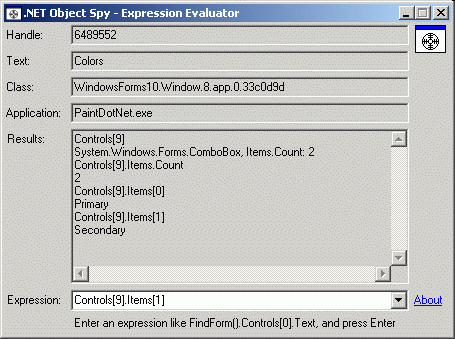
A sample application using the Evaluate method - ObjectSpyEE - is included in the downloads:
Future Enhancements
I hope this tool is useful as it is (at least it was fun making it!). However, there are several improvements that I would like to do when I have time:
- Include static members
- Find and include "root objects" from the application, if possible (i.e., not just objects referred to by the selected control)
- Stop expansion when "simple types" (
Int32etc.) are encountered - Display private properties + public and private fields in
PropertyGrid(by implementingICustomTypeDescriptor) - Display additional type information about objects (
FullNameof declared type,FullName(+Name?) of actual type), possibly inPropertyGrid - Allow changing the value of "simple types" (
Int32etc.), also when not public properties, and thus in parent'sPropertyGrid - Abort fetching enumerated objects if huge number of objects (when it takes too long)
- Show information about from which base class a property or field is inherited, possibly in
PropertyGrid - Option to only show fields, not properties, by default (to avoid possible side effects from calling a
getaccessor)
History
- 2007-02-23 (ObjectSpy 1.2.0)
- Added
ObjectSpyEvaluator, ObjectSpyEE and related functionality in the browser form.
- Added
- 2006-12-05 (ObjectSpy 1.1.0)
- Members are no longer sorted using
SortedList(by key), but bySortmethod on ordinaryList(and implementation ofIComparableon ObjectInfo). This solves the problem with handling obfuscated names (like in .NET Reflector). Due to culture issues, keys for different members were considered equal. See Microsft Forums and MSDN for details. - Tree in browser window no longer hides selection when there is no focus.
- Refresh option added in the browser context menu.
- ObjectInfo has been split up into base and derived classes.
- Slightly modified icon for browser window (to distinguish it from main window).
- Members are no longer sorted using
- 2006-11-21 (ObjectSpy 1.0.0)
License
This article, along with any associated source code and files, is licensed under The Code Project Open License (CPOL)
[출처] https://www.codeproject.com/Articles/16481/NET-Object-Spy-and-InvokeRemote
광고 클릭에서 발생하는 수익금은 모두 웹사이트 서버의 유지 및 관리, 그리고 기술 콘텐츠 향상을 위해 쓰여집니다.
댓글 0
| 번호 | 제목 | 글쓴이 | 날짜 | 조회 수 |
|---|---|---|---|---|
| 15 | C# getMethod : Call Method by Name | 졸리운_곰 | 2017.07.01 | 258 |
| 14 | Reflection for C++ | 졸리운_곰 | 2017.07.01 | 343 |
| 13 |
Load an EXE File and Run It from Memory
 | 졸리운_곰 | 2017.07.01 | 333 |
| 12 |
.Net code injection 닷넷 코드 인젝션
| 졸리운_곰 | 2017.07.01 | 298 |
| 11 |
Three Ways to Inject Your Code into Another Process
| 졸리운_곰 | 2017.07.01 | 547 |
| 10 |
Visual C++를 사용하여 플랫폼 간 앱 제작
| 졸리운_곰 | 2015.08.16 | 645 |
| 9 |
webdav c++ lib 라이브러러
| 졸리운_곰 | 2015.05.11 | 395 |
| 8 | Use Visual Studio C++ 6.0 on Windows 8.1 64bit : 윈도우 8.1에서 비주얼 스투디오 6.0 사용하기 | 졸리운_곰 | 2015.05.09 | 632 |
| 7 |
Visual Studio 2013을 사용하여 앱 개발
| 졸리운_곰 | 2014.05.30 | 842 |
| 6 |
C++로 작성한 Windows 스토어 앱용 로드맵
| 졸리운_곰 | 2014.05.30 | 570 |
| 5 |
블로그 뷰어 앱 만들기(C++)
| 졸리운_곰 | 2014.05.30 | 3956 |
| 4 |
C++ Windows 스토어 앱에서 파일 선택기 사용(자습서 4/4)
| 졸리운_곰 | 2014.05.30 | 762 |
| 3 |
C++ Windows 스토어 앱에서 탐색 및 보기 추가(자습서 3/4)
| 졸리운_곰 | 2014.05.30 | 594 |
| 2 |
C++ Windows 스토어 앱의 수명 주기 및 상태 관리(자습서 2/4)
| 졸리운_곰 | 2014.05.30 | 496 |
| 1 |
기본 C++ Windows 스토어 앱 만들기(자습서 1/4)
| 졸리운_곰 | 2014.05.30 | 857 |