
- 전체
- JAVA 일반
- JAVA 수학
- JAVA 그래픽
- JAVA 자료구조
- JAVA 인공지능
- JAVA 인터넷
- Java Framework
- Java GUI (AWT,SWING,SWT,JFACE)
- SWT and RCP (web RAP/RWT)[eclipse], EMF
Java GUI (AWT,SWING,SWT,JFACE) Demonstrates TreeEditor : Tree « SWT JFace Eclipse « Java
2015.07.28 21:10
Demonstrates TreeEditor : Tree « SWT JFace Eclipse « Java
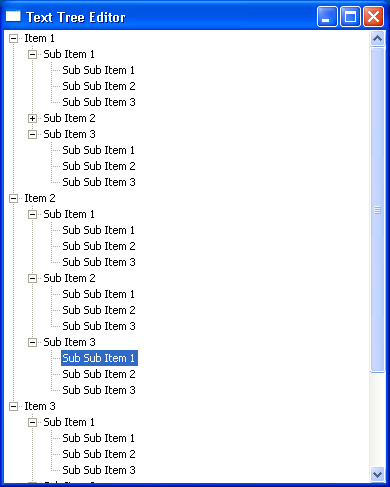


| import org.eclipse.swt.SWT; import org.eclipse.swt.custom.*; import org.eclipse.swt.events.*; import org.eclipse.swt.layout.*; import org.eclipse.swt.widgets.*; /** * This class demonstrates TreeEditor */ public class TextTreeEditor { // Constant for how many items to create at each level private static final int NUM = 3; /** * Runs the //Send questions, comments, bug reports, etc. to the authors: //Rob Warner (rwarner@interspatial.com) //Robert Harris (rbrt_harris@yahoo.com)application */ public void run() { Display display = new Display(); Shell shell = new Shell(display); shell.setText("Text Tree Editor"); createContents(shell); shell.open(); while (!shell.isDisposed()) { if (!display.readAndDispatch()) { display.sleep(); } } display.dispose(); } /** * Creates the contents of the main window * * @param shell the main window */ public void createContents(Shell shell) { shell.setLayout(new FillLayout()); // Create the tree final Tree tree = new Tree(shell, SWT.SINGLE); // Fill the tree with data for (int i = 0; i < NUM; i++) { TreeItem iItem = new TreeItem(tree, SWT.NONE); iItem.setText("Item " + (i + 1)); for (int j = 0; j < NUM; j++) { TreeItem jItem = new TreeItem(iItem, SWT.NONE); jItem.setText("Sub Item " + (j + 1)); for (int k = 0; k < NUM; k++) { new TreeItem(jItem, SWT.NONE).setText("Sub Sub Item " + (k + 1)); } jItem.setExpanded(true); } iItem.setExpanded(true); } // Create the editor and set its attributes final TreeEditor editor = new TreeEditor(tree); editor.horizontalAlignment = SWT.LEFT; editor.grabHorizontal = true; // Add a key listener to the tree that listens for F2. // If F2 is pressed, we do the editing tree.addKeyListener(new KeyAdapter() { public void keyPressed(KeyEvent event) { // Make sure one and only one item is selected when F2 is pressed if (event.keyCode == SWT.F2 && tree.getSelectionCount() == 1) { // Determine the item to edit final TreeItem item = tree.getSelection()[0]; // Create a text field to do the editing final Text text = new Text(tree, SWT.NONE); text.setText(item.getText()); text.selectAll(); text.setFocus(); // If the text field loses focus, set its text into the tree // and end the editing session text.addFocusListener(new FocusAdapter() { public void focusLost(FocusEvent event) { item.setText(text.getText()); text.dispose(); } }); // If they hit Enter, set the text into the tree and end the editing // session. If they hit Escape, ignore the text and end the editing // session text.addKeyListener(new KeyAdapter() { public void keyPressed(KeyEvent event) { switch (event.keyCode) { case SWT.CR: // Enter hit--set the text into the tree and drop through item.setText(text.getText()); case SWT.ESC: // End editing session text.dispose(); break; } } }); // Set the text field into the editor editor.setEditor(text, item); } } }); } /** * The application entry point * * @param args the command line arguments */ public static void main(String[] args) { new TextTreeEditor().run(); } } |
[출처] http://www.java2s.com/Code/Java/SWT-JFace-Eclipse/DemonstratesTreeEditor.htm
본 웹사이트는 광고를 포함하고 있습니다.
광고 클릭에서 발생하는 수익금은 모두 웹사이트 서버의 유지 및 관리, 그리고 기술 콘텐츠 향상을 위해 쓰여집니다.
광고 클릭에서 발생하는 수익금은 모두 웹사이트 서버의 유지 및 관리, 그리고 기술 콘텐츠 향상을 위해 쓰여집니다.
