
- 전체
- JAVA 일반
- JAVA 수학
- JAVA 그래픽
- JAVA 자료구조
- JAVA 인공지능
- JAVA 인터넷
- Java Framework
- Java GUI (AWT,SWING,SWT,JFACE)
- SWT and RCP (web RAP/RWT)[eclipse], EMF
JAXB (2) - XML Schema를 Java Interfaces & Classes로 Binding Compile 하기
JAXB (1) 에서 JAXB란 무엇인가에 대해 간략하게 알아보았다.
여기서는 JAXB에 포함되어 있는 xjc (Binding Compiler)를 이용하여 XML Schema를 가지고 정의 된 데이터 모델을 표현할 수 있는 Java Interfaces & Classes를 생성하는 것에 대해 다룬다.
먼저 JAXB Interfaces & Classes를 생성하기 위한 간단한 XML Schema를 만들어 보자.
정의 하고자 하는 XML Schema는 간단하게 회사를 정의 했는데, 회사와 팀을 정의하고, 회사에는 하나 이상의 팀이 속한다는 구조이다.
<?xml version="1.0"?>
<xsd:schema xmlns:xsd="http://www.w3.org/2001/XMLSchema">
<xsd:element name="compony">
<xsd:complexType>
<xsd:sequence minOccurs="1" maxOccurs="unbounded">
<xsd:element name="team">
<xsd:complexType>
<xsd:attribute name="name"/>
</xsd:complexType>
</xsd:element>
</xsd:sequence>
<xsd:attribute name="name"/>
<xsd:attribute name="address"/>
</xsd:complexType>
</xsd:element>
</xsd:schema>
도식적으로 표현하면 아래와 같이 나타난다. (XmlSpy Enterprise 2008을 이용했음)
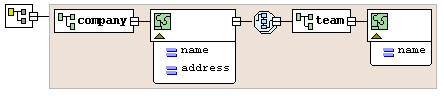
[ jaxb_sample.xsd 도식화 된 그림 ]
그럼 데이타 구조를 정의 한 XML Schema를 생성했으니, Binding Compiler (xjc)를 이용하여 Java Interfaces 또는 Classes를 생성해 보자. 생성에 앞서 먼저 Binding Compiler가 무엇인지 간단하게 설명을 하면
-- Binding Compiler (xjc)
XML Schema를 가지고, Schema에 의해 정의 된 데이터 모델을 표현할 수 있는 Java Interfaces 또는 Classes을 생성해 주는 Compiler를 말한다.
xjc는 JAXB를 다운받아 설치를 하면 bin 밑의 xjc.bat, xjc.sh를 이용하면 된다.
Usage: xjc [-options ...] <schema file/URL/dir> ... [-b <bindinfo>] ...
* xjc 옵션 설명 (자주 사용되는 것) *
-d <dir> : 저장 된 Directory를 지정
-p <package> : Compile 되어 나오는 Interfases & Classes의 Package를 지정
-classpath <arg> : 실행에서 사용 할 classpath
다음의 코멘드 라인 구문을 사용하여 Binding Compile을 해보자.
xjc -p com.junducki.blog.jaxb -d D:\goorm\project\blog\src jaxb_sample.xsd
결과는 아래와 같이 나오며, D:\goorm\project\blog\src 아래에 com.junducki.blog.jaxb package로 Interfaces & Classes 들이 생성되어 있는 것이 확인이 될 것이다.
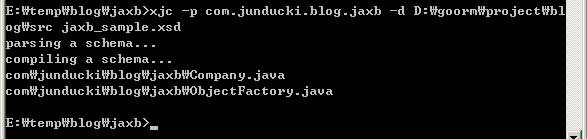
[ xjc를 실행 한 cmd 화면 ]


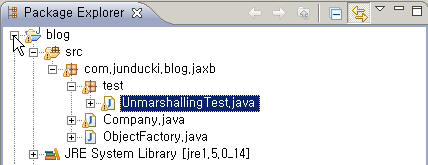
[ xjc 실행 결과 생성 된 Java Interfases & Classes ]
이제 JAXB를 이용하여 XML을 Java Object로 Java Object에서 XML로 변환하기 위한 준비가 완료 되었다. 다음에는 marshal과 unmarshal을 이용하여 XML과 Java Object의 변환 과정을 다루기로 한다.
[출처] https://ukzzang.tistory.com/11
광고 클릭에서 발생하는 수익금은 모두 웹사이트 서버의 유지 및 관리, 그리고 기술 콘텐츠 향상을 위해 쓰여집니다.
