[spring batch] 처음 해보는 Spring batch, Tasklet 작성하기


매번 일반 API 만 하다가 처음으로 Spring Batch 를 작성할 일이 생겼습니다.

이럴 때를 대비해서 저장해둔 jojoldu님의 Spring batch 가이드 를 참고해서, 기본적인 내용을 학습하고 Tasklet으로 실제 Batch를 작성했던 내용을 정리합니다.

배치 어플리케이션이란

간단하게 배치 어플리케이션이 무엇인지 정리해봅니다. 배치(batch) 는 일괄처리 라는 뜻을 갖고 있습니다. 즉, 요청이 들어오는 대로 응답을 보내주는 일반 웹 어플리케이션과 달리, 배치를 사용하면 큰 데이터를 한번에 처리하고, 해당 결과를 저장하거나 사용할 수 있습니다.

데이터에 손댈 일이 있으면 API 를 만들어서 계속 호출해서 사용하면 되는 거 아냐?

5만건, 10만건이 되는 데이터에 대해서 매번 API를 호출해서 처리를 한다면 실 서비스에 영향이 가게 됩니다. 클라이언트에서 사용자가 사용해야할 I/O 를 차지하게 되고, 서버에 부하를 유발하게 되죠.

이럴 때 배치 어플리케이션을 사용하게 됩니다.

본론 : Tasklet

간단하게 생각하면, Spring Batch에서는 Job이 있습니다. Job은 여러개의 Step으로 구성되고, Step 은 Tasklet(기능) 으로 구성됩니다. 배치 작업 하나가 Job에 해당 됩니다. 즉 다음과 같은 그림입니다.
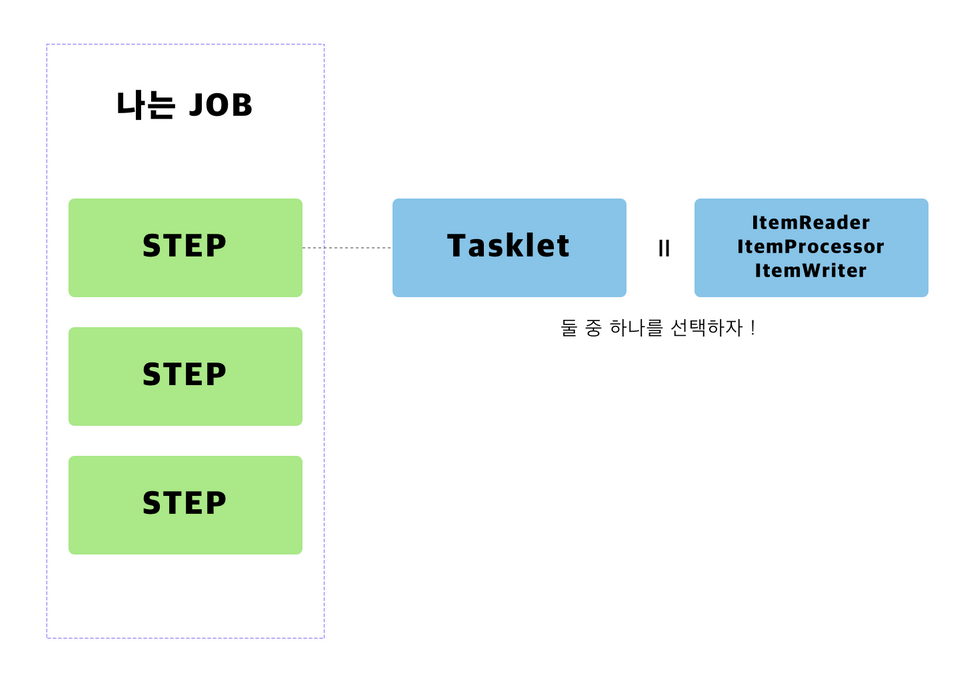
spring-batch-step

일단 아는 한도에서 써봤습니다. tasklet은 그냥 일반적인 Component라고 생각하시면 됩니다. 개발자가 이 STEP에서 하고 싶은 내용을 자유롭게 만들 수 있습니다.

그럼 Tasklet을 한번 들여다 볼까요?

 
1package org.springframework.batch.core.step.tasklet;
2
3import org.springframework.batch.core.StepContribution;
4import org.springframework.batch.core.scope.context.ChunkContext;
5import org.springframework.batch.repeat.RepeatStatus;
6import org.springframework.lang.Nullable;
7
8/**
9 * Strategy for processing in a step.
10 *
11 * @author Dave Syer
12 * @author Mahmoud Ben Hassine
13 *
14 */
15public interface Tasklet {
16
17 /**
18 * Given the current context in the form of a step contribution, do whatever
19 * is necessary to process this unit inside a transaction. Implementations
20 * return {@link RepeatStatus#FINISHED} if finished. If not they return
21 * {@link RepeatStatus#CONTINUABLE}. On failure throws an exception.
22 *
23 * @param contribution mutable state to be passed back to update the current
24 * step execution
25 * @param chunkContext attributes shared between invocations but not between
26 * restarts
27 * @return an {@link RepeatStatus} indicating whether processing is
28 * continuable. Returning {@code null} is interpreted as {@link RepeatStatus#FINISHED}
29 *
30 * @throws Exception thrown if error occurs during execution.
31 */
32 @Nullable
33 RepeatStatus execute(StepContribution contribution, ChunkContext chunkContext) throws Exception;
34
35}

우리가 만들어야할 Tasklet은 인터페이스입니다. 이걸 구현하면 step의 tasklet으로 등록이 가능합니다. 즉 실행할 내용을 execute 함수 안에 넣으면 해결됩니다.

경축! 아무것도 안하여 에스천사게임즈가 새로운 모습으로 재오픈 하였습니다.
어린이용이며, 설치가 필요없는 브라우저 게임입니다.
https://s1004games.com

그런데 저는 실행 전후에 하고 싶은 일이 있습니다. 실행 전에는 유저 목록을 불러와놓고 싶기때문입니다. 이를 위해서 StepExecutionListener 를 함께 구현합니다. 이를 구현하면 beforeStep과 afterStep을 사용해서 Step 전후에 원하는 일을 할 수 있습니다.

위의 사실을 참고해서 실제 Tasklet을 작성해보았습니다.

 
1public class SampleTasklet implements Tasklet, StepExecutionListener {
2
3 private List<Long> userIds;
4
5 private final NotificaitonService notificationService;
6 private final UserRepository userRepository;
7
8 @Autowired
9 public SampleTasklet(NotificaitonService notificationService,
10 UserRepository userRepository) {
11 this.notificationService = notificationService;
12 this.userRepository = userRepository;
13 }
14
15
16 @Override
17 public void beforeStep(StepExecution stepExecution) {
18 userIds = userRepository.findAllIds();
19 }
20
21 @Override
22 public RepeatStatus execute(StepContribution contribution, ChunkContext chunkContext) {
23 userIds.forEach(userId -> notificationService.send(userId, new Notification()));
24 return RepeatStatus.FINISHED;
25 }
26
27 @Override
28 public ExitStatus afterStep(StepExecution stepExecution) {
29 return ExitStatus.COMPLETED;
30 }

차례대로 beforeStep, execute, afterStep 순으로 실행됩니다.

beforeStep에서는 원하는 유저의 id를 가져와서, execute에서는 알림을 보내고 반복 Status를 종료로 설정합니다. afterStep에서는 추가로 하고 싶은 것이 없어서 종료 상태만 설정해주겠습니다.

이렇게 만든 Tasklet을 JobConfiguration에서 Bean으로 설정해줍니다.

 
1@Bean
2 public Tasklet sampleTasklet(NotificationService service, UserRepository repository) {
3 return new SampleTasklet(service, repository);
4 }

그리고 바로 위에서 Step에 tasklet을 다음과 같이 설정해주시면 완성입니다.

 
1@Bean
2 public Step testStep() {
3 return stepBuilderFactory.get("testStep")
4 .tasklet(sampleTasklet(service, repository))
5 .build();
6 }

배치 어플리케이션은 기본적으로 1. 읽어서 2. 작업하고 3. 그 결과를 다시 저장하는 것이 대부분이기 때문에 제가 본 코드들은 대부분 item reader - processor - writer의 과정을 거칩니다.

다만 가볍고 몇줄되지 않는 작업이며, writer 가 불필요한 경우 (위의 경우처럼) 이렇게 tasklet으로 처리하는 것도 좋은 선택인 것 같습니다.


참고

jojoldu님의 Spring batch 가이드 1편

[출처] https://juneyr.dev/2019-07-24/spring-batch-tasklet


본 웹사이트는 광고를 포함하고 있습니다.
광고 클릭에서 발생하는 수익금은 모두 웹사이트 서버의 유지 및 관리, 그리고 기술 콘텐츠 향상을 위해 쓰여집니다.
번호 제목 글쓴이 날짜 조회 수
35 [EMF] EMF Tutorial EMF 튜터리얼 file 졸리운_곰 2023.08.23 283
34 Eclipse RAP Tutorial for Beginners - Workbench Application (OLD) file 졸리운_곰 2021.01.30 323
33 Learn Eclipse GMF in 15 minutes file 졸리운_곰 2019.11.27 253
32 [Eclipse] GEF entry series (10, an implementation of the form) file 졸리운_곰 2019.11.25 212
31 GEF Programmer Guide 번역 졸리운_곰 2019.11.25 227
30 Learn Eclipse GMF in 15 minutes file 졸리운_곰 2019.11.20 224
29 RCP 에디터 정리 졸리운_곰 2019.11.20 333
28 다른 그림과 관련하여 GEF 편집기 레이아웃에서 그림의 위치 제한 조건을 동적으로 계산 Dynamically calculating the position constraints for a figure in a GEF editor layout in relation to another figure file 졸리운_곰 2019.11.20 277
27 RCP 등에서 .mf 파일로 다른 프로젝트 익스포트 포함시 라이브러리(메소드)를 찾지 못할 때, Eclipse RCP - cant resolve importing libraries in final build file 졸리운_곰 2019.10.15 410
26 ESE2006-EclipseModelingSymposium15_GMF.pdf file 졸리운_곰 2019.09.21 302
25 GMF_Creation_Review.pdf file 졸리운_곰 2019.09.21 366
24 Eclipse EMF and GMF Tutorial file 졸리운_곰 2019.09.21 222
23 GMF Tutorial/ko file 졸리운_곰 2019.09.20 347
22 Model Driven Architecture approach to domain of graphical editors file 졸리운_곰 2019.09.20 268
21 Single_Sourcing_RAP_RCP_en.pdf file 졸리운_곰 2019.05.15 311
20 Rich client platform 설명 및 배우기 참고 졸리운_곰 2019.05.15 309
19 Rich Ajax Platform, Part 1: 소개 file 졸리운_곰 2019.05.15 320
18 또 하나의 크로스 플랫폼: Eclipse RAP file 졸리운_곰 2019.05.15 319
17 Eclipse 4 RCP 튜토리얼(완료) file 졸리운_곰 2019.05.14 977
16 Updating UI in Eclipse RCP 졸리운_곰 2015.11.07 408
대표 김성준 주소 : 경기 용인 분당수지 U타워 등록번호 : 142-07-27414
통신판매업 신고 : 제2012-용인수지-0185호 출판업 신고 : 수지구청 제 123호 개인정보보호최고책임자 : 김성준 sjkim70@stechstar.com
대표전화 : 010-4589-2193 [fax] 02-6280-1294 COPYRIGHT(C) stechstar.com ALL RIGHTS RESERVED