
- 전체
- Sample DB
- database modeling
- [표준 SQL] Standard SQL
- G-SQL
- 10-Min
- ORACLE
- MS SQLserver
- MySQL
- SQLite
- postgreSQL
- 데이터아키텍처전문가 - 국가공인자격
- 데이터 분석 전문가 [ADP]
- [국가공인] SQL 개발자/전문가
- NoSQL
- hadoop
- hadoop eco system
- big data (빅데이터)
- stat(통계) R 언어
- XML DB & XQuery
- spark
- DataBase Tool
- 데이터분석 & 데이터사이언스
- Engineer Quality Management
- [기계학습] machine learning
- 데이터 수집 및 전처리
- 국가기술자격 빅데이터분석기사
- 암호화폐 (비트코인, cryptocurrency, bitcoin)
spark [apache spark] 아파치 스파크 Data Sharing between multiple Spark Jobs in Databricks
2021.03.13 13:21
[apache spark] 아파치 스파크 Data Sharing between multiple Spark Jobs in Databricks
Data Sharing between multiple Spark Jobs in Databricks
Using Global temporary view


There are multiple use cases where you want to share the data across multiple Spark Jobs when the data is not too huge. Using createOrReplaceGlobalTempView, the data can be shared between spark jobs instead of storing intermediate data persistently in disk and later cleaning those intermediate data.
createOrReplaceTempView or createOrReplaceGlobalTempView creates a lazily evaluated “view” from the dataframe that you can then use like a hive table in Spark SQL. But, it does not persist into memory unless you cache the data set.
The temp view created by these both methods will create memory reference to the dataframe in use. It will create a temporary view of the table in memory, it is not persistent at this moment but you can run SQL query on top of that.
The lifetime of temp view created by createOrReplaceTempView() is tied to Spark Session in which the dataframe has been created.
The lifetime of global temp view created by createGlobalTempView() is tied to Spark Application. So, this memory reference can be used across Spark Sessions. it will be automatically dropped when the application terminates. It’s tied to a system preserved database global_temp(configurable via SparkConf), and we must use the qualified name to refer a global temp view, e.g. SELECT * FROM global_temp.my_view
In Databricks, you can share the data using this global temp view between different notebook when each notebook have its own Spark Session. If each notebook shares the same spark session, then using normal temp view also you can share the data across notebooks, but due to some security reasons, this option is set to false by default. But you can turn it on, based on your requirements.


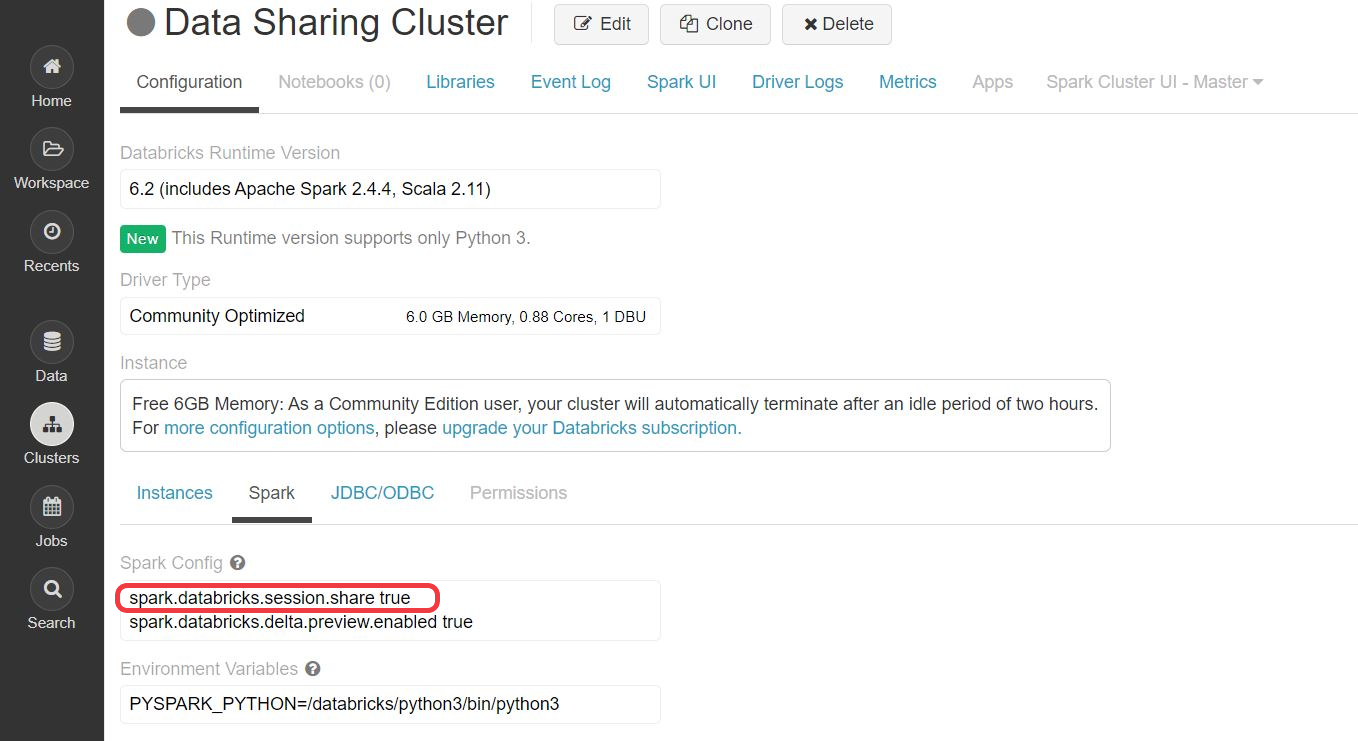
Spark Session Isolation is enabled by default. With Spark Session Isolation, different notebooks attached to a cluster are in different sessions with isolated runtime configurations and current database setting. In order to share temporary views across notebooks when session isolation is enabled, users can use global temporary views. Users can still disable session isolation by setting spark.databricks.session.share to true. If you enable this option, createOrReplaceTempView itself shares the data between different spark sessions(different notebooks). From Spark 2.0.2-db1 and above versions due to some security reasons and for user stability, session isolation is disabled by default. You can enable Spark session isolation so that every notebook uses its own SparkSession
To disable session isolation, declare it on cluster level and then restart the cluster. But, as a good practice session isolation shouldn’t be disabled.

Without Databricks Cluster
If you are not using Databricks Cluster, Spark Application can be considered as a single batch job, it can contain more than one Spark Session. Global temporary views will be used to share data between multiple spark session.
Spark session is a unified entry point of a spark application from Spark 2.0. It provides a way to interact with various spark’s functionality with a lesser number of constructs.


Why we need multiple Spark Session in a same Spark Job?
One of the scenario is, when two different configuration needs to be used to create a different Spark Session, for example 2 different Hive metastores. You have requirement to combine the data coming from two different Hive metastores, then you need two different Spark Session with different configuration:
val spark = SparkSession
        .builder()
        .appName("sparkHive1")
        .master("yarn")
        .config("hive.metastore.uris","thrift://hiveserver1:9083")
        .enableHiveSupport()
        .getOrCreate()

val newSpark = SparkSession
        .builder()
        .appName("sparkHive2")
        .master("yarn")
        .config("hive.metastore.uris","thrift://hiveserver2:9084")
        .enableHiveSupport()
        .getOrCreate()

val spark_df = spark.sql("select * from session_1_table")

spark_df.createGlobalTempView("spark_tbl_1")

/**
newSpark_tbl_2 is from 2nd hive metastore and spark_tbl_1 is from 1st hive metastore.
**/

display(newSpark.sql("""select * from newSpark_tbl_2 t2
              join
              spark_tbl_1 t1
              on
              t1.id = t2.id"""))

spark.stop()

// once spark session 1 is stopped, the data will related 1st hive metastore will be lost. But newSpark session can process its own data, but it can't access metastore-1.
Here, the usage is mostly within Spark Jobs. But in Databricks, you can share these same between different Spark Jobs.
Using Databricks Cluster

In Databricks as they share the same cluster, we can share the data between different Spark Applications using Notebook Workflows in Databricks.
Notebook workflows in databricks allows you to easily build complex workflows and pipelines with dependencies and conditional routing based on previous Job status(success/failure).
// Returning data through temporary tables.
// You can only return one string using dbutils.notebook.exit(), but since called notebooks reside in the same JVM, you can
// return a name referencing data stored in a temporary table.

/** In callee notebook  NOTEBOOK - 1 */
sc.parallelize(1 to 5).toDF().createOrReplaceGlobalTempView("my_data")

dbutils.notebook.exit("my_data")

/** In caller notebook  NOTEBOOK - 2 */

val returned_table = dbutils.notebook.run("LOCATION_OF_CALLEE_NOTEBOOK", 60)
val global_temp_db = spark.conf.get("spark.sql.globalTempDatabase")

table(global_temp_db + "." + returned_table).show()
// Output of data that got created in different notebook get accessed in another notebook:+-----+
|value|
+-----+
|    1|
|    2|
|    3|
|    4|
|    5|
+-----+
Wrapping up
In a nutshell, TEMPORARY skips persisting the view definition in the underlying metastore, if any. If GLOBAL is specified, the view can be accessed by different sessions and kept alive until your application ends; otherwise, the temporary views are session-scoped and will be automatically dropped if the session terminates. All the global temporary views are tied to a system preserved temporary database global_temp. The database name is preserved, and thus, users are not allowed to create/use/drop this database(global_temp db). You must use the qualified name to access the global temporary view.
Happy Learning !!
[출처] https://medium.com/@kar9475/data-sharing-between-multiple-spark-jobs-in-databricks-308687c99897
광고 클릭에서 발생하는 수익금은 모두 웹사이트 서버의 유지 및 관리, 그리고 기술 콘텐츠 향상을 위해 쓰여집니다.
