
- 전체
- android studio
- Android SDK
- Android NDK
- Android ADK
- Android Etc. Lib.
- Android dalvik VM
- Android 보안
- PhoneGap
- AOSP 개발
- MIT App Inventor 2
- kivy (python)
- ionic framework
- Kotlin (코틀린)
- React Native
android studio Android Studio Build시 failed linking references 해결방법
2020.05.05 18:40
Android Studio Build시 failed linking references 해결방법
Android Build 수행시 아래와 같은 에러가 나올때 해결방법
"failed linking references"
error: resource android:attr/fontVariationSettings not found.
Message{kind=ERROR, text=error: resource android:attr/fontVariationSettings not found., sources=[C:\Users\binso\.gradle\caches\transforms-1\files-1.1\appcompat-v7-28.0.0-alpha1.aar4dff644d806aa99009961ed95e1c03\res\values\values.xml:252:5-69], original message=, tool name=Optional.of(AAPT)}
error: resource android:attr/ttcIndex not found.
Message{kind=ERROR, text=error: resource android:attr/ttcIndex not found., sources=[C:\Users\binso\.gradle\caches\transforms-1\files-1.1\appcompat-v7-28.0.0-alpha1.aar4dff644d806aa99009961ed95e1c03\res\values\values.xml:252:5-69], original message=, tool name=Optional.of(AAPT)}
error: resource android:attr/dialogCornerRadius not found.
Message{kind=ERROR, text=error: resource android:attr/dialogCornerRadius not found., sources=[C:\Users\binso\.gradle\caches\transforms-1\files-1.1\appcompat-v7-28.0.0-alpha1.aar4dff644d806aa99009961ed95e1c03\res\values-v28\values-v28.xml:9:5-12:13], original message=, tool name=Optional.of(AAPT)}
그리고 이 에러의 끝에는 결국 다음과 같은 에러가 나온다.
error: failed linking references.
[해결방법]
1. Project Structure로 이동
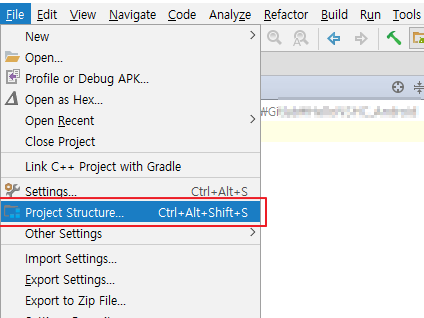


2. Compile Sdk Version 항목을 확인

3. API 27+를 선택 및 확인 버튼을 누름
API 27+: Android API 27, P preview (Preview)
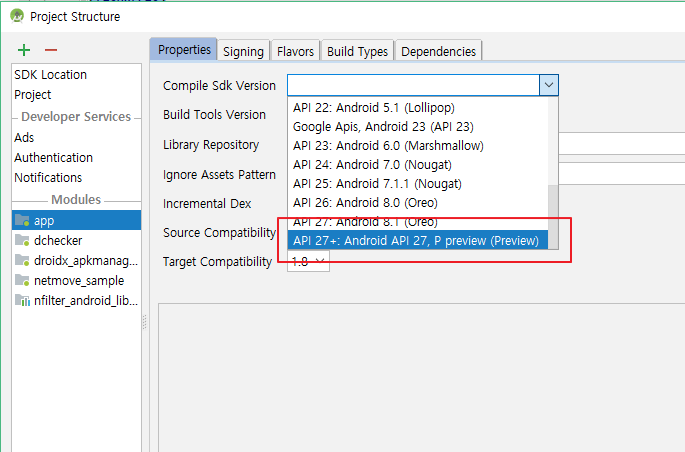
4. 바로 sync 및 Make가 수행되며, 결과로 completed successfully가 나오는것을 볼 수 있다.
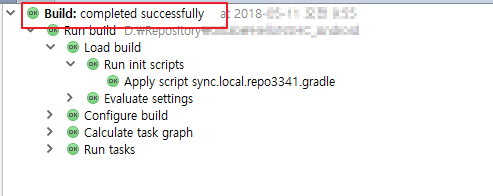
당장은 Android P에 해당하는 부분으로 해결하였지만, 이것을 응용하면 추후 비슷한 오류 발생시 Compile Sdk Version의 누락으로 인해 발생할 수 있음을 확인하면 될 것 같다.
출처: https://blog.soobinpark.com/149 [happy 빈이 라이프스토리]
광고 클릭에서 발생하는 수익금은 모두 웹사이트 서버의 유지 및 관리, 그리고 기술 콘텐츠 향상을 위해 쓰여집니다.
댓글 0
| 번호 | 제목 | 글쓴이 | 날짜 | 조회 수 |
|---|---|---|---|---|
| 12 |
App Inventor - MySQL interface 앱 인벤터 mysql 연결
 | 졸리운_곰 | 2018.04.07 | 8029 |
| 11 |
Connect App Inventor to MySQL Database 앱 인벤터와 mysql 데이터베이스 연결
| 졸리운_곰 | 2018.04.07 | 7273 |
| 10 |
Create an API (PHP) 앱 인벤터와 php 통합
| 졸리운_곰 | 2018.04.07 | 630 |
| 9 |
Using the WebViewer Control in App Inventor 앱인터에서 웹뷰 컨트롤 사용
| 졸리운_곰 | 2018.03.24 | 512 |
| 8 |
WebView Javascript Processor for App Inventor 앱 인벤터 웹뷰 자바스크립트 인터페이스
| 졸리운_곰 | 2018.03.24 | 507 |
| 7 |
Creating a digital wallet application in App Inventor 2
| 졸리운_곰 | 2017.05.01 | 287 |
| 6 | Creating a Custom TinyWebDB Service | 졸리운_곰 | 2016.05.18 | 201 |
| 5 |
TinyDB is a lightweight document oriented database
| 졸리운_곰 | 2016.05.16 | 270 |
| 4 |
구글 앱엔진에 의한 소형웹데이터베이스의 접속방법 tinywebdb
| 졸리운_곰 | 2016.05.15 | 547 |
| 3 |
App inventor 멀티스크린, 스크린 이동, 다중화면,
| 졸리운_곰 | 2016.02.17 | 780 |
| 2 |
Communicating with Web APIs
| 졸리운_곰 | 2016.02.17 | 1080 |
| 1 |
JSON data on the Android mobile with App Inventor 2
| 졸리운_곰 | 2016.02.17 | 364 |