
- 전체
- Sample DB
- database modeling
- [표준 SQL] Standard SQL
- G-SQL
- 10-Min
- ORACLE
- MS SQLserver
- MySQL
- SQLite
- postgreSQL
- 데이터아키텍처전문가 - 국가공인자격
- 데이터 분석 전문가 [ADP]
- [국가공인] SQL 개발자/전문가
- NoSQL
- hadoop
- hadoop eco system
- big data (빅데이터)
- stat(통계) R 언어
- XML DB & XQuery
- spark
- DataBase Tool
- 데이터분석 & 데이터사이언스
- Engineer Quality Management
- [기계학습] machine learning
- 데이터 수집 및 전처리
- 국가기술자격 빅데이터분석기사
- 암호화폐 (비트코인, cryptocurrency, bitcoin)
G-SQL 4 Ways to Join Only The First Row in SQL
2018.07.03 16:04
4 Ways to Join Only The First Row in SQL
For today’s daily report, we need a list of users and the most recent widget each user has created. We have a users table and a widgets table, and each user has many widgets. users.id is the primary key on users, and widgets.user_id is the corresponding foreign key in widgets.
To solve this problem, we need to join only the first row. There are several ways to do this. Here are a few different techniques and when to use them.
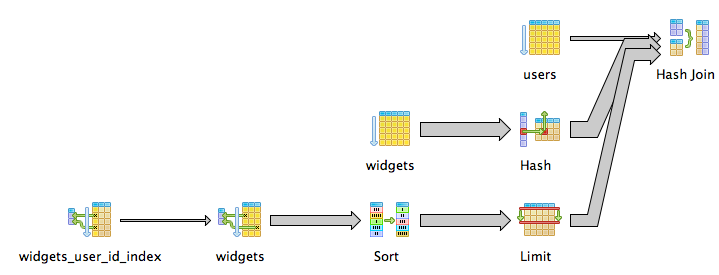
Use Correlated Subqueries when the foreign key is indexed
Correlated subqueries are subqueries that depend on the outer query. It’s like a for loop in SQL. The subquery will run once for each row in the outer query:
select * from users join widgets on widgets.id = (
select id from widgets
where widgets.user_id = users.id
order by created_at desc
limit 1
)
Notice the where widgets.user_id = users.id clause in the subquery. It queries the widgets table once for each user row and selects that user’s most recent widget row. It’s very efficient if user_id is indexed and there are few users.
Use a Complete Subquery when you don’t have indexes
Correlated subqueries break down when the foreign key isn’t indexed, because each subquery will require a full table scan.
In that case, we can speed things up by rewriting the query to use a single subquery, only scanning the widgets table once:
select * from users join (
select distinct on (user_id) * from widgets
order by user_id, created_at desc
) as most_recent_user_widget
on users.id = most_recent_user_widget.user_id
This new subquery returns a list of the most recent widgets, one for each user. We then join it to the users table to get our list.

We’ve used Postgres’ DISTINCT ON syntax to easily query for only one widget per user_id. If your database doesn’t support something like DISTINCT ON, you have two options:
Use Nested Subqueries if you have an ordered ID column
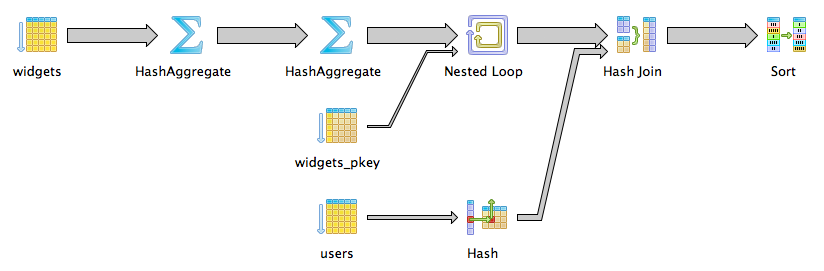
In our example, the most recent row always has the highest id value. This means that even without DISTINCT ON, we can cheat with our nested subqueries like this:


select * from users join (
select * from widgets
where id in (
select max(id) from widgets group by user_id
)
) as most_recent_user_widget
on users.id = most_recent_user_widget.user_id
We start by selecting the list of IDs repreenting the most recent widget per user. Then we filter the main widgets table to those IDs. This gets us the same result as DISTINCT ON since sorting by id and created_at happen to be equivalent.
Use Window Functions if you need more control
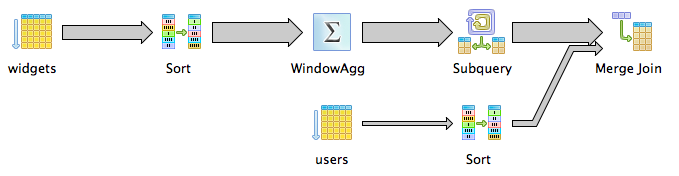
If your table doesn’t have an id column, or you can’t depend on its min or max to be the most recent row, use row_number with a window function. It’s a little more complicated, but a lot more flexible:
select * from users join (
select * from (
select *, row_number() over (
partition by user_id
order by created_at desc
) as row_num
from widgets
) as ordered_widgets
where ordered_widgets.row_num = 1
) as most_recent_user_widget
on users.id = most_recent_user_widget.user_id
order by users.id
The interesting part is here:
select *, row_number() over (
partition by user_id
order by created_at desc
) as row_num
from widgets
over (partition by user_id order by created_at desc specifies a sub-table, called a window, per user_id, and sorts those windows by created_at desc. row_number() returns a row’s position within its window. Thus the first widget for each user_id will have row_number 1.
In the outer subquery, we select only the rows with a row_number of 1. With a similar query, you could get the 2nd or 3rd or 10th rows instead.
In a future post we’ll go deeper on window functions and how they can make queries like this one even more powerful!
[출처] https://www.periscopedata.com/blog/4-ways-to-join-only-the-first-row-in-sql
광고 클릭에서 발생하는 수익금은 모두 웹사이트 서버의 유지 및 관리, 그리고 기술 콘텐츠 향상을 위해 쓰여집니다.
