
- 전체
- Sample DB
- database modeling
- [표준 SQL] Standard SQL
- G-SQL
- 10-Min
- ORACLE
- MS SQLserver
- MySQL
- SQLite
- postgreSQL
- 데이터아키텍처전문가 - 국가공인자격
- 데이터 분석 전문가 [ADP]
- [국가공인] SQL 개발자/전문가
- NoSQL
- hadoop
- hadoop eco system
- big data (빅데이터)
- stat(통계) R 언어
- XML DB & XQuery
- spark
- DataBase Tool
- 데이터분석 & 데이터사이언스
- Engineer Quality Management
- [기계학습] machine learning
- 데이터 수집 및 전처리
- 국가기술자격 빅데이터분석기사
- 암호화폐 (비트코인, cryptocurrency, bitcoin)
MySQL [MySQL] MySQL ROLLUP , summary, 부분합 구하기
2021.09.01 17:30
[MySQL] MySQL ROLLUP , summary, 부분합 구하기
Summary: in this tutorial, you will learn how to use the MySQL ROLLUP clause to generate subtotals and grand totals.
Setting up a sample table
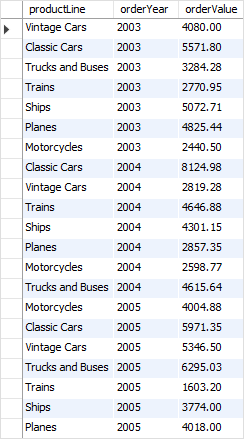
The following statement creates a new table named sales that stores the order values summarized by product lines and years. The data comes from the products, orders, and orderDetails tables in the sample database.
CREATE TABLE sales SELECT productLine, YEAR(orderDate) orderYear, SUM(quantityOrdered * priceEach) orderValue FROM orderDetails INNER JOIN orders USING (orderNumber) INNER JOIN products USING (productCode) GROUP BY productLine , YEAR(orderDate); Code language: SQL (Structured Query Language) (sql)
The following query returns all rows from the sales table:
SELECT * FROM sales;Code language: SQL (Structured Query Language) (sql)
MySQL ROLLUP Overview
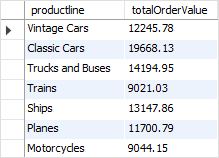
A grouping set is a set of columns to which you want to group. For example, the following query creates a grouping set denoted by (productline)
SELECT productline, SUM(orderValue) totalOrderValue FROM sales GROUP BY productline;Code language: SQL (Structured Query Language) (sql)
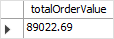
The following query creates an empty grouping set denoted by the ():
SELECT SUM(orderValue) totalOrderValue FROM sales;Code language: SQL (Structured Query Language) (sql)
If you want to generate two or more grouping sets together in one query, you may use the UNION ALL operator as follows:
SELECT productline, SUM(orderValue) totalOrderValue FROM sales GROUP BY productline UNION ALL SELECT NULL, SUM(orderValue) totalOrderValue FROM sales;Code language: SQL (Structured Query Language) (sql)
Here’s the query output:
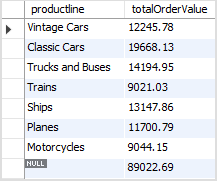
Because the UNION ALL requires all queries to have the same number of columns, we added NULL in the select list of the second query to fulfill this requirement.
The NULL in the productLine column identifies the grand total super-aggregate line.
This query is able to generate the total order values by product lines and also the grand total row. However, it has two problems:
- The query is quite lengthy.
- The performance of the query may not be good since the database engine has to internally execute two separate queries and combine the result sets into one.
To fix these issues, you can use the ROLLUP clause.
The ROLLUP clause is an extension of the GROUP BY clause with the following syntax:
SELECT select_list FROM table_name GROUP BY c1, c2, c3 WITH ROLLUP; Code language: SQL (Structured Query Language) (sql)
The ROLLUP generates multiple grouping sets based on the columns or expressions specified in the GROUP BY clause. For example:
SELECT productLine, SUM(orderValue) totalOrderValue FROM sales GROUP BY productline WITH ROLLUP;Code language: SQL (Structured Query Language) (sql)
Here is the output:
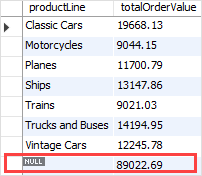
As clearly shown in the output, the ROLLUP clause generates not only the subtotals but also the grand total of the order values.
If you have more than one column specified in the GROUP BY clause, the ROLLUP clause assumes a hierarchy among the input columns.
For example:
GROUP BY c1, c2, c3 WITH ROLLUPCode language: SQL (Structured Query Language) (sql)
The ROLLUP assumes that there is the following hierarchy:
c1 > c2 > c3Code language: SQL (Structured Query Language) (sql)
And it generates the following grouping sets:
(c1, c2, c3) (c1, c2) (c1) ()Code language: SQL (Structured Query Language) (sql)
And in case you have two columns specified in the GROUP BY clause:
GROUP BY c1, c2 WITH ROLLUPCode language: SQL (Structured Query Language) (sql)


then the ROLLUP generates the following grouping sets:
(c1, c2) (c1) ()Code language: SQL (Structured Query Language) (sql)
See the following query example:
SELECT productLine, orderYear, SUM(orderValue) totalOrderValue FROM sales GROUP BY productline, orderYear WITH ROLLUP;Code language: SQL (Structured Query Language) (sql)
Here is the output:
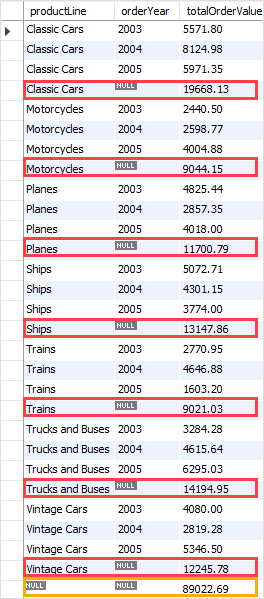
The ROLLUP generates the subtotal row every time the product line changes and the grand total at the end of the result.
The hierarchy in this case is:
productLine > orderYearCode language: SQL (Structured Query Language) (sql)
If you reverse the hierarchy, for example:
SELECT orderYear, productLine, SUM(orderValue) totalOrderValue FROM sales GROUP BY orderYear, productline WITH ROLLUP;Code language: SQL (Structured Query Language) (sql)
The following picture shows the output:
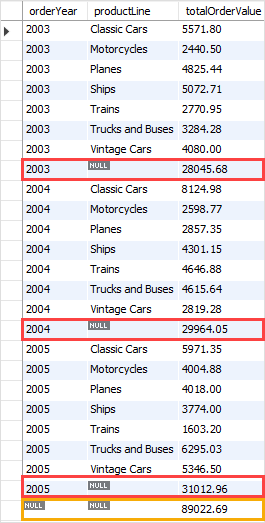
The ROLLUP generates the subtotal every time the year changes and the grand total at the end of the result set.
The hierarchy in this example is:
orderYear > productLine Code language: SQL (Structured Query Language) (sql)
The GROUPING() function
To check whether NULL in the result set represents the subtotals or grand totals, you use the GROUPING() function.
The GROUPING() function returns 1 when NULL occurs in a supper-aggregate row, otherwise, it returns 0.
The GROUPING() function can be used in the select list, HAVING clause, and (as of MySQL 8.0.12 ) ORDER BY clause.
Consider the following query:
SELECT orderYear, productLine, SUM(orderValue) totalOrderValue, GROUPING(orderYear), GROUPING(productLine) FROM sales GROUP BY orderYear, productline WITH ROLLUP;Code language: SQL (Structured Query Language) (sql)
The following picture shows the output:
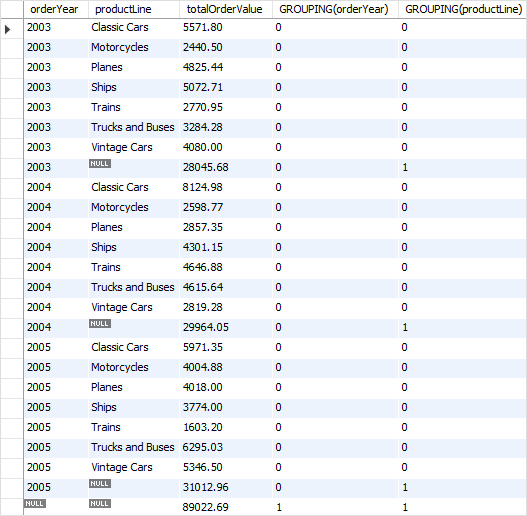
The GROUPING(orderYear) returns 1 when NULL in the orderYear column occurs in a super-aggregate row, 0 otherwise.
Similarly, the GROUPING(productLine) returns 1 when NULL in the productLine column occurs in a super-aggregate row, 0 otherwise.
We often use GROUPING() function to substitute meaningful labels for super-aggregate NULL values instead of displaying it directly.
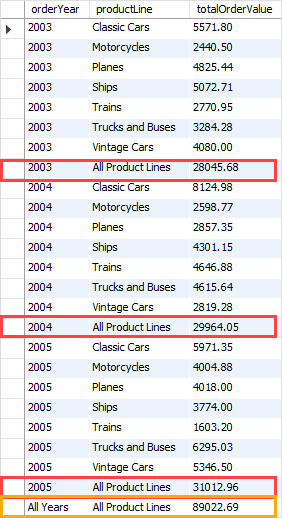
The following example shows how to combine the IF() function with the GROUPING() function to substitute labels for the super-aggregate NULL values in orderYear and productLine columns:
SELECT IF(GROUPING(orderYear), 'All Years', orderYear) orderYear, IF(GROUPING(productLine), 'All Product Lines', productLine) productLine, SUM(orderValue) totalOrderValue FROM sales GROUP BY orderYear , productline WITH ROLLUP;Code language: SQL (Structured Query Language) (sql)
The output is:
In this tutorial, you have learned how to use the MySQL ROLLUP() to generate multiple grouping sets considering a hierarchy between columns specified in the GROUP BY clause.
[출처] https://www.mysqltutorial.org/mysql-rollup/
광고 클릭에서 발생하는 수익금은 모두 웹사이트 서버의 유지 및 관리, 그리고 기술 콘텐츠 향상을 위해 쓰여집니다.
