

안녕하세요
RWDB 입니다~!!!
오늘 소개해드릴 내용은 WordPress 관련 내용인데요
WordPress에서 각 페이지나 글 등록시 해당 페이지나 글에만 적용되고 싶은 CSS, JavaScript 꼭 있잖아요??
그걸 쉽게~~ 아주 쉽게 하실 수 있게 하는 내용 입니다.
※ 다음에 소개하는 방법 functions.php을 사용하기 때문에 테마에 functions.php없는 경우 작성하십시오.
CSS를 추가 할 수 있도록
CSS를 추가 할 수 있도록하려면 아래 내용을 functions.php에 추가해주시면 됩니다.
functions.php
//Custom CSS Widget
add_action( 'admin_menu', 'custom_css_hooks' );
add_action( 'save_post', 'save_custom_css' );
add_action( 'wp_head','insert_custom_css' );
function custom_css_hooks() {
  add_meta_box( 'custom_css', 'Custom CSS', 'custom_css_input', 'post', 'normal', 'high' );
  add_meta_box( 'custom_css', 'Custom CSS', 'custom_css_input', 'page', 'normal', 'high' );
}
function custom_css_input() {
  global $post;
  echo '<input type="hidden" name="custom_css_noncename" id="custom_css_noncename" value="'.wp_create_nonce('custom-css').'" />';
  echo '<textarea name="custom_css" id="custom_css" rows="5" cols="30" style="width:100%;">'.get_post_meta($post->ID,'_custom_css',true).'</textarea>';
}
function save_custom_css($post_id) {
  if ( !wp_verify_nonce( $_POST['custom_css_noncename'], 'custom-css' ) ) return $post_id;
  if ( defined( 'DOING_AUTOSAVE' ) && DOING_AUTOSAVE) return $post_id;
  $custom_css = $_POST['custom_css'];
  update_post_meta( $post_id, '_custom_css', $custom_css );
}
function insert_custom_css() {
  if ( is_page() || is_single() ) {
    if ( have_posts() ) : while ( have_posts() ) : the_post();
      echo '<style type="text/css">' . get_post_meta(get_the_ID(), '_custom_css', true) . '</style>';
    endwhile; endif;
    rewind_posts();
  }
}
JavaScript를 추가 할 수 있도록
JavaScript를 추가 할 수 있도록하려면 아래 내용을 functions.php에 추가해주시면 끝!
functions.php


//Custom JS Widget
add_action( 'admin_menu', 'custom_js_hooks' );
add_action( 'save_post', 'save_custom_js' );
add_action( 'wp_head','insert_custom_js' );
function custom_js_hooks() {
  add_meta_box( 'custom_js', 'Custom JS', 'custom_js_input', 'post', 'normal', 'high' );
  add_meta_box( 'custom_js', 'Custom JS', 'custom_js_input', 'page', 'normal', 'high' );
}
function custom_js_input() {
  global $post;
  echo '<input type="hidden" name="custom_js_noncename" id="custom_js_noncename" value="'.wp_create_nonce('custom-js').'" />';
  echo '<textarea name="custom_js" id="custom_js" rows="5" cols="30" style="width:100%;">'.get_post_meta($post->ID,'_custom_js',true).'</textarea>';
}
function save_custom_js($post_id) {
  if (!wp_verify_nonce($_POST['custom_js_noncename'], 'custom-js')) return $post_id;
  if (defined('DOING_AUTOSAVE') && DOING_AUTOSAVE) return $post_id;
  $custom_js = $_POST['custom_js'];
  update_post_meta($post_id, '_custom_js', $custom_js);
}
function insert_custom_js() {
  if ( is_page() || is_single() ) {
    if ( have_posts() ) : while ( have_posts() ) : the_post();
      echo '<script type="text/javascript">' . get_post_meta(get_the_ID(), '_custom_js', true) . '</script>';
    endwhile; endif;
    rewind_posts();
  }
}
CSS와 JavaScript를 모두 사용하시려면 둘다 넣으시면 되겠죠?? ㅋ
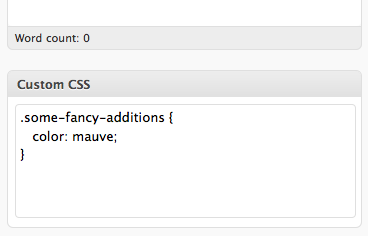
functions.php 파일을 저장후 편집 페이지를 확인해보시면 아래 이미지와 같이 추가된걸

확인 하실 수 있습니다.
[출처] http://rwdb.kr/wordpress-page-css-javascript/
