[javascript] How to append HTML code to a div using JavaScript ?

here are two ways to append HTML code to a div through JavaScript

  • Using the innerHTML attribute
  • Using the insertAdjacentHTML() method

Using the innerHTML attribute:
To append using the innerHTML attribute, first select the element (div) where you want to append the code. Then, add the code enclosed as strings using the += operator on innerHTML.

Syntax:

element.innerHTML += "additional HTML code"

or

element.innerHTML = element.innerHTML + "additional HTML code"

Example:


<!DOCTYPE html>
<html>
  
<head>
    <title>How to Append HTML Code to a Div using Javascript</title>
    <style>
        body {
            text-align: center;
              
            padding: 5%;
        }
        h1{
            color:green;
        }
    </style>
</head>
  
<body>
    <div id="add_to_me">
        <h1>GeeksforGeeks</h1>
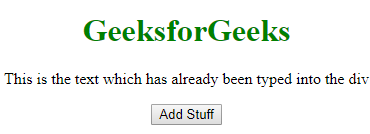
        <p>This is the text which has already been typed into the div</p>
    </div>
  
    <button onclick="addCode()">Add Stuff</button>
    <script>
        function addCode() {
            document.getElementById("add_to_me").innerHTML += 
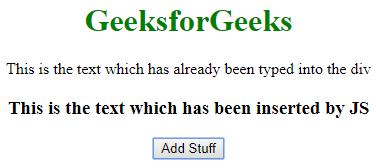
              "<h3>This is the text which has been inserted by JS</h3>";
        }
    </script>
</body>
  
</html>
  • Output:
  • Before Clicking the Button:
  • After Clicking the Button:

    Note: This method basically destroys all the content of the div and recreates it. So, if you have any listeners attached to the child nodes of that div, they will be lost.

    Using the insertAdjacentHTML() method

    경축! 아무것도 안하여 에스천사게임즈가 새로운 모습으로 재오픈 하였습니다.
    어린이용이며, 설치가 필요없는 브라우저 게임입니다.
    https://s1004games.com

    HTML code can be appended to a div using the insertAdjacentHTML() method. However, you need to select an element inside the div to add the code. This method takes two parameters:


    Syntax:

    elementInsideDiv.insertAdjacentHTML('afterend', 'additional HTML code');
    

    Example:

    <!DOCTYPE html>
    <html>
      
    <head>
        <title>How to Append HTML Code to a Div using Javascript</title>
        <style>
            body {
                text-align: center;
                padding: 5%;
            }
          h1{
            color: green
              }
        </style>
    </head>
      
    <body>
        <div id="add_to_me">
            <h1>GeeksforGeeks</h1>
            <p id="add_after_me">
              This is the text which has already been typed into the div</p>
        </div>
      
        <button onclick="addCode()">Add Stuff</button>
        <script>
            function addCode() {
                document.getElementById("add_after_me").insertAdjacentHTML("afterend",
                    "<h3>This is the text which has been inserted by JS</h3>");
            }
        </script>
    </body>
      
    </html>
      1. The position (in the document) where you want to insert the code (‘afterbegin’, ‘beforebegin’, ‘afterend’, ‘beforeend’)
      2. The HTML code you want to insert enclosed in quotes
      • Output:
      • Before Clicking the Button:
      • After Clicking the Button:

        [출처] https://www.geeksforgeeks.org/how-to-append-html-code-to-a-div-using-javascript/


본 웹사이트는 광고를 포함하고 있습니다.
광고 클릭에서 발생하는 수익금은 모두 웹사이트 서버의 유지 및 관리, 그리고 기술 콘텐츠 향상을 위해 쓰여집니다.
번호 제목 글쓴이 날짜 조회 수
34 [javascript] React - Apache에 배포하기 file 졸리운_곰 2026.01.25 516
33 Python으로 GraphQL 서버 구현 file 졸리운_곰 2019.12.17 581
32 처음 만나는 GraphQL file 졸리운_곰 2019.12.17 449
31 웹팩(Webpack) 이란, 웹팩 간단 정리 및 리액트(React) 기본 개발환경 세팅. [2] file 졸리운_곰 2019.11.08 639
30 웹팩(Webpack) 이란, 웹팩 간단 정리 및 리액트(React) 기본 개발환경 세팅. [1] file 졸리운_곰 2019.11.08 460
29 PHP 로 css/js 보호하기 졸리운_곰 2019.11.08 646
28 Three.js를 이용한 WebGL: 기본 file 졸리운_곰 2019.11.08 537
27 underscore.js로 편해지자 졸리운_곰 2018.10.16 659
26 자바스크립트로 각종 값넘기는방법 졸리운_곰 2018.01.24 693
25 form 데이터 주고 받기 file 졸리운_곰 2018.01.24 559
24 Node.js & WebSocket — Simple chat tutorial file 졸리운_곰 2017.12.08 669
23 JavaScript 모듈화 도구, webpack file 졸리운_곰 2017.10.30 637
22 웹팩이란? 졸리운_곰 2017.10.30 640
21 이해하기 쉬운 Webpack 가이드 file 졸리운_곰 2017.10.30 947
20 [jquery] Ajax를 품은 jQuery file 졸리운_곰 2017.04.25 522
19 Create Your First Mobile App with AngularJS and Ionic file 졸리운_곰 2016.11.20 1273
18 Single Page Application using AngularJs Tutorial file 졸리운_곰 2016.11.20 463
17 AngularJS Tutorial - Building a Web App in 5 minutes file 졸리운_곰 2016.11.20 500
16 자바스크립트의 'this' 키워드 이해하기 졸리운_곰 2016.11.17 690
15 jQuery 핵심 - 노드 다루기 졸리운_곰 2016.11.17 838
대표 김성준 주소 : 경기 용인 분당수지 U타워 등록번호 : 142-07-27414
통신판매업 신고 : 제2012-용인수지-0185호 출판업 신고 : 수지구청 제 123호 개인정보보호최고책임자 : 김성준 sjkim70@stechstar.com
대표전화 : 010-4589-2193 [fax] 02-6280-1294 COPYRIGHT(C) stechstar.com ALL RIGHTS RESERVED