
Summary: updating data is one of the most important tasks when you work with the database. In this tutorial, you will learn how to use the MySQL UPDATE statement to update data in a table.
Introduction to MySQL UPDATE statement
We use the UPDATE statement to update existing data in a table. We can use the UPDATE statement to change column values of a single row, a group of rows, or all rows in a table.
The following illustrates the syntax of the MySQL UPDATE statement:
In the UPDATE statement:
- First, specify the table name that you want to update data after the
UPDATEkeyword. - Second, the SET clause specifies which column that you want to modify and the new values. To update multiple columns, you use a list comma-separated assignments. You supply the value in each column’s assignment in the form of a literal value, an expression, or a subquery.
- Third, specify which rows to be updated using a condition in the WHERE clause. The
WHEREclause is optional. If you omit theWHEREclause, theUPDATEstatement will update all rows in the table.
Notice that the WHERE clause is so important that you should not forget. Sometimes, you may want to change just one row; However, you may forget the WHERE clause and accidentally updates all the rows in the table.
MySQL supports two modifiers in the UPDATE statement.
- The
LOW_PRIORITYmodifier instructs theUPDATEstatement to delay the update until there is no connection reading data from the table. TheLOW_PRIORITYtakes effect for the storage engines that use table-level locking only, for example, MyISAM, MERGE, MEMORY. - The
IGNOREmodifier enables theUPDATEstatement to continue updating rows even if errors occurred. The rows that cause errors such as duplicate-key conflicts are not updated.
MySQL UPDATE examples
Let’s practice the UPDATE statement with some tables in the MySQL sample database.
MySQL UPDATE a single column example
In this example, we are going to update the email of Mary Patterson to the new email mary.patterso@classicmodelcars.com.
First, to make sure that we update the email successfully, we query Mary’s email from the employees table using the following SELECT statement:

Second, we can update Mary’s email to the new email mary.patterson@classicmodelcars.com using the UPDATE statement as the following query:
Because we just want to update one row, we use the WHERE clause to specify the row using the employee number 1056. The SET clause sets the value of the email column to the new email.
Third, we execute the SELECT statement again to verify the change.

MySQL UPDATE multiple columns
To update values in the multiple columns, you need to specify the assignments in the SET clause. For example, the following statement updates both last name and email columns of employee number 1056:


Let’s check the changes.

MySQL UPDATE from SELECT statement example
You can supply the values for the SET clause from a SELECT statement that queries data from other tables.
For example, in the customers table, some customers do not have any sale representative. The value of the column saleRepEmployeeNumber is NULL as follows:
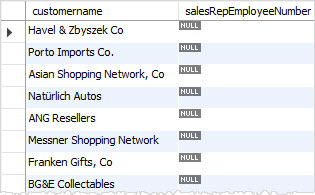
We can take a sale representative and update for those customers.
To do this, we can select a random employee whose job title is Sales Rep from the employees table and update it for the employees table.
This query selects a random employee from the employees table whose job title is the Sales Rep.
To update the sales representative employee number column in the customers table, we put the query above in the SET clause of the UPDATE statement as follows:
If you query data from the employees table, you will see that every customer has a sales representative. In other words, the following query returns no row.
In this tutorial, you have learned how to use MySQL UPDATE statement to update data in a database table.
