
- 전체
- HTML
- Web Design (웹디자인)
- XE 응용 개발
- wordpress plugin dev
- Javascript & JavaScript Application
- MEAN Stack : full stack javascript
- angular js & ionic framework
- bootstrap
- WebGL, Three.js and Babylon.js
- restful api design
- mobile web
- node.js 응용
- Cloud Service 응용
- 웹 어셈블리 개발 [WASM, WebAssembly]
- 마이크로서비스, MSA (microservice architecture)
- WebGL / WebGPU
- next.js 개발
- micro frontend (마이크로프론트앤드)
- 전자상거래/쇼핑몰
- 서버 클라우드 (aws, azure, google)
HTML [javascript] How to append HTML code to a div using JavaScript ?
2021.09.07 16:24
[javascript] How to append HTML code to a div using JavaScript ?
here are two ways to append HTML code to a div through JavaScript
- Using the innerHTML attribute
- Using the insertAdjacentHTML() method
Using the innerHTML attribute:
To append using the innerHTML attribute, first select the element (div) where you want to append the code. Then, add the code enclosed as strings using the += operator on innerHTML.
Syntax:
element.innerHTML += "additional HTML code"
or
element.innerHTML = element.innerHTML + "additional HTML code"
Example:
- Output:
- Before Clicking the Button:
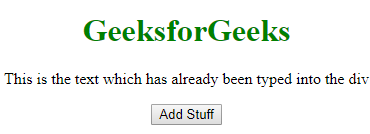
- After Clicking the Button:
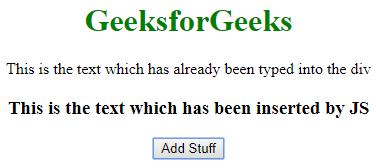
Note: This method basically destroys all the content of the div and recreates it. So, if you have any listeners attached to the child nodes of that div, they will be lost.
Using the insertAdjacentHTML() method
HTML code can be appended to a div using the insertAdjacentHTML() method. However, you need to select an element inside the div to add the code. This method takes two parameters:
Syntax:
elementInsideDiv.insertAdjacentHTML('afterend', 'additional HTML code');Example:
-
- The position (in the document) where you want to insert the code (‘afterbegin’, ‘beforebegin’, ‘afterend’, ‘beforeend’)
- The HTML code you want to insert enclosed in quotes
- Output:
- Before Clicking the Button:
- After Clicking the Button:
[출처] https://www.geeksforgeeks.org/how-to-append-html-code-to-a-div-using-javascript/
-


광고 클릭에서 발생하는 수익금은 모두 웹사이트 서버의 유지 및 관리, 그리고 기술 콘텐츠 향상을 위해 쓰여집니다.
댓글 0
| 번호 | 제목 | 글쓴이 | 날짜 | 조회 수 |
|---|---|---|---|---|
| 4 |
[Node.js] forever - node.js app 이 죽을경우 자동으로 재실행해주는 모듈
 | 졸리운_곰 | 2017.09.26 | 701 |
| 3 |
[Node.js] proxy 환경에서 node.js 설정
| 졸리운_곰 | 2017.08.16 | 549 |
| 2 |
[Node.js] Node.js, Express, MongoDB를 이용하여 REST API 만들기
| 졸리운_곰 | 2016.06.06 | 813 |
| 1 |
Create a Web App and RESTful API Server Using the MEAN Stack
| 졸리운_곰 | 2016.06.05 | 2155 |