
- 전체
- android studio
- Android SDK
- Android NDK
- Android ADK
- Android Etc. Lib.
- Android dalvik VM
- Android 보안
- PhoneGap
- AOSP 개발
- MIT App Inventor 2
- kivy (python)
- ionic framework
- Kotlin (코틀린)
- React Native
android studio [안드로이드 스튜디오] COULD NOT FIND COM.ANDROID.TOOLS.BUILD:GRADLE:3.0.0-BETA6
2020.05.05 17:03

안녕하세요. 제임스 입니다.
저녁에 안드로이드 프로그램 깔작 작업좀 하고자 안드로이드 스튜디오를 켰는데 갑자기 아래와 같은 오류 메세지가 뜹니다.
Error:Could not find com.android.tools.build:gradle:3.0.0-beta6.
Searched in the following locations:
file:/C:/Program Files/Android/Android Studio/gradle/m2repository/com/android/tools/build/gradle/3.0.0-beta6/gradle-3.0.0-beta6.pom
file:/C:/Program Files/Android/Android Studio/gradle/m2repository/com/android/tools/build/gradle/3.0.0-beta6/gradle-3.0.0-beta6.jar
https://jcenter.bintray.com/com/android/tools/build/gradle/3.0.0-beta6/gradle-3.0.0-beta6.pom
https://jcenter.bintray.com/com/android/tools/build/gradle/3.0.0-beta6/gradle-3.0.0-beta6.jar
Required by:
project :
무섭게 왜 이러냐 ㅠㅠ
모든 에러는 에러 메세지에서 원인을 찾을 수 있습니다 :)


com.android.tools.build:gradle:3.0.0-beta6 를 찾을 수 있게 해주면 되겠죠?
build.gradle 파일을 열어 줍니다.
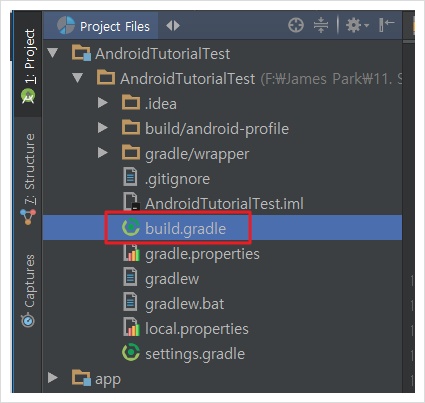
build.gradle (AS-IS)
// Top-level build file where you can add configuration options common to all sub-projects/modules.

buildscript {
    repositories {
        jcenter()
    }
    dependencies {
        classpath 'com.android.tools.build:gradle:3.0.0-beta6'

        // NOTE: Do not place your application dependencies here; they belong
        // in the individual module build.gradle files
    }
}

allprojects {
    repositories {
        jcenter()
    }
}

task clean(type: Delete) {
    delete rootProject.buildDir
}
buildscript 의 repositories 에 아래 두줄을 추가 해주면 됩니다.
mavenCentral()
maven { url "https://maven.google.com" }
build.gradle (TO-BE)
// Top-level build file where you can add configuration options common to all sub-projects/modules.

buildscript {
    repositories {
        jcenter()
        mavenCentral()
        maven { url "https://maven.google.com" }
    }
    dependencies {
        classpath 'com.android.tools.build:gradle:3.0.0-beta6'

        // NOTE: Do not place your application dependencies here; they belong
        // in the individual module build.gradle files
    }
}

allprojects {
    repositories {
        jcenter()
    }
}

task clean(type: Delete) {
    delete rootProject.buildDir
}
파일을 저장 후 아래와 같이 Clean Project 를 해줍니다.
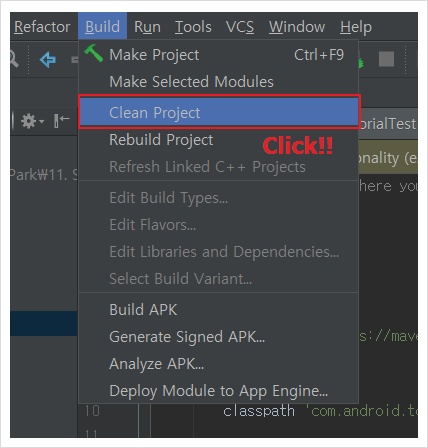
잠시 기다리면 오류가 나던 부분은 더이상 볼 수 없게 됩니다.
위와 같은 오류가 발생 한다면 도움이 되시길 바랍니다 :)
[출처] https://jamesdreaming.tistory.com/63
광고 클릭에서 발생하는 수익금은 모두 웹사이트 서버의 유지 및 관리, 그리고 기술 콘텐츠 향상을 위해 쓰여집니다.
댓글 0
| 번호 | 제목 | 글쓴이 | 날짜 | 조회 수 |
|---|---|---|---|---|
| 8 |
Ionic Framework로 만화 사이트 어플 만들기 #3
 | 졸리운_곰 | 2016.07.31 | 273 |
| 7 |
Ionic Framework로 만화 사이트 어플 만들기 #2
| 졸리운_곰 | 2016.07.31 | 570 |
| 6 |
Ionic Framework로 만화 사이트 어플 만들기 #1
| 졸리운_곰 | 2016.07.31 | 379 |
| 5 |
Ionic을 이용한 iOS, Android 하이브리드 앱 개발 사례
| 졸리운_곰 | 2016.07.31 | 550 |
| 4 |
Ionic Framework를 이용하여 하이브리드앱 개발하기
| 졸리운_곰 | 2016.07.31 | 284 |
| 3 |
Build a mobile app with Ionic + WordPress
| 졸리운_곰 | 2016.06.06 | 362 |
| 2 |
Create a Mobile Application Using WordPress, Ionic, and AngularJS
| 졸리운_곰 | 2016.06.06 | 10185 |
| 1 |
Ionic Framework를 이용하여 하이브리드앱 개발하기
| 졸리운_곰 | 2016.06.06 | 426 |