
- 전체
- Python 일반
- Python 수학
- Python 그래픽
- Python 자료구조
- Python 인공지능
- Python 인터넷
- Python SAGE
- wxPython
- TkInter
- iPython
- wxPython
- pyQT
- Jython
- django
- flask
- blender python scripting
- python for minecraft
- Python 데이터 분석
- Python RPA
- cython
- PyCharm
- pySide
- kivy (python)
파이썬으로 MySQL DB에 데이터 저장하기,
Python handles transactions with MySQL
파이썬과 MySQL의 연결에 성공했다면 이제 데이터를 저장해야겠죠.
실제 소스코드를 통해 db에 데이트를 저장하는 방법을 보겠습니다.
실행환경은 Python 3.5와 MySQL 5.7.15입니다.
import MySQLdb


def save_record(title, article, date, writer, cnt):
    # Open database connection
    db = MySQLdb.connect(host="localhost", user="newuser", passwd="Newuser123!",
                                      db="newworld")
    db.set_character_set('utf8')

    # Prepare a cursor object using cursor() method
    cursor = db.cursor()

    # Prepare SQL query to INSERT a record into the database
    sql = "INSERT INTO document (title, article, wdate, writer, vcnt) \
            VALUES (%s, %s, %s, %s, %s)" % \
          ("'"+title+"'", "'"+article+"'", "'"+date+"'", "'"+writer+"'", "'"+cnt+"'")

    try:
        # Execute the SQL command
        cursor.execute(sql)

        # Commit changes in the database
        db.commit()

        # cursor.execute("""SELECT title, article, date, writer, vcnt FROM document""")
        # print(cursor.fetchall())
    except Exception as e:
        print(str(e))
        # Rollback in case there is any error
        db.rollback()

    # Disconnect from database
    db.close()
MySQLdb는 MySQL 데이터베이스에 연결하기 위한 일종의 인터페이스입니다.
import _mysql로 코드를 만들 수도 있지만, _mysql은 MySQL C API를 대부분 구현한 모듈이기 때문에 다소 무겁습니다. 좀더 간편하게 MySQL과 연동하도록 구현하고 싶다면 MySQLdb을 사용하기를 추천합니다.


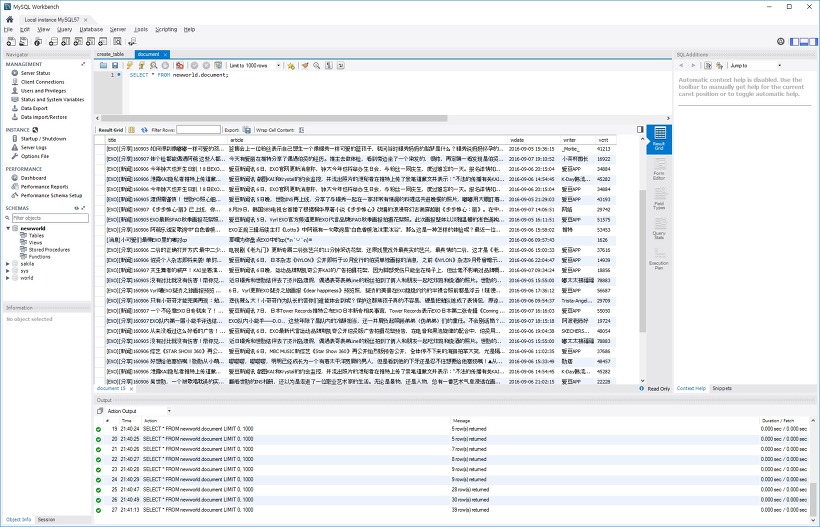
아래는 위의 코드를 활용해서 실제 인터넷에서 크롤링한 데이터를 MySQL에 저장한 결과입니다.
오늘은 여기까지입니다~
[출처] http://itissmart.tistory.com/46
본 웹사이트는 광고를 포함하고 있습니다.
광고 클릭에서 발생하는 수익금은 모두 웹사이트 서버의 유지 및 관리, 그리고 기술 콘텐츠 향상을 위해 쓰여집니다.
광고 클릭에서 발생하는 수익금은 모두 웹사이트 서버의 유지 및 관리, 그리고 기술 콘텐츠 향상을 위해 쓰여집니다.
