
- 전체
- Sample DB
- database modeling
- [표준 SQL] Standard SQL
- G-SQL
- 10-Min
- ORACLE
- MS SQLserver
- MySQL
- SQLite
- postgreSQL
- 데이터아키텍처전문가 - 국가공인자격
- 데이터 분석 전문가 [ADP]
- [국가공인] SQL 개발자/전문가
- NoSQL
- hadoop
- hadoop eco system
- big data (빅데이터)
- stat(통계) R 언어
- XML DB & XQuery
- spark
- DataBase Tool
- 데이터분석 & 데이터사이언스
- Engineer Quality Management
- [기계학습] machine learning
- 데이터 수집 및 전처리
- 국가기술자격 빅데이터분석기사
- 암호화폐 (비트코인, cryptocurrency, bitcoin)
SQLite DB Browser for SQLite
2017.04.26 20:58
DB Browser for SQLite
The Official home of the DB Browser for SQLite
DB.Browser.for.SQLite-3.9.1v2.dmg
DB.Browser.for.SQLite-3.9.1-win32.exe-x
DB.Browser.for.SQLite-3.9.1-win64.exe-x
SQLiteDatabaseBrowserPortable_3.9.1_English.paf.exe-x
News
2016-12-17 - The v3.9.1 binary for OSX has been rebuilt using Qt 5.7.1, to fix an important colour display problem on macOS Sierra.
2016-12-15 - An initial DBHub.io server is online, running our latest development code. Testing and feedback is encouraged.
Note - The data on this server will probably be wiped/reset every few days.
2016-10-20 - PortableApp version of DB4S 3.9.1 now available. Thanks John! :)
Screenshot
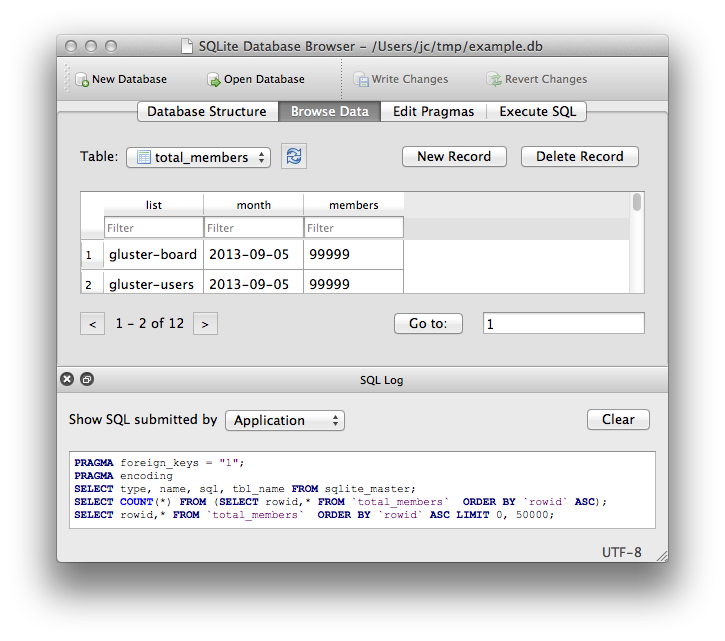
What it is
DB Browser for SQLite is a high quality, visual, open source tool to create, design, and edit database files compatible with SQLite.
It is for users and developers wanting to create databases, search, and edit data. It uses a familiar spreadsheet-like interface, and you don't need to learn complicated SQL commands.
Controls and wizards are available for users to:
- Create and compact database files
- Create, define, modify and delete tables
- Create, define and delete indexes
- Browse, edit, add and delete records
- Search records
- Import and export records as text
- Import and export tables from/to CSV files
- Import and export databases from/to SQL dump files
- Issue SQL queries and inspect the results
- Examine a log of all SQL commands issued by the application
What it is not
This program is not a visual shell for the sqlite command line tool. It does not require familiarity with SQL commands. It is a tool to be used both by developers and by end users, and it must remain as simple to use as possible in order to achieve its goals.
Windows
Windows binaries can be downloaded from here:
Nightly builds are available at:
Note - If for some reason the standard Windows release doesn't work for you (eg it gives an error), try a nightly build. They often fix bugs reported after the last release. :D
MacOS X
DB Browser for SQLite works well on MacOS X.
- OSX 10.8 (Mountain Lion) - 10.11 (El Capitan) are tested and known to work
MacOS X binaries
OSX binaries can be downloaded from here:
Latest OSX binary can be installed via Homebrew Cask:
brew cask install sqlitebrowser
Nightly builds for OSX are available at:
Linux
DB Browser for SQLite works well on Linux.
Arch Linux
Arch Linux provides a package through pacman.
Fedora
For Fedora (i386 and x86_64) you can install by issuing:
$ sudo dnf install sqlitebrowser
Ubuntu and Derivatives
Stable release
For Ubuntu and derivaties, @deepsidhu1313 provides a PPA with our latest release here:
To add this ppa just type in these commands in terminal:
sudo add-apt-repository -y ppa:linuxgndu/sqlitebrowser
Then update the cache using:


sudo apt-get update
Install the package using:
sudo apt-get install sqlitebrowser
Ubuntu 14.04.X, 15.04.X, 15.10.X and 16.04.X are supported for now (until Launchpad decides to discontinue build for any series).
Ubuntu Precise (12.04) and Utopic (14.10) are not supported:
- Precise doesn't have a Qt 5.2 package in its repository by default, which is a dependency
- Launchpad doesn't support Utopic any more, as that has reached its End of Life
Nightly builds
Nightly builds are available here:
To add this ppa just type in these commands in terminal:
sudo add-apt-repository -y ppa:linuxgndu/sqlitebrowser-testing
Then update the cache using:
sudo apt-get update
Install the package using:
sudo apt-get install sqlitebrowser
Other Linux
On others you'll need to compile it yourself using the (simple) instructions in BUILDING.md.
FreeBSD
DB Browser for SQLite works well on FreeBSD, and there is a port for it (thanks to lbartoletti). It can be installed using either this:
# make -C /usr/ports/databases/sqlitebrowser install
or this:
# pkg install sqlitebrowser
Follow us on Twitter: https://twitter.com/sqlitebrowser
Website
Old project pages
Releases
- Version 3.9.1 released - 2016-10-03
- Version 3.9.0 released - 2016-08-24
- Version 3.8.0 released - 2015-12-25
- Version 3.7.0 released - 2015-06-14
- Version 3.6.0 released - 2015-04-27
- Version 3.5.1 released - 2015-02-08
- Version 3.5.0 released - 2015-01-31
- Version 3.4.0 released - 2014-10-29
- Version 3.3.1 released - 2014-08-31 - Project renamed from "SQLite Database Browser"
- Version 3.3.0 released - 2014-08-24
- Version 3.2.0 released - 2014-07-06
- Version 3.1.0 released - 2014-05-17
- Version 3.0.3 released - 2014-04-28
- Version 3.0.2 released - 2014-02-12
- Version 3.0.1 released - 2013-12-02
- Version 3.0 released - 2013-09-15
- Version 3.0rc1 released - 2013-09-09 - Project now on GitHub
- Version 2.0b1 released - 2009-12-10 - Based on Qt4.6
- Version 1.2 released - 2005-04-05
- Version 1.1 released - 2004-07-20
- Version 1.01 released - 2003-10-02
- Version 1.0 released to public domain - 2003-08-19
History
This program was developed originally by Mauricio Piacentini (@piacentini) from Tabuleiro Producoes, as the Arca Database Browser. The original version was used as a free companion tool to the Arca Database Xtra, a commercial product that embeds SQLite databases with some additional extensions to handle compressed and binary data.
The original code was trimmed and adjusted to be compatible with standard SQLite 2.x databases. The resulting program was renamed SQLite Database Browser, and released into the Public Domain by Mauricio. Icons were contributed by Raquel Ravanini, also from Tabuleiro. Jens Miltner (@jmiltner) contributed the code to support SQLite 3.x databases for the 1.2 release.
Pete Morgan (@daffodil) created an initial project on GitHub with the code in 2012, where several contributors fixed and improved pieces over the years. René Peinthor (@rp-) and Martin Kleusberg (@MKleusberg) then became involved, and have been the main driving force from that point. Justin Clift (@justinclift) helps out with testing on OSX, and started the new github.com/sqlitebrowser organisation on GitHub.
John T. Haller, of PortableApps.com fame, created the new logo. He based it on the Tango icon set (public domain).
In August 2014, the project was renamed to "Database Browser for SQLite" at the request of Richard Hipp (creator of SQLite), as the previous name was creating unintended support issues.
In September 2014, the project was renamed to "DB Browser for SQLite", to avoid confusion with an existing application called "Database Browser".
License
DB Browser for SQLite is bi-licensed under the Mozilla Public License Version 2, as well as the GNU General Public License Version 3 or later.
You can modify or redistribute it under the conditions of these licenses.
광고 클릭에서 발생하는 수익금은 모두 웹사이트 서버의 유지 및 관리, 그리고 기술 콘텐츠 향상을 위해 쓰여집니다.
