
- 전체
- HTML
- Web Design (웹디자인)
- XE 응용 개발
- wordpress plugin dev
- Javascript & JavaScript Application
- MEAN Stack : full stack javascript
- angular js & ionic framework
- bootstrap
- WebGL, Three.js and Babylon.js
- restful api design
- mobile web
- node.js 응용
- Cloud Service 응용
- 웹 어셈블리 개발 [WASM, WebAssembly]
- 마이크로서비스, MSA (microservice architecture)
- WebGL / WebGPU
- next.js 개발
- micro frontend (마이크로프론트앤드)
- 전자상거래/쇼핑몰
- 서버 클라우드 (aws, azure, google)
HTML [Javascript][persistent storage] persistent storage of Javascript
2023.02.05 14:52
[Javascript][persistent storage] persistent storage of Javascript
Chapter 20. Persistence
20.0. Introduction
In the early years of web development, to keep a value around as users moved from page to page, youâd have to make use of session persistence functionality built into the environment, attach the data to the web page URL, or provide it in a hidden form field. Of course, this persisted the data from page to page, but once you closed the browser, the data was lost.
JavaScript added a third approach, a cookie, which could not only persist from page to page, but cause the data to persist beyond the current session. With cookies, you could not only access data such as login information throughout a website, but you could close the browser and reopen it another day and still have access to the same data.
These techniques still exist, but now, because of the needs of more complex web applications, including applications that support offline functionality, browsers support a variety of sophisticated data storage and persistence techniques.
No area of JavaScript has gone through more upheaval recently than persistence. Whether itâs storing data between sessions or enabling access to information while offline, complex new ideas have been spawned, supported by web pages and implementations, only to quietly fade away when something new and shiny appeared.
Probably one of the more famous examples of an idea that came and went is Google Gearsâan offline storage mechanism that generated considerable excitement in 2007 when it debuted, only to die a fairly quick and unexpected death when Google announced in November 2009 that it was dropping support for Gears in favor of the new Web Applications/HTML5 persistence initiatives.
Fun new technology aside, the old approaches, such as using data encoding on an URL or a cookie, still exist and still provide a service that some of the newer techniques donât provide: simplicity. This chapter touches on all of the techniques, from the old time to the new, the simple to the complex.
Note
Some of the methods explored in this chapter are cutting edge, based on specifications that are still being developed. Use with caution.
See Also
For more on Googleâs Gears decision, see the blog post at http://gearsblog.blogspot.com/2010/02/hello-html5.html.
20.1. Attaching Persistent Information to URLs
Problem
You want to store a small fragment of information so that the information is available to anyone accessing the page.
Solution
Persisting a fragment of information in a web page for general access by everyone is dependent on the old school capability of attaching information to a URL. The information can be passed as a page fragment:
Discussion
JavaScript can be used to add a page fragment, though this is more of a way to store a simple state than anything more complex:
The data can also be encoded as parameters in a query string, which starts with a question mark, followed by the parameters passed as key/value pairs separated by equal signs, and separated from each other by ampersands:
There are limits to lengths of URLs, and probably for numbers of GET pairs, but I would hope we wouldnât ever approach these limits. This also isnât an approach you would use in place of a cookie. For instance, if you want to capture user input into a form, in case the users have to leave before finishing the form entries (or they accidentally close their browser tab page), you should put this data into a cookie, which is more secure, and more specific to the person.
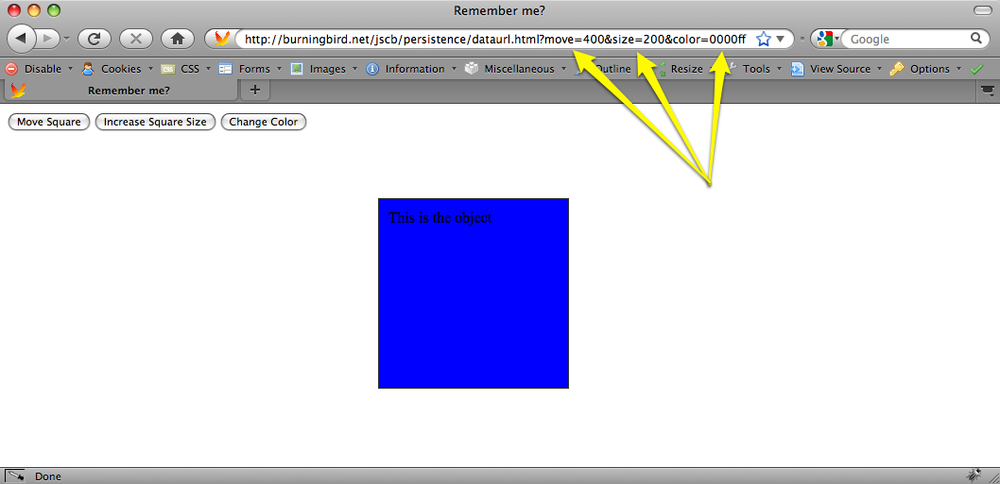
Data encoding in the URL is more of a way to capture page state so that a person can send a link to the page in that state to another person, or link it within a web page. Example 20-1 demonstrates how something like data persistence via URL can work. In the web page, there are three buttons and one div element controlled by the action of the buttons. One button moves the div element to the right, one button increases the size of the element, and one button changes its color. As each button is clicked, the div element is adjusted, and the newly applied CSS value is stored with the appropriate button.
When the state of the page is changed, a link within the page is updated to reflect the state of the page. Note that the actual window.location property and even the window.location.search property is not changed. The reason is that the page reloads as a security precaution when you update any component of window.location except the hash value.
Note
Allowing a person to change the URL in the location bar, which isnât reflected in the actual page, introduces the threat of spoofingâone page masquerading as another in order to scam passwords and other confidential information.
Now you can reload the page and have the script restore the page to the state in the URL when it reloadsâbut thatâs a lot of moving parts. In the example, weâll just create a static state link, and leave it at that.
Figure 20-1 shows the web page after several changes to the square element, and after the page is reloaded using the link.
See Also
Recipes 8.7 and 8.8 demonstrate how to use the location.hash property to store state in the URL and return to that state when the page is reloaded. The query string routine in the example is described at http://www.netlobo.com/url_query_string_javascript.html.
20.2. Creating a Cookie to Persist Information Across Pages
Problem
You want to persist some information about or for the user within the existing browser session.
Solution
If the amount of data is less than 4k in size, use a browser cookie. A cookie is a patterned line of text that you assign to the document.cookie property:
Discussion
Cookies are still one of the easiest, simplest, and most widely used persistent storage technique for web pages today. Theyâre easy to set, safe, well understood by most people who browse web pages, and require little overhead.
People can also turn cookie support off in their browsers, which means your application has to work, regardless. In addition, the amount of data stored is smallâless than 4kâand doesnât support complex data structures. Thereâs also the security restrictions associated with cookies: theyâre domain-specific. Despite the restriction, though, cookies are also insecure, as any data stored is done so in plain text. You donât want to use cookies to store passwords.
Note
Read the article âImproving Persistent Login Cookie Best Practiceâ if youâre interested in implementing âRemember Meâ using cookies on your site.
Cookies are created by assigning the cookie to the document.cookie property. The cookie consists of a name/value pair, separated by an equal sign:
There are parameters that can follow the cookie/value pair, all separated by semi-colons (;). The parameters are:
path=path(such as/or/subdir)domain=domain(such asburningbird.net, for all subdomains, or a given subdomain,missourigreen.burningbird.net)max-age=maximum age in secondsexpires=date in GMTString-formatsecure
Hereâs an example. This cookie keyword is Language, with a value of JavaScript, set to expire at a given time with expires, and with path set to the top-level domain:
If we wanted the cookie to expire when the browser closes, all we need do is leave off the expires.
To retrieve the cookie, we have to retrieve the entire document.cookie property, which returns all cookies set on the domain. The application needs to find all of the cookies, and then look for a specific one. To erase the cookie, all we need do is set it with a past date.
To demonstrate, Example 20-2 contains a web page that has two input fields, one for the cookie name and one for the value. Clicking the Set Cookie button creates the cookie; clicking the Get Cookie retrieves the value for the given cookie; clicking the Erase Cookie button erases the cookie.
See Also
See Recipe 3.6 for how to access a future date.
20.3. Persisting Information Using the History.pushState Method and window.onpopevent
Problem
Youâve looked at all the ways of handling the back button and controlling page state for an Ajax application, and youâre saying to yourself, âThere has to be a better way.â
Solution
There is a better way, a much better way...but itâs going to be some time before youâll be able to incorporate the technique into your applications: using HTML5âs new history.pushState and history.replaceState methods to persist a state object, and the window.onpopevent:
Discussion
Addressing the significant problems Ajax developers have had with trying to persist state through back button events or page reloads, HTML5 has new history object methods, pushState and replaceState, to persist state information, and then an associated window.onpopevent that can be used to restore the page state.
In the past, we had the ability to persist information regarding the page state, though weâve had to be conservative in how much data we persist. A popular approach, and one demonstrated in Recipe 20.1, is to store the data in the page URL hash, which updates the page history and can be pulled via JavaScript.
The problem with this approach is that updating the hash may update the history. If you hit the back button, the URL with the hash shows in the location bar, but no event is triggered so you can grab the data and restore the page. The workaround was to use a timer to check for the new hash and then restore the page if a new hash was found. Not an attractive solution, and one most of us decided just wasnât worth trying.
Now, you can easily store any object that can be passed to JSON.stringify. Since the data is stored locally, the early implementor, Firefox, limits the size of the JSON representation to 640k. However, unless youâre recording the state of every pixel in the page, 640k should be more than sufficient.
To see how the new event and methods work, Example 20-3 is a recreation of Example 8-2, from Recipe 8.8. The changes to the application include the removal of the use of the hash location fragment, which is replaced by history.pushState, and the window.onpopstate event handler, both of which are highlighted in the code. Thereâs one other minor changeâin the functionOne function, also highlightedâand Iâll get into the reason why after the example.
In this example, the state object that is stored is extremely simple: a page property and its associated value. The history.pushState also takes a title parameter, which is used for the session history entry, and a URL. For the example, I appended a query string representing the page. What is displayed in the location bar is:
The history.replaceState method takes the same parameters, but modifies the current history entry instead of creating a new one.
When using the browser back button to traverse through the created history entries, or when hitting the page reload, a window.onpopstate event is fired. This is really the truly important component in this new functionality, and is the event weâve needed for years. To restore the web page to the stored state, we create a window.onpopstate event handler function, accessing the state object from the event passed to the window handler function:
In the example, when you click the button three times to get to the third âpage,â reload the page, or hit the back button, the window.onpopstate event handlers fires. Perfect timing to get the state data, and repair the page. Works beautifully, too. In the Firefox Minefield edition, that is.
One other change that had to be made to the older example, is that functionOne had to be modified and the following style settings added:
The reason is that unlike Example 8-2, which goes through a complete page reload, the new state methods and event handler actually do preserve the state in-page. This means the changes going from step one to step two (setting position to absolute and moving the div element) have to be canceled out in the first function in order to truly restore the page state. Itâs a small price to pay for this lovely new functionality.
Again, the example only worked with the Firefox nightly. However, the back button did seem to work with the WebKit nightly.
20.4. Using sessionStorage for Client-Side Storage
Problem
You want to easily store session information without running into the size and cross-page contamination problems associated with cookies, and prevent loss of information if the browser is refreshed.
Discussion
One of the constraints with cookies is they are domain/subdomain-specific, not page-specific. Most of the time, this isnât a problem. However, there are times when such domain specificity isnât sufficient.
For instance, a person has two browser tabs open to the same shopping site and adds a few items to the shopping cart in one tab. In the tab, the shopper clicks a button to add an item because of the admonishment to add the item to the cart in order to see the price. The shopper decides against the item and closes the tab page, thinking that action is enough to ensure the item isnât in the cart. The shopper then clicks the check-out option in the other opened tag, assuming that the only items currently in the cart are the ones that were added in that browser page.
If the users arenât paying attention, they may not notice that the cookie-based shopping cart has been updated from both pages, and theyâll end up buying something they didnât want.
While it is true that many web users are savvy enough to not make this mistake, there are many who arenât; they assume that persistence is browser-page-specific, not necessarily domain-specific. With sessionStorage (to paraphrase the famous quote about Las Vegas), what happens in the page, stays in the page.
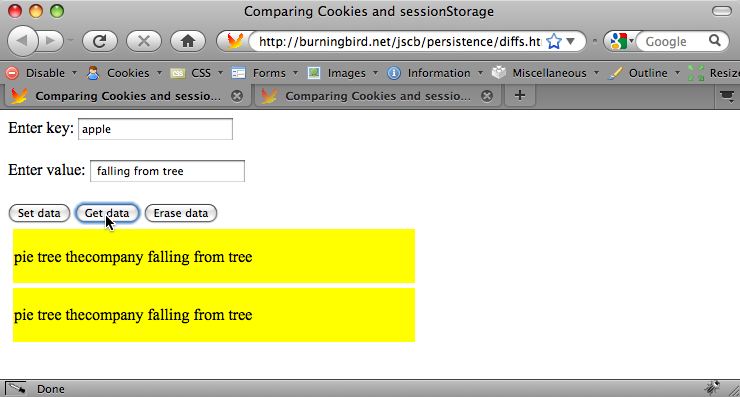
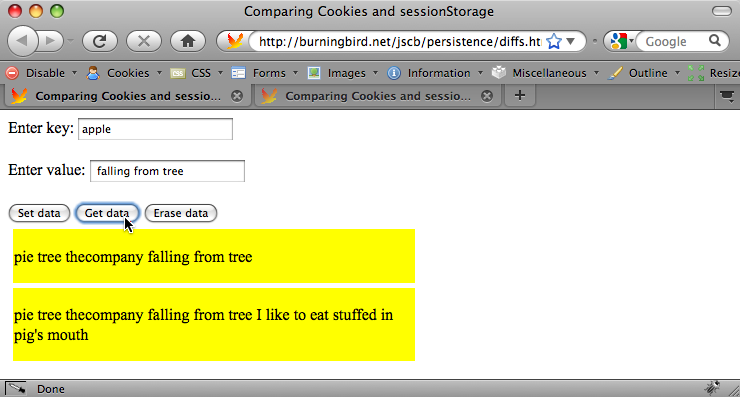
As an example of the differences between the cookies and the new storage option, Example 20-4 stores information from a form in both a cookie and sessionStorage. Clicking the button to get the data gets whatever is stored for the key in both, and displays it in the page: the sessionStorage data in the first block, the cookie data in the second. The remove button erases whatever exists in both.
Load the example page (itâs in the book examples) in Firefox 3.5 and up. Add one or more items to the same key value, and then click the button labeled âGet dataâ, as shown in Figure 20-2.
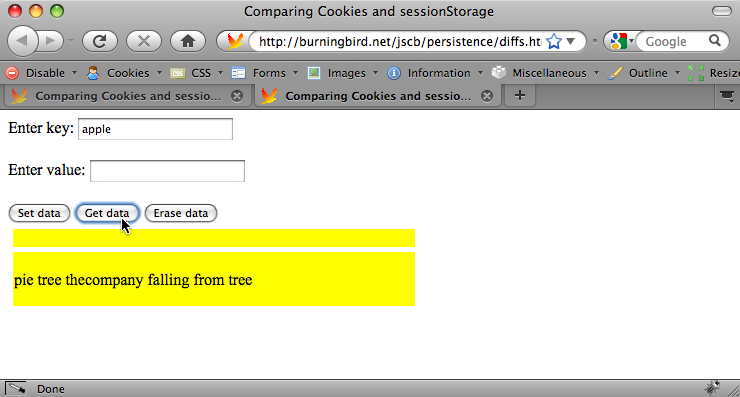
Now, open the same page in a new tab window, and click the âGet dataâ button. The activity results in a page like that shown in Figure 20-3.
In the new tab window, the cookie value persists because the cookie is session-specific, which means it lasts until you close the browser. The cookie lives beyond the first tab window, but the sessionStorage, which is specific to the tab window, does not.
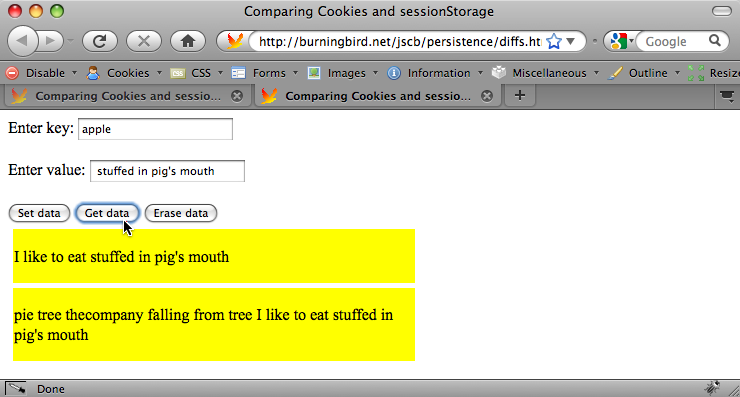
Now, in the new tab window, add a couple more items to the key value, and click âGet dataâ again, as shown in Figure 20-4.
Return to the original tab window, and click âGet dataâ. As you can see in Figure 20-5, the items added in the second tab are showing with the cookie, but not the sessionStorage item.
Lastly, in the original tab window, click the âErase dataâ button. Figure 20-6 shows the results of clicking âGet dataâ on the original window, while Figure 20-7 shows the results when clicking âGet dataâ in the second tab window. Again, note the disparities between the cookie and sessionStorage.
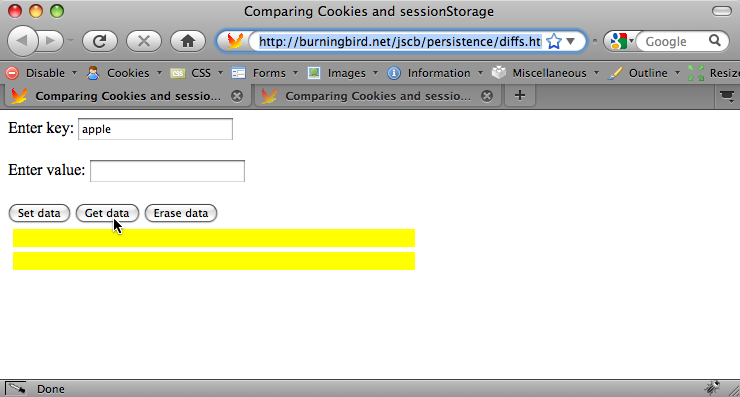
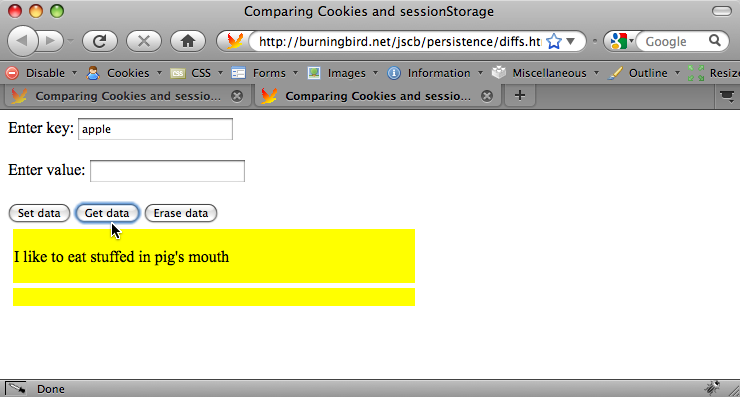
The reason for all of these images is to demonstrate the significant differences between sessionStorage and cookies, aside from how theyâre set and accessed in JavaScript. Hopefully, the images and the example also demonstrate the potential hazards involved when using sessionStorage, especially in circumstances where cookies have normally been used.
If your website or application users are familiar with the cookie persistence across tabbed windows, sessionStorage can be an unpleasant surprise. Along with the different behavior, thereâs also the fact that browser menu options to delete cookies probably wonât have an impact on sessionStorage, which could also be an unwelcome surprise for your users. Use sessionStorage with caution.
The sessionStorage object is currently supported in Firefox 3.5 and up, Safari 4.x and up, and IE 8. There are some implementation differences for sessionStorage, but the example shown in this recipe is consistently implemented across all environments.
One last note on sessionStorage, as it relates to its implementation. Both sessionStorage and localStorage, covered in the next recipe, are part of the new DOM Storage specification, currently under development by the W3C. Both are window object properties, which means they can be accessed globally. Both are implementations of the Storage object, and changes to the prototype for Storage result in changes to both the sessionStorage and localStorage objects:
Aside from the differences, covered in this recipe and the next, another major difference is that the Storage objects donât make a round trip to the serverâtheyâre purely client-side storage techniques.
See Also
For more information on the Storage object, sessionStorage, localStorage, or the Storage DOM, consult the specification. See Recipe 20.5 for a different look at how sessionStorage and localStorage can be set and retrieved, and other supported properties on both.
20.5. Creating a localStorage Client-Side Data Storage Item
Problem
You want to shadow form element entries (or any data) in such a way that if the browser crashes, the user accidentally closes the browser, or the Internet connection is lost, the user can continue.
Solution
You could use cookies if the data is small enough, but that strategy doesnât work in an offline situation. Another, better approach, especially when youâre persisting larger amounts of data or if you have to support functionality when no Internet connection is present, is to use the new localStorage:
Discussion
Recipe 20.4 covered sessionStorage, one of the new DOM Storage techniques. The localStorage object interface is the same, with the same approaches to setting the data:
and for getting the data:
Both also support the length property, which provides a count of stored item pairs, and the clear method (no parameters), which clears out all Storage (but Firefox only supports clearing storage for localStorage). In addition, both are scoped to the HTML5 origin, which means that the data storage is shared across all pages in a domain, but not across protocols (e.g., http is not the same as https) or ports.
The difference between the two is how long data is stored. The sessionStorage object only stores data for the session, but the localStorage object stores data on the client forever, or until specifically removed.
The sessionStorage and localStorage objects also support one event: the storage event. This is an interesting event, in that it fires on all pages when changes are made to a localStorage item. It is also an area of low-compatibility among browsers: you can capture the event on the body or document elements for Firefox, on the body for IE, or on the document for Safari.
Example 20-5 demonstrates a more comprehensive implementation than the use case covered in the solution for this recipe. In the example, all elements of a small form have their onchange event handler method assigned to a function that captures the change element name and value, and stores the values in the local storage via localStorage. When the form is submitted, all of the stored form data is cleared.
When the page is loaded, the form elements onchange event handler is assigned to the function to store the values, and if the value is already stored, it is restored to the form element. To test the application, enter data into a couple of the form fieldsâbut, before clicking the submit button, refresh the page. Without the use of localStorage, youâd lose the data. Now, when you reload the page, the form is restored to the state it was in before the page was reloaded.
The size alloted for localStorage varies by browser, and some browsers, such as Firefox, allow users to extend the Storage object limits.
The localStorage object can be used for offline work. For the form example, you can store the data in the localStorage and provide a button to click when connected to the Internet, in order to sync the data from localStorage to server-side storage.
See Also
See Recipe 20.4 for more on the Storage object, and on sessionStorage and localStorage.
20.6. Persisting Data Using a Relational Data Store
Problem
You want a more sophisticated data store on the client than whatâs provided with other persistent storage methods, such as localStorage. Youâd also like to use your mad SQL skills.
Solution
You can use SQL in client applications, with some significant limitations. There is a W3C Web SQL Database Working Draft for using a relational database such as SQLite on the client, but support for the specification is provided only in WebKit browsers (Safari and Chrome) and the latest Opera (10.5):
You can create a database:
and you can create tables, within a transaction:
Then query on the tables:
Discussion
I hesitated to cover the Web SQL Database specification because the implementation is limited, and the specification is currently blocked at the W3C. Only WebKit (and Chrome and Safari) and Opera have made any progress with this implementation, and thereâs no guarantee that Mozilla or Microsoft will pick up on it, especially since the specification is blocked.
It is an interesting concept, but it has significant problems. One is security, naturally.
In our current applications, the client part of the applications handles one form of security, and the server component handles the other, including database security and protection against SQL injection: attaching text on to a data field value that actually triggers a SQL commandâsuch as drop all tables, or expose private data. Now, with client-side relational database support, weâre introducing a new set of security concerns on the client.
Another concern is the increasing burden we put on client-side storage. Each new innovation exposes new vulnerabilities, increases the size and complexity of our browsers, and embeds all sorts of data on our machines. Yet the vast majority of JavaScript applications donât need to create their own version of Gmail, or a Photoshop-like paint program.
Then thereâs the separation of a skill set. While itâs true that in small-to-medium shops, the same people who develop the frontend application probably participate in the server-side development, itâs not unusual in many shops to have the tasks handled by different groups. So people who may not be terribly experienced at relational database management might be tossing around SQL transactions (and believe me, relational database application development is a dedicated skill).
From an implementation point of view, only SQLite is currently supported. One difference in implementations, if you have worked with server-side SQL applications, is that client-side SQL is asynchronous by default. This means your application is not blocked until the transaction completes, which provides its own challenge.
However, thereâs nothing wrong with playing around with something new. If youâre interested, pick up a browser that supports the functionality and give it a shot. However, I would avoid production use until weâre sure this technology is going to have a life beyond 2010.
See Also
The Web SQL Database specification can be found at http://dev.w3.org/html5/webdatabase/.
Chapter 20. Persistence
20.0. Introduction
In the early years of web development, to keep a value around as users moved from page to page, youâd have to make use of session persistence functionality built into the environment, attach the data to the web page URL, or provide it in a hidden form field. Of course, this persisted the data from page to page, but once you closed the browser, the data was lost.
JavaScript added a third approach, a cookie, which could not only persist from page to page, but cause the data to persist beyond the current session. With cookies, you could not only access data such as login information throughout a website, but you could close the browser and reopen it another day and still have access to the same data.


These techniques still exist, but now, because of the needs of more complex web applications, including applications that support offline functionality, browsers support a variety of sophisticated data storage and persistence techniques.
No area of JavaScript has gone through more upheaval recently than persistence. Whether itâs storing data between sessions or enabling access to information while offline, complex new ideas have been spawned, supported by web pages and implementations, only to quietly fade away when something new and shiny appeared.
Probably one of the more famous examples of an idea that came and went is Google Gearsâan offline storage mechanism that generated considerable excitement in 2007 when it debuted, only to die a fairly quick and unexpected death when Google announced in November 2009 that it was dropping support for Gears in favor of the new Web Applications/HTML5 persistence initiatives.
Fun new technology aside, the old approaches, such as using data encoding on an URL or a cookie, still exist and still provide a service that some of the newer techniques donât provide: simplicity. This chapter touches on all of the techniques, from the old time to the new, the simple to the complex.
Note
Some of the methods explored in this chapter are cutting edge, based on specifications that are still being developed. Use with caution.
See Also
For more on Googleâs Gears decision, see the blog post at http://gearsblog.blogspot.com/2010/02/hello-html5.html.
20.1. Attaching Persistent Information to URLs
Problem
You want to store a small fragment of information so that the information is available to anyone accessing the page.
Solution
Persisting a fragment of information in a web page for general access by everyone is dependent on the old school capability of attaching information to a URL. The information can be passed as a page fragment:
Discussion
JavaScript can be used to add a page fragment, though this is more of a way to store a simple state than anything more complex:
The data can also be encoded as parameters in a query string, which starts with a question mark, followed by the parameters passed as key/value pairs separated by equal signs, and separated from each other by ampersands:
There are limits to lengths of URLs, and probably for numbers of GET pairs, but I would hope we wouldnât ever approach these limits. This also isnât an approach you would use in place of a cookie. For instance, if you want to capture user input into a form, in case the users have to leave before finishing the form entries (or they accidentally close their browser tab page), you should put this data into a cookie, which is more secure, and more specific to the person.
Data encoding in the URL is more of a way to capture page state so that a person can send a link to the page in that state to another person, or link it within a web page. Example 20-1 demonstrates how something like data persistence via URL can work. In the web page, there are three buttons and one div element controlled by the action of the buttons. One button moves the div element to the right, one button increases the size of the element, and one button changes its color. As each button is clicked, the div element is adjusted, and the newly applied CSS value is stored with the appropriate button.
When the state of the page is changed, a link within the page is updated to reflect the state of the page. Note that the actual window.location property and even the window.location.search property is not changed. The reason is that the page reloads as a security precaution when you update any component of window.location except the hash value.
Note
Allowing a person to change the URL in the location bar, which isnât reflected in the actual page, introduces the threat of spoofingâone page masquerading as another in order to scam passwords and other confidential information.
Now you can reload the page and have the script restore the page to the state in the URL when it reloadsâbut thatâs a lot of moving parts. In the example, weâll just create a static state link, and leave it at that.
Figure 20-1 shows the web page after several changes to the square element, and after the page is reloaded using the link.
See Also
Recipes 8.7 and 8.8 demonstrate how to use the location.hash property to store state in the URL and return to that state when the page is reloaded. The query string routine in the example is described at http://www.netlobo.com/url_query_string_javascript.html.
20.2. Creating a Cookie to Persist Information Across Pages
Problem
You want to persist some information about or for the user within the existing browser session.
Solution
If the amount of data is less than 4k in size, use a browser cookie. A cookie is a patterned line of text that you assign to the document.cookie property:
Discussion
Cookies are still one of the easiest, simplest, and most widely used persistent storage technique for web pages today. Theyâre easy to set, safe, well understood by most people who browse web pages, and require little overhead.
People can also turn cookie support off in their browsers, which means your application has to work, regardless. In addition, the amount of data stored is smallâless than 4kâand doesnât support complex data structures. Thereâs also the security restrictions associated with cookies: theyâre domain-specific. Despite the restriction, though, cookies are also insecure, as any data stored is done so in plain text. You donât want to use cookies to store passwords.
Note
Read the article âImproving Persistent Login Cookie Best Practiceâ if youâre interested in implementing âRemember Meâ using cookies on your site.
Cookies are created by assigning the cookie to the document.cookie property. The cookie consists of a name/value pair, separated by an equal sign:
There are parameters that can follow the cookie/value pair, all separated by semi-colons (;). The parameters are:
path=path(such as/or/subdir)domain=domain(such asburningbird.net, for all subdomains, or a given subdomain,missourigreen.burningbird.net)max-age=maximum age in secondsexpires=date in GMTString-formatsecure
Hereâs an example. This cookie keyword is Language, with a value of JavaScript, set to expire at a given time with expires, and with path set to the top-level domain:
If we wanted the cookie to expire when the browser closes, all we need do is leave off the expires.
To retrieve the cookie, we have to retrieve the entire document.cookie property, which returns all cookies set on the domain. The application needs to find all of the cookies, and then look for a specific one. To erase the cookie, all we need do is set it with a past date.
To demonstrate, Example 20-2 contains a web page that has two input fields, one for the cookie name and one for the value. Clicking the Set Cookie button creates the cookie; clicking the Get Cookie retrieves the value for the given cookie; clicking the Erase Cookie button erases the cookie.
See Also
See Recipe 3.6 for how to access a future date.
20.3. Persisting Information Using the History.pushState Method and window.onpopevent
Problem
Youâve looked at all the ways of handling the back button and controlling page state for an Ajax application, and youâre saying to yourself, âThere has to be a better way.â
Solution
There is a better way, a much better way...but itâs going to be some time before youâll be able to incorporate the technique into your applications: using HTML5âs new history.pushState and history.replaceState methods to persist a state object, and the window.onpopevent:
Discussion
Addressing the significant problems Ajax developers have had with trying to persist state through back button events or page reloads, HTML5 has new history object methods, pushState and replaceState, to persist state information, and then an associated window.onpopevent that can be used to restore the page state.
In the past, we had the ability to persist information regarding the page state, though weâve had to be conservative in how much data we persist. A popular approach, and one demonstrated in Recipe 20.1, is to store the data in the page URL hash, which updates the page history and can be pulled via JavaScript.
The problem with this approach is that updating the hash may update the history. If you hit the back button, the URL with the hash shows in the location bar, but no event is triggered so you can grab the data and restore the page. The workaround was to use a timer to check for the new hash and then restore the page if a new hash was found. Not an attractive solution, and one most of us decided just wasnât worth trying.
Now, you can easily store any object that can be passed to JSON.stringify. Since the data is stored locally, the early implementor, Firefox, limits the size of the JSON representation to 640k. However, unless youâre recording the state of every pixel in the page, 640k should be more than sufficient.
To see how the new event and methods work, Example 20-3 is a recreation of Example 8-2, from Recipe 8.8. The changes to the application include the removal of the use of the hash location fragment, which is replaced by history.pushState, and the window.onpopstate event handler, both of which are highlighted in the code. Thereâs one other minor changeâin the functionOne function, also highlightedâand Iâll get into the reason why after the example.
In this example, the state object that is stored is extremely simple: a page property and its associated value. The history.pushState also takes a title parameter, which is used for the session history entry, and a URL. For the example, I appended a query string representing the page. What is displayed in the location bar is:
The history.replaceState method takes the same parameters, but modifies the current history entry instead of creating a new one.
When using the browser back button to traverse through the created history entries, or when hitting the page reload, a window.onpopstate event is fired. This is really the truly important component in this new functionality, and is the event weâve needed for years. To restore the web page to the stored state, we create a window.onpopstate event handler function, accessing the state object from the event passed to the window handler function:
In the example, when you click the button three times to get to the third âpage,â reload the page, or hit the back button, the window.onpopstate event handlers fires. Perfect timing to get the state data, and repair the page. Works beautifully, too. In the Firefox Minefield edition, that is.
One other change that had to be made to the older example, is that functionOne had to be modified and the following style settings added:
The reason is that unlike Example 8-2, which goes through a complete page reload, the new state methods and event handler actually do preserve the state in-page. This means the changes going from step one to step two (setting position to absolute and moving the div element) have to be canceled out in the first function in order to truly restore the page state. Itâs a small price to pay for this lovely new functionality.
Again, the example only worked with the Firefox nightly. However, the back button did seem to work with the WebKit nightly.
20.4. Using sessionStorage for Client-Side Storage
Problem
You want to easily store session information without running into the size and cross-page contamination problems associated with cookies, and prevent loss of information if the browser is refreshed.
Discussion
One of the constraints with cookies is they are domain/subdomain-specific, not page-specific. Most of the time, this isnât a problem. However, there are times when such domain specificity isnât sufficient.
For instance, a person has two browser tabs open to the same shopping site and adds a few items to the shopping cart in one tab. In the tab, the shopper clicks a button to add an item because of the admonishment to add the item to the cart in order to see the price. The shopper decides against the item and closes the tab page, thinking that action is enough to ensure the item isnât in the cart. The shopper then clicks the check-out option in the other opened tag, assuming that the only items currently in the cart are the ones that were added in that browser page.
If the users arenât paying attention, they may not notice that the cookie-based shopping cart has been updated from both pages, and theyâll end up buying something they didnât want.
While it is true that many web users are savvy enough to not make this mistake, there are many who arenât; they assume that persistence is browser-page-specific, not necessarily domain-specific. With sessionStorage (to paraphrase the famous quote about Las Vegas), what happens in the page, stays in the page.
As an example of the differences between the cookies and the new storage option, Example 20-4 stores information from a form in both a cookie and sessionStorage. Clicking the button to get the data gets whatever is stored for the key in both, and displays it in the page: the sessionStorage data in the first block, the cookie data in the second. The remove button erases whatever exists in both.
Load the example page (itâs in the book examples) in Firefox 3.5 and up. Add one or more items to the same key value, and then click the button labeled âGet dataâ, as shown in Figure 20-2.
Now, open the same page in a new tab window, and click the âGet dataâ button. The activity results in a page like that shown in Figure 20-3.
In the new tab window, the cookie value persists because the cookie is session-specific, which means it lasts until you close the browser. The cookie lives beyond the first tab window, but the sessionStorage, which is specific to the tab window, does not.
Now, in the new tab window, add a couple more items to the key value, and click âGet dataâ again, as shown in Figure 20-4.
Return to the original tab window, and click âGet dataâ. As you can see in Figure 20-5, the items added in the second tab are showing with the cookie, but not the sessionStorage item.
Lastly, in the original tab window, click the âErase dataâ button. Figure 20-6 shows the results of clicking âGet dataâ on the original window, while Figure 20-7 shows the results when clicking âGet dataâ in the second tab window. Again, note the disparities between the cookie and sessionStorage.
The reason for all of these images is to demonstrate the significant differences between sessionStorage and cookies, aside from how theyâre set and accessed in JavaScript. Hopefully, the images and the example also demonstrate the potential hazards involved when using sessionStorage, especially in circumstances where cookies have normally been used.
If your website or application users are familiar with the cookie persistence across tabbed windows, sessionStorage can be an unpleasant surprise. Along with the different behavior, thereâs also the fact that browser menu options to delete cookies probably wonât have an impact on sessionStorage, which could also be an unwelcome surprise for your users. Use sessionStorage with caution.
The sessionStorage object is currently supported in Firefox 3.5 and up, Safari 4.x and up, and IE 8. There are some implementation differences for sessionStorage, but the example shown in this recipe is consistently implemented across all environments.
One last note on sessionStorage, as it relates to its implementation. Both sessionStorage and localStorage, covered in the next recipe, are part of the new DOM Storage specification, currently under development by the W3C. Both are window object properties, which means they can be accessed globally. Both are implementations of the Storage object, and changes to the prototype for Storage result in changes to both the sessionStorage and localStorage objects:
Aside from the differences, covered in this recipe and the next, another major difference is that the Storage objects donât make a round trip to the serverâtheyâre purely client-side storage techniques.
See Also
For more information on the Storage object, sessionStorage, localStorage, or the Storage DOM, consult the specification. See Recipe 20.5 for a different look at how sessionStorage and localStorage can be set and retrieved, and other supported properties on both.
20.5. Creating a localStorage Client-Side Data Storage Item
Problem
You want to shadow form element entries (or any data) in such a way that if the browser crashes, the user accidentally closes the browser, or the Internet connection is lost, the user can continue.
Solution
You could use cookies if the data is small enough, but that strategy doesnât work in an offline situation. Another, better approach, especially when youâre persisting larger amounts of data or if you have to support functionality when no Internet connection is present, is to use the new localStorage:
Discussion
Recipe 20.4 covered sessionStorage, one of the new DOM Storage techniques. The localStorage object interface is the same, with the same approaches to setting the data:
and for getting the data:
Both also support the length property, which provides a count of stored item pairs, and the clear method (no parameters), which clears out all Storage (but Firefox only supports clearing storage for localStorage). In addition, both are scoped to the HTML5 origin, which means that the data storage is shared across all pages in a domain, but not across protocols (e.g., http is not the same as https) or ports.
The difference between the two is how long data is stored. The sessionStorage object only stores data for the session, but the localStorage object stores data on the client forever, or until specifically removed.
The sessionStorage and localStorage objects also support one event: the storage event. This is an interesting event, in that it fires on all pages when changes are made to a localStorage item. It is also an area of low-compatibility among browsers: you can capture the event on the body or document elements for Firefox, on the body for IE, or on the document for Safari.
Example 20-5 demonstrates a more comprehensive implementation than the use case covered in the solution for this recipe. In the example, all elements of a small form have their onchange event handler method assigned to a function that captures the change element name and value, and stores the values in the local storage via localStorage. When the form is submitted, all of the stored form data is cleared.
When the page is loaded, the form elements onchange event handler is assigned to the function to store the values, and if the value is already stored, it is restored to the form element. To test the application, enter data into a couple of the form fieldsâbut, before clicking the submit button, refresh the page. Without the use of localStorage, youâd lose the data. Now, when you reload the page, the form is restored to the state it was in before the page was reloaded.
The size alloted for localStorage varies by browser, and some browsers, such as Firefox, allow users to extend the Storage object limits.
The localStorage object can be used for offline work. For the form example, you can store the data in the localStorage and provide a button to click when connected to the Internet, in order to sync the data from localStorage to server-side storage.
See Also
See Recipe 20.4 for more on the Storage object, and on sessionStorage and localStorage.
20.6. Persisting Data Using a Relational Data Store
Problem
You want a more sophisticated data store on the client than whatâs provided with other persistent storage methods, such as localStorage. Youâd also like to use your mad SQL skills.
Solution
You can use SQL in client applications, with some significant limitations. There is a W3C Web SQL Database Working Draft for using a relational database such as SQLite on the client, but support for the specification is provided only in WebKit browsers (Safari and Chrome) and the latest Opera (10.5):
You can create a database:
and you can create tables, within a transaction:
Then query on the tables:
Discussion
I hesitated to cover the Web SQL Database specification because the implementation is limited, and the specification is currently blocked at the W3C. Only WebKit (and Chrome and Safari) and Opera have made any progress with this implementation, and thereâs no guarantee that Mozilla or Microsoft will pick up on it, especially since the specification is blocked.
It is an interesting concept, but it has significant problems. One is security, naturally.
In our current applications, the client part of the applications handles one form of security, and the server component handles the other, including database security and protection against SQL injection: attaching text on to a data field value that actually triggers a SQL commandâsuch as drop all tables, or expose private data. Now, with client-side relational database support, weâre introducing a new set of security concerns on the client.
Another concern is the increasing burden we put on client-side storage. Each new innovation exposes new vulnerabilities, increases the size and complexity of our browsers, and embeds all sorts of data on our machines. Yet the vast majority of JavaScript applications donât need to create their own version of Gmail, or a Photoshop-like paint program.
Then thereâs the separation of a skill set. While itâs true that in small-to-medium shops, the same people who develop the frontend application probably participate in the server-side development, itâs not unusual in many shops to have the tasks handled by different groups. So people who may not be terribly experienced at relational database management might be tossing around SQL transactions (and believe me, relational database application development is a dedicated skill).
From an implementation point of view, only SQLite is currently supported. One difference in implementations, if you have worked with server-side SQL applications, is that client-side SQL is asynchronous by default. This means your application is not blocked until the transaction completes, which provides its own challenge.
However, thereâs nothing wrong with playing around with something new. If youâre interested, pick up a browser that supports the functionality and give it a shot. However, I would avoid production use until weâre sure this technology is going to have a life beyond 2010.
See Also
The Web SQL Database specification can be found at http://dev.w3.org/html5/webdatabase/.
[출처] https://www.oreilly.com/library/view/javascript-cookbook/9781449390211/ch20.html
광고 클릭에서 발생하는 수익금은 모두 웹사이트 서버의 유지 및 관리, 그리고 기술 콘텐츠 향상을 위해 쓰여집니다.
