[javascript] How to append HTML code to a div using JavaScript ?

here are two ways to append HTML code to a div through JavaScript

  • Using the innerHTML attribute
  • Using the insertAdjacentHTML() method

Using the innerHTML attribute:
To append using the innerHTML attribute, first select the element (div) where you want to append the code. Then, add the code enclosed as strings using the += operator on innerHTML.

Syntax:

element.innerHTML += "additional HTML code"

or

element.innerHTML = element.innerHTML + "additional HTML code"

Example:


<!DOCTYPE html>
<html>
  
<head>
    <title>How to Append HTML Code to a Div using Javascript</title>
    <style>
        body {
            text-align: center;
              
            padding: 5%;
        }
        h1{
            color:green;
        }
    </style>
</head>
  
<body>
    <div id="add_to_me">
        <h1>GeeksforGeeks</h1>
        <p>This is the text which has already been typed into the div</p>
    </div>
  
    <button onclick="addCode()">Add Stuff</button>
    <script>
        function addCode() {
            document.getElementById("add_to_me").innerHTML += 
              "<h3>This is the text which has been inserted by JS</h3>";
        }
    </script>
</body>
  
</html>
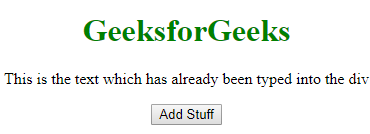
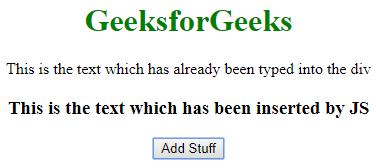
  • Output:
  • Before Clicking the Button:
  • After Clicking the Button:

    Note: This method basically destroys all the content of the div and recreates it. So, if you have any listeners attached to the child nodes of that div, they will be lost.

    Using the insertAdjacentHTML() method

    경축! 아무것도 안하여 에스천사게임즈가 새로운 모습으로 재오픈 하였습니다.
    어린이용이며, 설치가 필요없는 브라우저 게임입니다.
    https://s1004games.com

    HTML code can be appended to a div using the insertAdjacentHTML() method. However, you need to select an element inside the div to add the code. This method takes two parameters:


    Syntax:

    elementInsideDiv.insertAdjacentHTML('afterend', 'additional HTML code');
    

    Example:

    <!DOCTYPE html>
    <html>
      
    <head>
        <title>How to Append HTML Code to a Div using Javascript</title>
        <style>
            body {
                text-align: center;
                padding: 5%;
            }
          h1{
            color: green
              }
        </style>
    </head>
      
    <body>
        <div id="add_to_me">
            <h1>GeeksforGeeks</h1>
            <p id="add_after_me">
              This is the text which has already been typed into the div</p>
        </div>
      
        <button onclick="addCode()">Add Stuff</button>
        <script>
            function addCode() {
                document.getElementById("add_after_me").insertAdjacentHTML("afterend",
                    "<h3>This is the text which has been inserted by JS</h3>");
            }
        </script>
    </body>
      
    </html>
      1. The position (in the document) where you want to insert the code (‘afterbegin’, ‘beforebegin’, ‘afterend’, ‘beforeend’)
      2. The HTML code you want to insert enclosed in quotes
      • Output:
      • Before Clicking the Button:
      • After Clicking the Button:

        [출처] https://www.geeksforgeeks.org/how-to-append-html-code-to-a-div-using-javascript/


본 웹사이트는 광고를 포함하고 있습니다.
광고 클릭에서 발생하는 수익금은 모두 웹사이트 서버의 유지 및 관리, 그리고 기술 콘텐츠 향상을 위해 쓰여집니다.
번호 제목 글쓴이 날짜 조회 수
106 [HTML/Javascript] 웹소켓 튜터리얼 졸리운_곰 2022.11.15 863
105 [html, javascript] JavaScript에서 함수가 완료 될 때까지 기다립니다 졸리운_곰 2022.11.15 658
104 [IE javascript to Chrome] A universal createPopup() replacement 졸리운_곰 2022.11.14 592
103 [HTML/Javascript] indexedDB에 대해 알아보자! file 졸리운_곰 2022.09.15 656
102 [HTML][Javascript] JavaScript - DOM 요소의 생성 및 삭제, innerHTML, CSS 스타일 적용, JavaScript 스타일 적용 file 졸리운_곰 2022.09.09 646
101 [JWT} [WEB] JWT(Json Web Token)란? 개념 정리 및 예제 file 졸리운_곰 2022.07.15 607
100 [web개발][javascript] javascript - 주소의 파라미터값 변수로 받기 졸리운_곰 2021.10.19 526
99 [Javascript, ajax] <jQuery>Ajax, json(제이손) 파싱해서 가져오기 졸리운_곰 2021.05.17 597
98 [Javascript, ajax] XMLHttpRequest, jQuery Ajax 예제 file 졸리운_곰 2021.05.17 661
97 [javascript] Javascript JSON.parse(), JSON.stringify() 사용하는법 졸리운_곰 2021.05.17 416
96 [JAVASCRIPT에서 session 값 가져다 쓰는 법] 가져오는 법, string data type과 비교하는 법 졸리운_곰 2021.05.14 2651
95 [javascript] 다른 도메인으로 AJAX을 위한 Access-Control-Allow-Origin 졸리운_곰 2021.05.14 721
94 [javascript] html 로드시 자동실행 javascript : 자동 실행 함수 (window.onload, $(document).ready()) 졸리운_곰 2021.05.14 790
93 [javascript] 순수 javascript로 동기 ajax, Sync ajax without jquery? 졸리운_곰 2021.05.14 1091
92 [javascript][hello world]자바스크립트] 문자열 출력 함수, 텍스트 쓰기; HTML-JavaScript Print String 졸리운_곰 2021.05.14 639
91 [JavaScript] How to Write a Simple Interpreter in JavaScript file 졸리운_곰 2021.04.13 654
90 [javascript, 자바스크립트] 자동 실행 함수 (window.onload, $(document).ready()) 졸리운_곰 2021.02.13 585
89 배민찬은 Vue를 어떻게 사용하나요? file 졸리운_곰 2020.12.02 512
88 [Javascript] with 명령에 대하여 졸리운_곰 2020.09.16 563
87 Webpack 완전정복하기!! file 졸리운_곰 2020.07.20 798
대표 김성준 주소 : 경기 용인 분당수지 U타워 등록번호 : 142-07-27414
통신판매업 신고 : 제2012-용인수지-0185호 출판업 신고 : 수지구청 제 123호 개인정보보호최고책임자 : 김성준 sjkim70@stechstar.com
대표전화 : 010-4589-2193 [fax] 02-6280-1294 COPYRIGHT(C) stechstar.com ALL RIGHTS RESERVED