
- 전체
- android studio
- Android SDK
- Android NDK
- Android ADK
- Android Etc. Lib.
- Android dalvik VM
- Android 보안
- PhoneGap
- AOSP 개발
- MIT App Inventor 2
- kivy (python)
- ionic framework
- Kotlin (코틀린)
- React Native
[Android SDK] 안드로이드: 간단한 데이터를 저장하고 싶을 때(SharedPreferences 사용예제)
안드로이드 스튜디오 2020. 12. 18. 17:27
앱이 종료되면 메모리에 저장되어 있던 데이터는 사라진다.
때때로 간단한 데이터를 앱에 저장해서 쓰고 싶을 때가 있다.
(예를 들면 로그인 정보)
물론 DB나 파일을 이용하면 데이터를 읽고 써서 상태를 유지할 수 있지만
SharedPreferences를 사용한다면 간단한 방법으로 필요한 데이터를 저장해 놓을 수 있다.
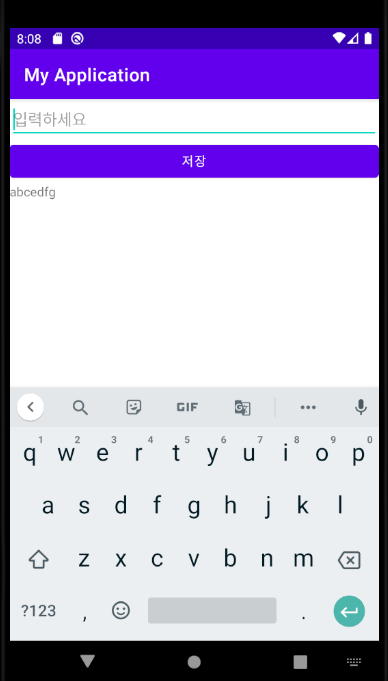
<activity_main.xml>


<?xml version="1.0" encoding="utf-8"?>
<LinearLayout xmlns:android="http://schemas.android.com/apk/res/android"
    xmlns:app="http://schemas.android.com/apk/res-auto"
    xmlns:tools="http://schemas.android.com/tools"
    android:layout_width="match_parent"
    android:layout_height="match_parent"
    android:orientation="vertical"
    tools:context=".MainActivity">

    <EditText
        android:layout_width="match_parent"
        android:layout_height="wrap_content"
        android:id="@+id/edit_text"
        android:hint="입력하세요"
        />
    <Button
        android:layout_width="match_parent"
        android:layout_height="wrap_content"
        android:id="@+id/button"
        android:text="저장"
        />


    <TextView
        android:layout_width="wrap_content"
        android:layout_height="wrap_content"
        android:text=""
        android:id="@+id/text_view"
        app:layout_constraintBottom_toBottomOf="parent"
        app:layout_constraintLeft_toLeftOf="parent"
        app:layout_constraintRight_toRightOf="parent"
        app:layout_constraintTop_toTopOf="parent" />

</LinearLayout>
<MainActivity.java>
package org.techtown.myapplication;
import androidx.appcompat.app.AppCompatActivity;
import android.app.Activity;
import android.content.SharedPreferences;
import android.os.Bundle;
import android.view.View;
import android.widget.Button;
import android.widget.EditText;
import android.widget.TextView;


public class MainActivity extends AppCompatActivity{
    Button btn;
    EditText editText;
    TextView textView;
    String text;

    @Override
    protected void onCreate(Bundle savedInstanceState) {
        super.onCreate(savedInstanceState);
        setContentView(R.layout.activity_main);
        btn = findViewById(R.id.button);
        editText = findViewById(R.id.edit_text);
        textView = findViewById(R.id.text_view);


        btn.setOnClickListener(new View.OnClickListener() {
            @Override
            public void onClick(View v) {
                text = editText.getText().toString();

                if(text != null)
                    textView.setText(text);
                editText.setText("");


            }
        });


    }

    @Override
    protected void onPause() { // Activity가 보이지 않을때 값을 저장한다.
        super.onPause();
        saveState();
    }

    @Override
    protected void onStart() {  // Activity가 보이기 시작할때 값을 저장한다.
        super.onStart();
        restoreState();
        if(text != null)
            textView.setText(text);

    }

    protected void saveState(){ // 데이터를 저장한다.
        SharedPreferences pref = getSharedPreferences("pref", Activity.MODE_PRIVATE);
        SharedPreferences.Editor editor = pref.edit();
        editor.putString("text", text);

        editor.commit();


    }
    protected void restoreState(){  // 데이터를 복구한다.
        SharedPreferences pref = getSharedPreferences("pref", Activity.MODE_PRIVATE);
        if((pref!=null) && (pref.contains("text"))){
            text = pref.getString("text", "");
        }

    }
    protected void clearPref(){  // sharedpreference에 쓰여진 데이터 지우기
        SharedPreferences pref = getSharedPreferences("pref", Activity.MODE_PRIVATE);
        SharedPreferences.Editor editor = pref.edit();
        editor.clear();
        text = null;
        editor.commit();
    }


}
반응형
[출처] https://seungjuitmemo.tistory.com/115
본 웹사이트는 광고를 포함하고 있습니다.
광고 클릭에서 발생하는 수익금은 모두 웹사이트 서버의 유지 및 관리, 그리고 기술 콘텐츠 향상을 위해 쓰여집니다.
광고 클릭에서 발생하는 수익금은 모두 웹사이트 서버의 유지 및 관리, 그리고 기술 콘텐츠 향상을 위해 쓰여집니다.
