
- 전체
- HTML
- Web Design (웹디자인)
- XE 응용 개발
- wordpress plugin dev
- Javascript & JavaScript Application
- MEAN Stack : full stack javascript
- angular js & ionic framework
- bootstrap
- WebGL, Three.js and Babylon.js
- restful api design
- mobile web
- node.js 응용
- Cloud Service 응용
- 웹 어셈블리 개발 [WASM, WebAssembly]
- 마이크로서비스, MSA (microservice architecture)
- WebGL / WebGPU
- next.js 개발
- micro frontend (마이크로프론트앤드)
- 전자상거래/쇼핑몰
- 서버 클라우드 (aws, azure, google)
THREE.JS EXPERIMENT 2 – SELECTION/HIGHLIGHTING
JANUARY 9, 2014 3D GRAPHICS
For my second set of experiments using Three.js, I wanted to explore selection and highlighting of objects, as that is an important part of manipulating 3D geometry. Using Processing, this was somewhat tricky to enable while maintaining the click/drag manipulation of the environment as well. However, because WebGL/Three.js were made specifically for 3D applications, it is very simple.
Click the picture below to check it out!
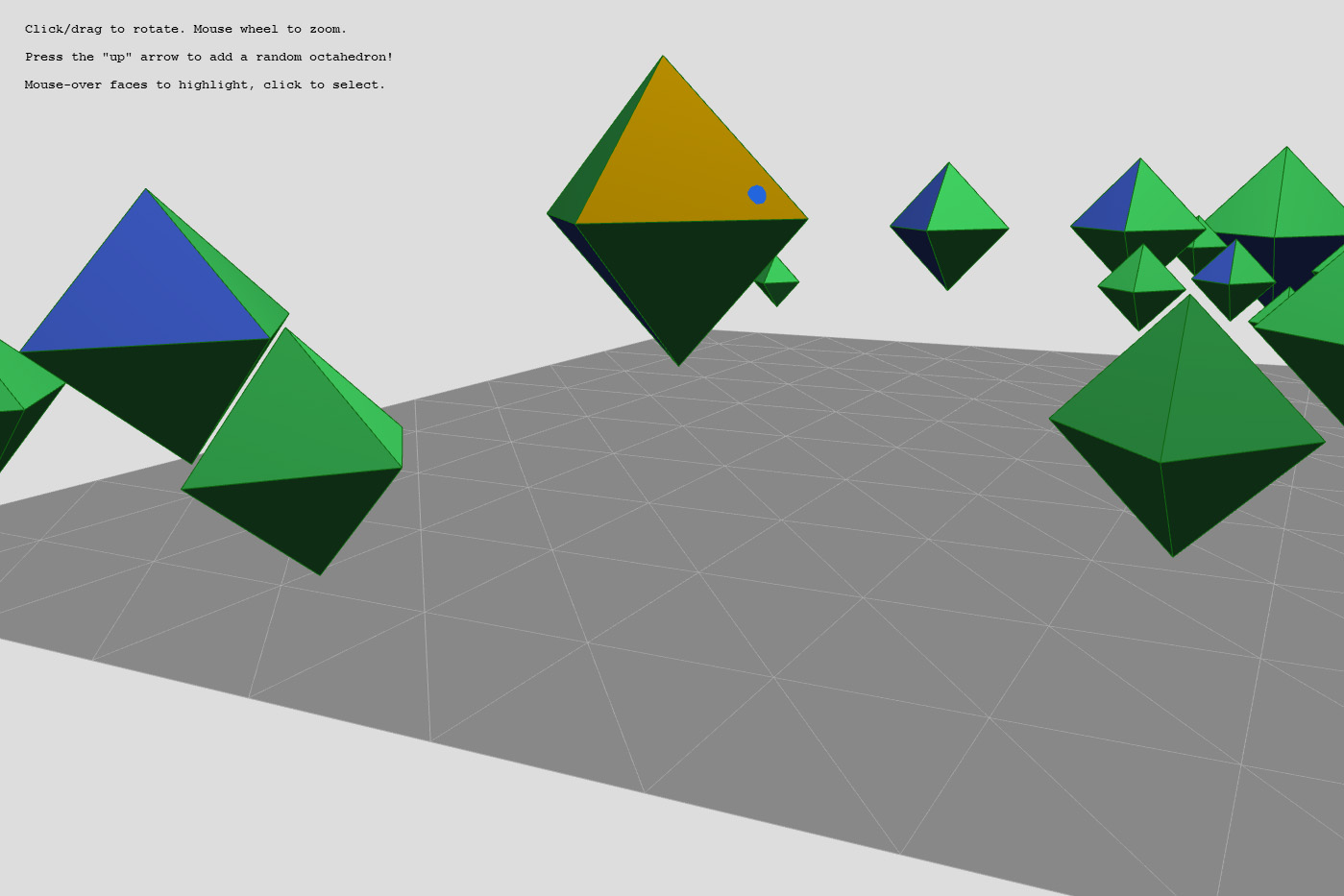
The key to picking in Three.js is to combine the THREE.Projector andTHREE.Raycaster classes. To do this:
- Initialize
projector = new THREE.Projector();when your main script starts. - In your function requiring a picking vector, create a vector and transform it using
.unprojectVector()into a ray.var vector = new THREE.Vector3( mouse.x, mouse.y, 1 ); projector.unprojectVector( vector, camera ); var ray = new THREE.Raycaster( camera.position, vector.sub( camera.position ).normalize() );
- Use the
ray.intersectObjects();method to see which objects it intersects!


That’s it… very simple. Here is an example of how it’s used to highlight faces of objects in the scene:
function checkHighlight(){
// find intersections
// create a Ray with origin at the mouse position
// and direction into the scene (camera direction)
var vector = new THREE.Vector3( mouse.x, mouse.y, 1 );
projector.unprojectVector( vector, camera );
var ray = new THREE.Raycaster( camera.position, vector.sub( camera.position ).normalize() );
// create an array containing all objects in the scene with which the ray intersects
var intersects = ray.intersectObjects( targetList );
// INTERSECTED = the object in the scene currently closest to the camera
// and intersected by the Ray projected from the mouse position
// if there is one (or more) intersections
if ( intersects.length > 0 )
{ // case if mouse is not currently over an object
if(INTERSECTED==null){
INTERSECTED = intersects[ 0 ];
INTERSECTED.face.color = highlightedColor;
}
else{ // if thse mouse is over an object
INTERSECTED.face.color= baseColor;
INTERSECTED.object.geometry.colorsNeedUpdate=true;
INTERSECTED = intersects[ 0 ];
INTERSECTED.face.color = highlightedColor;
}
// upsdate mouseSphere coordinates and update colors
mouseSphereCoords = [INTERSECTED.point.x,INTERSECTED.point.y,INTERSECTED.point.z];
INTERSECTED.object.geometry.colorsNeedUpdate=true;
}
else // there are no intersections
{
// restore previous intersection object (if it exists) to its original color
if ( INTERSECTED ){
INTERSECTED.face.color = baseColor;
INTERSECTED.object.geometry.colorsNeedUpdate=true;
}
// remove previous intersection object reference
// by setting current intersection object to "nothing"
INTERSECTED = null;
mouseSphereCoords = null;
}
}
And another example of how it’s used to select the highlight faces:
function checkSelection(){
	// find intersections

	// create a Ray with origin at the mouse position
	//   and direction into the scene (camera direction)
	var vector = new THREE.Vector3( mouse.x, mouse.y, 1 );
	projector.unprojectVector( vector, camera );
	var ray = new THREE.Raycaster( camera.position, vector.sub( camera.position ).normalize() );

	// create an array containing all objects in the scene with which the ray intersects
	var intersects = ray.intersectObjects( targetList );

	//if an intersection is detected
	if ( intersects.length > 0 )
	{
		console.log("Hit @ " + toString( intersects[0].point ) );

		//test items in selected faces array
		var test=-1;
		selectedFaces.forEach( function(arrayItem)
		{
			// if the faceIndex and object ID are the same between the intersect and selected faces ,
			// the face index is recorded
			if(intersects[0].faceIndex==arrayItem.faceIndex && intersects[0].object.id==arrayItem.object.id){
				test=selectedFaces.indexOf(arrayItem);
			}
		});

		// if is a previously selected face, change the color back to green, otherswise change to blue
		if(test>=0){
			intersects[ 0 ].face.color=new THREE.Color( 0x44dd66 );
			selectedFaces.splice(test, 1);
		}
		else{
			intersects[ 0 ].face.color=new THREE.Color( 0x222288 );
			selectedFaces.push(intersects[0]);
		}

		intersects[ 0 ].object.geometry.colorsNeedUpdate = true;
	}
}
In this experiment, I also wanted to have an indicator appear on the object, so the user can tell where the pointer is actually landing. The sphere shows up only when the mouse is positioned over face of a target object. In the Highlight() function above, I write the intersection point of the nearest intersection face to a global variable. When the mouse is not over an eligible object, it is returned to a null state. This allows me to simply toggle the visiblity of the mouseSphere array object I initialized earlier:
function CheckMouseSphere(){
	// if the coordinates exist, make the sphere visible
	if(mouseSphereCoords != null){
		//console.log(mouseSphereCoords[0].toString()+","+mouseSphereCoords[1].toString()+","+mouseSphereCoords[2].toString());
		mouseSphere[0].position.set(mouseSphereCoords[0],mouseSphereCoords[1],mouseSphereCoords[2]);
		mouseSphere[0].visible = true;
	}
	else{ // otherwise hide the sphere
		mouseSphere[0].visible = false;
	}
}
My code is built upon the work of Lee Stemkoski as a base template for new experiments. He has an amazing collection of Three.js examples on his website: here.
[출처] http://moczys.com/2014/01/09/three-js-experiment-2-selectionhighlighting/
광고 클릭에서 발생하는 수익금은 모두 웹사이트 서버의 유지 및 관리, 그리고 기술 콘텐츠 향상을 위해 쓰여집니다.
